Sarrera
Thank you for choosing the ASUS TUF Gaming H1 GEN II Hatsune Miku Edition Wired Gaming Headset. This manual provides essential information for setting up, operating, maintaining, and troubleshooting your new headset. Please read it thoroughly to ensure optimal performance and longevity of your device.
Produktua amaituview
The ASUS TUF Gaming H1 GEN II Hatsune Miku Edition headset is designed for immersive gaming audio and clear communication. It features 40mm ASUS Essence drivers, virtual 7.1 surround sound, and a TeamSpeak-certified unidirectional microphone. Its lightweight design and durable ear cushions ensure comfort during extended use.

Figure 1: ASUS TUF Gaming H1 GEN II Hatsune Miku Edition Headset with in-line controls.
Ezaugarri nagusiak:
- Diseinu arina eta ergonomikoa: Weighing approximately 297 grams with a metal suspension headband for comfortable, extended gaming sessions.
- Audio-kalitate paregabea: Equipped with 40mm ASUS Essence drivers and virtual 7.1 surround sound for immersive in-game audio.
- Komunikazio hobetua: Features a TeamSpeak-certified unidirectional microphone for clear voice chat.
- Durable Ear Cushions: Easy-to-remove and resistant to alcohol and hypochlorous acid for convenient daily cleaning.
- Lineako kontrolak: Convenient controls for volume adjustment, audio mute, virtual 7.1 surround sound activation, and lighting.
- Eye-catching Style: Incorporates Hatsune Miku’s signature teal color and lighting for a distinctive look.
- Plataforma anitzeko bateragarritasuna: Connects via USB Type-A, compatible with PCs, PlayStation 4, and PlayStation 5.
Paketearen edukia
Paketea irekitzean, egiaztatu elementu guztiak bertan daudela eta egoera onean daudela.
- ASUS TUF Gaming H1 GEN II Hatsune Miku Edition Gaming Headset
- Erabiltzailearen eskuliburua
- Additional accessories (refer to packaging for specific items like stickers or promotional materials)
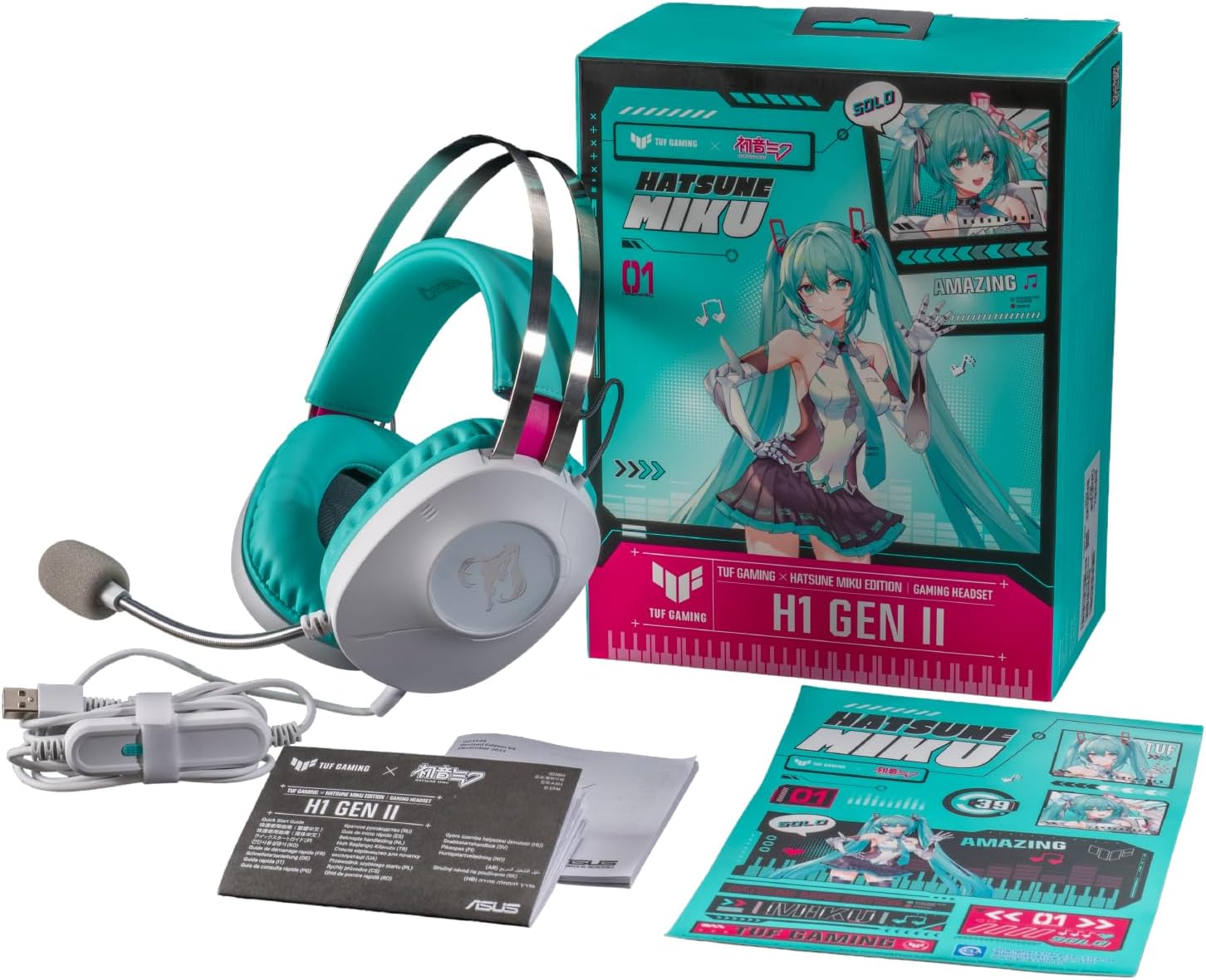
Figure 2: Contents of the headset package, including the headset, manual, and stickers.
Konfigurazioa
Entzungailua konektatzea:
- Locate the USB Type-A connector on your headset cable.
- Plug the USB Type-A connector into an available USB port on your PC, PlayStation 4, or PlayStation 5.
- The headset should be automatically recognized by your device. You may need to select it as the default audio input/output device in your system settings.
Mikrofonoaren doikuntza:
- The unidirectional microphone is designed for clear voice pickup. Position the microphone boom arm close to your mouth for optimal clarity.
- Use the in-line controls to mute or unmute the microphone as needed.
Entzungailuaren funtzionamendua
Lineako kontrolak:
The headset features convenient in-line controls for quick adjustments during use.
- Bolumen kontrola: Use the scroll wheel or buttons to adjust the audio volume.
- Audio desaktibatu: Press the dedicated button to mute or unmute the headset audio.
- Mikrofonoa isiltzea: Press the dedicated button to mute or unmute the microphone.
- 7.1 Inguratzaile Soinu Birtuala: Activate or deactivate virtual 7.1 surround sound for an immersive audio experience.
- Argiztapenaren kontrola: Adjust or toggle the headset's lighting effects.

Figure 3: Headset with visible in-line controls for volume, mute, and 7.1 surround sound.

Figure 4: Close-up of the headset earcup, emphasizing the 40mm ASUS Essence drivers for exceptional audio quality.

Figure 5: Headset with its TeamSpeak-certified unidirectional microphone for clear communication.
Mantentzea
Entzungailuak garbitzea:
- Erabili zapi leun eta lehor bat entzungailuen kanpoaldea garbitzeko.
- The ear cushions are designed to be easy to remove and are resistant to alcohol and hypochlorous acid. For thorough cleaning, gently remove the ear cushions and wipe them with a suitable cleaning solution. Ensure they are completely dry before reattaching.
- Avoid using abrasive cleaners or solvents that may damage the headset's finish.
Biltegiratzea:
- Gorde entzungailuak leku fresko eta lehor batean, eguzki-argitik eta muturreko tenperaturetatik babestuta.
- Kalteak ekiditeko, ez jarri objektu astunak entzungailuen gainean.
Arazoak konpontzea
| Arazoa | Kausa posiblea | Irtenbidea |
|---|---|---|
| Aurikularretatik ez dago audiorik |
|
|
| Mikrofonoa ez dabil |
|
|
| Virtual 7.1 surround sound not working |
|
|
Zehaztapenak
| Ezaugarri | Xehetasuna |
|---|---|
| Eredua | A303 TG H1 GEN II MIKU |
| Konektibitatea | Kable bidezkoa (USB A mota) |
| Gidariak | 40mm ASUS Essence Drivers |
| Inpedantzia | 32 ohmio |
| Maiztasun Erantzuna | 20 Hz - 20 KHz |
| Mikrofonoa | TeamSpeak-certified unidirectional microphone |
| Inguruko Soinu Birtuala | 7.1 Surround Soinu birtuala |
| Pisua | Gutxi gorabehera 297 g (0.7 lb) |
| Belarrietarako kuxinak | Durable, easy-to-remove, alcohol- and hypochlorous acid-resistant |
| Kontrolak | In-line: Volume, Audio Mute, Virtual 7.1 Surround Sound, Lighting |
| Gailu bateragarriak | Desktops, Laptops, PlayStation 4, PlayStation 5 |
| Materiala | Metala, Plastikoa |
| Kolorea | White with Teal accents |
Bermea eta Laguntza
For warranty information, please refer to the warranty card included in your product packaging or visit the official ASUS support website. You can find drivers, FAQs, and contact information for technical support there.
ASUS laguntza Webgunea: www.asus.com/support/


