1. Sarrera
Thank you for choosing the MageGee Cloud98 Mechanical Keyboard. This manual provides detailed instructions for setting up, operating, and maintaining your keyboard. The Cloud98 features a 98-key layout, triple-mode connectivity (Bluetooth, 2.4GHz wireless, and USB-C wired), RGB backlighting, hot-swappable switches, and PBT keycaps for a premium typing experience.

Image 1.1: MageGee Cloud98 Mechanical Keyboard Overview
2. Paketearen edukia
Mesedez, egiaztatu paketea elementu hauek dituen:
- MageGee Cloud98 Mechanical Keyboard
- USB-C kablea
- 2.4GHz USB Receiver (typically stored in the keyboard's bottom compartment)
- Tekla-tapoien erauzgailua (barne badago)
- Etengailu-ateragailua (barruan badago)
3. Produktuaren ezaugarriak
- 98 teklako diseinua: Compact yet functional, retaining essential keys.
- Hirukoitzeko Konexio Modua: Seamlessly switch between Bluetooth, 2.4GHz wireless, and USB-C wired connections.
- RGB atzeko argia: Customizable full-key RGB backlighting with multiple effects and adjustable brightness.
- Junta muntatutako diseinua: Enhances typing feel and sound by reducing vibrations and cavity noise.
- PBT Material Keycaps: Durable dual-injection molded keycaps with ASA height for clear legends and ergonomic comfort.
- Beroan alda daitezkeen etengailuak: Compatible with most 3-pin and 5-pin mechanical switches, allowing for easy customization without soldering.
- 4000 mAh bateria: Provides extended wireless usage, up to 200 hours with backlight off.
- N-teklaren birjartzea: Ensures every keystroke is registered accurately, even during rapid typing or gaming.
- Bateragarritasun zabala: Supports Win2000, Win XP, Win ME, Vista, Win7, Win8, Win10, Android, Linux, and Mac operating systems.
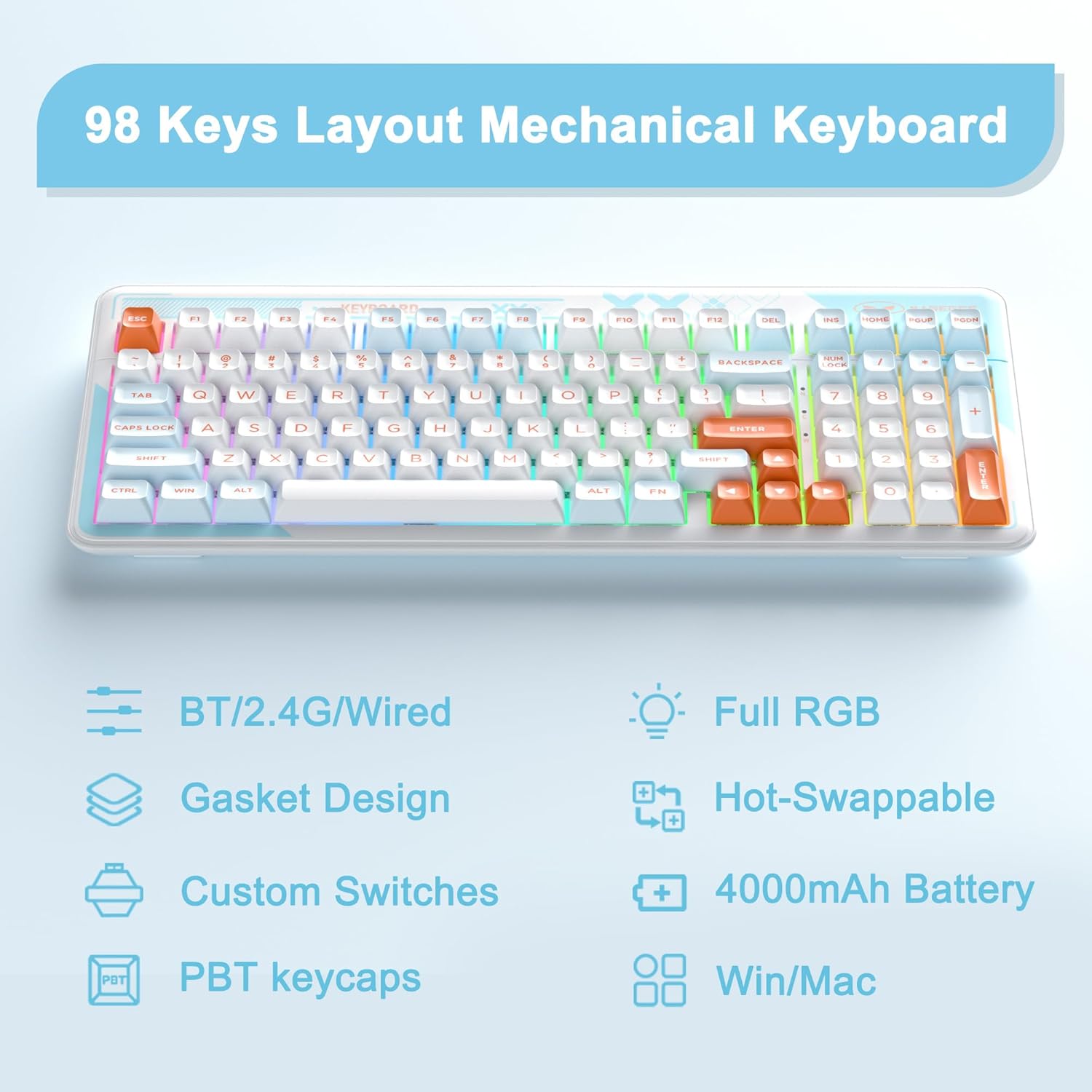
Image 3.1: Key features of the Cloud98 keyboard.

3.2. irudia: Lehertua view illustrating the gasket-mounted design and internal components.

3.3 irudia: Gertuko planoa view of a Blue Whale mechanical switch.

Image 3.4: Detail of the dual-color injection PBT keycaps.
4. Konfigurazioa eta konexioa
4.1. Kable bidezko modua (USB-C)
- Locate the USB-C port on the keyboard (typically on the top edge).
- Konektatu emandako USB-C kablearen mutur bat teklatura.
- Konektatu USB-C kablearen beste muturra zure ordenagailuko USB ataka libre batera.
- Teklatua automatikoki ezagutuko da eta erabiltzeko prest egongo da.
- Sakatu fn+5 for 3 seconds to ensure the keyboard is in wired mode.

Image 4.1: Connecting the USB-C cable to the keyboard.
4.2. 2.4 GHz-ko haririk gabeko modua
- Locate the 2.4GHz USB receiver, usually stored in a compartment on the bottom of the keyboard.
- Konektatu 2.4 GHz-ko USB hargailua zure ordenagailuko USB ataka erabilgarri batean.
- Turn on the keyboard using the power switch (if present, typically on the back or side).
- Luze sakatu fn+4 for 3 seconds to enter 2.4GHz pairing mode. The indicator light will flash.
- Konektatu ondoren, argi adierazleak keinuka geldituko da eta tinko jarraituko du.

Image 4.2: The 2.4GHz USB receiver.
4.3. Bluetooth modua
- Ziurtatu teklatua piztuta dagoela.
- Luze sakatu fn+1, fn+2, edo fn+3 for 3 seconds to enter Bluetooth pairing mode for the respective profile. The indicator light will flash quickly.
- Zure gailuan (ordenagailuan, tabletan, telefonoan), gaitu Bluetooth-a eta bilatu gailu berriak.
- Select "MageGee Cloud98" (or similar name) from the list of available devices to pair.
- Once paired, the indicator light will flash slowly when reconnecting, and then remain solid.
- To switch between paired Bluetooth devices, short press fn+1, fn+2, edo fn+3.

Image 4.3: Visual guide for triple mode connection.
5. Funtzionamendu-argibideak
5.1. RGB atzeko argiaren kontrola
The Cloud98 keyboard features full RGB backlighting with 19 RGB modes, 9 monochrome modes, and a custom mode. Use the following key combinations to control the lighting:
- Fn + ← (Ezkerreko gezia): Switch backlight flowing direction.
- Fn + → (Eskuineko gezia): Switch backlight color (single color mode).
- Fn + - (Minus): Decrease backlight flowing speed.
- Fn + = (Equals): Increase backlight flowing speed.
- Fn + Del: Atzeko argia piztu/itzali.
- Fn + zuriunea: Switch backlight color (RGB mode).
- Fn + Ins: Switch backlight modes.
- Fn + ↑ (Gora gezia): Handitu atzeko argiaren distira.
- Fn + ↓ (Behera gezia): Atzeko argiaren distira txikitu.

Image 5.1: Keyboard layout showing RGB backlight control key combinations.
5.2. Beroan alda daitezkeen etengailuak
The Cloud98 keyboard supports hot-swappable switches, allowing you to change switches without soldering. This feature enables customization of typing feel and sound.
- Kendu tekla-tapoia: Erabili emandako tekla-estalkiaren ateragailua nahi duzun tekla-estalkia astiro-astiro kentzeko.
- Kendu etengailua: Erabili emandako etengailu-ateragailua etengailuaren goiko eta beheko klipak arretaz heltzeko eta zuzen gora tiratzeko.
- Txertatu etengailu berria: Align the pins of the new switch with the holes on the PCB. Ensure the pins are straight. Gently push the switch down until it clicks into place. Do not force it to avoid bending pins.
- Ordeztu tekla-tapoia: Sakatu giltza-tapa etengailu-zurtoin berriaren gainean.
Oharra: Ensure the keyboard is disconnected or powered off before changing switches to prevent accidental input or damage.
5.3. WIN Key Lock Function
To prevent accidental presses of the Windows key during gaming, you can lock it. Press Fn + Irabazi to toggle the WIN key lock function. An indicator light may illuminate when the WIN key is locked.
5.4. N-Key Rollover
The Cloud98 supports N-Key Rollover, meaning all keys pressed simultaneously will be registered. This is particularly beneficial for fast typists and gamers.

Image 5.2: Illustration of N-Key Rollover capability.
6. Bateria eta kargatzea
The Cloud98 keyboard is equipped with a 4000mAh battery, providing extended usage in wireless modes.
- Kargatzen: Connect the keyboard to a USB power source using the provided USB-C cable. The charging indicator light will show the charging status.
- Bateriaren iraupena: The keyboard can last up to 200 hours with the backlight off. Battery life will vary depending on backlight usage and connection mode.
- Bateria baxuaren adierazlea: The keyboard may indicate low battery status through a flashing light or reduced functionality. Charge the keyboard promptly when this occurs.

Image 6.1: Information regarding the 4000mAh battery capacity.
7. Mantentzea
Mantentze egokiak zure teklatuaren iraupena eta errendimendua bermatzen ditu.
- Tekla-tapoiak garbitzea: Erabili tekla-tapoien erauzgailu bat tekla-tapoiak kentzeko. Garbitu xaboi leun batekin eta zapi leun batekin, eta gero lehortu ondo berriro jarri aurretik.
- Teklatuaren gorputza garbitzea: Use a soft, dry cloth to wipe the keyboard surface. For stubborn dirt, a slightly damp cloth can be used, ensuring no moisture enters the keyboard.
- Hautsa kentzea: Erabili aire konprimatua tekla-tapen eta etengailuen arteko hautsa eta hondakinak kentzeko.
- Biltegiratzea: Gorde teklatua leku fresko eta lehor batean, eguzki-argitik eta muturreko tenperaturetatik babestuta.
8. Arazoak
If you encounter issues with your MageGee Cloud98 keyboard, please refer to the following common solutions:
| Arazoa | Irtenbidea |
|---|---|
| Teklatuak ez du erantzuten kable bidezko moduan. | Ensure the USB-C cable is securely connected to both the keyboard and the computer. Try a different USB port or cable. Confirm the keyboard is in wired mode (Fn + 5 for 3s). |
| 2.4GHz wireless connection unstable or not connecting. | Ensure the 2.4GHz USB receiver is plugged in. Press and hold Fn + 4 for 3 seconds to re-pair. Move the receiver closer to the keyboard. Check for interference from other wireless devices. |
| Bluetooth konexio arazoak. | Ensure Bluetooth is enabled on your device. Press and hold Fn + 1/2/3 for 3 seconds to enter pairing mode. Remove previous pairings from your device and try again. Ensure the keyboard battery is charged. |
| Atzeko argia ez dabil edo trabatuta dago. | Press Fn + Del to toggle the backlight. Adjust brightness with Fn + ↑/↓. Try switching backlight modes with Fn + Ins. Ensure the keyboard battery is charged. |
| Specific keys not working. | If hot-swappable, carefully remove the keycap and switch. Re-seat the switch firmly, ensuring pins are not bent. If the issue persists, try replacing the switch. |
| Keyboard randomly disconnects. | Ensure the battery is sufficiently charged. For wireless modes, ensure the receiver/device is within range and free from interference. Update drivers if available. |
9. Zehaztapenak
| Ezaugarri | Xehetasuna |
|---|---|
| Modelo zenbakia | Cloud98 |
| Konektibitatea | Bluetooth, 2.4 GHz haririk gabekoa, USB-C kable bidezkoa |
| Teklatu mota | Mekanikoa |
| Atzeko argiztapena | RGB osoa |
| Keycap materiala | PBT (polibutileno tereftalatoa) |
| Ezaugarri Berezia | Ergonomic, Gasket Mounted, Hot-Swappable |
| Bateria Edukiera | 4000mAh |
| Produktuaren neurriak | 16.5 x 7.87 x 1.57 hazbete (41.9 x 19.99 x 3.99 cm) |
| Elementuaren pisua | 2.66 libra (1.21 kg) |
| Gailu bateragarriak | Laptop, PC, Android, Mac |
| Sistema Eragileak | Win2000, Win XP, Win ME, Vista, Win7, Win8, Win10, Android, Linux, Mac |
10. Bermea eta Laguntza
MageGee products come with a standard warranty. For specific warranty details, please refer to the warranty card included with your product or visit the official MageGee website. If you encounter any issues not covered in this manual or require further assistance, please contact MageGee customer support through their official channels.
Normalean fabrikatzailearen laguntza-harremanetarako informazioa aurki dezakezu webgunean edo produktuaren ontzian.


