Erabiltzailearen eskuliburua
AXIS M5000-G 5 Megapixel Network Camera
Model: M5000-G | Brand: AXIS
1. Sarrera
This manual provides comprehensive instructions for the installation, operation, and maintenance of the AXIS M5000-G 5 Megapixel Network Camera. Please read this manual thoroughly before using the product to ensure proper functionality and safety.
The AXIS M5000-G is a high-performance network camera designed for surveillance applications, offering 5-megapixel resolution and PTZ capabilities for enhanced monitoring.
2. Segurtasun informazioa
Produktuari kalterik edo zeure buruari kalterik ez egiteko, jarraitu segurtasun neurri hauek:
- Ziurtatu energia-iturria kameraren eskakizunekin bat datorrela.
- Ez jarri kamera muturreko tenperaturen edo hezetasunaren eraginpean.
- Avoid direct exposure to strong light sources, which may damage the image sensor.
- Instalazioa langile kualifikatuek egin behar dute, tokiko araudi elektrikoen arabera.
- Deskonektatu energia garbitu edo kontserbatu aurretik.
3. Paketearen edukia
Egiaztatu elementu guztiak paketean daudela:
- AXIS M5000-G Network Camera Unit
- Muntatzeko kita (torlojuak, aingurak)
- Installation Guide (Quick Start)
- Energiaren egokitzailea (sartuta badago)
Note: Specific components may vary based on region or package version.
4. Produktua amaitu daview
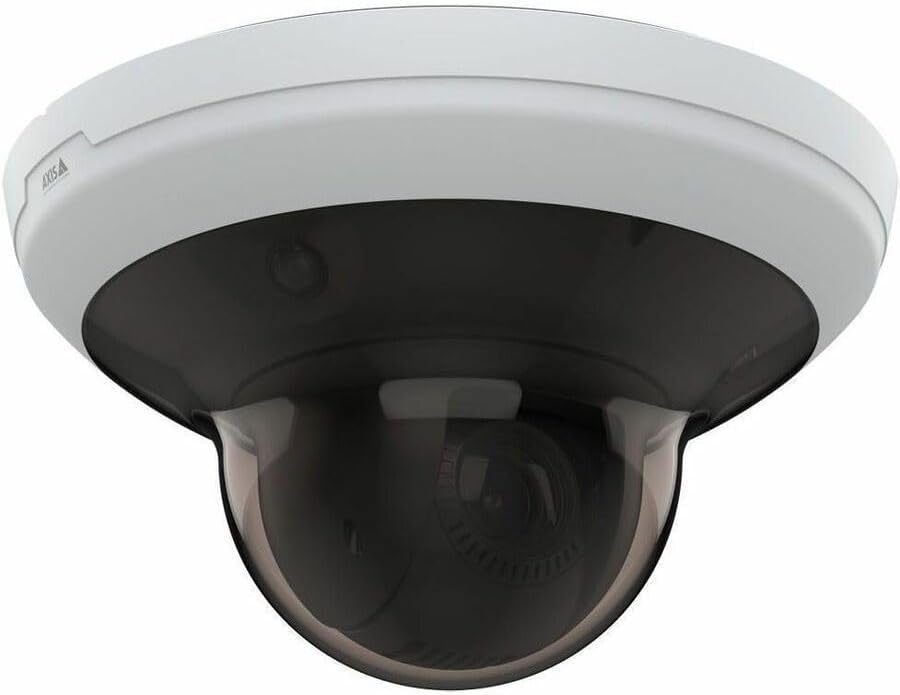
The AXIS M5000-G is a dome-style network camera designed for discreet and effective surveillance. It features a robust housing suitable for outdoor use and a PTZ (Pan-Tilt-Zoom) mechanism for flexible viewangeluak.

4.1. irudia: Aurrealdea view of the AXIS M5000-G Network Camera. This image shows the camera's dome shape, with the lens visible through the dark transparent cover. The main body is white.
4.2. irudia: Angelukoa view of the AXIS M5000-G Network Camera. This perspective highlights the camera's compact design and the subtle AXIS logo on the side of the white base.

4.3. irudia: Beste angelu bat view of the AXIS M5000-G Network Camera. Similar to Figure 4.2, this image provides a slightly different angle, emphasizing the smooth contours of the camera's housing.
5. Konfigurazioa eta instalazioa
The AXIS M5000-G is designed for wall mount installation and requires a wired connection for network and power.
5.1 Kamera muntatzea
- Aukeratu kokapena: Select an outdoor location that provides the desired field of view and is within reach of a power source and network connection. Ensure the mounting surface is sturdy enough to support the camera's weight (approximately 5.7 pounds).
- Markatu zulatzeko puntuak: Use the provided mounting template (if applicable) or the camera base to mark the drilling points on the wall.
- Zulatzeko zuloak: Zulatu pilotu-zuloak markatutako puntuetan. Beharrezkoa bada, sartu hormako aingurak.
- Ziurtatu oinarria: Lotu kameraren euskarria horman emandako torlojuak erabiliz.
- Attach Camera Unit: Secure the main camera unit to the mounted base, ensuring it clicks into place or is fastened according to the quick start guide.
5.2 Energia eta sarea konektatzea
- Potentzia-konexioa: Connect the provided power adapter to the camera's power input and then to a suitable electrical outlet. The camera operates on corded electric power.
- Sare-konexioa: Connect an Ethernet cable from your network router or switch to the camera's network port. The camera uses wired connectivity technology.
- Hasierako abiaraztea: Allow the camera a few minutes to power on and establish a network connection.
6. Kameraren funtzionamendua
The AXIS M5000-G camera is controlled primarily through a dedicated application or network video recorder (NVR) software.
6.1 Hasierako konfigurazioa
- Ezagutu kamera: Use the AXIS IP Utility or your network's device discovery tools to find the camera's IP address on your network.
- Sarbidea Web Interfazea: Ireki a web arakatzailea eta sartu kameraren IP helbidea atzitzeko web interfazea.
- Saioa hasi: Enter the default username and password (refer to the quick start guide or manufacturer's documentation for default credentials). Change default credentials immediately for security.
- Sarearen ezarpenak: Configure network settings (e.g., static IP, DHCP) as required by your network environment.
- Data eta ordua: Set the correct date and time for accurate video timestamps.
6.2 Bizi View eta PTZ Kontrola
- Zuzenean View: Sartu zuzeneko bideo-jariora honen bidez: web interface or a compatible surveillance application. The camera provides 1080p video capture resolution and 5 MP effective still resolution.
- Pan, Tilt, Zoom (PTZ): Utilize the PTZ controls within the application to adjust the camera's viewing angle and zoom level. This feature allows for dynamic monitoring of large areas.
- Aurrez ezarritako posizioak: Configure and save specific PTZ positions for quick navigation to frequently monitored areas.
6.3 Mugimenduaren detekzioa eta alertak
- Motion Only Alert Type: Configure motion detection zones and sensitivity settings within the camera's interface.
- Alerta ekintzak: Set up actions to be triggered upon motion detection, such as recording video, sending email notifications, or uploading images to an FTP server.
7. Mantentzea
Regular maintenance ensures optimal performance and longevity of your AXIS M5000-G camera.
- Lentea garbitzea: Gently wipe the camera lens and dome cover with a soft, clean, lint-free cloth. For stubborn dirt, use a mild lens cleaning solution applied to the cloth, not directly to the lens.
- Firmware eguneraketak: Periodically check the AXIS website for firmware updates. Keeping the firmware updated ensures access to the latest features and security patches.
- Kableen ikuskapena: Regularly inspect all cables (power and network) for any signs of wear, damage, or corrosion, especially in outdoor installations.
- Ingurumen-egiaztapenak: Ensure the camera's environment remains within its specified operating temperature and humidity ranges.
8. Arazoak
This section addresses common issues you might encounter with the AXIS M5000-G camera.
| Arazoa | Kausa posiblea | Irtenbidea |
|---|---|---|
| Ez dago bideo-jariorik | Argia deskonektatuta, sare arazoa, IP helbide okerra. | Check power connection. Verify network cable is securely connected. Confirm camera's IP address and network settings. Restart camera. |
| Irudi kalitate eskasa | Lente zikina, argi gutxikoa, bereizmen ezarpen okerrak. | Clean the lens. Ensure adequate lighting. Adjust video resolution settings in the camera's web interfazea. |
| PTZ kontrolak ez dute erantzuten | Network latency, software issue, camera malfunction. | Check network connection stability. Restart the camera and the control application. If issue persists, contact support. |
| Mugimendu-hautemateak ez du funtzionatzen | Incorrect sensitivity settings, detection zones not configured. | Review and adjust motion detection sensitivity. Ensure detection zones are properly defined in the camera's settings. |
9. Zehaztapenak
| Ezaugarri | Xehetasuna |
|---|---|
| Ereduaren izena | M5000-G Network Camera |
| Marka | ARDATZA |
| Barruko/Kanpoko erabilera | Kanpoan |
| Energia iturria | Kable elektrikoa |
| Konektibitate Teknologia | Kableatua |
| Bideo Harrapaketa Ebazpena | 1080p |
| Ebazpen finko eraginkorra | 5 MP |
| Muntatze Mota | Hormako Muntaia |
| Alerta mota | Mugimendua bakarrik |
| Elementuaren neurriak (L x W x H) | 11.9 x 12 x 8.4 hazbete |
| Elementuaren pisua | 5.7 kilo |
| Fabrikatzailea | AXIS COMMUNICATION INC |
10. Bermea eta Laguntza
For warranty information, please refer to the documentation included with your purchase or visit the official AXIS website. AXIS provides support resources, including FAQs, troubleshooting guides, and contact information for technical assistance.
You can typically find more information and support on the AXIS Store on Amazon edo fabrikatzailearen ofiziala webgunea.


