1. Sarrera
Thank you for choosing the ADE CK2310 Digital Radio Alarm Clock. This device offers precise timekeeping via DCF radio signal, dual alarm settings, temperature and humidity display, and a convenient backlight function. Its compact design makes it suitable for both home use and travel. Please read this manual carefully to ensure proper use and optimal performance of your new alarm clock.

Image 1.1: The ADE CK2310 Digital Radio Alarm Clock is designed for portability, making it an ideal travel companion.
2. Segurtasun informazioa
- Mantendu gailua uretatik eta hezetasun handietatik urrun.
- Ez jarri gailua muturreko tenperatura edo eguzki-argia zuzenean.
- Saihestu gailua erortzea edo kolpe gogorrak jasan.
- Ez saiatu gailua zeuk desmuntatzen edo konpontzen. Jarri harremanetan zerbitzu-langile kualifikatuekin.
- Bota erabilitako bateriak tokiko araudiaren arabera.
- Mantendu bateriak haurren eskura.
3. Paketearen edukia
Mesedez, egiaztatu paketearen edukia deskonprimitzean:
- ADE CK2310 Digital Radio Alarm Clock
- 2 x AAA bateria
- Argibide eskuliburua

Image 3.1: The package includes the ADE CK2310 alarm clock and two AAA batteries.
4. Produktua amaitu daview
Familiarize yourself with the various components and display elements of your alarm clock.
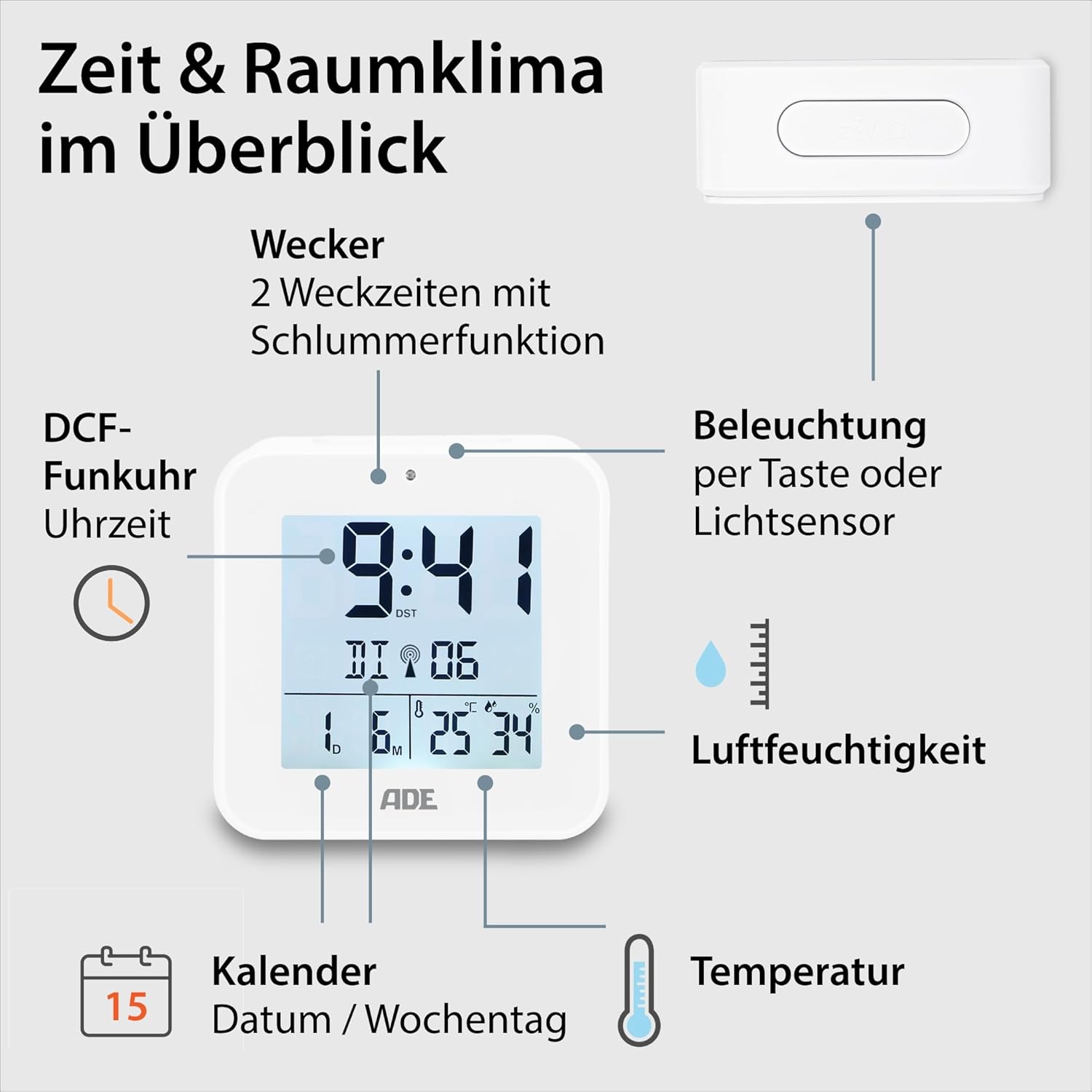
Image 4.1: Front display and key features of the ADE CK2310.
- Denbora bistaratzea: Shows current time (hours, minutes).
- DCF Signal Indicator: Indicates successful reception of the radio time signal.
- Alarma adierazleak: Shows if Alarm 1 or Alarm 2 is active.
- Date and Day of Week: Displays the current date and day.
- Tenperatura bistaratzea: Inguruko tenperatura Celsius edo Fahrenheit gradutan erakusten du.
- Hezetasuna bistaratzea: Shows ambient relative humidity.
- Errepikatu/Argi botoia: Activates snooze during an alarm or backlight manually.
- Funtzio-botoiak: Buttons for setting time, alarms, and other functions (located on the back/side).
- Argi-sentsorea: Automatically activates backlight in dark environments.

4.2. irudia: Atzekoa view with controls and battery compartment.
The compact dimensions of the alarm clock are approximately 7.2 x 3.8 x 7.2 cm (width x depth x height).

Image 4.3: Dimensions of the ADE CK2310 alarm clock.
5. Konfigurazioa
5.1. Bateriaren instalazioa
- Open the battery compartment cover on the back of the alarm clock (refer to Image 4.2).
- Sartu bi AAA pilak, polaritate zuzena ziurtatuz (+ eta -).
- Itxi bateriaren konpartimenduaren estalkia ondo.
The alarm clock will power on automatically and begin searching for the DCF radio signal.
5.2. DCF Radio Signal Reception
Upon initial power-on or after battery replacement, the alarm clock will automatically attempt to receive the DCF radio time signal. This process can take several minutes. During reception, a signal icon may flash on the display. Once the signal is successfully received, the time will be set automatically, and the signal icon will appear steadily. For best reception, place the alarm clock near a window and away from electronic devices that may cause interference.
The DCF signal also ensures automatic adjustment for daylight saving time (summer/winter time).
5.3. Manual Time Setting (Optional)
If the DCF signal is not available or you prefer to set the time manually:
- Press and hold the "SET" button (or equivalent, refer to specific button labels on your device) for a few seconds until the time display starts flashing.
- Use the "+" or "-" buttons to adjust the hours.
- Press "SET" again to confirm the hours and move to minutes.
- Erabili "+" edo "-" botoiak minutuak doitzeko.
- Press "SET" to confirm and exit manual setting mode.
- Repeat similar steps to set the date and year if necessary.
6. Funtzionamendu-argibideak
6.1. Alarmak ezartzea (1. alarma eta 2. alarma)
The ADE CK2310 features two independent alarm times. This is useful for different wake-up times on weekdays and weekends.

Image 6.1: The alarm clock supports two independent alarm times.
- Press the "ALARM 1" or "ALARM 2" button (usually located on the side or back) once to display the current alarm time.
- Press and hold the respective "ALARM" button until the alarm time starts flashing.
- Use the "+" or "-" buttons to adjust the alarm hours.
- Press the "ALARM" button again to confirm hours and move to minutes.
- Use the "+" or "-" buttons to adjust the alarm minutes.
- Press the "ALARM" button to confirm and exit alarm setting mode.
- To activate or deactivate an alarm, use the dedicated ON/OFF switch for Alarm 1 and Alarm 2 (refer to Image 6.1 for typical switch location). An alarm icon will appear on the display when active.
6.2. Errepikapen funtzioa
When an alarm sounds, press the large "SNOOZE/LIGHT" button on top of the alarm clock. The alarm will pause for approximately 5 minutes and then sound again. To turn off the alarm completely, press any other button or let it ring for its full duration.
6.3. Tenperatura eta hezetasunaren bistaratzea
The alarm clock continuously displays the indoor temperature and relative humidity. You can switch between Celsius (°C) and Fahrenheit (°F) for temperature display by pressing a dedicated button (often labeled "°C/°F" or integrated with another setting button).
6.4. Atzeko argiztapen funtzioa
The backlight can be activated in two ways:
- Eskuzko aktibazioa: Press the "SNOOZE/LIGHT" button on top. The backlight will illuminate for approximately 8 seconds.
- Automatic Activation (Light Sensor): Slide the "AUTO LIGHT" switch on the back of the device to the "ON" position (refer to Image 4.2). The built-in light sensor will detect low ambient light conditions and automatically activate a soft backlight, making the display visible in the dark. Slide the switch to "OFF" to disable this feature.
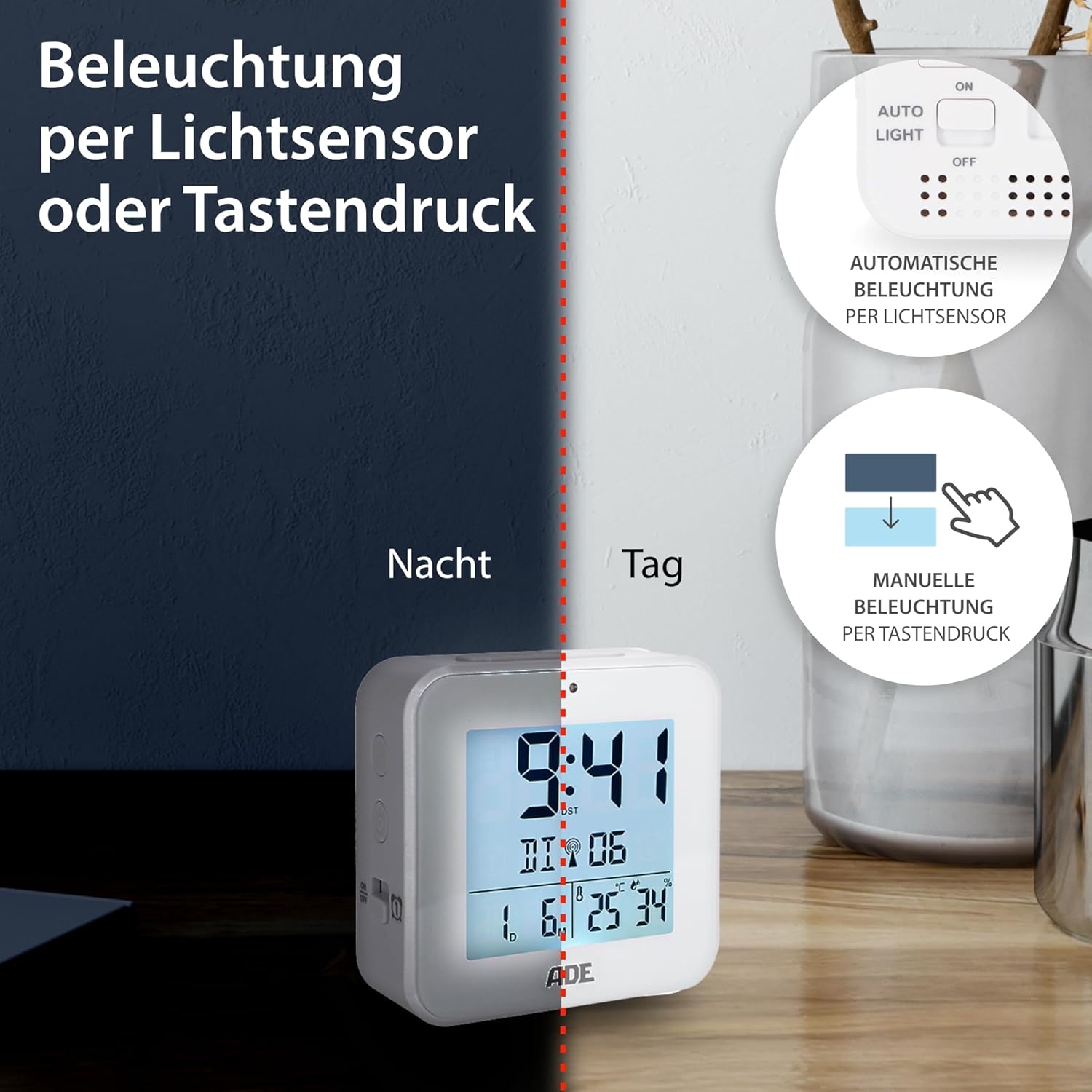
Image 6.2: Backlight can be activated manually or automatically via the light sensor.
7. Mantentzea
- Garbiketa: Garbitu gailua zapi leun eta lehor batekin. Ez erabili garbitzaile edo disolbatzaile urratzailerik.
- Bateria ordezkatzea: When the display becomes dim or functions are erratic, replace both AAA batteries. Ensure correct polarity. If the device will not be used for an extended period, remove the batteries to prevent leakage.
8. Arazoak
| Arazoa | Kausa posiblea | Irtenbidea |
|---|---|---|
| Pantaila hutsik edo ilun dago. | Bateriak gutxi daude edo gaizki sartuta daude. | Ordeztu bateriak beste batzuekin, polaritate zuzena ziurtatuz. |
| Ordua okerra da edo ez da automatikoki ezartzen. | Poor DCF signal reception or interference. | Move the alarm clock to a location with better reception (e.g., near a window, away from electronics). Allow time for signal acquisition. Manually set the time if necessary. |
| Alarmak ez du jotzen. | Alarma ez dago aktibatuta edo gaizki konfiguratuta. | Ensure the alarm is switched "ON" and the alarm time is set correctly. Check for the alarm icon on the display. |
| Atzeko argia ez dabil. | AUTO LIGHT switch is OFF, or batteries are low. | Check if the "AUTO LIGHT" switch is in the "ON" position. Press the SNOOZE/LIGHT button manually. Replace batteries if needed. |
9. Zehaztapenak
- Eredua: CK2310
- Neurriak: 8 x 3.81 x 8 cm (approx. W x D x H)
- Pisua: 100 g
- Energia iturria: 2 x AAA bateria (barne)
- Bistaratzeko mota: Digitala
- Materiala: ABS plastikoa
- Ezaugarri bereziak: DCF Radio Signal, 2 Alarm Times, Snooze Function, Temperature Display (°C/°F), Humidity Display, Calendar Display, Automatic Backlight (Light Sensor), Manual Backlight.
- Barruko/Kanpoko erabilera: Barruan
10. Bermea eta laguntza
ADE products are manufactured with quality and reliability in mind. For information regarding warranty terms and conditions, please refer to the warranty card included with your purchase or visit the official ADE website. For technical support or service inquiries, please contact your retailer or the ADE customer service department.
Fabrikatzailea: ADE


