Sarrera
Welcome to the iRobot Roomba i1 (1152) Robot Vacuum user manual. This guide provides essential information for setting up, operating, maintaining, and troubleshooting your robot vacuum. The Roomba i1 is designed to efficiently clean hard floors and carpets, utilizing Wi-Fi connected mapping technology to navigate your home.
Segurtasun informazio garrantzitsua
Before using your Roomba i1 robot vacuum, please read all safety instructions carefully. Failure to follow these instructions may result in electric shock, fire, or serious injury.
- Tresna hau 8 urtetik gorako haurrek eta gaitasun fisiko, sentsorial edo mental murriztua duten pertsonek edo esperientzia eta ezagutzarik ez duten pertsonek erabil dezakete, baldin eta aparatua modu seguruan erabiltzeko gainbegiratze edo argibideak eman badituzte eta dakartzan arriskuak ulertzen badituzte. .
- Children should not play with the appliance. Cleaning and user maintenance shall not be made by children without supervision.
- Erabili eskuliburu honetan deskribatzen den moduan soilik.
- Ez erabili kanpoan edo gainazal hezeetan.
- Ez utzi jostailu gisa erabiltzea. Arreta handia behar da umeek edo umeek gertu erabiltzen dutenean.
- Ez erabili kablea edo entxufea hondatuta badago. Gailua behar bezala ez badabil, erori bada, hondatu bada, kanpoan utzi bada edo uretan erori bada, itzuli zerbitzu-zentro batera.
- Ez tiratu edo eraman kabletik, ez erabili kablea helduleku gisa, ez itxi ate bat kabletik, edo ez tiratu kablea ertz edo ertz zorrotzetatik. Ez jarri aparatua kablearen gainean. Mantendu kablea gainazal beroetatik urrun.
- Ez deskonektatu kableari tiraka. Deskonektatzeko, heldu entxufeari, ez kableari.
- Ez maneiatu entxufea edo aparatua esku bustiekin.
- Ez sartu objekturik irekiduran. Ez erabili irekiera blokeatuta dagoela; mantendu hauts, litxar, ile eta aire-fluxua murrizten duen ezer.
- Mantendu ilea, arropa solteak, atzamarrak eta gorputz-atal guztiak irekiguneetatik eta atal mugikorretatik urrun.
- Ez hartu erretzen edo erretzen ari den ezer, hala nola zigarroak, pospoloak edo errauts beroak.
- Ez erabili likido sukoiak edo erregarriak jasotzeko, hala nola gasolina, edo erabili egon daitezkeen tokietan.
- Ez erabili hauts poltsa eta/edo iragazkiak lekurik gabe.
- Saihestu nahi gabeko abiarazteak. Ziurtatu etengailua itzalita dagoela bateria batera konektatu, aparatua jaso edo eraman aurretik.
- Kargatu fabrikatzaileak zehaztutako kargagailuarekin soilik. Bateria mota baterako egokia den kargagailu batek sute-arriskua sor dezake beste bateria batekin erabiltzen denean.
- Erabili tresnak berariaz izendatutako bateria-paketeekin soilik. Beste edozein bateria-pakete erabiltzeak lesio eta sute arriskua sor dezake.
- Bateria erabiltzen ez duzunean, urrun ezazu beste metalezko objektuetatik, hala nola paper-klipak, txanponak, giltzak, iltzeak, torlojuak edo beste metalezko objektu txiki batzuetatik, terminal batetik bestera konektatu dezaketenak. Bateriaren terminalak elkarrekin laburtuz gero, erredurak edo sua izan daitezke.
- Baldintza abusuetan, likidoa atera daiteke bateriatik; kontaktua saihestu. Ustekabean kontaktua gertatzen bada, garbitu urarekin. Likidoak begiekin kontaktuan jartzen badu, eskatu laguntza medikoa. Bateriatik botatako likidoak narritadura edo erredurak sor ditzake.
- Ez erabili hondatuta edo aldatuta dagoen bateria edo tresnarik. Kaltetutako edo aldatutako bateriak ezusteko portaera izan dezakete, sua, leherketa edo lesio arriskua eraginez.
- Ez utzi bateria edo etxetresna elektrikoak sutara edo gehiegizko tenperaturara. Suteak edo 130 ° C-tik gorako tenperaturak leherketak sor ditzake.
- Jarraitu kargatzeko jarraibide guztiak eta ez kargatu bateria edo tresna argibideetan zehaztutako tenperatura-tartetik kanpo. Gaizki kargatzeak edo zehaztutako tartetik kanpoko tenperaturan kargatzeak bateria kaltetu eta sute-arriskua areagotu dezake.
- Konponketa-pertsona kualifikatu batek egin diezaioke zerbitzua, ordezko pieza berdinak erabiliz. Horrek produktuaren segurtasuna mantentzea bermatuko du.
- Ez aldatu edo saiatu konpontzen gailua edo bateria-paketea (hala dagokionean) erabiltzeko eta zaintzeko jarraibideetan adierazitakoa izan ezik.
Paketearen edukia
Verify that all original components are included in your package:
- iRobot Roomba i1 Robot Vacuum
- Etxeko Base kargatzeko geltokia
- Lerro-kablea
- Litio-ioizko bateria 1 (aurrez instalatuta)
- Side Brush
- Filter (Cloth Type)
- Dual Multi-Surface Rubber Brushes
Konfigurazioa
Follow these steps to set up your Roomba i1 robot vacuum for first use:
- Choose a Location for the Home Base: Place the Home Base charging station against a wall in an open, uncluttered area. Ensure there is at least 1.5 feet (0.5 meters) of clear space on each side of the Home Base and 4 feet (1.2 meters) in front of it.
- Konektatu korronte kablea: Plug the line cord into the Home Base and then into a wall outlet. Ensure the Home Base is powered on.
- Kargatu robota: Place your Roomba i1 onto the Home Base. The robot will emit a tone to confirm it is properly docked and charging. Allow the robot to charge for at least 3 hours before its first cleaning mission. The light ring around the CLEAN button will pulse white while charging and turn solid white when fully charged.
- Deskargatu iRobot Home aplikazioa: For full functionality, download the iRobot Home App on your smartphone or tablet. The app will guide you through connecting your robot to your Wi-Fi network and setting up cleaning schedules.
- Konektatu wifira: Follow the in-app instructions to connect your Roomba i1 to your home Wi-Fi network. This enables smart features like mapping, scheduling, and integration with voice assistants.

Operating Your Roomba i1
Your Roomba i1 is designed for intelligent and efficient cleaning. Here's how to operate it:
Starting a Cleaning Job
- Using the CLEAN Button: Press the large CLEAN button on top of the robot once to wake it up, then press it again to start a cleaning cycle.
- iRobot Home aplikazioa erabiliz: Open the app and tap the "CLEAN" button to start a cleaning job from anywhere. You can also schedule cleaning times and customize cleaning preferences through the app.
- Ahots kontrola: The Roomba i1 is compatible with Google Home. Once connected via the iRobot Home App, you can use voice commands like "Hey Google, ask Roomba to start cleaning."
Garbiketa Ezaugarriak
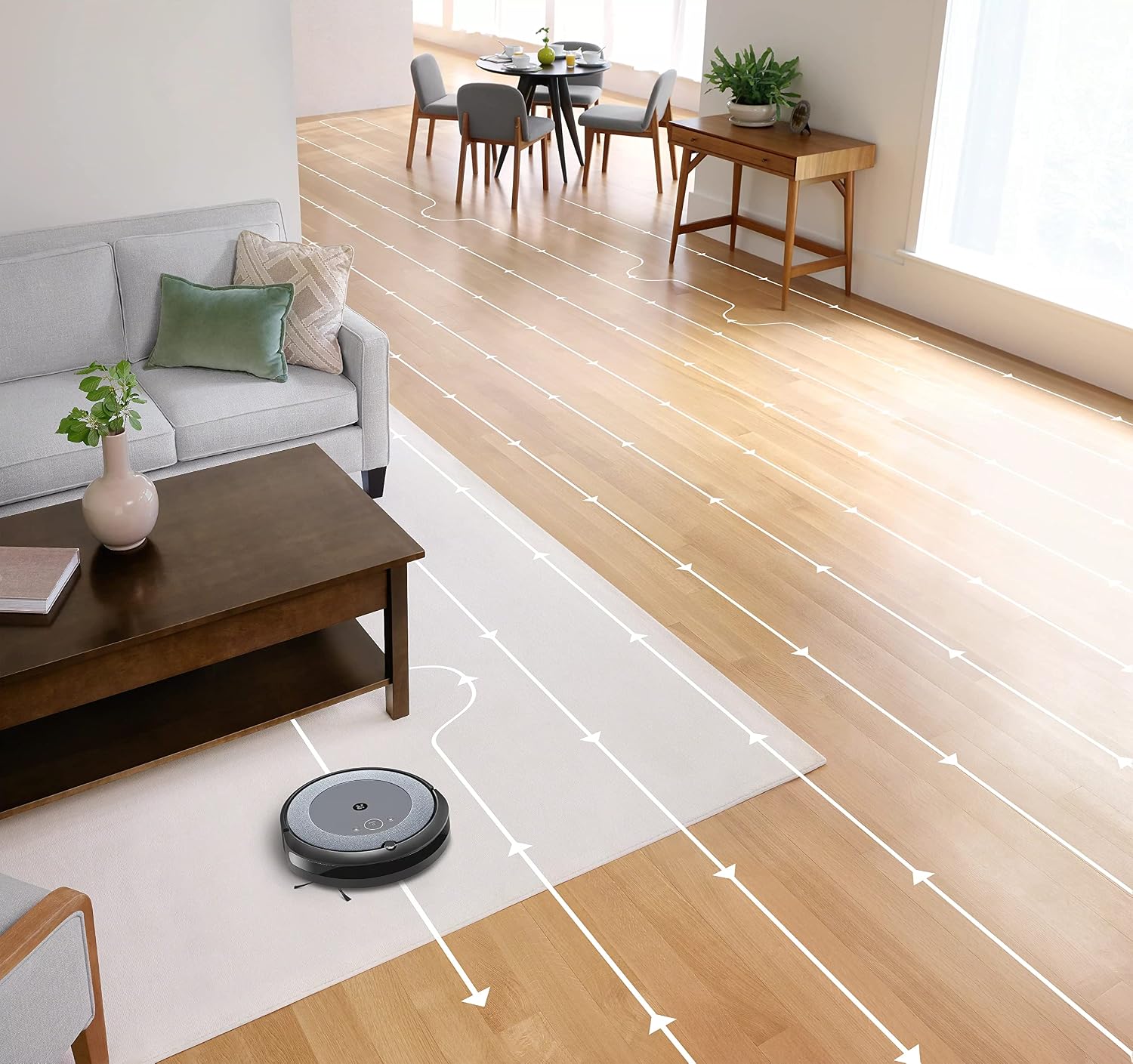
- Nabigazio Adimenduna: The robot cleans in neat, efficient rows, adapting to different floor types including carpets and hard floors.
- Dual Multi-Surface Rubber Brushes: These brushes are designed to prevent tangles with pet hair and effectively pick up dirt and debris from various surfaces.
- Dirt Detect™ Technology: The robot uses acoustic and optical sensors to find dirtier areas and spends more time cleaning them.
- Automatic Dirt Disposal (with compatible Clean Base): If you have a compatible Clean Base (sold separately), the robot will automatically empty its dustbin into an enclosed bag, allowing for weeks of hands-free cleaning.


Mantentzea
Regular maintenance ensures your Roomba i1 operates at peak performance. Always turn off the robot and disconnect it from the Home Base before performing any maintenance.
Hautsontzia hustea
- Press the bin release button and pull out the bin.
- Open the bin door and empty debris into a trash can.
- Tap the bin against the trash can to dislodge any trapped debris.
Cleaning the Filter (Cloth Type)
- Kendu iragazkia hauts-ontzitik.
- Tap the filter against a trash can to remove debris. Do not wash the filter.
- Replace the filter every 2 months, or more frequently if you have pets.
Eskuilak garbitzea
- Pinch the yellow brush release tabs to lift the brush frame.
- Remove the brushes and remove any hair or debris wrapped around them or trapped beneath the yellow caps.
- Reinstall the brushes, ensuring they click into place.
Alboko eskuila garbitzea
- Use a coin or small screwdriver to remove the screw holding the side brush.
- Remove the side brush and clean any hair or debris from the brush and its post.
- Berriro jarri alboko eskuila eta estutu torlojua.
Sentsoreak eta kargatzeko kontaktuak garbitzea
- Wipe the charging contacts on the robot and Home Base with a clean, dry cloth.
- Wipe the cliff sensors (located on the bottom of the robot) and the front bumper sensor window with a clean, dry cloth.
Arazoak konpontzea
If your Roomba i1 encounters an issue, the robot will play an audible alert and the light ring around the CLEAN button will flash. Consult the iRobot Home App for specific error messages and solutions.
Ohiko arazoak eta irtenbideak:
- Robota ez da kargatzen: Ensure the Home Base is plugged in and the robot is properly docked. Clean the charging contacts on both the robot and Home Base.
- Robot stuck or trapped: Clear obstacles from the robot's path. If it frequently gets stuck in the same area, consider using Virtual Wall Barriers (sold separately) or adjusting furniture.
- Garbiketa-errendimendu eskasa: Empty the dust bin, clean or replace the filter, and clean the main brushes and side brush. Ensure the robot's sensors are clean.
- Robota ez da Wi-Fi-ra konektatzen: Ensure your Wi-Fi router is on and within range. Restart your router and the robot. Follow the Wi-Fi setup instructions in the iRobot Home App again.
- Robotak soinu ezohikoak egiten ditu: Check the brushes and wheels for any trapped debris or hair. Clean them thoroughly.
For more detailed troubleshooting, refer to the iRobot Home App or the iRobot support webgunea.
Zehaztapenak
| Marka | iRobot |
| Ereduaren izena | Roomba i1 (1152) |
| Ezaugarri Berezia | Smart, Wi-Fi Connected Mapping |
| Kolorea | Beltza/Grisa |
| Dakarten osagaiak | Robot Vacuum, Home Base, Line Cord, Battery, Side Brush, Filter, Dual Multi-Surface Rubber Brushes |
| Iragazki mota | Oihal |
| Energia iturria | Bateriaren bidez |
| Pilak | 1 litio ioizko bateria (barne) |
| Kontrol-metodoa | Aplikazioa |
| Gailu bateragarriak | Google Home |
| Forma-faktorea | Robotikoa |
| Produktuaren neurriak | 13.5 x 3.6 x 13.4 hazbete |
| Elementuaren pisua | 13.2 kilo |
| Azalera gomendioa | Alfonbrak, zoru gogorrak |
| UPC | 657768820809 |
| ASIN | B0CPQ3RVDK |
Bermea eta Laguntza
This product is sold as a renewed item. Please refer to the specific warranty terms provided by the seller or Amazon Renewed at the time of purchase. For technical support, troubleshooting assistance, or to purchase replacement parts, please visit the official iRobot support website or contact iRobot customer service. You can also find helpful resources within the iRobot Home App.
Lineako laguntza: www.irobot.com/support


