1. Sarrera
Thank you for choosing the Geek Smart L7 Robot Vacuum and Mop. This device is designed to provide efficient and thorough cleaning for your home, combining powerful vacuuming with intelligent mopping capabilities. Featuring advanced LDS navigation, Wi-Fi connectivity, and smart app control, the L7 ensures a customized cleaning experience for various floor types, including carpets and hard floors.
This manual provides essential information for the safe operation, setup, maintenance, and troubleshooting of your robot vacuum. Please read it carefully before use and retain it for future reference.
2. Segurtasun-argibideak
To reduce the risk of injury or damage, read and follow all safety precautions when setting up, using, and maintaining your robot vacuum.
- Tresna hau 8 urtetik gorako haurrek eta gaitasun fisiko, sentsorial edo mental murriztua duten pertsonek edo esperientzia eta ezagutzarik ez duten pertsonek erabil dezakete, baldin eta aparatua modu seguruan erabiltzeko gainbegiratze edo argibideak eman badituzte eta dakartzan arriskuak ulertzen badituzte. .
- Haurrak gainbegiratu behar dira aparatuarekin jolasten ez dutela ziurtatzeko.
- Garbiketa eta erabiltzailearen mantentze-lanak ez dituzte haurrek gainbegiratu gabe egingo.
- Erabili fabrikatzaileak emandako jatorrizko korronte-egokitzailea soilik.
- Do not use the robot in environments with open flames or flammable materials.
- Mantendu ilea, arropa solteak, behatzak eta gorputzeko atal guztiak irekiguneetatik eta atal mugikorretatik urrun.
- Ez erabili robota haurtxo edo ume bat lo dagoen geletan.
- Ez erabili robota hondakin handiak, likidoak edo erretzen ari diren objektuak jasotzeko.
- Ensure the robot is placed on a stable surface and cannot fall from high places.
- Turn off the robot and unplug the charging dock before cleaning or maintenance.
3. Paketearen edukia
Egiaztatu osagai guztiak daudela eta egoera onean daudela paketea desontziratzean.
- Geek Smart L7 Robot Vacuum and Mop
- Kargatzeko kaia
- Elikatze-moldagailua
- Alboko eskuilak (2 bikote)
- Eskuila nagusia
- Dust Bin (680ML)
- 2-in-1 Water Tank & Dust Bin (350ML water tank & 260ML dust bin)
- Mop-oihalak (2)
- High-Efficiency Filter (pre-installed in dust bin)
- Garbiketa tresna
- Erabiltzailearen eskuliburua
4. Produktua amaitu daview
Robot Vacuum Components

Image: The Geek Smart L7 Robot Vacuum, showcasing its top view with control buttons, LDS sensor, and accompanying accessories like the charging dock and replacement filters.
- LDS Navigation Sensor: Located on top, for precise mapping and navigation.
- Kontrol-botoiak: Power/Clean, Home/Recharge.
- Aurrealdeko Bumper: Oztopoak detektatzen ditu.
- Alboko eskuilak: Garbitu hondakinak eskuila-bide nagusira.
- Eskuila nagusia: Collects dirt and debris.
- Gurpil eragileak: Gainazal desberdinetan zehar mugimendua ahalbidetu.
- Kontaktuak kargatzeko: Connect with the charging dock.
- Dust Bin / Water Tank: Removable compartments for dust collection and water for mopping.
Kargatzeko kaia
The charging dock provides power to recharge the robot's battery. It should be placed in an open area with sufficient clearance.
5. Konfigurazioa
5.1 Kargatzeko kaiaren kokapena
- Place the charging dock against a wall in an open area.
- Ensure there is at least 0.5 meters (1.6 feet) of clear space on both sides of the dock and 1.5 meters (4.9 feet) in front.
- Konektatu korronte-egokitzailea kargatzeko oinarrira eta entxufe batera.
- Ensure the power indicator on the charging dock illuminates.
5.2 Hasierako karga
- Place the robot onto the charging dock, ensuring the charging contacts align.
- The robot will automatically begin charging. Allow it to fully charge before its first use (approximately 4-5 hours).
5.3 Aplikazioaren konexioa eta mapaketa

Image: The Geek Smart L7 Robot Vacuum actively scanning its environment using LDS navigation to create a detailed map, with digital map representations floating above it.
- Download the Geek Smart app from your mobile device's app store (available for iOS and Android).
- Erregistratu kontu bat eta hasi saioa.
- Follow the in-app instructions to add your L7 robot vacuum. This typically involves connecting to the robot's Wi-Fi hotspot and then connecting the robot to your home Wi-Fi network.
- Once connected, initiate a full cleaning cycle. The robot will use its LDS navigation to create an accurate map of your home. This map will be saved in the app for future use, allowing for features like selective room cleaning and setting no-go zones. The robot can save up to 5 different maps.
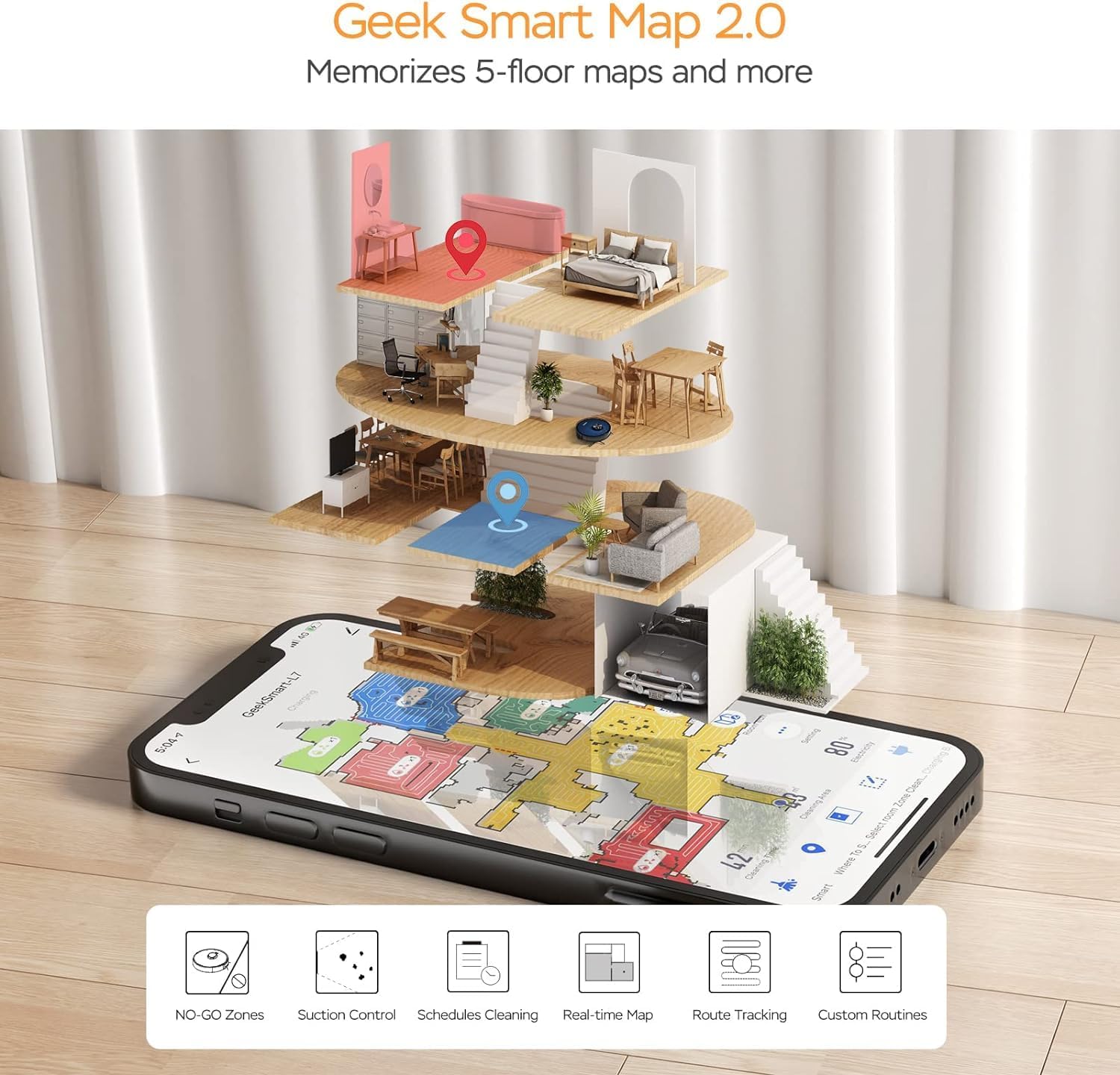
Image: A smartphone screen displaying the Geek Smart app interface, showing a color-coded floor plan map with various cleaning zones and controls.
6. Funtzionamendu-argibideak
6.1 Garbiketa abiaraztea eta gelditzea
- Hasi garbitzen: Press the Power/Clean button on the robot or tap "Start Cleaning" in the app. The robot will begin a full cleaning cycle.
- Garbiketa pausatu: Press the Power/Clean button during operation or tap "Pause" in the app.
- Berrekin garbiketa: Press the Power/Clean button again or tap "Resume" in the app.
- Itzuli kaira: Press the Home/Recharge button on the robot or tap "Recharge" in the app. The robot will return to its charging dock.
6.2 Garbiketa moduak
The L7 offers various cleaning modes to suit different needs.

Image: The Geek Smart L7 Robot Vacuum demonstrating its 2-in-1 sweeping and mopping capabilities on a hard floor, with debris being swept and a damp mop trail visible.
- Garbiketa automatikoa: The robot intelligently plans its cleaning path using LDS navigation.
- Aspiragailua: Utilizes up to 2700Pa suction power to clean dirt and debris from various surfaces.
- Mopping: Attach the mop cloth and fill the 2-in-1 water tank. The electronic water tank allows for adjustable water output.
- Vacuum & Mop (Simultaneous): The robot can vacuum and mop simultaneously when the 2-in-1 tank is installed.
- Carpet Boost Mode: The robot automatically increases suction power when it detects carpeted areas for deeper cleaning.

Image: The Geek Smart L7 Robot Vacuum actively cleaning a hard floor, with a visual representation of its powerful 2700Pa suction lifting debris.

Image: The Geek Smart L7 Robot Vacuum transitioning from a hard floor to a carpet, illustrating its Carpet Boost Mode with enhanced suction indicated by glowing lines.

Image: The Geek Smart L7 Robot Vacuum positioned on a floor split between marble and wood, illustrating its integrated mopping system and adjustable water output for different surfaces.
6.3 Aplikazioen kontrol funtzioak
The Geek Smart app unlocks advanced cleaning customization.
- Selective Room Cleaning: Choose specific rooms or areas on the map for cleaning.
- No-Go Zones / No-Mop Zones: Draw virtual boundaries on the map to prevent the robot from entering certain areas or mopping carpets.
- Invisible Walls: Create virtual walls to restrict the robot's movement.
- Programazioa: Set cleaning schedules for automatic operation at desired times.
- Xurgatze potentziaren doikuntza: Manually adjust the suction level.
- Water Output Adjustment: Control the water flow for mopping.

Image: The Geek Smart L7 Robot Vacuum operating quietly (65dB) in a living room, demonstrating its low noise level suitable for homes with sleeping individuals or pets.
7. Mantentzea
Regular maintenance ensures optimal performance and extends the lifespan of your robot vacuum. Always turn off the robot and unplug the charging dock before performing any maintenance.
7.1 Hautsontzia hustea
- Sakatu hauts-ontzia askatzeko botoia eta atera hauts-ontzia.
- Open the dust bin cover and empty the contents into a trash can.
- Clean the filter and dust bin with the provided cleaning tool or a soft brush.
- Berriro instalatu hauts-ontzia.
7.2 Cleaning the 2-in-1 Water Tank & Dust Bin
- Remove the 2-in-1 tank from the robot.
- Empty any remaining water from the water tank compartment.
- Hustu hautsaren konpartimendua eta garbitu iragazkia.
- Rinse the water tank compartment with clean water. Do not immerse the entire tank in water, especially the electronic components.
- Allow all parts to air dry completely before reassembling and reinstalling.
7.3 Eskuila nagusia garbitzea
- Irauli robota eta sakatu askatzeko fitxak eskuila nagusiaren estalkia kentzeko.
- Atera eskuila nagusia.
- Use the cleaning tool to remove hair and debris tangled around the brush and its bearings.
- Jarri berriro eskuila nagusia eta estalkia.
7.4 Alboko eskuilak garbitzea
- Alboko eskuilak astiro-astiro gora tiratu kentzeko.
- Remove any hair or debris. If brushes are bent, soak them in warm water for a few minutes to reshape.
- Press the brushes back into place until they click.
7.5 Sentsoreak eta kargatzeko kontaktuak garbitzea
- Use a clean, dry cloth to wipe the cliff sensors (located on the bottom of the robot), wall sensors (on the side), and the charging contacts on both the robot and the charging dock.
- Ensure the LDS sensor on top is also clean and free of obstructions.
8. Arazoak
If you encounter issues with your robot vacuum, refer to the following table for common problems and solutions.
| Arazoa | Kausa posiblea | Irtenbidea |
|---|---|---|
| Robota ez da pizten | Bateria baxua; Etengailua itzalita | Place robot on charging dock; Ensure power switch is on. |
| Robotak ezin du kargatu | Kargatzeko kontaktuak zikinak; kargatzeko oinarria ez dago elikatuta | Clean charging contacts on robot and dock; Ensure dock is plugged in. |
| Robota maiz trabatuta geratzen da | Obstacles on floor; Cliff sensors dirty | Clear cables and small objects; Clean cliff sensors. |
| Garbiketa errendimendu eskasa | Dust bin full; Brushes tangled; Filter clogged | Hauts-ontzia hustu; eskuila nagusiak eta albokoak garbitu; iragazkia garbitu edo ordezkatu. |
| Fregonatze funtzioa ez dabil | Water tank empty; Mop cloth dry; Water outlet clogged | Fill water tank; Moisten mop cloth; Clean water outlet. |
| Aplikazioaren konexio-arazoak | Wi-Fi pasahitz okerra; Bideratzailea urrunegi; Robota lineaz kanpo | Verify Wi-Fi credentials; Move robot closer to router; Restart robot and router. |
9. Zehaztapenak
| Ezaugarri | Zehaztapena |
|---|---|
| Marka | Geek Smart |
| Ereduaren izena | L7 |
| Nabigazio mota | 360° LiDAR |
| Xurgatze potentzia maximoa | 2700 Pa |
| Bateria Edukiera | 2600 mAh |
| Gehienezko exekuzioa | 130 minutu |
| Hauts-ontziaren edukiera | 680 ML |
| Water Tank Capacity (2-in-1) | 350 ML |
| Zarata Maila | Sub-65 dB |
| Produktuaren neurriak | 12.59"L x 12.59"Z x 3.74"A |
| Elementuaren pisua | 13.39 kilo |
| Gailu bateragarriak | Amazon Echo |
| UPC | 764773837187 |
10. Bermea eta Laguntza
Geek Smart products are manufactured to the highest quality standards. For warranty information, technical support, or customer service inquiries, please refer to the contact information provided on the product packaging or visit the official Geek Smart webgunea.
Mesedez, gorde zure erosketa-froga berme-erreklamazioetarako.


