Sarrera
The ttec AirBeat Snap True Wireless Bluetooth Earphones are designed to provide a superior audio experience for music and calls. Featuring advanced Bluetooth 5.3 connectivity, touch controls, and a lightweight, sweat-resistant design, these earbuds offer comfort and performance for daily use, gaming, and more.
This manual provides detailed instructions on setting up, operating, maintaining, and troubleshooting your ttec AirBeat Snap earphones. Please read it carefully before use to ensure optimal performance and longevity of your device.
Paketearen edukia
Mesedez, markatu laukitxoa elementu hauetarako:
- 1 x ttec AirBeat Snap True Wireless TWS Bluetooth Earphones (Left and Right Earbuds)
- 1 x Earphone Charging and Storage Case
- 3 x Sets of Earbud Tips (Sizes: S, M, L)
- 1 x USB-A USB-C kargatzeko kablea
- 1 x Erabiltzailearen eskuliburua (Dokumentu hau)
Konfigurazioa
1. Hasierako kargatzea
Lehenengo aldiz erabili aurretik, kargatu guztiz entzungailuak eta kargatzeko zorroa.
- Place both earbuds into the charging case. Ensure they are correctly seated; the indicator lights on the earbuds should illuminate.
- Connect the USB-C charging cable to the charging port on the case and the other end to a USB power source (e.g., computer USB port, wall adapter).
- The charging indicator on the case will show charging status. A full charge typically takes approximately 1.5 hours.
- Guztiz kargatuta dagoenean, deskonektatu kargatzeko kablea.

Image: ttec AirBeat Snap earbuds placed inside their white charging case, ready for charging or storage.
2. Pairing with a Device (Bluetooth 5.3)
The ttec AirBeat Snap uses Bluetooth 5.3 for a stable and fast wireless connection.
- Open the charging case. The earbuds will automatically enter pairing mode, indicated by flashing lights (if applicable, refer to specific light indicators in product documentation).
- Zure gailuan (telefono adimenduna, tableta, ordenagailu eramangarria), joan Bluetooth ezarpenetara.
- Aktibatu Bluetooth-a eta bilatu eskuragarri dauden gailuak.
- Select "ttec AirBeat Snap" from the list of found devices.
- Once connected, you will hear a confirmation tone, and the earbud indicator lights will change (e.g., turn off or solid).
MonoSmart Technology: Both earbuds can be used independently. Simply take one earbud out of the case, and it will automatically connect to your paired device. If both are out, they will connect as a stereo pair.

Image: Illustration showing the ttec AirBeat Snap earbuds next to a smartphone with Bluetooth settings open, highlighting Bluetooth 5.3 and MonoSmart Technology for fast and easy connection.
Funtzionamendu-argibideak
Ukitu Kontrolak
The ttec AirBeat Snap features intuitive touch sensors on each earbud for easy control of music, calls, and voice assistants.
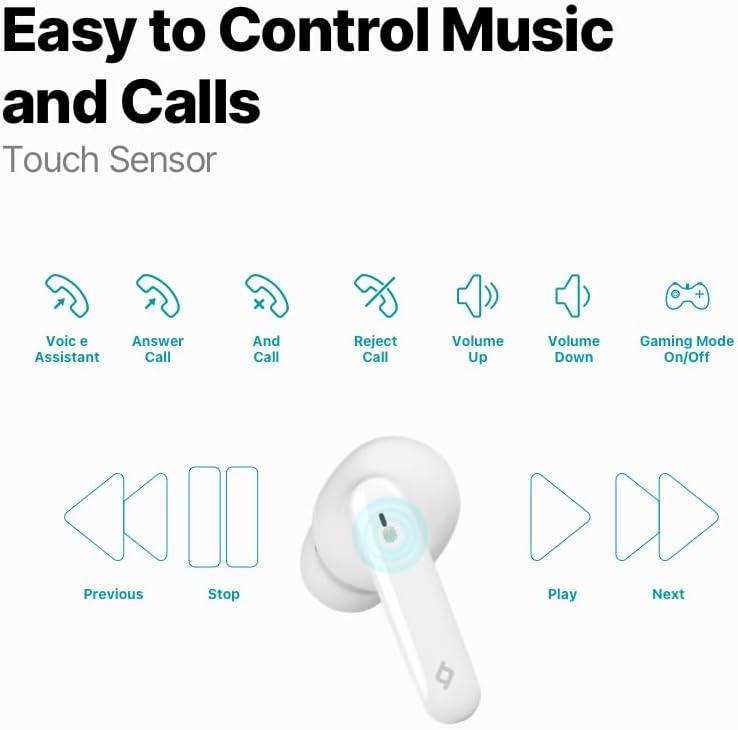
Image: Diagram illustrating the touch control functions for the earbuds, including voice assistant, answer/end/reject call, volume up/down, gaming mode on/off, previous/next track, play/stop.
| Ekintza | Funtzioa |
|---|---|
| Ukitu bakarra (ezkerra/eskuina) | Musika erreproduzitu/pausatu, deia erantzun/amaitu |
| Sakatu bikoitza (ezkerra) | Aurreko Pista |
| Sakatu bikoitza (eskuinean) | Hurrengo Pista |
| Sakatu hirukoitza (ezkerrean) | Bolumena jaitsi |
| Sakatu hirukoitza (eskuinean) | Bolumena igo |
| Sakatu luzea (2 segundo) | Deia baztertu, ahots-laguntzailea aktibatu |
| Quadruple Tap (Left/Right) | Toggle Gaming Mode On/Off |
Musika Esperientzia
Enjoy superior sound and deep bass for an impressive music experience.

Image: The ttec AirBeat Snap earbuds floating above their open charging case, with sound waves emanating, illustrating superior sound and deep bass.
Gaming Mode (60ms Low Latency)
Activate Gaming Mode for an outstanding gaming and video experience with ultra-low latency of 60ms, ensuring synchronized audio and visuals.

Image: The ttec AirBeat Snap earbuds positioned next to a smartphone displaying a mobile game, emphasizing the 60ms low latency feature for an enhanced gaming experience.
Bateriaren iraupena eta kargatzea
The earbuds provide up to 5 hours of battery life on a single charge. The ultra-compact USB-C charging case extends the total usage time up to 28 hours.
Charge&Go Feature: A quick 15-minute charge provides approximately 1.5 hours of usage.
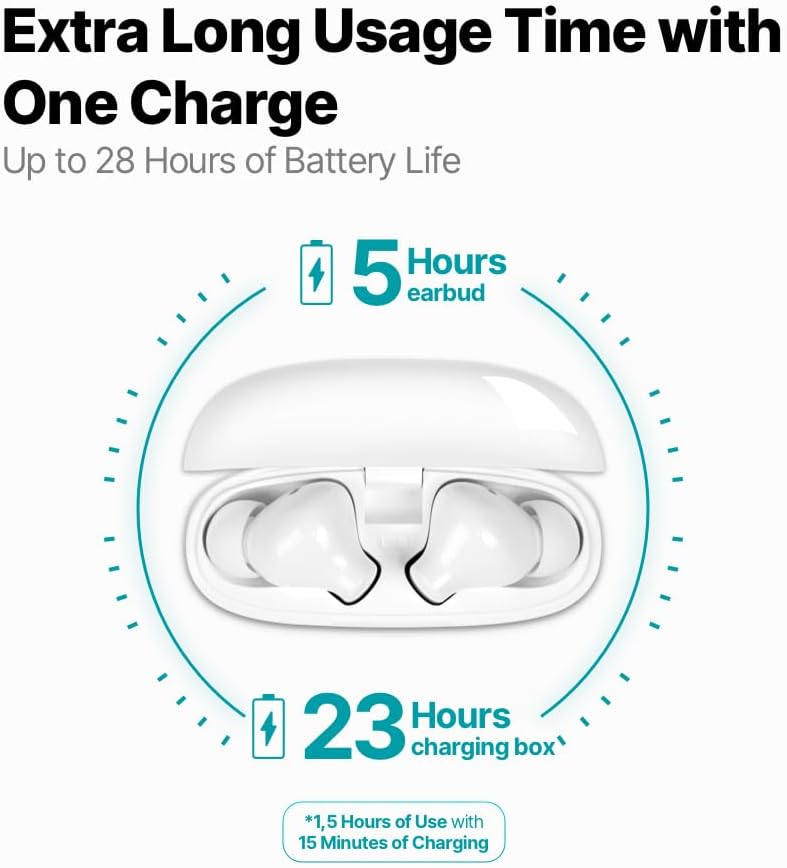
Image: An infographic showing the ttec AirBeat Snap earbuds in their charging case, indicating 5 hours of battery life for the earbuds and an additional 23 hours from the charging case, totaling 28 hours. It also highlights the Charge&Go feature.
Mantentzea
Garbiketa
- Garbitu aldizka entzungailuak eta kargatzeko zorroa oihal leun, lehor eta lihorik gabeko batekin.
- Ez erabili garbitzaile urratzailerik, alkoholik edo disolbatzaile kimikorik.
- Kendu astiro-astiro belarri-argizaria edo hondakinak entzungailuen puntetatik eta bozgorailuen saretik eskuila txiki eta leun bat edo kotoi-hagaxka bat erabiliz.
- Ensure charging contacts on both earbuds and the case are clean and free of dust.
Biltegiratzea
- Erabiltzen ez dituzunean, gorde beti entzungailuak kargatzeko zorroan, babesteko eta kargatuta mantentzeko.
- Gorde gailua leku fresko eta lehor batean, eguzki-argitik eta muturreko tenperaturetatik babestuta.
Water and Sweat Resistance (IPX6 Rated)
The ttec AirBeat Snap earbuds are IPX6 rated, meaning they are resistant to strong jets of water and sweat. This makes them suitable for workouts and outdoor activities.
- Ez murgildu entzungailuak uretan.
- Ez jarri kargatzeko kaxa uretan, ez baita urarekiko erresistentea.
- After exposure to sweat or water, wipe the earbuds dry before placing them back into the charging case to prevent damage to the charging contacts.

Image: A person wearing the ttec AirBeat Snap earbuds, demonstrating their sweat and water-resistant design with an IPX6 rating, suitable for active use.
Arazoak konpontzea
| Arazoa | Balizko Kausa / Irtenbidea |
|---|---|
| Aurikularrak ez dira gailuarekin parekatzen. |
|
| Entzungailu bakarra dabil. |
|
| Bolumen baxua edo soinu-kalitate eskasa. |
|
| Aurikularrak ez dira kargatzen. |
|
| Ukipen-kontrolek ez dute erantzuten. |
|
Zehaztapenak
| Ezaugarri | Xehetasuna |
|---|---|
| Ereduaren izena | AirBeat Snap |
| Produktuaren eredu-zenbakia | 2KM147 |
| Marka | TTEC |
| Konektibitate Teknologia | Haririk gabekoa (Bluetooth 5.3) |
| Aurikularretako bateriaren iraupena | Gehienez 5 ordu |
| Kargatzeko kasua bateriaren iraupena | Up to 23 hours (total 28 hours with earbuds) |
| Kargatzeko Denbora | Gutxi gorabehera 1.5 ordu (karga osoa lortzeko) |
| Kargatu eta Joan funtzioa | 15 min charge for 1.5 hours use |
| Earbud pisua | 3.5 gramo (bakoitza) |
| Kargatzeko kasuaren pisua | 30 gramo |
| Earbud Dimensions (L x W x H) | 32 x 21 x 2.3 mm |
| Kargatzeko kaxaren neurriak (L x Z x A) | 57 x 23 x 44 mm |
| Distantzia eragilea | Gehienez 10 metro |
| Uraren Erresistentzia Maila | IPX6 (aurikularretarako soilik) |
| Latentzia baxuko joko modua | 60 ms |
| Ezaugarri nagusiak | Touch Control, Lightweight, Microphone Included, Volume Control, Sweat Resistant, MonoSmart Technology |
| Gailu bateragarriak | Mobile Phone, Laptop, Desktop Computer, Tablet |
| Kolorea | Zuria |
| ASIN | B0CQ7YZPFG |
Bermea eta Laguntza
For warranty information and customer support, please refer to the official TTEC webwebgunearekin edo jarri harremanetan zure tokiko saltzailearekin. Gorde erosketaren frogagiria bermearen erreklamazioetarako.
Ohar garrantzitsua: As per health and hygiene regulations, products that come into direct contact with the human body, such as earphones, can only be returned if their packaging has not been opened, the product has not been tried, damaged, or used.


