Sarrera
Thank you for choosing the Bigben 5000mAh MagSafe Compatible Wireless Power Bank. This portable power bank is designed to provide convenient wireless charging for compatible devices, as well as wired charging via its USB-C port. Please read this manual carefully before using the product to ensure safe and optimal performance.
Segurtasun Informazioa
Zure gailuari lesiorik edo kalterik ez egiteko, jarraitu segurtasun neurri hauek:
- Ez jarri bateria eramangarria muturreko tenperaturen, eguzki-argiaren eraginpean edo suaren eraginpean.
- Ez murgildu bateria eramangarria uretan edo beste likido batzuetan.
- Saihestu bateria eramangarria erortzea, jotzea edo desmuntatzea.
- Mantendu haurren eskura.
- Erabili ziurtatutako kargatzeko kableak eta egokigailuak soilik.
- If the power bank swells, emits an odor, or becomes excessively hot, discontinue use immediately.
- Tokiko araudien arabera bota bateria eramangarria arduraz.
Paketearen edukia
Mesedez, egiaztatu paketea elementu hauek dituen:
- Bigben 5000mAh MagSafe Compatible Wireless Power Bank
- USB-C-tik USB-C-ra kargatzeko kablea
- Erabiltzailearen eskuliburua (dokumentu hau)
Produktua amaituview
Familiarize yourself with the components of your power bank:

Irudia: Aurrealdea view of the Bigben 5000mAh Power Bank, highlighting the LED indicator lights and the USB-C port.
- LED adierazle argiak: Four small lights indicating the remaining battery level.
- USB-C ataka: For charging the power bank and for wired device charging.
- Haririk gabeko kargatzeko gainazala: The flat surface designed for MagSafe compatible wireless charging.
- Pizteko botoia: Activates wireless charging and checks battery level.
Konfigurazioa
Power Banka kargatzen
Before first use, fully charge your power bank.
- Konektatu emandako USB-C kablea bateria eramangarriaren USB-C atakara.
- Konektatu USB-C kablearen beste muturra USB hormako egokitzaile bateragarri batera (ez dago barne).
- The LED indicator lights will illuminate to show the charging status. When all four LEDs are solid, the power bank is fully charged.
LED adierazlearen egoera:
- 1 LED: 0-25% charged
- 2 LED: % 25-50 kargatuta
- 3 LED: % 50-75 kargatuta
- 4 LED: % 75-100 kargatuta
Funtzionamendua
Haririk gabeko kargatzea (MagSafe-rekin bateragarria)
This power bank supports MagSafe compatible wireless charging up to 10W.
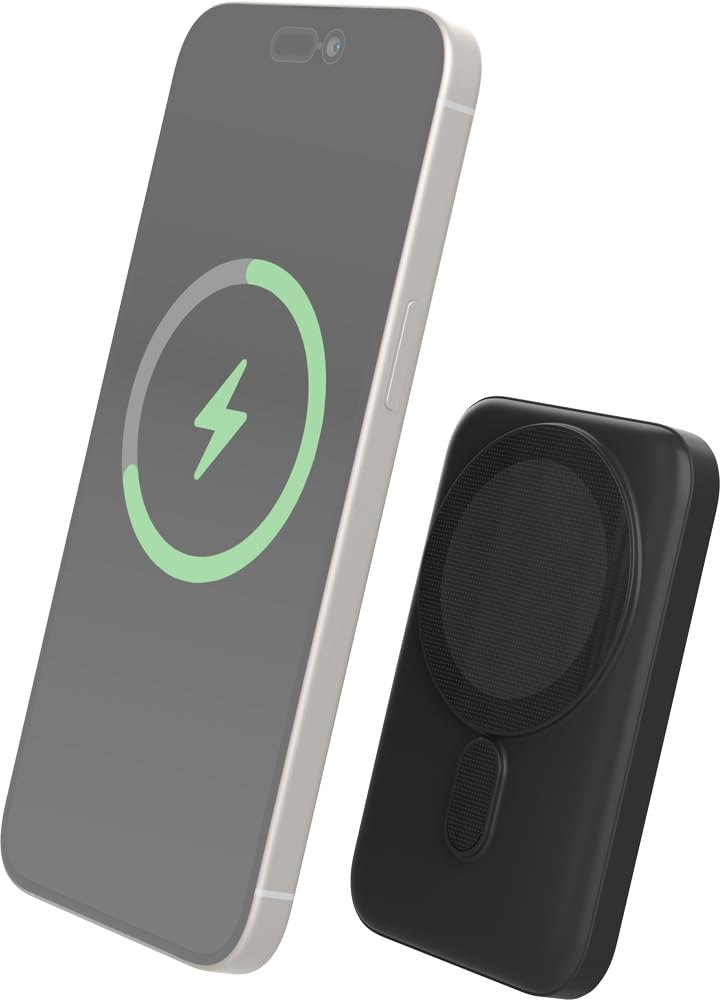
Image: The Bigben power bank magnetically connected to the back of a smartphone, illustrating the wireless charging function.
- Ensure your device is MagSafe compatible or has a MagSafe compatible case.
- Align the power bank with the back of your device. The magnets will snap it into place.
- The power bank will automatically begin charging your device. The LED indicators on the power bank will show its remaining charge.
- To stop charging, simply detach the power bank from your device.
Note: For optimal magnetic attachment and charging efficiency, ensure there are no obstructions between the power bank and your device.
Kable bidez kargatzea
You can also charge devices using a USB-C cable.
- Connect one end of a USB-C cable (not included, or use the provided one if suitable) to the power bank's USB-C port.
- Konektatu kablearen beste muturra zure gailuaren kargatzeko atakara.
- Power bank-ak automatikoki hasiko da zure gailua kargatzen.
Mantentzea
Garbiketa
- Disconnect the power bank from all devices and power sources before cleaning.
- Garbitu gainazala zapi leun, lehor eta lihorik gabeko batekin.
- Ez erabili produktu kimiko gogorrak, garbiketa-disolbatzaileak edo garbigarri indartsuak.
Biltegiratzea
- Gorde bateria eramangarria leku fresko eta lehor batean, eguzki-argitik eta muturreko tenperaturetatik babestuta.
- Denbora luzez gordetzen baduzu, kargatu bateriaren potentzia-bankua % 50 ingurura hiru hilabetero bateriaren egoera mantentzeko.
Arazoak konpontzea
| Arazoa | Irtenbide posiblea |
|---|---|
| Power banka ez da kargatzen |
|
| Gailua ez da haririk gabe kargatzen |
|
| Device not charging via cable |
|
| LED adierazleak ez dira funtzionatzen |
|
Zehaztapenak
| Ezaugarri | Xehetasuna |
|---|---|
| Modelo zenbakia | 6128 |
| Bateria Edukiera | 5000mAh |
| Haririk gabeko irteera | Up to 10W (MagSafe Compatible) |
| Sarrera/Irteera ataka | USB-C |
| Pisua | 300 g inguru |
Bermea eta Laguntza
Bigben products are designed and manufactured to the highest standards. For warranty information or technical support, please refer to the warranty card included with your purchase or visit the official Bigben webgunea.
For further assistance, please contact Bigben customer service.


