1. Sarrera
This manual provides essential information for the proper setup, operation, and maintenance of your INNOCN 32M2V 32-inch 4K Mini LED Monitor. Please read this manual thoroughly before using the product to ensure optimal performance and safety.
The INNOCN 32M2V is a high-performance 32-inch 4K UHD (3840x2160) Mini LED monitor designed for demanding visual tasks, including gaming and professional content creation. It features a 144Hz refresh rate, 1ms response time, HDR1000 support, and AMD FreeSync Premium technology for a smooth and immersive viewesperientzia.
2. Paketearen edukia
Mesedez, egiaztatu osagai guztiak paketean daudela:
- INNOCN 32M2V Monitor
- Monitorearen euskarria (oinarria eta lepoa)
- Korronte egokitzailea eta kablea
- HDMI kablea
- USB-C kablea
- Erabiltzailearen eskuliburua (dokumentu hau)
- Other accessories (may vary by region)
3. Konfigurazioa
3.1 Standa muntatzea
- Kontu handiz atera monitorearen eta euskarriaren osagaiak paketetik.
- Lotu euskarriaren lepoa monitorearen panelari. Ziurtatu ondo sartzen dela klik eginez edo torlojuekin lotuta dagoela, baldin badaude.
- Attach the stand base to the stand neck. Tighten any screws to secure the assembly.
- Jarri muntatutako monitorea gainazal egonkor eta lau batean.
Oharra: The monitor also supports VESA mounting (100x100mm) for wall or arm installation. Refer to your VESA mount's instructions for installation.
3.2 Monitorea konektatzea
The INNOCN 32M2V offers multiple connectivity options. Ensure your computer or device is powered off before making any connections.

Irudia: Atzealdea view of the INNOCN 32M2V monitor displaying its various input and output ports, including USB-B 3.0, USB-A 2.0, Type-C 90W, HDMI 2.1, DP1.4, Audio out, and DC Power In.
- HDMI konexioa: Connect one end of the HDMI cable to the HDMI 2.1 port on the monitor and the other end to the HDMI port on your computer or device. This supports up to 4K @ 144Hz.
- DisplayPort (DP) konexioa: Connect one end of the DisplayPort cable to the DP1.4 port on the monitor and the other end to the DisplayPort on your computer or device. This supports up to 4K @ 120Hz.
- USB-C konexioa: Connect one end of the USB-C cable to the Type-C 90W port on the monitor and the other end to a compatible USB-C port on your computer or device. This connection supports video, data transfer, and power delivery (up to 90W) to the connected device.
- USB-A atakak: Use the USB-A 2.0 ports for connecting peripherals such as a keyboard, mouse, or USB drive. These ports require the USB-B 3.0 upstream cable to be connected from the monitor to your computer.
- Audio irteera: Connect headphones or external speakers to the 3.5mm audio out jack.
- Potentzia-konexioa: Connect the power adapter to the DC Power In port on the monitor, then plug the power cable into a power outlet.
3.3 Piztea
- Ziurtatu kable guztiak ondo konektatuta daudela.
- Press the power button located on the monitor (usually on the bottom right or rear).
- Power on your connected computer or device.
- The monitor should automatically detect the input signal. If not, you may need to manually select the input source using the On-Screen Display (OSD) menu.
4. Monitorea funtzionatzea
4.1 Pantailan bistaratzeko (OSD) menua
The OSD menu allows you to adjust various monitor settings. The control buttons are typically located on the bottom right side of the monitor. Refer to the icons next to the buttons for their functions (e.g., Menu, Up, Down, Enter, Exit).
- Sakatu Menua botoia sakatu OSD irekitzeko.
- Erabili Gora/Behera botoiak menuko aukeren artean nabigatzeko.
- Sakatu Sartu botoia aukera bat hautatzeko edo ezarpen bat berresteko.
- Sakatu Irten button to go back or close the OSD.
4.2 Key Features and Adjustments
Bistaratzeko ezarpenak
- Distira/Kontrastea: Egokitu ezarpen hauek zure beharretara egokitzeko viewingurunea.
- Kolore Tenperatura: Select from preset modes (e.g., Warm, Cool, User) or adjust RGB values manually. The monitor supports 99% sRGB, 99% DCI-P3, and 99% Adobe RGB color spaces for accurate color reproduction.
- HDR (Barruti Dinamiko Handia): The monitor supports HDR1000, providing enhanced contrast and color depth. Ensure HDR is enabled in both the monitor OSD and your operating system settings for compatible content.
- Tokiko iluntzea: The 1152-zone Mini LED backlight provides precise local dimming for superior contrast and black levels. This feature is automatically managed for optimal brightness.
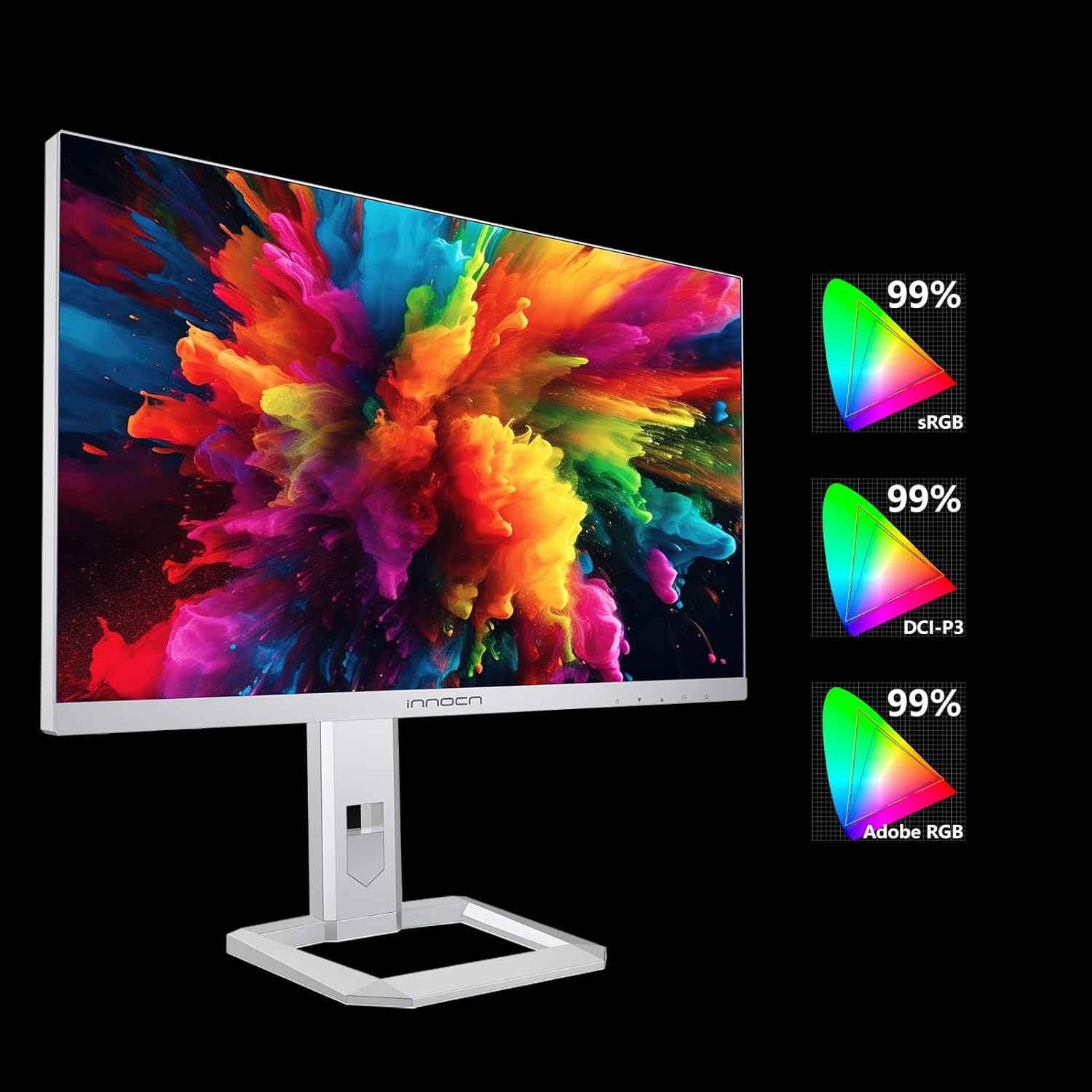
Image: The INNOCN 32M2V monitor showcasing its wide color gamut support, indicating 99% coverage for sRGB, DCI-P3, and Adobe RGB color spaces.

Image: A side-by-side comparison demonstrating the enhanced contrasts and visual depth achieved with HDR1000 support on the INNOCN Mini-LED monitor compared to an ordinary display.

Irudia: Leherketa bat view diagram illustrating the 1152-zone Mini LED backlight technology, highlighting its smart brightness management for precise local dimming and improved contrast.
Joko Ezaugarriak
- Freskatze-tasa: The monitor supports up to 144Hz refresh rate for smooth motion. Ensure your graphics card and connection cable support this refresh rate at 4K resolution.
- Erantzun denbora: With a 1ms (MPRT) response time, the monitor minimizes motion blur and ghosting.
- AMD FreeSync Premium: This technology synchronizes the monitor's refresh rate with your AMD graphics card's frame rate, eliminating screen tearing and stuttering. Enable FreeSync Premium in the OSD menu and your graphics card settings.

Image: A side-by-side comparison demonstrating the smoother motion and reduced blur achieved with a 144Hz refresh rate on the INNOCN Mini-LED monitor compared to an ordinary display.

Image: A side-by-side comparison illustrating the reduced motion blur and sharper image quality provided by the 1ms response time of the INNOCN Mini-LED monitor versus an ordinary display.

Image: A side-by-side comparison demonstrating the tear-free and stutter-free gaming experience provided by AMD FreeSync Premium on the INNOCN Mini-LED monitor compared to an ordinary display.
USB-C Power Delivery
The USB-C port supports up to 90W Power Delivery, allowing you to charge compatible laptops or devices directly through the monitor while simultaneously receiving video and data signals.

Image: A laptop connected to the INNOCN 32M2V monitor using a single USB Type-C cable, illustrating the 90W Power Delivery feature that charges the laptop while transmitting video and data.
Bozgorailu Integratuak
The monitor includes integrated speakers. You can adjust the volume through the OSD menu or your connected device's audio settings.
5. Mantentzea
5.1 Monitorea garbitzea
- Deskonektatu beti monitorearen entxufea korrontetik garbitu aurretik.
- Erabili lipurrik gabeko zapi leun bat dampUrarekin edo pantaila-garbitzaile leun eta ez-urratzaile batekin garbitu.
- Ez ihinztatu garbitzailea zuzenean pantailan. Aplikatu lehenik oihalaren gainean.
- Saihestu bentzenoa, mehetzailea, amoniakoa duten garbitzaileak edo material urratzaileak erabiltzea, hauek pantaila edo... kaltetu baitezakete.asing.
5.2 Biltegiratzea
Monitorea denbora luzez gordetzen baduzu, deskonektatu kable guztiak, sartu jatorrizko ontzian (baldin badago) eta gorde leku fresko eta lehor batean, eguzki-argitik eta muturreko tenperaturetatik babestuta.
6. Arazoak
If you encounter issues with your monitor, please refer to the following common problems and solutions before contacting support.
| Arazoa | Kausa posiblea | Irtenbidea |
|---|---|---|
| Ez dago irudirik pantailan |
|
|
| Irudia lausoa edo distortsionatua dago |
|
|
| Pantailaren urratzea edo tartekatzea |
|
|
| Bozgorailuen soinurik ez |
|
|
7. Zehaztapenak
The following table lists the technical specifications for the INNOCN 32M2V monitor:
| Ezaugarri | Xehetasuna |
|---|---|
| Marka | INNOCN |
| Modelo zenbakia | 32M2V |
| Pantailaren tamaina | 32 hazbete |
| Ebazpena | 4K UHD (3840 x 2160) |
| Freskatze tasa | 144 Hz |
| Erantzun Denbora | 1 millisecond (MPRT) |
| Panel mota | Mini LED |
| HDR euskarria | HDR1000 (VESA Certified DisplayHDR 1000) |
| Sinkronizazio egokitzailea | AMD FreeSync Premium |
| Aspektu-erlazioa | 16:9 |
| Kontraste-erlazioa | 3000:1 |
| Pantailaren gainazala | Matea |
| Konektibitatea | 2x HDMI 2.1, 1x DisplayPort 1.4, 1x USB-C (90W PD), 1x USB-B 3.0 (upstream), 2x USB-A 2.0 (downstream), 1x Audio Out |
| Ezaugarri bereziak | Adaptive Sync, Integrated Speakers, USB-C Power Delivery (90W) |
| Kolorea | Zilarrezkoa |
| Energia Eraginkortasun Klasea | F |
| Energia-kontsumoa (SDR) | 30 kWh/1000h |
| Energia-kontsumoa (HDR) | 62 kWh/1000h |
For detailed energy information, scan the QR code on the energy label or visit the official EU EPREL database: https://eprel.ec.europa.eu/qr/1566356

Image: The EU Energy Label for the INNOCN monitor, indicating an energy efficiency class of F, with SDR consumption of 30 kWh/1000h and HDR consumption of 62 kWh/1000h. The label also shows the screen size and resolution.
8. Bermea eta Laguntza
For warranty information, technical support, or service inquiries, please refer to the warranty card included with your product or visit the official INNOCN webgunea. Gorde erosketa-agiria erosketaren frogagiri gisa berme-erreklamazioetarako.


