Sarrera
Eskerrik asko erosketagatik.asing the 7artisans AF 50mm F1.8 Full Frame Lens. This manual provides essential information for the safe and effective use of your new lens. Please read it thoroughly before use and keep it for future reference.
This 50mm F1.8 lens is designed for Sony E-Mount full-frame cameras, offering a large aperture, fast autofocus, and support for advanced features like face and eye recognition. Its versatile focal length makes it suitable for a wide range of photographic applications, from portraits to street photography.
Segurtasun Informazioa
- Do not look at the sun or bright light sources through the lens, as this may cause permanent vision impairment.
- Erabili behar ez duzunean, lentea eguzki-argitik urrun eduki, sute arriskuak edo barneko osagaiak kaltetzea saihesteko.
- Avoid exposing the lens to extreme temperatures, high humidity, or dust.
- Ez saiatu lentea zeuk desmuntatzen edo konpontzen. Jarri harremanetan baimendutako zerbitzu-langileekin laguntza jasotzeko.
- Mantendu haurren eskura.
Paketearen edukia
Egiaztatu elementu guztiak zure paketean daudela:
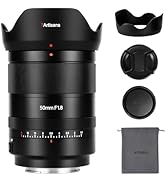
- 7artisans AF 50mm F1.8 Full Frame Lens
- Aurrealdeko lentearen kapela
- Atzeko lentilen txanoa
- Lens Hood
- Lente zorroa
- Argibide eskuliburua (dokumentu hau)

Image: The 7artisans AF 50mm F1.8 lens shown with its included accessories: front and rear lens caps, lens hood, and a soft pouch.
Produktua amaituview
The 7artisans AF 50mm F1.8 lens features a robust metal construction with a sleek black finish. Key components include:
- Fokatzeko eraztuna: For manual focusing.
- Irekidura-eraztuna: Allows switching between automatic and manual aperture control.
- AF/MF etengailua: Autofokatze moduaren eta eskuzko fokatze moduaren artean txandakatzen du.
- Lentearen muntaia: Sony E-Mount compatible.
- USB-C ataka: Firmware eguneratzeetarako.
Irudia: Gertutik view of the lens barrel, highlighting the AF/MF switch for mode selection.

Irudia: Xehetasun zehatza view of the lens mount, showing the electronic contacts and the integrated USB-C port for firmware updates.
Konfigurazioa
- Lentea eranstea:
- Align the white dot on the lens barrel with the white dot on your camera's lens mount.
- Sartu lentea kameraren euskarrian astiro-astiro.
- Biratu lentea erlojuaren orratzen noranzkoan klik egin arte, ondo blokeatuta dagoela adieraziz.
- Lentea kentzea:
- Sakatu eta eutsi kameraren gorputzeko lentearen askapen botoiari.
- Biratu lentea erlojuaren orratzen kontrako noranzkoan, kameraren euskarritik askatu arte.
- Jarri aurreko eta atzeko lenteen estalkiak lentearen elementuak babesteko.
- Lens Hood eranstea:
- Lerrokatu lentearen estalkia lentearen aurrealdearekin.
- Biratu estalkia erlojuaren orratzen noranzkoan ondo blokeatu arte.
- The lens hood helps reduce flare and provides physical protection to the front element.

Image: The 7artisans AF 50mm F1.8 lens securely mounted on a Sony mirrorless camera, viewed albotik.
Lentearen funtzionamendua
1. Focus Mode Selection (AF/MF)
Use the AF/MF switch on the lens barrel to select your desired focus mode:
- AF (Autofokua): The camera will automatically focus on the subject. This lens features a high-speed STM stepping motor for quick and accurate autofocus performance.
- MF (Eskuzko Fokua): You can manually adjust the focus by rotating the focus ring on the lens.
Irudia: Xehetasun zehatza view of the AF/MF switch, allowing users to toggle between autofocus and manual focus modes.
2. Aperture Control
The lens features an aperture ring that can be switched between automatic and manual control:
- Automatic Aperture: Set the aperture ring to the 'A' position. The camera will control the aperture settings.
- Manual Aperture: Rotate the aperture ring to select your desired F-stop (F1.8 to F16). This provides precise control over depth of field and exposure.
The large F1.8 aperture allows for excellent low-light performance and the creation of beautiful background blur (bokeh).
3. Face/Eye Recognition Support
This lens supports your camera's face and eye recognition functions. When enabled on your camera, the lens will automatically set accurate focusing points and exposure for human faces or eyes, ensuring sharp portraits.

Image: A photograph illustrating the camera's eye recognition feature actively focusing on a subject's eye.
4. Firmware eguneraketak
The integrated USB-C port allows for easy firmware updates. Connect the lens to your computer using a USB-C cable and follow the instructions provided on the 7artisans official website to update the firmware. This ensures optimal performance and compatibility with future camera models.
Irudia: Xehetasun zehatza view of the lens mount, showing the electronic contacts and the integrated USB-C port for firmware updates.
Mantentzea
- Garbiketa: Use a soft, lint-free cloth to clean the lens barrel. For lens elements, use a lens brush to remove dust, then gently wipe with a lens cleaning cloth and lens cleaning solution.
- Biltegiratzea: When not in use, store the lens with both caps attached in a cool, dry place away from direct sunlight and moisture. Consider using a desiccant to prevent mold growth.
- Manipulazioa: Avoid dropping or subjecting the lens to strong impacts, as this can damage internal optical elements.
Arazoak konpontzea
1. Lens not focusing:
- Ensure the AF/MF switch is set to the desired mode (AF for autofocus).
- Check camera settings to ensure autofocus is enabled and the correct focus area is selected.
- Clean the lens contacts on both the lens and camera body.
2. Images are blurry:
- Verify that the lens is properly focused.
- Check shutter speed to avoid camera shake, especially in low light.
- Ensure the lens elements are clean and free from smudges or dust.
3. Lens not recognized by camera:
- Remove and reattach the lens, ensuring it clicks securely into place.
- Clean the electronic contacts on both the lens and camera body with a clean, dry cloth.
- Check for available firmware updates for both the lens and your camera.
Zehaztapenak
| Ezaugarri | Xehetasuna |
|---|---|
| Marka | 7artisauak |
| Modelo zenbakia | AF5018EB |
| Fokua | 50 mm |
| Gehieneko irekiera | F1.8 |
| Gutxieneko irekiera | F16 |
| Lente mota | Lente lehen estandarra |
| Muntaketa bateragarriak | Sony E-Mount |
| Egitura Optikoa | 11 elementu 9 taldetan |
| Diafragma Palak | 11 pieza |
| Angelua View | D:46.8°, H:39.6°, V:27.0° |
| Fokatze-distantzia hurbilena | 0.5M - ∞ |
| Iragazkiaren tamaina | 58 mm |
| Elementuaren pisua | 1.78 kilo (807 g inguru) |
| Produktuaren neurriak | 40.94 x 28.35 x 28.35 hazbete |
Bermea eta Laguntza
For warranty information, technical support, or service inquiries, please visit the official 7artisans webwebgunera edo jarri harremanetan zure baimendutako saltzailearekin. Gorde erosketaren frogagiria bermearen erreklamazioetarako.
For the latest firmware updates and additional resources, please visit: 7artisans Official Store
Produktu Ofizialaren Bideoak
Watch these official videos for more information on the 7artisans AF 50mm F1.8 lens:
7artisans AF50mm F1.8
Bideoa: Produktu ofizial baten bideo-erakustaldiaasing the features and capabilities of the 7artisans AF 50mm F1.8 lens.
7artisans AutoFocus 50mm F1.8
Video: Another official product video demonstrating the autofocus performance and image quality of the 7artisans 50mm F1.8 lens.


