1. Produktua amaitu daview
The Keyscaper Star Wars Darth Vader Wireless Mouse is designed for comfort and precision, featuring a distinctive Darth Vader color block design. This wireless mouse connects via a USB nano-receiver and is powered by two AAA batteries. It offers laser-optical precision and an auto-sleep function to maximize battery life.

Figure 1: Keyscaper Star Wars Darth Vader Wireless Mouse
Ezaugarri nagusiak:
- Officially licensed Star Wars product.
- Easy plug & play functionality via included USB nano-receiver.
- Laser-optical precision for accurate and responsive tracking.
- Auto-sleep feature to conserve battery power.
- Durable full-color printed logo.
2. Konfiguratzeko argibideak
2.1 Zer dago kutxan
- Keyscaper Star Wars Darth Vader Wireless Mouse
- USB nano-hartzailea
- 2 AAA batteries (pre-installed or included separately)
2.2 Bateriaren instalazioa
- Bilatu bateriaren konpartimentuaren estalkia saguaren azpialdean.
- Irristatu edo altxatu estalkia astiro-astiro konpartimentua irekitzeko.
- Sartu bi AAA pila, konpartimentuaren barruan adierazten den polaritate zuzena (+/-) ziurtatuz.
- Jarri bateriaren konpartimentuaren estalkia ondo sartu arte klik egin arte.

Figure 2: Mouse components and battery installation
2.3 Connecting the USB Nano-Receiver
- Locate the USB nano-receiver, typically stored within a slot in the battery compartment for convenience.
- Remove the nano-receiver from its storage slot.
- Plug the USB nano-receiver into an available USB-A port on your computer or laptop.
- Zure ordenagailuak automatikoki detektatu eta instalatu beharko lituzke beharrezko kontrolatzaileak. Honek minutu batzuk iraun ditzake.

Figure 3: USB nano-receiver storage
2.4 Piztu/Itzaltzea
- On the underside of the mouse, locate the ON/OFF switch.
- Slide the switch to the "ON" position to activate the mouse.
- To conserve battery life when not in use, slide the switch to the "OFF" position.
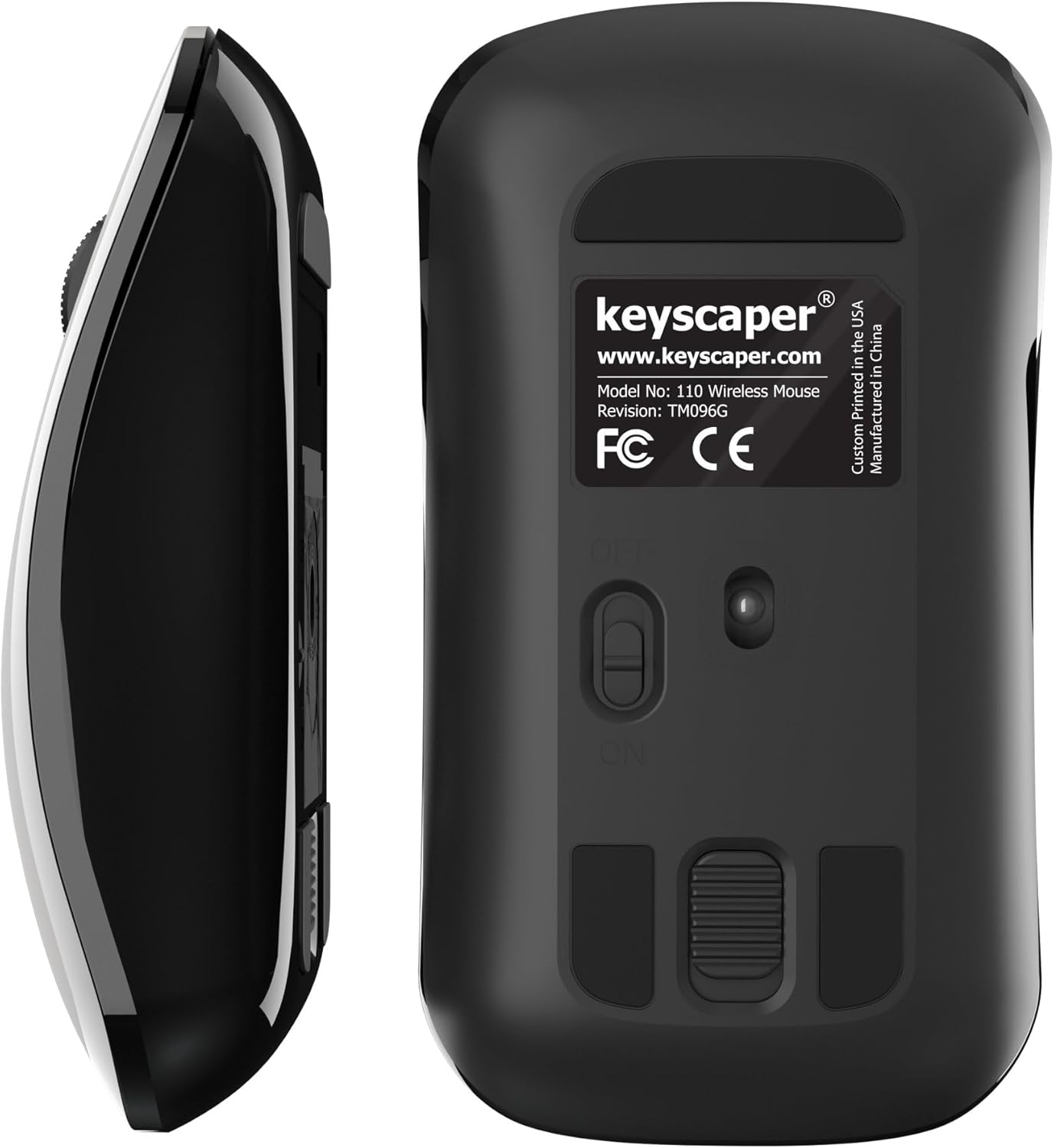
Figure 4: Underside of the mouse
3. Funtzionamendu-argibideak
3.1 Oinarrizko erabilera
- Ezkerreko klik: Press the left button for primary actions (selecting, opening).
- Egin klik eskuineko botoiarekin: Press the right button for secondary actions (context menus).
- Korritzeko gurpila: Roll the wheel up or down to scroll through documents or web pages. Press the scroll wheel for middle-click functionality (e.g., opening links in new tabs).
3.2 Auto-lo funtzioa
The mouse is equipped with an auto-sleep feature. If inactive for a period, it will enter a low-power sleep mode to save battery. To wake the mouse, simply move it or click any button.
4. Mantentzea
4.1 Bateria ordezkatzea
When the mouse performance degrades or it stops responding, it's time to replace the AAA batteries. Follow the steps in Section 2.2 for battery installation.
4.2 Garbiketa
Errendimendu optimoa mantentzeko, garbitu sagua aldian-aldian:
- Ensure the mouse is turned OFF.
- Erabili lipurrik gabeko zapi leun bat dampened with water or a mild cleaning solution to wipe the exterior.
- Saihestu hezetasuna irekiduretan sartzea.
- Use a dry cotton swab to gently clean the optical sensor on the underside.
5. Arazoak
5.1 Saguak ez du erantzuten
- Ziurtatu sagua piztuta dagoela.
- Egiaztatu bateriak. Ordeztu itzazu gutxi edo agortuta badaude.
- Verify that the USB nano-receiver is securely plugged into a working USB-A port on your computer. Try a different USB port if necessary.
- Move the mouse closer to the USB nano-receiver to rule out range issues.
- Berrabiarazi ordenagailua.
5.2 Kurtsorearen mugimendu irregularra
- Clean the optical sensor on the underside of the mouse (refer to Section 4.2).
- Ensure you are using the mouse on a suitable surface. Highly reflective or uneven surfaces may cause issues. A mouse pad is recommended for best performance.
6. Zehaztapenak
- Modelo zenbakia: 110WL
- Produktuaren neurriak: 2 x 1 x 0.1 hazbete
- Elementuaren pisua: 4 ontza
- Konektibitate Teknologia: Radio Frequency (via USB nano-receiver)
- Mugimenduak hautemateko teknologia: Optikoa
- Pilak: 2 AAA bateria (barne)
- Kolorea: Darth Vader (Color Block)
- Fabrikatzailea: Dongguan Togran Electronic Technology Co, Ltd.
7. Bermea eta Laguntza
For warranty information or technical support, please refer to the official Keyscaper webwebgunera edo jarri harremanetan bezeroarentzako arreta-zerbitzura. Gorde erosketa-agiria berme-erreklamazioetarako.
This product is designed and printed by Keyscaper in Tualatin, Oregon, USA, and manufactured by Dongguan Togran Electronic Technology Co, Ltd.
