1. Sarrera
Thank you for choosing the iJoy Disney Lilo & Stitch Expressions Bluetooth Over-Ear Headphones. These wireless headphones are designed to provide a comfortable audio experience with the added charm of Lilo & Stitch designs. This manual will guide you through the setup, operation, and maintenance of your new headphones.

Image: iJoy Disney Lilo & Stitch Bluetooth Over-Ear Headphones.
2. Produktua amaitu daview
Ezaugarri nagusiak:
- Haririk gabeko Bluetooth konexioa: Enjoy audio without tangled cords.
- Mikrofono integratua: For clear communication during calls.
- LED adierazleak: Provide battery and connection status.
- Diseinu tolesgarria: Erraz eramangarritasun eta biltegiratze lanetarako.
- Micro SD Card Plug-in: Play music directly from a Micro SD card.
- Built-in Radio Receiver: Tune into your favorite radio stations.
- Aux Cable Included: Option for wired listening when battery is low or Bluetooth is not available.
Zer dago Kutxan:
- iJoy Disney Lilo & Stitch Expressions Bluetooth Over-Ear Headphones
- Babes-zorroa
- Kargatzeko kablea (USB)
- Auxiliary Audio Cable with Microphone
3. Konfigurazioa
3.1 Entzungailuak kargatzea
Before initial use, fully charge your headphones. Connect the provided USB charging cable to the charging port on the headphones and to a compatible USB power source. The LED indicator will show charging status and turn off or change color when fully charged. A full charge provides approximately 15 hours of playtime.

Image: Headphones highlighting 15 hours of playtime.
3.2 Bluetooth parekatzea
- Ziurtatu entzungailuak itzalita daudela.
- Sakatu eta eutsi pizteko botoia LED adierazlea urdin eta gorri keinuka hasi arte, parekatze modua adieraziz.
- Zure gailuan (smartphone-an, tabletan, etab.), gaitu Bluetooth-a eta bilatu eskuragarri dauden gailuak.
- Select "iJoy Stitch Headphones" (or similar name) from the list.
- Behin konektatuta, LED adierazleak normalean argi urdin finko bat erakutsiko du edo urdin keinuka poliki egingo du.

Image: Headphones demonstrating universal compatibility with Apple and Android devices.
4. Funtzionamendu-argibideak
4.1 Kontrolakview
The headphone controls are located on the ear cup. Refer to the diagram below for button functions:
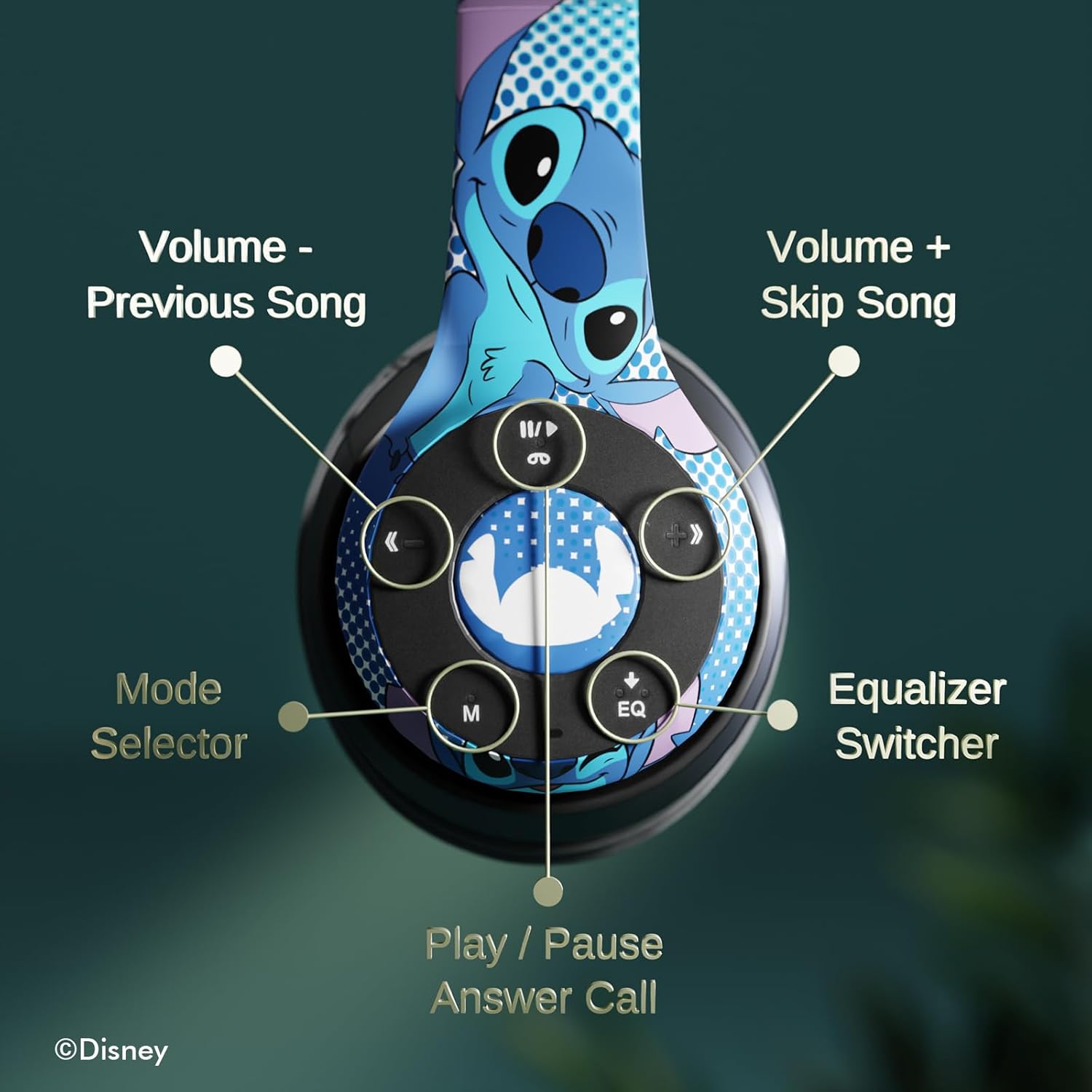
Irudia: Xehetasun handikoa view of the headphone controls, including Volume -, Previous Song, Volume +, Skip Song, Mode Selector, Equalizer Switcher, and Play/Pause/Answer Call buttons.
- Play/Pause/Answer Call Button: Press once to play/pause music or answer/end a call. Press and hold to reject a call.
- Volume + / Skip Song Button: Press once for Volume Up. Press and hold to skip to the next song.
- Bolumena - / Aurreko abestiaren botoia: Press once for Volume Down. Press and hold to go to the previous song.
- Mode Selector (M): Press to switch between Bluetooth, Micro SD card, and FM Radio modes.
- Equalizer Switcher (EQ): Press to cycle through different equalizer presets.
4.2 Deiak egitea eta jasotzea
With the built-in microphone, you can make and receive calls when connected via Bluetooth:
- Deia erantzun/amaitu: Press the Play/Pause/Answer Call button once.
- Deia baztertu: Press and hold the Play/Pause/Answer Call button.
4.3 Musika erreproduzitzea
- Bluetooth modua: After pairing, music from your connected device will play through the headphones. Use the controls to manage playback.
- Mikro SD txartelaren modua: Insert a Micro SD card with MP3 files into the designated slot. Press the 'M' button to switch to Micro SD card mode. The headphones will automatically begin playing music from the card.
4.4 FM Irrati modua
Press the 'M' button to switch to FM Radio mode. Use the Volume +/- buttons to scan for stations or adjust volume.
5. Mantentzea
- Garbiketa: Erabili zapi leun eta lehor bat entzungailuak garbitzeko. Ez erabili produktu kimiko gogorrik edo material urratzailerik.
- Biltegiratzea: When not in use, store the headphones in the provided protective case. The foldable design allows for compact storage.
- Saihestu hezetasuna: Mantendu entzungailuak uretatik eta gehiegizko hezetasunetik urrun.
- Tenperatura: Saihestu entzungailuak muturreko tenperaturetara.

Image: Headphones demonstrating their foldable design for easy storage.
6. Arazoak
| Arazoa | Irtenbide posiblea |
|---|---|
| Entzungailuak ez dira pizten. | Ziurtatu entzungailuak guztiz kargatuta daudela. |
| Ezin da gailuarekin parekatu. | Ziurtatu entzungailuak parekatze moduan daudela (LED urdin/gorri keinukaria). Itzali eta piztu Bluetooth-a gailuan. Hurbildu gailura. |
| Soinurik ez. | Check volume levels on both headphones and connected device. Ensure headphones are correctly paired. Try using the auxiliary cable. |
| Soinu kalitate txarra. | Move closer to the connected device to avoid interference. Check audio source quality. |
| Mikrofonoa ez dabil. | Ensure headphones are properly connected. Check microphone settings on your device. |
7. Zehaztapenak
| Ezaugarri | Xehetasuna |
|---|---|
| Ereduaren izena | Disney Lilo & Stitch Expressions |
| Modelo zenbakia | DS20137 |
| Konektibitate Teknologia | Haririk gabeko (Bluetooth) |
| Haririk gabeko Komunikazio Teknologia | Bluetootha |
| Bluetooth bertsioa | 4.0 |
| Bluetooth barrutia | 10 metro |
| Belarrien Kokatzea | Belarri gainean |
| Forma-faktorea | Belarri gainean |
| Zarata Kontrola | Soinu Isolamendua |
| Kontrol mota | Bolumenaren kontrola, ukimena |
| Ezaugarri bereziak | Built-in Radio Receiver, Foldable and Adjustable headband, Micro SD Card Plug-in, Microphone Included |
| Gailu bateragarriak | Bluetooth-enabled devices (e.g. smartphones, tablets, laptops) |
| Materiala | Memoria-aparra, Plastikoa |
| Elementuaren pisua | 0.29 kilogramo (10.2 ontza) |
| Pilak | 1 litio-polimeroko bateria (barne) |
| Paketearen neurriak | 8.78 x 6.26 x 3.62 hazbete |
| UPC | 810116712489 |
8. Produktuaren bideo ofiziala
Bideoa: Produktu ofizial baten bideo-erakustaldiaasing the Disney Lilo & Stitch Bluetooth Headphones, highlighting their features and design.
9. Bermea eta Laguntza
For warranty information and customer support, please refer to the documentation included with your product or visit the official iJoy webgunea. Gorde erosketa-agiria berme-erreklamazioetarako.


