1. Produktua amaitu daview
This manual provides essential information for the operation and maintenance of your GHUST MR23GA Replacement Magic Voice Remote Control. This remote is designed as a replacement for various LG Smart TV models, offering convenient control without complex setup.

Image 1.1: The GHUST MR23GA Replacement Magic Voice Remote Control.
Ezaugarri nagusiak:
- Ordezkapen zuzena: Functions as a direct replacement for original LG Magic Remote models.
- Ez da programaziorik behar: Ready to use out of the box after battery insertion.
- Eraikuntza iraunkorra: Made of high-quality ABS material for enhanced durability.
- Diseinu trinkoa: Small and ergonomic for comfortable grip.
- Voice Search Capability: Supports voice commands for easier navigation (functionality may vary based on TV model and original remote features).
- Lasterbide-botoi dedikatuak: Quick access to popular streaming services like Netflix and Prime Video.
2. Konfigurazioa eta instalazioa
The MR23GA remote control is designed for immediate use with compatible LG Smart TVs. No complex programming or pairing procedures are required.
2.1. Bateriaren instalazioa
- Kokatu bateriaren konpartimentuaren estalkia urrutiko agintearen atzealdean.
- Irristatu estalkia beherantz edo sakatu giltzarrapoa konpartimentua irekitzeko.
- Insert two (2) AAA batteries (not included) into the compartment, ensuring the positive (+) and negative (-) terminals align correctly with the indicators inside.
- Itxi bateriaren konpartimentuaren estalkia berriro bere lekuan jarriz, ondo klik egin arte.

Image 2.1: The remote control is designed for ease of use with no setup or programming required after battery installation.
Once batteries are installed, the remote is ready to operate your compatible LG Smart TV.
3. Funtzionamendu-argibideak
This section details the basic functions and operation of your MR23GA remote control.
3.1. Oinarrizko funtzioak
- Pizteko botoia (●): Sakatu telebista pizteko edo itzaltzeko.
- Zenbaki-botoiak (0-9): Use to directly input channel numbers.
- Bolumena igo/behera (+/-): Adjust the TV's volume level.
- Channel Up/Down (▲/▼): Aldatu telebistako kateak.
- Mute Button (🔇): Mute or unmute the TV's audio.
- Nabigazio-panela (Gora, Behera, Ezkerra, Eskuina, Ados): Nabigatu menuetan eta hautatu aukerak.
- Back Button (↶): Aurreko pantailara edo menura itzuli.
- Hasiera botoia (🏠): Access the TV's Smart Home dashboard.

Image 3.1: The compact size and ergonomic design make the remote easy to hold and operate.
3.2. Ahots kontrola
Eduki sakatuta Mikrofonoaren botoia to activate voice control. Speak clearly into the remote to issue commands or search for content. Release the button when finished speaking. Note that voice control functionality may depend on your specific LG TV model and its original features.
3.3. Lasterbide-botoi dedikatuak
The remote features dedicated buttons for quick access to popular streaming applications:
- Netflix botoia: Directly launch the Netflix application.
- Prime Video botoia: Directly launch the Amazon Prime Video application.
- Disney+ botoia: Directly launch the Disney+ application.
- LG Channels Button: Directly launch the LG Channels application.
- Sling Button: Directly launch the Sling TV application.
- Alexa botoia: Activate Alexa voice assistant (functionality depends on TV model).

Image 3.2: Dedicated shortcut buttons provide quick access to your favorite applications.
3.4. Bateragarritasuna
This replacement remote control is compatible with a wide range of LG Smart TV models, including but not limited to:
- LG OLED Series: OLED42C3AUA, OLED42C3PUA, OLED48C3PUA, OLED55C3PUA, OLED65C3AUA, OLED77C3PUA, OLED83C3PUA, OLED55G3PUA, OLED65G3PUA, OLED77G3PUA, OLED83G3PUA, OLED55B3PUA, OLED65B3PUA, OLED77B3PUA
- LG QNED Series: 43QNED75URA, 50QNED75URA, 55QNED75URA, 65QNED75URA, 75QNED75URA, 50QNED80URA, 55QNED80URA, 65QNED80URA, 75QNED80URA, 86QNED80URA
- LG UR9000 Series: 43UR9000PUA, 50UR9000PUA, 55UR9000PUA, 65UR9000PUA, 75UR9000PUA
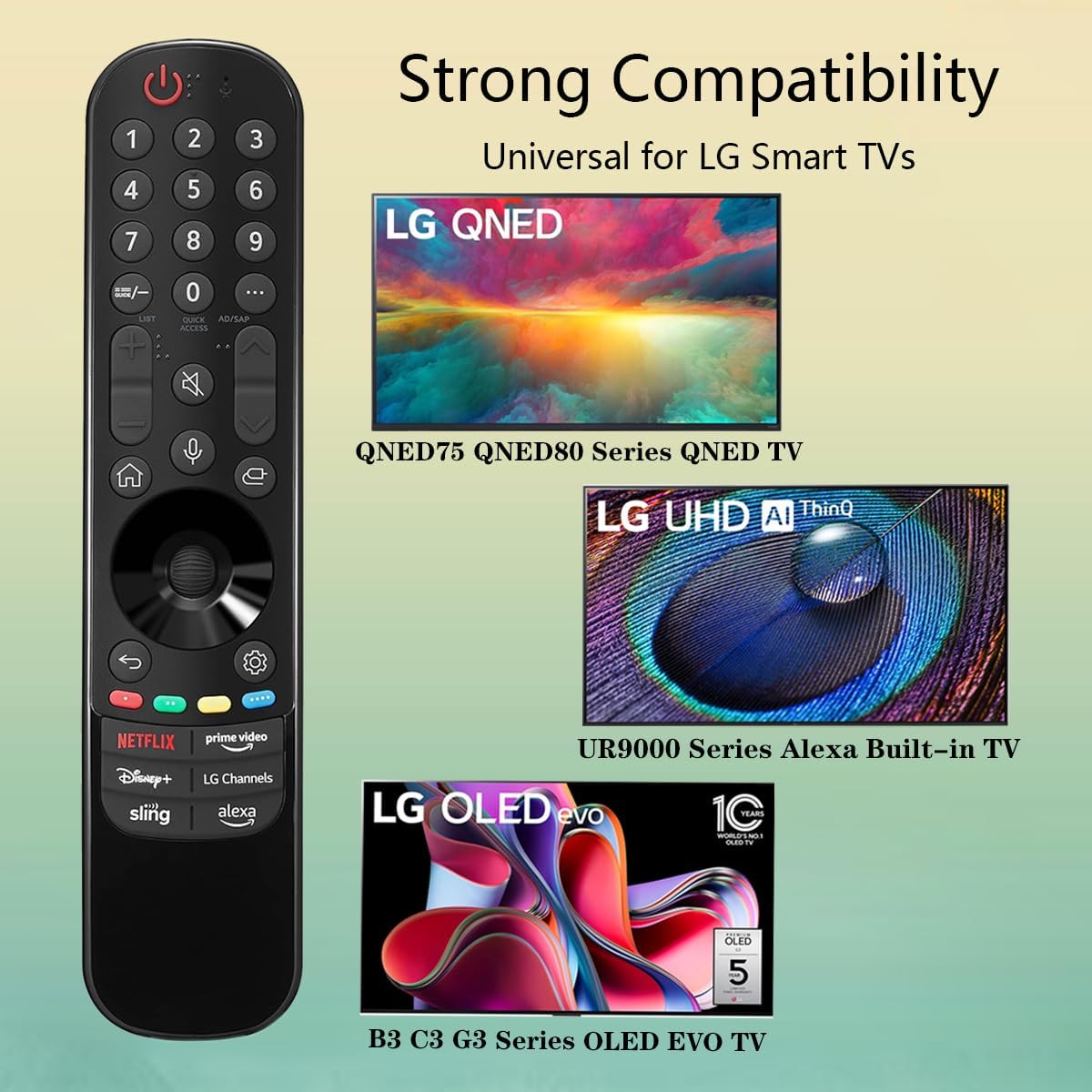
Image 3.3: The remote offers strong compatibility with various LG Smart TV series.
4. Mantentzea
Proper care and maintenance will extend the lifespan of your remote control.
4.1. Garbiketa
- Erabili zapi leun eta lehor bat urrutiko agintearen gainazala garbitzeko.
- Zikinkeria egoskorrerako, apur bat lehortuampGarbitu zapi bat urarekin edo garbitzaile leun eta ez-urratzaile batekin. Ez ihinztatu garbitzailea zuzenean urrutiko agintearen gainean.
- Avoid using harsh chemicals, solvents, or abrasive cleaning materials, as these can damage the remote's finish or internal components.
4.2. Bateria zaintzea
- Replace batteries when the remote's responsiveness decreases or it stops functioning.
- Always replace both batteries at the same time with new ones of the same type (AAA).
- If the remote will not be used for an extended period (e.g., one month or more), remove the batteries to prevent leakage and potential damage to the remote.
- Bota erabilitako bateriak tokiko araudiaren arabera.
5. Arazoak
Urrutiko agintearekin arazoak badituzu, jo ezazu honako arazo eta irtenbide ohikoenei:
| Arazoa | Kausa posiblea | Irtenbidea |
|---|---|---|
| Urrutiko agintea ez da erantzuten. | Pila hilak edo gaizki sartutakoak. | Replace batteries with new AAA batteries, ensuring correct polarity (+/-). |
| Urrutiko agintea tarteka funtzionatzen du. | Low battery power; obstruction between remote and TV; infrared sensor blocked on TV. | Aldatu bateriak. Ziurtatu telebistaren infragorri sentsorearekiko ikusmen-lerro garbia dagoela. Kendu oztopo guztiak. |
| Voice control or pointer not working. | This replacement remote may not support all advanced features of the original LG Magic Remote, or your TV model does not fully support these features with a replacement remote. | Verify your TV model's compatibility with replacement remotes for advanced features. Basic functions should still operate. |
| Dedicated app buttons (e.g., Alexa, LG Channels) not working. | Functionality depends on TV model and specific app integration. | Some app buttons may not be universally compatible or require specific TV software versions. Verify if other buttons work. |
Irtenbide hauek probatu ondoren arazoa konpontzen ez bada, jarri harremanetan bezeroarentzako arreta-zerbitzuarekin.
6. Zehaztapenak
- Modelo zenbakia: MR23GA
- Marka: MAMUA
- Produktuaren neurriak: 7.3 x 1.6 x 1.2 hazbete
- Elementuaren pisua: 2.29 ontza
- Energia iturria: 2 x AAA bateria (ez daude barne)
- Kolorea: Beltza
- Materiala: Kalitate handiko ABSa
- Gailu bateragarriak: LG Smart Televisions (specific models listed in Section 3.4)
- Ezaugarri berezia: Voice Search (functionality may vary)
7. Bermea eta Laguntza
GHUST is committed to providing high-quality products and excellent customer service.
7.1. Salmenta Osteko Zerbitzua
If you have any questions regarding the quality or functionality of your GHUST MR23GA remote control, please do not hesitate to contact our customer support team. We are dedicated to resolving any issues promptly and ensuring your satisfaction.
For support, please refer to the contact information provided with your purchase or on the official GHUST product page.


