1. Sarrera
Thank you for choosing the Pulido F199B Smart Fingerprint Door Knob Lock. This device provides enhanced security and convenience with multiple unlocking methods. This manual will guide you through the installation, operation, and maintenance of your new smart lock.
The Pulido F199B offers four distinct unlocking modes: fingerprint, access code, IC card, and traditional physical key. It is designed for local data storage, ensuring your information remains secure without cloud dependency.
2. Segurtasun informazioa
- Irakurri arretaz argibide guztiak instalatu eta erabili aurretik.
- Ez saiatu sarraila zeuk desmuntatzen edo konpontzen. Jarri harremanetan bezeroarentzako arreta-zerbitzuarekin laguntza jasotzeko.
- Use only specified battery types. Incorrect battery usage may lead to damage or malfunction.
- Keep physical keys in a secure location outside the property to prevent lockout in case of electronic failure.
- Avoid exposing the lock to extreme temperatures or direct moisture.
3. Produktua amaitu daview
The Pulido F199B is a versatile smart door knob designed for various applications, including homes, studios, and offices. It features a sleek design and robust construction.

Image: The Pulido F199B Smart Fingerprint Door Knob Lock, showcasing its modern design, integrated keypad, fingerprint sensor, and accompanying IC cards and physical keys.
Ezaugarri nagusiak:
- 4-in-1 Unlocking Modes: Fingerprint, Access Code, IC Card, and Physical Key.
- Tokiko datuen biltegiratzea: Stores up to 100 access codes and 100 fingerprints securely on the device.
- Enhanced Fingerprint Sensor: Larger, high-precision sensor with 99% recognition rate and 0.5-second unlock speed.
- Universal Installation: Compatible with both left-handed and right-handed doors without modification.
- Larrialdi potentzia: Micro USB interface for temporary power supply if batteries deplete.
- Pasabide modua: Allows temporary unrestricted access.

Image: A detailed diagram highlighting the key components of the Pulido F199B Smart Lock, including the mechanical keyhole, IC card reader, fingerprint sensor, Micro USB interface, passage mode setting button, and reset button.
4. Konfigurazioa eta instalazioa
The Pulido F199B is designed for straightforward installation, typically requiring no modification to existing door holes. Ensure you have the necessary tools (screwdriver, measuring tape) before beginning.
Instalazio urratsak:
- Atea prestatu: Ensure your door has standard boreholes for a door knob.
- Instalatu Latch-a: Insert the latch mechanism into the door edge and secure it with screws.
- Kanpoko Muntaketa Instalatu: Place the exterior handle assembly through the door, ensuring the spindle aligns with the latch.
- Instalatu barruko muntaia: Connect the interior handle assembly to the exterior assembly, ensuring all wires are properly routed and not pinched. Secure with mounting screws.
- Sartu bateriak: Open the battery cover on the interior assembly and insert the required batteries (typically 4 AAA batteries, not included).
- Proba funtzionamendua: After installation, test the mechanical operation of the handle and the electronic functions.

Image: A visual comparison illustrating how the Pulido F199B Smart Lock replaces a general mechanical lock, highlighting its modern design and ease of upgrade.
5. Funtzionamendu-argibideak
The Pulido F199B offers multiple ways to secure and access your space.
Unlocking Modes:
- Hatz-marka desblokeatzea: Jarri erregistratutako hatza hatz-marken sentsorean. Blokeoa desblokeatuko da hatz-marka ezagutzen bada.
- Access Code Unlock: Enter your registered access code on the keypad, followed by the '#' key.
- IC txartelaren desblokeoa: Present a registered IC card to the designated sensor area on the lock.
- Physical Key Unlock: In case of electronic failure or dead batteries, use the provided physical key to unlock the door.
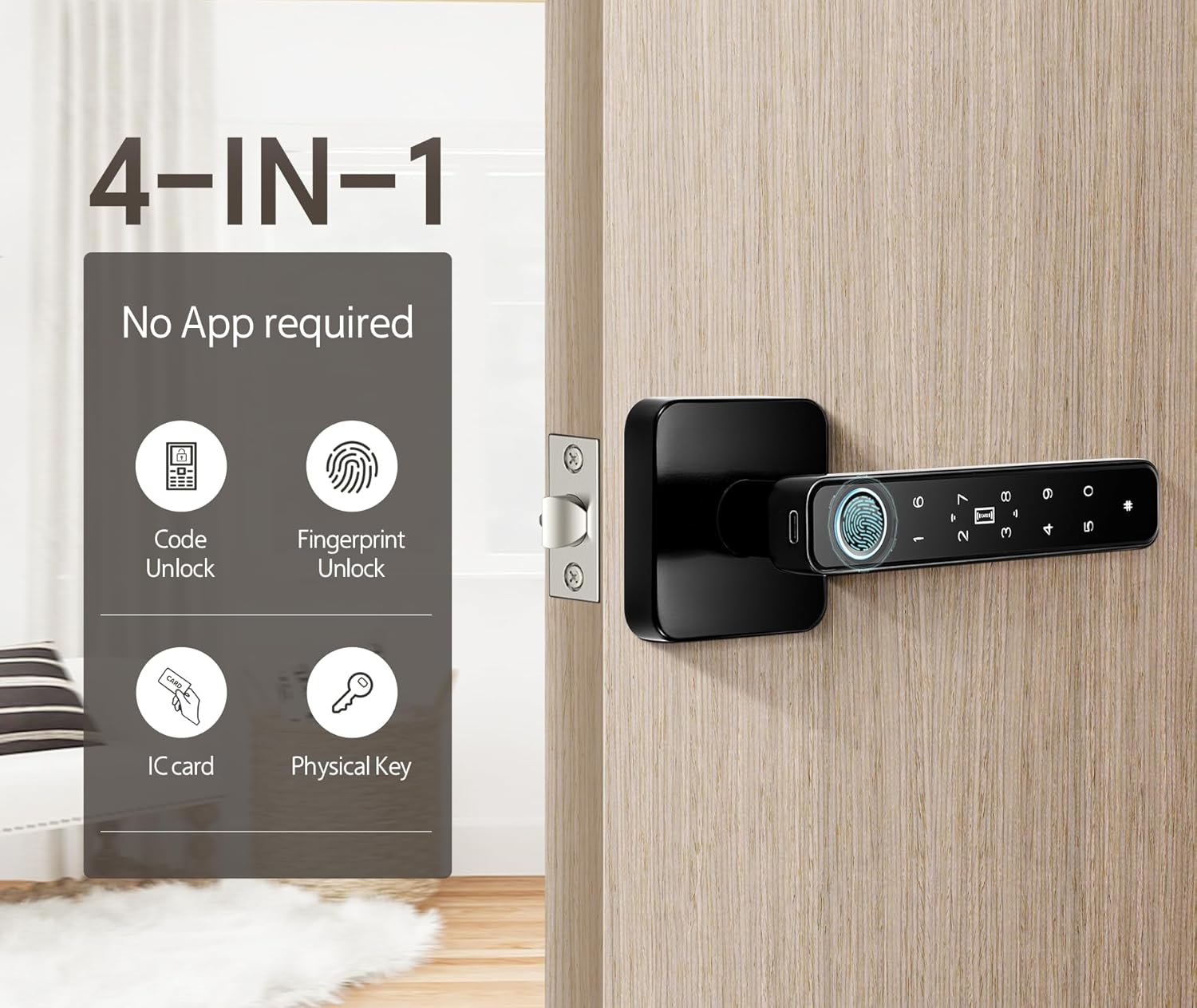
Image: The Pulido F199B Smart Lock illustrating its four unlocking methods: Code Unlock, Fingerprint Unlock, IC Card, and Physical Key.
Programming Fingerprints and Codes:
Refer to the detailed programming instructions included in the packaging for adding and deleting user fingerprints and access codes. This process is typically initiated by pressing a programming button on the interior side of the lock.
Pasabide modua:
To enable Passage Mode, press and hold the Passage Mode setting button (usually located on the interior handle) for 1 second. This allows the door to be opened without requiring a fingerprint or code. Press again for 1 second to disable Passage Mode.

Image: The Pulido F199B Smart Lock demonstrating Passage Mode, where the lock remains unlocked for convenient access.
Larrialdi desblokeatzea:
If the batteries are completely depleted, the lock can be temporarily powered via the Micro USB interface located on the exterior handle. Connect a power bank or USB charger to provide temporary power for unlocking. Alternatively, use the physical backup key.

Image: The Pulido F199B Smart Lock showing emergency unlock options, including USB charging capability and the physical backup keyhole.
Bideo erakustaldia:
Video: A brief demonstration of the Pulido F199B Smart Door Lock in use, showcasing the fingerprint unlocking function.
6. Mantentzea
- Bateria ordezkatzea: Replace batteries when the low battery indicator appears or when the lock's response time slows. Use 4 AAA batteries.
- Garbiketa: Garbitu giltzarrapoaren gainazala oihal leun eta lehor batekin. Saihestu garbitzaile edo disolbatzaile urratzaileak, akabera edo osagai elektronikoak kaltetu ditzaketenak.
- Hatz-marken sentsorearen zaintza: Mantendu hatz-marken sentsorea garbi eta lehor errendimendu optimoa lortzeko.
7. Arazoak
- Blokeoak ez du erantzuten: Check battery levels. If batteries are dead, use the Micro USB emergency power or physical key.
- Hatz-marka ez da ezagutzen: Ensure your finger is clean and dry. Try re-registering your fingerprint. Remove any protective plastic film from the sensor.
- Access code not working: Verify the code is entered correctly, followed by the '#' key. Ensure the code is still active.
- IC card not working: Ensure the card is properly registered and presented to the correct sensor area.
- Blokeoak etengabe bip egiten du: This may indicate low battery. Replace batteries immediately.
Laguntza gehiago lortzeko, jo ezazu Laguntza ataleko harremanetarako informazioara.
8. Zehaztapenak
| Marka | Pulido |
| Modelo zenbakia | F199B |
| Desblokeatzeko metodoak | Fingerprint, Access Code, IC Card, Physical Key |
| Hatz-marken ezagutza-tasa | %99 |
| Desblokeatu Abiadura | 0.5 segundo |
| Erabiltzaile-gaitasuna | Up to 100 Fingerprints, 100 Access Codes |
| Elikatze Hornidura | 4 x AAA bateria (ez daude barne) |
| Larrialdi Potentzia | Mikro USBa |
| Materiala | Altzairu herdoilgaitza |
| Produktuaren neurriak | 5.7 cm-ko luzera x 2.7 cm-ko zabalera |
| Elementuaren pisua | 1.64 libra (0.75 kilogramo) |
9. Bermea eta Laguntza
Pulido products are manufactured with quality and reliability in mind. For specific warranty details, please refer to the warranty card included with your product.
If you encounter any issues during use or installation, please contact our customer support team. We aim to reply within 8-12 hours.
Bezeroarentzako laguntza: Please refer to the contact information provided in your product packaging or visit the official Pulido weblaguntza aukeren gunea.


