1. Sarrera
The ThermoPro TP60-3 is a digital wireless indoor/outdoor thermometer and hygrometer designed to monitor temperature and humidity levels in various environments. This device provides accurate readings for both indoor and outdoor conditions, featuring a long wireless range and the ability to connect with multiple remote sensors. It is suitable for use in homes, baby rooms, nurseries, cellars, basements, warehouses, and greenhouses to ensure optimal environmental control.
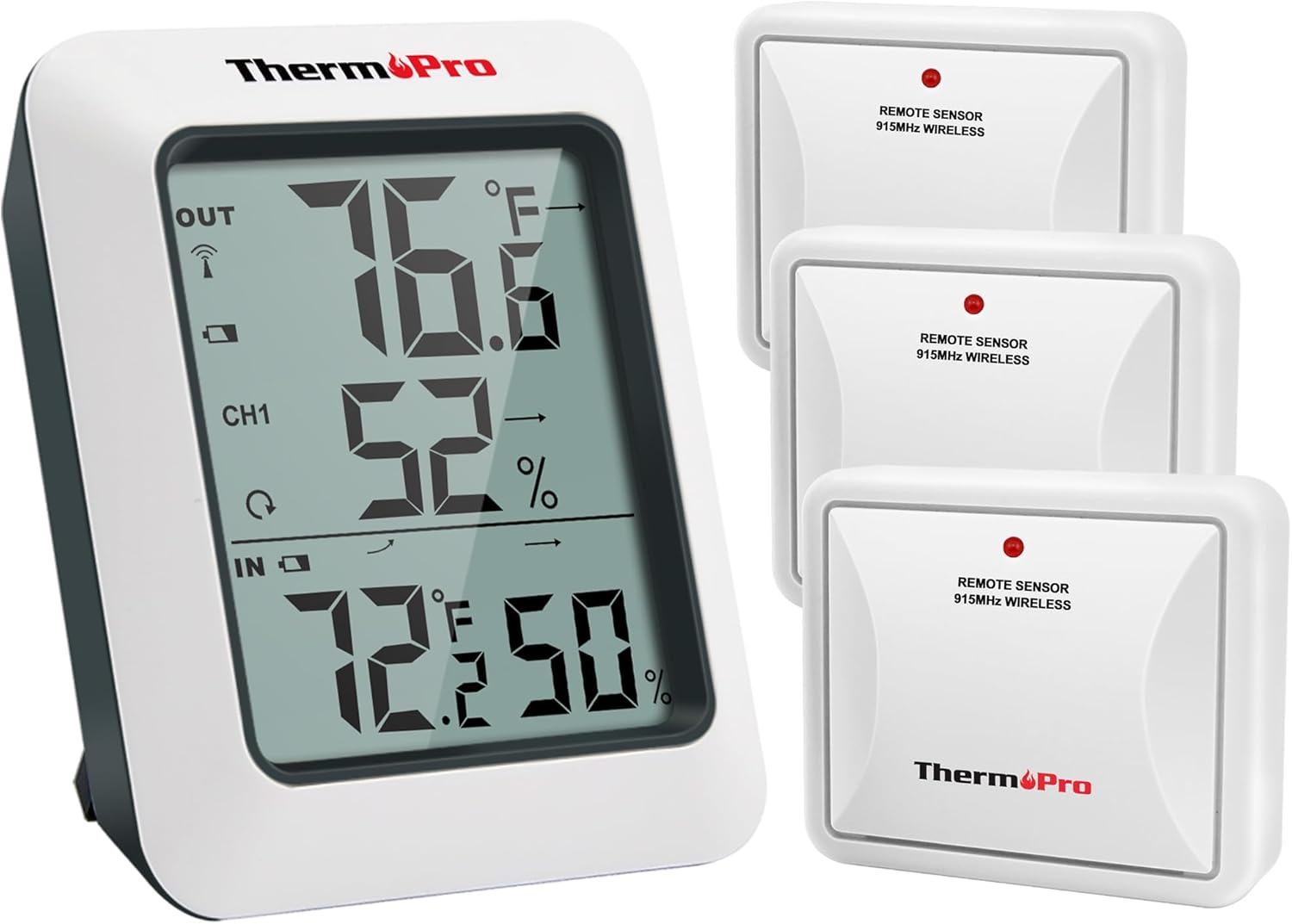
Image: The ThermoPro TP60-3 main display unit and three remote wireless sensors, illustrating the complete product package.
2. Zer dago kutxan
- 1 x Hartzaile Nagusiaren Unitatea
- 3 x Remote Transmitter Sensors
- 8 x AAA bateria
3. Produktua amaitu daview
3.1 Main Receiver Unit
The main receiver unit features a large, easy-to-read LCD screen that displays indoor and outdoor temperature and humidity percentages. It also shows temperature and humidity trend indicator arrows, and daily high/low information. The unit is designed for tabletop placement with a built-in stand or can be wall-mounted.

Image: Close-up of the main display unit showing outdoor temperature and humidity, channel indicator, and indoor temperature and humidity with trend arrows.
3.2 Remote Transmitter Sensors
The remote sensors transmit temperature and humidity data wirelessly to the main unit. Each sensor is designed for outdoor use and should be placed in a location protected from direct sunlight and rain. The system supports up to three remote sensors, allowing monitoring of different locations simultaneously.

Image: Diagram showing the main unit receiving data from three remote sensors placed in a bedroom, storage room, and garden, highlighting multi-location monitoring.
4. Konfigurazioa
4.1 Bateriaren instalazioa
- Open the battery compartment on the back of both the main receiver unit and each remote sensor.
- Insert the provided AAA Batteries, ensuring correct polarity (+/-).
- Itxi bateriaren konpartimentuak ongi.
4.2 Synchronization Process
After installing batteries, the main unit and remote sensors should automatically synchronize. The RF signal icon on the upper left of the main unit's display will flash during synchronization. If connection is lost or batteries are replaced, follow these steps:
- Ensure batteries are correctly installed in both units.
- Press the TX button on the remote sensor(s) to re-establish connection.
4.3 Kokatze-jarraibideak
- Unitate nagusia: Place the main unit indoors on a tabletop using its built-in stand or mount it on a wall.
- Urruneko sentsoreak:
- Place sensors in an open area, avoiding wall obstructions.
- Keep sensors away from routers and other electronic devices to prevent high-frequency signal interference.
- Avoid direct sunlight exposure, as this can lead to inaccurate temperature readings.
- Always place sensors upright to prevent rain from entering through vent holes.
- The wireless range is up to 500ft/150m in open areas.

Image: The main unit shown on a tabletop and a remote sensor mounted on an exterior wall, demonstrating flexible placement options.
5. Funtzionamendu-argibideak
5.1 Bistaratzeko Ezaugarriak
- Kanpoko tenperatura eta hezetasuna: Displayed at the top of the screen.
- Kanalaren adierazlea: Shows which remote sensor's data is currently displayed (CH1, CH2, CH3).
- Barruko tenperatura eta hezetasuna: Displayed at the bottom of the screen.
- Joera geziak: Indicate whether temperature and humidity are rising, falling, or remaining stable.
- MAX/MIN erregistroak: Shows the highest and lowest temperature and humidity readings recorded over the last 24 hours or all-time since the last reset.
5.2 Unitatearen hautaketa (°F/°C)
To switch between Fahrenheit (°F) and Celsius (°C), press the °F/°C button located on the back of the main receiver unit.
5.3 Viewing MAX/MIN Records
Press the MAX/MIN button on the back of the main unit to cycle through the 24-hour and all-time high and low records for temperature and humidity. To clear the records, press and hold the CLEAR button.
5.4 Kanalaren hautaketa
If using multiple remote sensors, press the CHANNEL button on the back of the main unit to switch between the different sensor channels (CH1, CH2, CH3) and view their respective outdoor readings.
6. Mantentzea
- Garbiketa: Garbitu leun batekin, damp oihal. Ez sartu uretan.
- Bateria ordezkatzea: Ordeztu bateriak bateria baxuaren adierazlea pantailan agertzen denean. Ziurtatu polaritate zuzena dagoela.
- Biltegiratzea: Gailua denbora luzez gordetzen baduzu, kendu bateriak isuriak saihesteko.
7. Arazoak
- Pantailarik ez/Bateria baxua: Egiaztatu bateriaren instalazioa eta ordeztu behar izanez gero.
- No Remote Sensor Reading:
- Ensure remote sensor is within range (500ft/150m).
- Press the TX button on the remote sensor to re-sync.
- Egiaztatu beste gailu elektroniko batzuen interferentziarik.
- Replace remote sensor batteries.
- Irakurketa okerrak:
- Ensure remote sensor is not in direct sunlight or exposed to rain.
- Verify proper placement away from heat sources or vents.
8. Zehaztapenak
| Marka | ThermoPro |
| Ereduaren izena | TP60S |
| Barruko Tenperatura Tartea | -4°F eta 158°F (-20°C eta 70°C) |
| Kanpoko tenperatura-tartea | -4°F eta 158°F (-20°C eta 70°C) |
| Hezetasun-barrutia | %10etik %99era |
| Wireless Range | Up to 500ft/150m (in open area) |
| Konektibitate Teknologia | Radio Frequency (RF) - ASK 433Mhz |
| Energia iturria | Bateriaz elikatzen da (AAA) |
| Bistaratzeko mota | LCD digitala |
| Materiala | Plastikoa |
9. Bermea eta Laguntza
For warranty information, technical support, or further assistance, please visit the official ThermoPro website or contact their customer service. Details can typically be found in the product packaging or on the manufacturer's webgunea.
Bisita dezakezu ThermoPro denda produktu eta informazio gehiago lortzeko.


