Sarrera
Thank you for choosing the RECHOO SR5000 Rechargeable Flashlight. This manual provides essential information for the safe and efficient use of your new flashlight. Please read it thoroughly before operation and retain it for future reference.
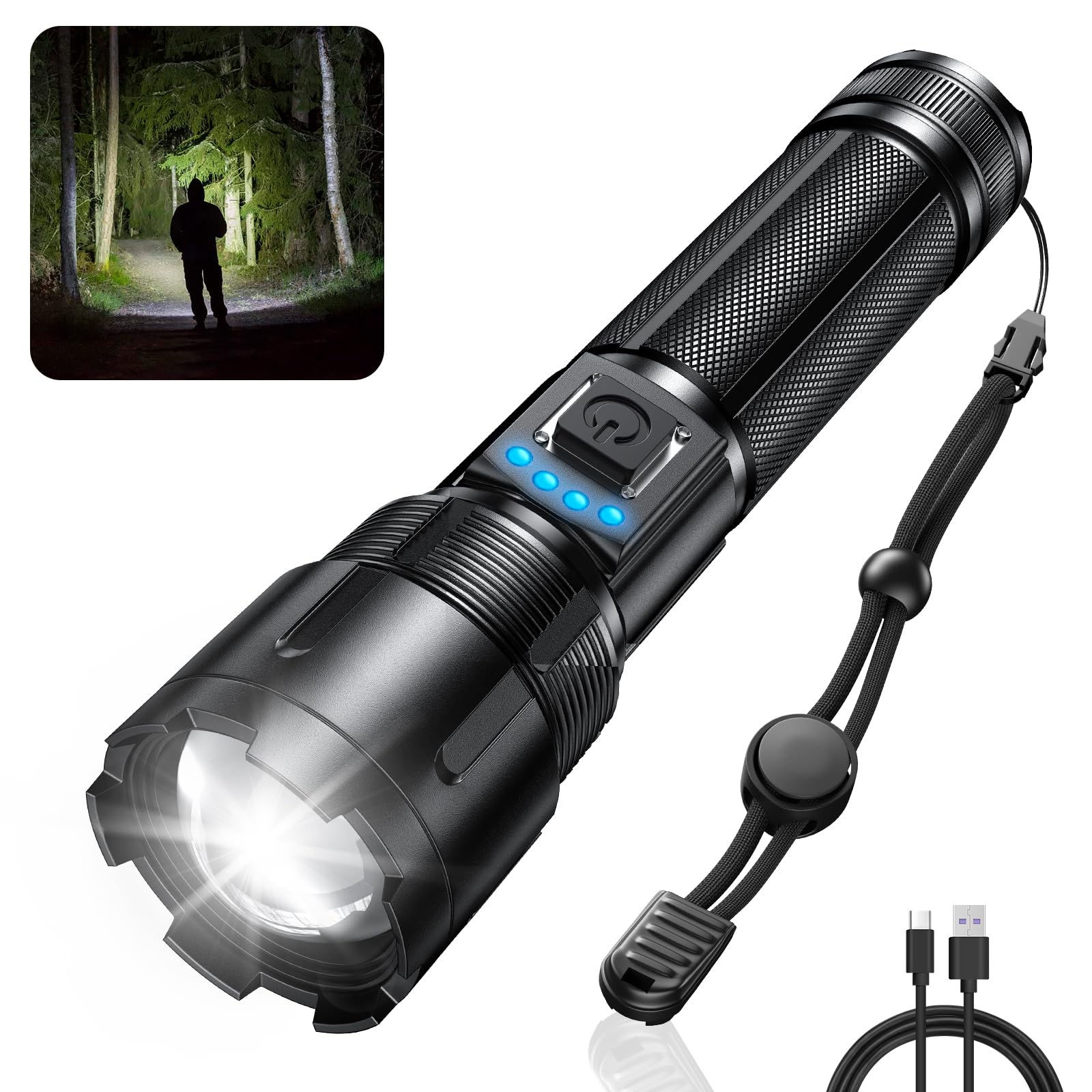
Image: The RECHOO SR5000 Rechargeable Flashlight, showcasing its design and bright beam in a dark environment.
Segurtasun Informazioa
- Ez bidali linterna zuzenean begietara, lumen-irteera handiak aldi baterako ikusmen-narriadura eragin baitezake.
- Mantendu haurren eskura.
- Ez desmuntatu edo aldatu linterna. Honek bermea baliogabetu eta segurtasun arriskuak sor ditzake.
- Saihestu linterna denbora luzez tenperatura altuetan edo eguzki-argia zuzenean erabiltzean.
- Ensure the charging port cover is securely closed when not charging to maintain IP65 waterproof rating.
Paketearen edukia
Mesedez, egiaztatu paketea elementu hauek dituen:
- RECHOO SR5000 Rechargeable Flashlight (1 unit)
- Built-in 4800mAh Rechargeable Battery (pre-installed)
- USB kargatzeko kablea (C motakoa)
- Erabiltzailearen eskuliburua (dokumentu hau)
Produktua amaituview
The RECHOO SR5000 flashlight features a durable aluminum alloy body, a powerful LED, and a user-friendly interface.

Image: Diagram illustrating the USB-C charging port and the flashlight's capability to act as a power bank for other devices.
- LED igorlea: Provides up to 1000 lumens of bright light.
- Zoomable Head: Adjusts beam from wide flood to narrow spot.
- Pizteko botoia: Argiztapen-potentzia kontrolatzen du eta argiztapen-moduak aldatzen ditu.
- Bateriaren adierazle argiak: Four blue LED lights show remaining battery capacity (25%, 50%, 75%, 100%).
- USB-C kargatzeko ataka: For recharging the flashlight's internal battery.
- USB-A irteerako ataka: For using the flashlight as a power bank.
- C iraunkorraasing: Constructed from aluminum alloy for impact resistance and IP65 waterproof rating.
Konfigurazioa
Lehenengo erabilera baino lehen, jarraitu urrats hauek:
- Remove Insulating Foil: Unscrew the tail cap of the flashlight. Locate and remove the transparent insulating foil from the pre-installed battery.
- Reinsert Battery: Ensure the battery is placed with the positive (+) end facing the head of the flashlight and the negative (-) end towards the tail cap.
- Itsatsi txanoa segurua: Screw the tail cap back on tightly to ensure proper contact and maintain water resistance.
- Hasierako karga: It is recommended to fully charge the flashlight before its first use. Refer to the "Charging" section for instructions.
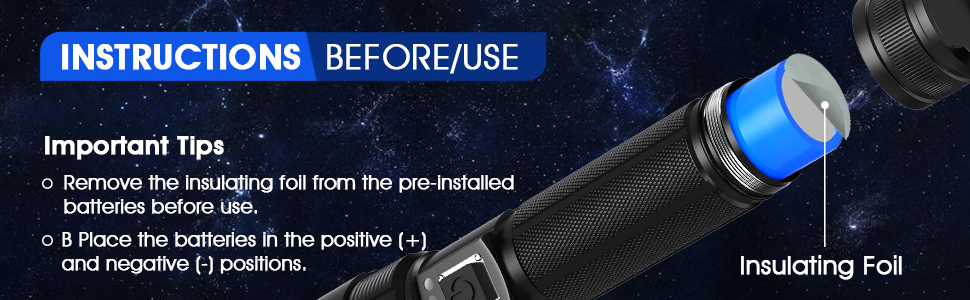
Image: Illustration demonstrating the removal of the insulating foil from the battery before initial use.
Kargatzen
The RECHOO SR5000 features a built-in rechargeable battery and a Type-C charging port.
- Konektatu kargatzeko kablea: Open the rubber cover of the USB-C charging port on the flashlight. Insert the provided Type-C charging cable into the port.
- Konektatu energia iturrira: Connect the other end of the USB charging cable to a 5V/1A USB power source (e.g., wall adapter, power bank, computer USB port, car charger).
- Monitorearen bateriaren adierazlea: The four blue LED indicator lights will illuminate sequentially during charging, indicating the charging progress.
- 1 LED: 0-25% charged
- 2 LED: % 25-50 kargatuta
- 3 LED: % 50-75 kargatuta
- 4 LED: % 75-100 kargatuta
- Kargatzeko denbora: Karga osoak 4-6 ordu behar izaten ditu normalean.
- Deskonektatu: Kargatzen amaitutakoan, deskonektatu kablea eta itxi ondo gomazko estalkia urarekiko erresistentzia mantentzeko.

Image: The flashlight displaying its battery indicator lights and illustrating its extended run time of up to 20 hours in low mode.
Funtzionamendua
Piztu/Itzali
Sakatu behin pizteko botoia linterna pizteko. Sakatu berriro itzaltzeko.
Argiztapen moduak
With the flashlight on, press the power button repeatedly to cycle through the 5 lighting modes:
- Altua: Maximum brightness (1000 lumens) for powerful illumination.
- Ertaina: Moderate brightness for general use.
- Baxua: Reduced brightness for extended run time or close-range tasks.
- Strobe: Seinaleztatzeko edo desorientatzeko argi keinukaria.
- SOS: International Morse code signal for emergencies.
Zoom funtzioa
To adjust the beam focus, gently pull the head of the flashlight outwards for a narrow, focused spot beam (zoom in), or push it inwards for a wide floodlight beam (zoom out).

Image: Visual representation of the flashlight's zoomable head, showing the difference between a focused beam (zoom in) and a wide beam (zoom out), along with icons for the five lighting modes.
Power Bank funtzioa
The RECHOO SR5000 can serve as an emergency power bank to charge other devices.
- Konektatu gailua: Open the rubber cover of the USB-A output port on the flashlight. Connect your device's charging cable to this port.
- Kargatzen: The flashlight will begin charging your device. The battery indicator lights on the flashlight will show its remaining power.
- Deskonektatu: Disconnect your device once charging is complete or when the flashlight's battery is low. Securely close the rubber cover.
Oharra: Using the power bank function will deplete the flashlight's battery. It is intended for emergency use.
Mantentzea
- Garbiketa: Garbitu linterna leun batekin, damp oihal. Ez erabili garbitzaile edo disolbatzaile urratzailerik.
- Biltegiratzea: Gorde linterna leku fresko eta lehor batean, eguzki-argitik babestuta, denbora luzez erabiltzen ez duzunean.
- Bateria zaintzea: For optimal battery life, charge the flashlight at least once every three months if not used regularly.
- Uraren erresistentzia: Ensure all port covers and the tail cap are tightly sealed to maintain the IP65 waterproof rating.

Image: The RECHOO SR5000 flashlight shown with water splashing on it, highlighting its IP65 waterproof feature.
Arazoak konpontzea
| Arazoa | Kausa posiblea | Irtenbidea |
|---|---|---|
| Linterna ez da pizten. | Bateria agortuta dago. Insulating foil not removed. Bateria gaizki sartu da. Isats-txapel soltea. | Kargatu linterna. Remove the insulating foil from the battery. Ensure battery polarity is correct. Estutu isats-tapoia. |
| Linterna ez da kargatzen. | Charging cable is faulty. Power source is not working. Kargatzeko ataka zikina dago. | Probatu beste USB-C kable batekin. Saiatu beste korronte egokitzaile edo USB ataka batekin. Gently clean the charging port. |
| Beam is weak or flickers. | Bateria baxua. Konexio solteak. | Kargatu berriro linterna. Ensure the tail cap is tight. |
| Power bank-aren funtzioa ez dabil. | Flashlight battery is too low. Gailuaren kablea akastuna da. | Kargatu linterna guztiz. Saiatu beste kargatzeko kable bat zure gailurako. |
Zehaztapenak
- Eredua: SR5000
- Argi iturria: LED
- Distira: 1000 Lumenseraino
- Argiztapen moduak: Altua, Ertaina, Baxua, Strobe, SOS
- Bateria: Built-in 4800mAh Rechargeable Battery (NiMH)
- Kargatzeko ataka: USB Type-C (5V/1A input)
- Irteerako ataka: USB-A (energia bankuaren funtziorako)
- Materiala: Aluminiozko aleazioa
- Uraren erresistentzia: IP65 (Dustproof and protected against water jets)
- Eragin erresistentzia: 10-foot drop resistance
- Neurriak: 6.5" (Luzera) x 1.3" (Zabalera) x 1.7" (Altuera)
- Pisua: 11.7 ontza
Bermea eta Laguntza
RECHOO provides a limited warranty for this product. For detailed warranty information or if you encounter any issues with your RECHOO SR5000 Rechargeable Flashlight, please contact our customer support team. We are committed to providing excellent after-sales service and will respond to inquiries within 24 hours.
Please refer to the contact information provided with your purchase or visit the official RECHOO weblaguntzarako gunea.