1. Sarrera
This manual provides detailed instructions for the safe and efficient operation of your Xprinter XP-P323B Portable Thermal Printer. Please read this manual thoroughly before using the device to ensure proper functionality and to prevent damage. The XP-P323B is designed for printing receipts and labels, offering portability and high-speed capabilities for various business needs.
2. Segurtasun informazioa
- Ez jarri inprimagailua uraren edo hezetasun gehiegiaren eraginpean.
- Saihestu inprimagailua erortzea edo kolpe gogorren eraginpean jartzea.
- Erabili zehaztutako energia-egokitzailea eta osagarriak soilik.
- Keep the printer away from heat sources and direct sunlight.
- Do not attempt to disassemble or repair the printer yourself. Contact qualified service personnel.
- Ziurtatu aireztapen egokia funtzionatzerakoan.
3. Paketearen edukia
Egiaztatu elementu guztiak paketean daudela:
- Xprinter XP-P323B Portable Thermal Printer
- Power Adapter (not explicitly listed but standard)
- USB Cable (not explicitly listed but standard)
- Sample Thermal Paper Roll (not explicitly listed but standard)
- Erabiltzailearen eskuliburua (dokumentu hau)
4. Produktua amaitu daview
The Xprinter XP-P323B is a compact and efficient thermal printer designed for various printing tasks. It supports NV logo download and picture printing (BMP format), along with concentration adjustment for print quality.
4.1. Printer Components

1. irudia: Aurrealdea view of the Xprinter XP-P323B Portable Thermal Printer, showing the power button, display, and a sample label being printed.
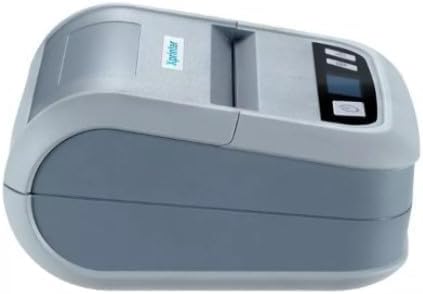
2. irudia: Aldea view of the Xprinter XP-P323B, highlighting its compact design and the Xprinter logo.
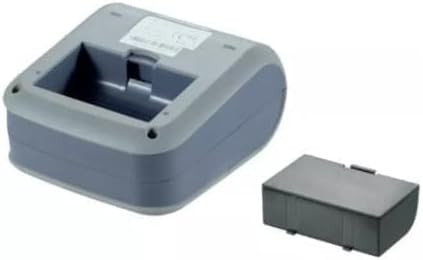
3. irudia: Azpialdea view of the Xprinter XP-P323B, showing the base and the removable battery compartment.
5. Konfigurazioa
5.1. Bateria kargatzea
- Connect the power adapter to the printer's charging port.
- Entxufatu korronte-egokigailua hormako entxufe batera.
- The charging indicator light will illuminate. Allow the printer to charge fully before first use.
5.2. Loading Thermal Paper/Labels
- Open the paper compartment cover by gently pushing the release latch.
- Insert the thermal paper roll with the printing surface facing the print head. Ensure the roll is seated correctly.
- Atera paper zati txiki bat inprimatze-burutik.
- Itxi paperaren konpartimentuaren estalkia ondo, bere lekuan klik egin arte.
5.3. Gailu batera konektatzea
The XP-P323B supports USB and Bluetooth connectivity.
5.3.1. USB konexioa
- Konektatu inprimagailua ordenagailura emandako USB kablea erabiliz.
- Install the necessary printer drivers (available from the Xprinter website or included software).
5.3.2. Bluetooth Connection (for Smartphones/iOS)
- Ziurtatu inprimagailua piztuta dagoela.
- On your smartphone or iOS device, go to Bluetooth settings and enable Bluetooth.
- Bilatu available devices and select 'XP-P323B' (or similar name).
- Enter the pairing PIN if prompted (refer to printer documentation for default PIN, often '0000' or '1234').
- Once paired, you can use a compatible printing application to send print jobs.
6. Inprimagailuaren funtzionamendua
6.1. Oinarrizko inprimaketa
- Ensure the printer is connected to your device and has paper loaded.
- Open the document or image you wish to print on your connected device.
- Select the print option within your application.
- Choose 'XP-P323B' as the printer.
- Adjust print settings as needed (e.g., paper size, print quality).
- Hasi inprimatze-lana.
6.2. NV Logo and Picture Printing
The printer supports downloading and printing NV (Non-Volatile) logos and BMP format pictures. This functionality typically requires specific software or commands. Refer to the advanced programming guide or software documentation for detailed instructions on how to upload and print custom logos or images.
6.3. Adjusting Print Concentration
Print concentration can be adjusted to optimize print quality. This setting is usually accessible through the printer driver software on a computer or within the settings of a compatible mobile printing application. Consult your software's help section for specific steps.
7. Mantentzea
7.1. Inprimagailua garbitzea
- Kanpoaldea: Garbitu inprimagailuaren kanpoaldea oihal leun eta lehor batekinamp oihal. Ez erabili produktu kimiko gogorrak edo garbitzaile urratzaileak.
- Inprimatzeko burua: The thermal print head should be cleaned periodically to ensure optimal print quality. Use a cotton swab lightly dampened with isopropyl alcohol. Gently wipe the print head surface. Allow it to dry completely before closing the cover and resuming operation.
- Paperaren bidea: Kendu paper-bideko hautsa edo hondakinak eskuila leun bat edo aire konprimatua erabiliz.
7.2. Biltegiratzea
When not in use for extended periods, store the printer in a cool, dry place, away from direct sunlight and extreme temperatures. Remove the paper roll if storing for a very long time to prevent dust accumulation.
8. Arazoak
| Arazoa | Kausa posiblea | Irtenbidea |
|---|---|---|
| Inprimagailua ez da pizten | Low battery; Power adapter not connected; Faulty power adapter | Charge the battery; Ensure power adapter is securely connected; Try a different power outlet or adapter |
| Ez dago inprimatze-irteerarik | No paper; Paper loaded incorrectly; Printer not connected; Driver issue | Load paper correctly; Re-establish connection; Reinstall printer drivers |
| Inprimatze-kalitate eskasa | Dirty print head; Low print concentration; Low battery | Clean the print head; Adjust print concentration in software; Charge the battery |
| Bluetooth konexioak huts egin du | Bluetooth off on device; Incorrect pairing PIN; Printer out of range | Enable Bluetooth; Re-enter correct PIN; Move device closer to printer |
9. Zehaztapenak
| Marka | Xprinter |
| Modelo zenbakia | XP-P323B |
| Elementuaren neurriak (L x W x H) | 15D x 7W x 10H zentimetro |
| Konektibitate Teknologia | USBa |
| Inprimagailuaren teknologia | Termikoak |
| Ezaugarri bereziak | Eramangarria |
| Kolorea | Grisa |
| Gailu bateragarriak | Smartphoneak |
| Kontrolagailu mota | iOS |
| Gehienezko euskarriaren tamaina | 4 x 6 hazbete |
| Inprimatutako euskarriak | Etiketak |
| Paper Tamaina | 4 x 6 hazbete |
| Inprimagailuaren irteera | Monokromoa |
| Maximum Print Speed (Black and White) | 40 mm/s (estimated from context) |
| Elementuaren pisua | 300 gramo |
10. Bermea eta Laguntza
For warranty information and technical support, please refer to the warranty card included with your product or visit the official Xprinter webgunea. Gorde erosketa-agiria erosketaren frogagiri gisa berme-erreklamazioetarako.


