1. Sarrera
This manual provides essential information for setting up, operating, and maintaining your Samsung Galaxy S22 SM-S901 5G smartphone. The Galaxy S22 features a vibrant 120Hz Dynamic AMOLED display, advanced camera capabilities, and a powerful 4nm processor for a smooth user experience. This device is a renewed product, ensuring full functionality with generic or original accessories.
2. Zer dago kutxan
Egiaztatu zure paketeak elementu hauek dituela:
- Samsung Galaxy S22 SM-S901 5G Device
- Standard Battery (STD Battery)
- Datu-kablea
- Cling (Protective film)
Note: Specific accessories may vary based on the renewed product supplier.
3. Konfigurazioa
3.1 Gailua gainditzeaview

3.1. irudia: Aurrealdea view of the Samsung Galaxy S22 SM-S901 5G.
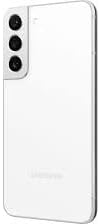
3.2. irudia: Atzealdea view of the Samsung Galaxy S22 SM-S901 5G, highlighting the camera system.
3.2 Hasierako piztea
- Sakatu eta eutsi gailuaren eskuinaldean dagoen pizteko/alboko tekla Samsung logotipoa agertu arte.
- Jarraitu pantailan agertzen diren argibideei zure hizkuntza hautatzeko, Wi-Fi sare batera konektatzeko eta zure Google kontua konfiguratzeko.
3.3 SIM txartelaren instalazioa
- Bilatu SIM txartelaren erretilua gailuaren beheko ertzean.
- Insert the SIM ejection tool (not included with renewed products, use a paperclip) into the small hole next to the tray to eject it.
- Jarri Nano-SIM txartela erretiluan, urre-koloreko kontaktuak behera begira dituela.
- Sartu erretilua astiro-astiro zirrikituan klik egin arte.
4. Zure gailua funtzionatzea
4.1 Oinarrizko nabigazioa
- Eduki sakatuta: Press and hold an item to move it or access additional options.
- Pasatu hatza: Move your finger across the screen to navigate between pages or scroll through content.
- Pixka bat: Erabili bi hatz argazkiak handitu edo txikitzeko eta web orrialdeak.
4.2 Deiak egitea eta mezuak bidaltzea
- Dei bat egiteko, sakatu Telefonoa ikonoa, idatzi zenbakia eta sakatu deitzeko botoia.
- To send a message, tap the Mezuak ikonoa, sakatu mezu berriaren ikonoa, idatzi hartzailea eta zure mezua.
4.3 Kameraren Ezaugarriak
The Galaxy S22 features advanced camera technology designed for various lighting conditions.
- Gaueko grafia: This feature enhances low-light photography by pulling in more light and reducing lens flare through the Super Clear Glass, supported by fast-acting AI processing.
- Linear Camera System: The rear camera housing integrates a linear camera system for a sleek design and optimized performance.
4.4 Bistaratzeko Ezaugarriak
Experience clear and vibrant visuals with the Galaxy S22's display.
- 120Hz Dynamic AMOLED Display: Provides smooth scrolling and responsive touch interactions.
- Vision Booster Technology: Enhances outdoor visibility by optimizing brightness and color contrast, making the screen clear even in bright sunlight.
4.5 Bateria eta karga
The device is equipped with a battery that intelligently adapts to your usage patterns to optimize battery life, often lasting more than 24 hours under normal use. Use the provided data cable and a compatible charging adapter (sold separately or included with renewed product) for optimal charging.
4.6 Konektibitatea
- Wi-Fi: Konektatu haririk gabeko sareetara interneterako sarbidea izateko.
- Bluetootha: Parekatu haririk gabeko entzungailuekin, bozgorailuekin eta beste Bluetooth gaitutako gailu batzuekin.
- Adimentsu View: Stream your phone's screen to a compatible TV. Access this feature from the Quick Panel by swiping down from the top of the screen.
5. Mantentzea
5.1 Gailua garbitzea
Gailua garbitzeko, astiro-astiro zapi leun eta pelusik gabeko batekin garbitu. Saihestu produktu kimiko gogorrak edo material urratzaileak erabiltzea.
5.2 Software eguneraketak
Egiaztatu eta instalatu software eguneraketak aldizka errendimendu, segurtasun eta funtzio berrietarako sarbidea optimoa bermatzeko. Joan honera Ezarpenak > Software eguneraketa > Deskargatu eta instalatu.
6. Arazoak
Gailuarekin arazoak badituzu, saiatu arazoak konpontzeko ohiko urrats hauekin:
- Gailuak ez du erantzuten: Eduki sakatuta pizteko/alboko tekla eta bolumena jaisteko tekla aldi berean 7 segundo baino gehiagoz gailua berrabiarazteko.
- Bateria azkar husten: Egiaztatu atzeko planoan aplikazioen erabilera hemen: Ezarpenak > Bateria eta gailuaren zaintza > Bateria. Reduce screen brightness or disable unnecessary features like GPS or Wi-Fi when not in use.
- Konektibitate arazoak: Restart your device. For Wi-Fi, try forgetting the network and reconnecting. For cellular data, ensure your SIM card is properly inserted and your mobile data is enabled.
- Aplikazioa kraskatzen: Garbitu aplikazioaren cachea eta datuak Ezarpenak > Aplikazioak > [Aplikazioaren izena] > BiltegiratzeaArazoak jarraitzen badu, desinstalatu eta berriro instalatu aplikazioa.
For more complex issues, refer to Samsung's official support resources or contact your renewed product seller.
7. Zehaztapenak
| Ezaugarri | Zehaztapena |
|---|---|
| Ereduaren izena | Galaxia S22 |
| Elementuaren eredu-zenbakia | SM-S901 |
| Marka | Samsung |
| Sistema eragilea | Android 12.0 |
| Pantailaren tamaina | 6.1 hazbete |
| Ebazpena | 1080 x 2340 |
| Freskatze tasa | 120 Hz |
| CPU Abiadura | 2.3 GHz |
| RAM memoria instalatuaren tamaina | 8 GB |
| Memoria Biltegiratzeko Ahalmena | 128 GB (Internal, specific to this renewed model) |
| Elementuaren pisua | 5.9 ontza (167 gramo) |
| Haririk gabeko komunikazio teknologiak | Bluetooth, Sare Mugikorra, Wi-Fi |
| Haririk gabeko garraiolaria | Desblokeatuta garraiolari guztientzat |
| Telefonoz hitz egiteko denbora | 24 ordu (gutxi gorabehera) |
| Kolorea | Phantom White (specific to this renewed model) |
8. Renewed Product Condition Guidelines
As a renewed product, your Samsung Galaxy S22 SM-S901 5G is fully functional and comes with generic or original accessories and packaging. The condition of renewed products is categorized to provide transparency:

Figure 8.1: Amazon Renewed product condition guidelines.
Please refer to the specific condition description provided at the time of purchase for details regarding your device.
9. Bermea eta Laguntza
9.1 Itzultzeko politika
This renewed product typically includes a 90-day return policy for refund or replacement. Please consult your seller's specific return policy for detailed terms and conditions.
9.2 Laguntza Teknikoa
For technical assistance, software issues, or hardware malfunctions, please contact the seller from whom you purchased this renewed device. You may also find general support resources on the official Samsung webgunea.