Sarrera
This manual provides comprehensive instructions for the PowerA Enhanced Wireless Controller, designed for use with Nintendo Switch, Nintendo Switch Lite, Nintendo Switch – OLED Model, and Nintendo Switch 2. Please read this manual thoroughly before use to ensure proper setup and operation.
Paketearen edukia
- PowerA Enhanced Wireless Controller (Pikachu Vibrant)
- 10 oin (3 m) USB-C karga-kablea
- Erabiltzailearen eskuliburua (dokumentu hau)
Kontroladorearen ezaugarriak
The PowerA Enhanced Wireless Controller offers a range of features for an optimized gaming experience:
- Haririk gabeko konektagarritasuna: Utilizes Bluetooth 5.0 technology for seamless connection.
- Bateria kargagarria: Internal lithium-ion battery provides up to 30 hours of gameplay per charge.
- Jokoetarako botoi aurreratuak: Two mappable buttons for custom control configurations.
- Mugimendu-kontrolak: Integrated motion sensors for intuitive gameplay.
- Diseinu ergonomikoa: Superior ergonomics for extended comfortable gaming sessions.
- Smooth Thumbsticks: Embedded anti-friction rings ensure precise thumbstick control.
Oharra: This controller does not support HD rumble, IR camera, or Amiibo NFC functionality.
Kontrolagailuaren diseinua
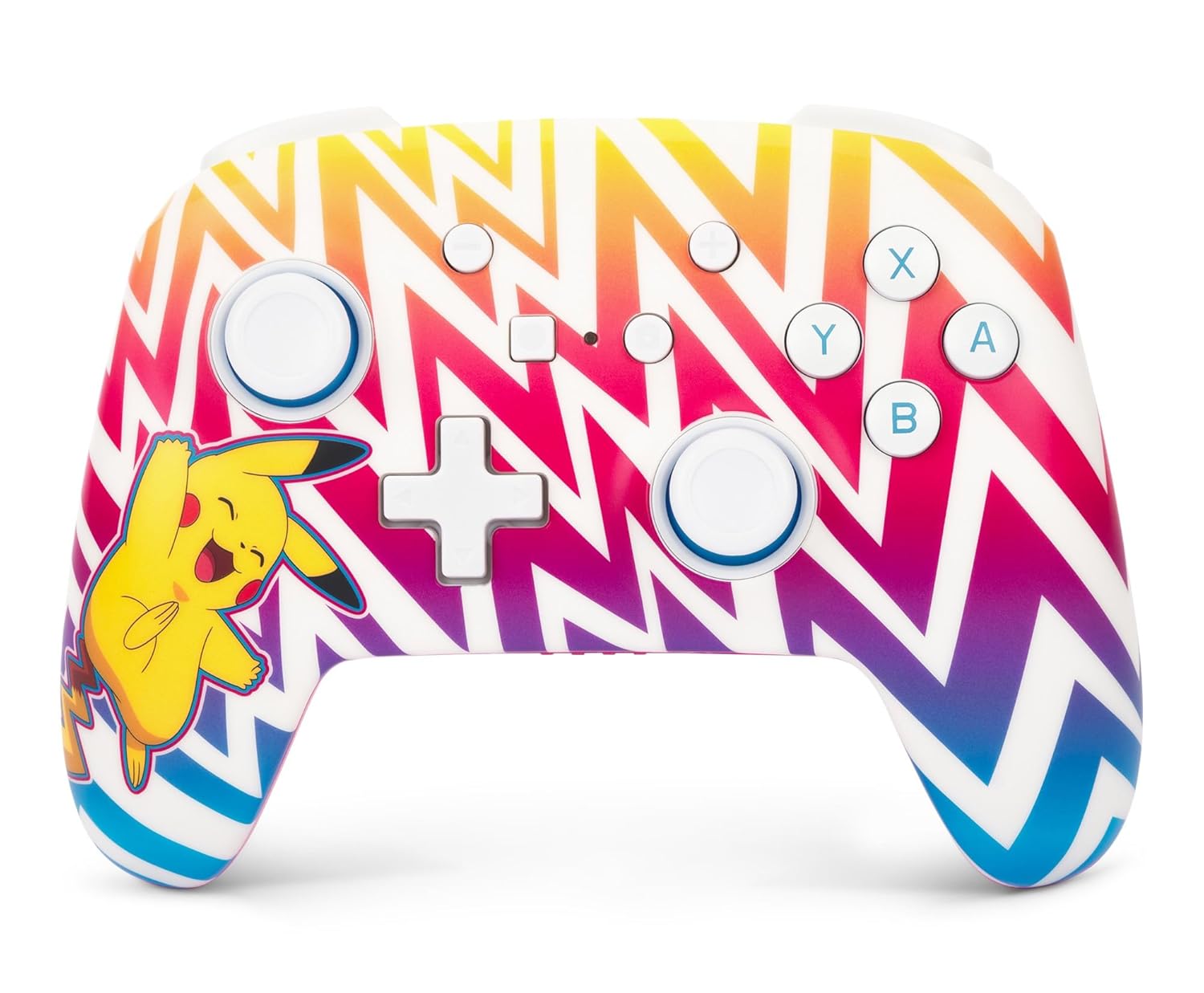
1. irudia: Aurrealdea view of the PowerA Enhanced Wireless Controller, featuring a vibrant Pikachu design on a zigzag pattern. Shows the left and right analog sticks, D-pad, A/B/X/Y buttons, Home button, Capture button, Plus and Minus buttons, and indicator lights.

2. irudia: Itzuli view of the PowerA Enhanced Wireless Controller. This image highlights the two mappable Advanced Gaming Buttons (AGB) located on the grips, and the program button in the center.

3. irudia: Goiena view of the PowerA Enhanced Wireless Controller. This perspective shows the L, R, ZL, and ZR shoulder buttons, along with the USB-C charging port located between the ZL and ZR buttons.
Konfigurazioa
Kontrolagailua kargatzen
- Konektatu barneko USB-C kablearen mutur txikia kontrolatzailearen goiko aldean dagoen USB-C atakara.
- Connect the large end of the USB-C cable to a USB power source (e.g., Nintendo Switch dock, USB wall adapter, computer USB port).
- The LED indicator lights on the front of the controller will illuminate to show charging status. All four LEDs will be solid when fully charged.
- A full charge provides up to 30 hours of gameplay. Actual battery life may vary based on usage.

4. irudia: Aldea view of the controller with the USB-C charging cable connected to the port on the top edge.
Nintendo Switch-ekin parekatzea
Follow these steps to pair your PowerA Enhanced Wireless Controller with your Nintendo Switch console:
- Ziurtatu zure Nintendo Switch kontsola piztuta dagoela eta sistemaren softwarearen azken bertsiora eguneratuta dagoela.
- HOME Menuan, hautatu "Controllers", orduan "Change Grip/Order".
- On the PowerA controller, press and hold the SYNC botoia (small button next to the USB-C port) for at least three seconds. The LED indicator lights will begin to flash.
- Once the controller is successfully paired, the player LED(s) corresponding to the controller number will remain solid.
- Sakatu Hasierako botoia on the controller to return to the HOME Menu and begin playing.
The controller can be used whether the Nintendo Switch is docked or in handheld mode.
Funtzionamendu-argibideak
Programming Advanced Gaming Buttons (AGB)
The controller features two mappable Advanced Gaming Buttons (AGB) on the back. These can be programmed on-the-fly:
- Sakatu Programaren botoia (small white button on the back, between the AGBs). The Program LED will flash, indicating the controller is in programming mode.
- Press the button you wish to map (e.g., A, B, X, Y, L, R, ZL, ZR, D-pad directions, Left Stick Click, Right Stick Click).
- Sakatu Advanced Gaming Button (AGB L or AGB R) you want to assign the function to. The Program LED will stop flashing, indicating the AGB has been successfully programmed.
- To clear an AGB assignment, repeat steps 1-2, but instead of pressing a button to map, press the Program Button again to exit programming mode without assigning a new function.
Mugimendu-kontrolak
This controller supports motion controls in compatible Nintendo Switch games. No special setup is required; motion controls will function automatically when supported by the game.
Mantentzea
- Garbiketa: Erabili zapi leun eta lehor bat kontrolatzailea garbitzeko. Saihestu produktu kimiko gogorrak edo material urratzaileak erabiltzea.
- Biltegiratzea: Gorde kontrolatzailea leku fresko eta lehor batean, eguzki-argitik eta muturreko tenperaturetatik babestuta.
- Bateria zaintzea: Bateriaren iraupena luzatzeko, saihestu kontrolagailua maiz erabat deskargatzea. Kargatu aldizka, etengabe erabiltzen ez baduzu ere.
Arazoak konpontzea
- Kontrolatzailea ez da konektatzen:
- Ziurtatu kontrolatzailea guztiz kargatuta dagoela.
- Verify the Nintendo Switch console is powered on and within range.
- Repeat the pairing process as described in the "Pairing with Nintendo Switch" section.
- If issues persist, try restarting both the controller and the Nintendo Switch console.
- Botoiek edo joystick-ek ez dute erantzuten:
- Check if the controller is properly connected to the console.
- Ensure no debris is obstructing the buttons or joysticks.
- Test the controller in another game or on the Switch's controller test menu to isolate the issue.
- Bateriaren iraupen laburra:
- Ziurtatu kontrolatzailea guztiz kargatuta dagoela erabili aurretik.
- Battery life can be affected by game intensity and environmental factors.
- If battery life significantly degrades over time, contact customer support.
Zehaztapenak
| Modelo zenbakia | NSGP0262-01 |
| Konektibitatea | Bluetooth 5.0 |
| Bateria mota | Litio-ioizko kargagarria |
| Bateriaren iraupena | Karga bakoitzeko 30 ordu arte (gutxi gorabehera) |
| Neurriak | 6.02 x 4.41 x 2.48 hazbete |
| Pisua | 8 ontza (227 gramo inguru) |
| Bateragarritasuna | Nintendo Switch, Switch Lite, Switch – OLED Model, Switch 2 |
| Kablea barne | 10 oin (3 m) USB-C karga-kablea |
Bermearen informazioa
PowerA backs all products with a 2 urteko berme mugatua. For detailed warranty terms and conditions, please refer to the official PowerA webwebgunean edo jarri harremanetan bezeroarentzako laguntzarekin.
Laguntza
For further assistance, technical support, or warranty claims, please visit the official PowerA support website or contact their customer service department. Contact information can typically be found on the PowerA webgunea edo produktuaren ontziak.
Sareko baliabideak: www.powera.com/support


