Sarrera
This user manual provides essential information for setting up, operating, maintaining, and troubleshooting your VIBOX I-45 Gaming PC. Please read this manual thoroughly before using your new computer to ensure optimal performance and longevity.
1. Konfigurazioa
1.1 Kutxa irekitzea eta paketearen edukia
Carefully remove all components from the packaging. Ensure all items listed below are present. Retain the packaging for future transport or service needs.
- VIBOX I-45 Gaming PC (VTX-4 Black Tower)
- Elikatze-kablea
- Wi-Fi Network Adapter (300 Mbps)
- Dokumentazioa (eskuliburu hau)
1.2 Periferikoak konektatzea
Before powering on your PC, connect all necessary peripherals.
- Monitorea: Connect your monitor to the graphics output port (HDMI or DisplayPort) on the rear of the PC. Ensure the monitor is also connected to a power source.
- Teklatua eta sagua: Konektatu teklatua eta sagua eskuragarri dauden USB ataketara.
- Sarea: For wired internet, connect an Ethernet cable to the LAN port. For wireless internet, ensure the included Wi-Fi adapter is installed or connected.
- Audioa: Connect speakers or a headset to the audio output jacks.
- Potentzia: Konektatu elikatze-kablea ordenagailuaren elikatze-sarrerara eta gero hormako entxufe batera.

Figure 1.2.1: Rear I/O Ports for connecting peripherals.
1.3 Hasierako abiarazpena eta Windows 11 konfigurazioa
After connecting all peripherals, press the power button on the front of the PC. The system will boot into Windows 11 Home. Follow the on-screen instructions to complete the initial setup, including language selection, network connection, and user account creation.

Figure 1.3.1: Windows 11 Home Operating System.
2. Funtzionamendu-argibideak
2.1 Piztu/Itzali eta Berrabiarazi
- Piztu: Sakatu aurreko panelean dagoen pizteko botoia.
- Itzali: Egin klik Windows-eko Hasi botoian, eta ondoren hautatu Energia > Itzali.
- Berrabiarazi: Egin klik Windows-eko Hasi botoian eta, ondoren, hautatu Energia > Berrabiarazi.
2.2 Windows 11 Home Features
Your VIBOX I-45 comes pre-installed with Windows 11 Home, offering several features designed to enhance your computing experience:
- DirectStorage: Enables faster game loading times.
- AutoHDR: Automatically enhances visuals for improved graphics.
- Xbox Game Pass Integration: Seamless access to a library of games.
- Optimized CPU Performance: Enhanced performance for various tasks.
2.3 RGB argiztapenaren kontrola
The VTX-4 case features Hex RGB Infinity 120mm fans. You can customize the lighting effects and colors using the dedicated RGB change button on the top panel or through compatible software if available.

Figure 2.3.1: Customizable RGB Fans.
3. Mantentzea
3.1 Cleaning Your PC
Regular cleaning helps maintain performance and extends the lifespan of your computer.
- Kanpoaldea: Erabili biguna, damp kanpoko gainazalak garbitzeko zapi bat. Saihestu produktu kimiko gogorrak.
- Hautsa kentzea: Periodically use compressed air to clear dust from fan vents and internal components. Ensure the PC is powered off and unplugged before cleaning.
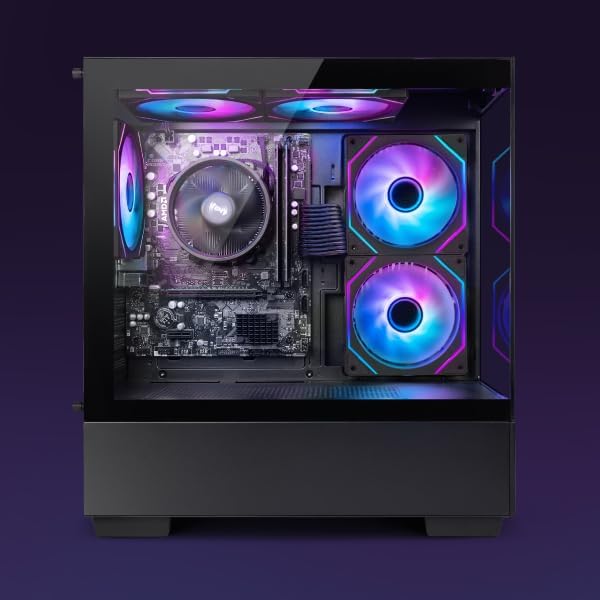
Figure 3.1.1: Internal components of the VIBOX I-45 PC.
3.2 Software eguneraketak
Keep your operating system and drivers updated to ensure security, stability, and optimal performance.
- Windows eguneraketak: Windows 11 automatically checks for updates. You can manually check by going to Settings > Windows Update.
- Gidarien eguneraketak: Regularly check the VIBOX support website or component manufacturers' websites (AMD for CPU/GPU) for the latest drivers.
3.3 Sistemaren babeskopia
Datuen galerak saihesteko, egin aldizka datu garrantzitsuen babeskopiak kanpoko disko gogor batean edo hodeiko biltegi batean.
4. Arazoak
This section addresses common issues you might encounter. For more complex problems, please contact VIBOX support.
4.1 Potentziarik gabe
- Ziurtatu kablea ondo konektatuta dagoela bai ordenagailura bai hormako entxufera.
- Egiaztatu hormako entxufea funtzionatzen duela beste gailu bat konektatuz.
- Check the power supply switch on the rear of the PC (if present) is in the 'On' position.
4.2 Ez da pantailarik agertzen monitorearen gainean
- Confirm the monitor is powered on and correctly connected to the PC's graphics output port.
- Ziurtatu sarrera-iturri zuzena hautatuta dagoela monitorearen bidez.
- Try a different display cable if available.
4.3 Errendimendu motela
- Itxi atzeko planoan exekutatzen ari diren beharrezkoak ez diren aplikazioak.
- Egiaztatu eta instalatu dauden Windows edo kontrolatzaileen eguneratzeak.
- Diskoaren garbiketa eta desfragmentazioa egin (HDDrako, normalean ez da beharrezkoa SSDrako).
- Eskaneatu malwarea edo birusak bilatzeko.
4.4 Sarearen konexio arazoak
- Wi-Fi: Ensure the Wi-Fi adapter is properly installed and drivers are up to date. Check your router and internet connection.
- Ethernet: Verify the Ethernet cable is securely connected to both the PC and the router/modem. Check router status.
- Restart your router/modem and PC.
5. Zehaztapenak
| Ezaugarri | Zehaztapena |
|---|---|
| Marka | VIBOX |
| Modelo zenbakia | I-45 |
| Kolorea | VTX-4 Black |
| Sistema eragilea | Windows 11 Home |
| Prozesadorea | AMD Ryzen 3 3200G (4 Cores, 3.6 GHz Base, up to 4.0 GHz Max) |
| Grafikoak | Integrated Radeon Vega 8 Graphics (2GB Shared Memory) |
| RAM | 16 GB DDR4 (3200 MHz Dual Channel) |
| Biltegiratzea | 480 GB SSD |
| Max Memory Support | 128 GB |
| Wi-Fi | 802.11n (300 Mbps adapter included) |
| HDMI atakak | 1 |
| USB 2.0 Portuak | 3 |
| USB 3.0 Portuak | 3 |
| Neurriak (L x W x H) | 36 x 20 x 41 cm |
| Gailu bateragarriak | Headset, Keyboard, Printer, Monitor, Mouse |
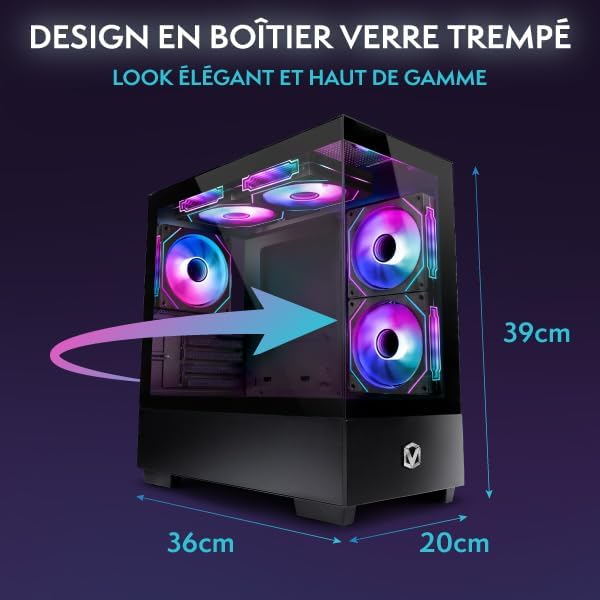
Figure 5.1.1: VIBOX I-45 PC Dimensions.
6. Bermearen informazioa
Your VIBOX I-45 Gaming PC comes with a manufacturer's warranty covering:
- Atalak: 2 Urte
- Lana: Bizitza osoan
Please retain your proof of purchase for warranty claims. For detailed terms and conditions, refer to the warranty card included with your product or visit the official VIBOX webgunea.
7. Laguntza
For technical assistance, troubleshooting beyond this manual, or warranty inquiries, please contact VIBOX customer support. You can find contact information on the official VIBOX Gaming webgunea edo zure dendariaren bidez.
Sareko baliabideak:
- Bisitatu VIBOX Gaming Store on Amazon produktuen informazioa eta eguneratzeak lortzeko.


