Sarrera
Eskerrik asko erosketagatik.asing the SHARP XL-B530 Micro Component System. This system is designed to provide high-quality audio playback from various sources, including Bluetooth wireless streaming, CD, USB, AM/FM radio, and auxiliary input. This manual provides detailed instructions for setting up, operating, and maintaining your new audio system to ensure optimal performance and longevity.
Segurtasun informazio garrantzitsua
- Irakurri arretaz argibide guztiak erabili aurretik.
- Gorde eskuliburu hau etorkizunean erreferentzia izateko.
- Ez jarri unitatea euri edo hezetasunera.
- Ziurtatu unitatearen inguruko aireztapen egokia dagoela. Ez blokeatu aireztapen-irekidurak.
- Ez jarri unitatea bero-iturrien ondoan, hala nola erradiadoreen, bero-erregistroen, sukaldeen edo beste aparatuen ondoan (adibidez, ampberoa sortzen duten argitzaileak).
- Babestu korronte-kablea ibiltzeko edo atximur ez dadin.
- Erabili soilik fabrikatzaileak zehaztutako eranskinak/osagarriak.
- Deskonektatu aparatu hau tximista-ekaitzetan edo denbora luzez erabiltzen ez duzunean.
- Jarri zerbitzu-zerbitzu guztiak zerbitzu-pertsonal kualifikatuari.
Paketearen edukia
Mesedez, egiaztatu ondorengo elementu guztiak zure paketean sartuta daudela:
- Main Unit (Micro Component System)
- Bozgorailu unitateak (x2)
- Urruneko Kontrola
- Elikatze kablea
- FM antena
- AM Loop Antena
- Erabiltzailearen eskuliburua (dokumentu hau)
Produktua amaituview
Familiarize yourself with the components and controls of your SHARP XL-B530 system.
Main Unit and Speakers

Orokorrean view of the SHARP XL-B530 Micro Component System, including the main unit, two speakers, and the remote control.
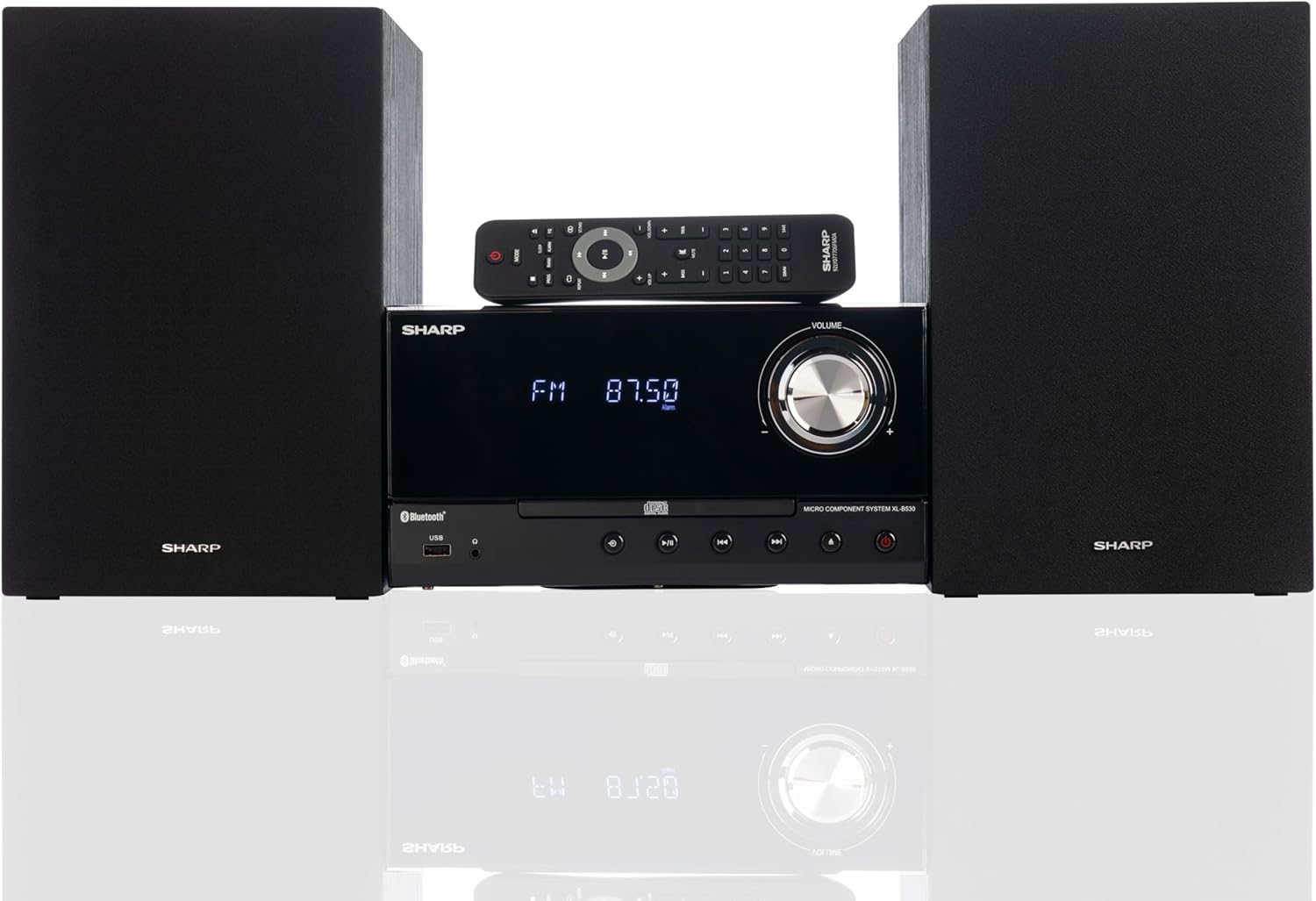
Front panel of the main unit, showing the LCD display, volume knob, CD tray, and control buttons.
Atzeko panelaren konexioak

The rear panel of the main unit, featuring speaker terminals, FM antenna input, AM antenna input, and auxiliary input ports.
Urruneko Kontrola
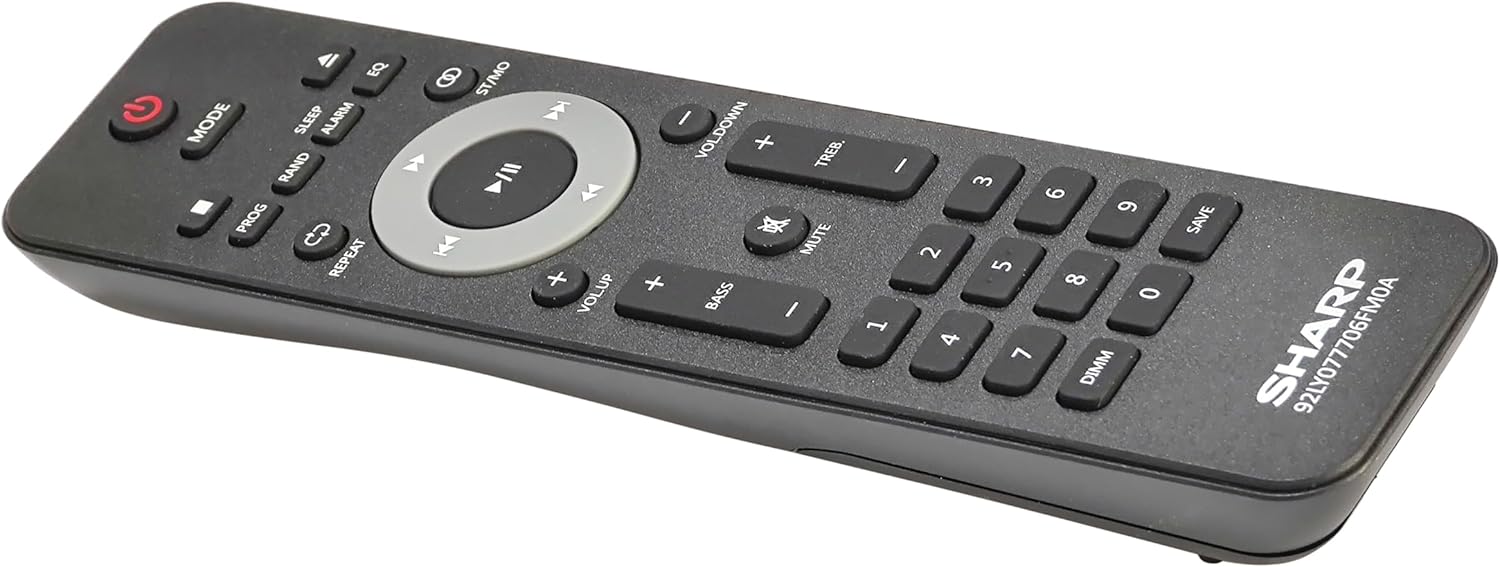
Xehetasuna view of the remote control, showing various function buttons for power, mode, playback, volume, and sound adjustments.
Konfigurazioa
Follow these steps to set up your micro component system.
1. Bozgorailuaren konexioa
- Identify the left and right speaker cables.
- Connect the red (+) wire from each speaker to the red (+) terminal on the main unit's rear panel.
- Connect the black (-) wire from each speaker to the black (-) terminal on the main unit's rear panel.
- Ensure a secure connection for both speakers.
2. Antena konexioa
- FM Antena: Connect the supplied FM wire antenna to the FM antenna jack on the rear panel. Extend the wire fully for best reception.
- AM antena: Assemble the AM loop antenna and connect its wires to the AM antenna terminals on the rear panel. Rotate the antenna for optimal AM reception.
3. Energia-konexioa
- Ensure all other connections are made.
- Plug the power cord into the AC IN jack on the rear of the main unit.
- Insert the other end of the power cord into a wall outlet.
Funtzionamendu-argibideak
This section details how to use the various functions of your SHARP XL-B530 system.
Piztu/Itzali
- Sakatu BOTEREA unitate nagusiko edo urrutiko aginteko botoia sistema pizteko edo itzaltzeko.
Iturburuaren hautaketa
- Sakatu MODUA button on the main unit or remote control repeatedly to cycle through available sources: CD, Bluetooth, USB, FM, AM, AUX.
CD erreprodukzioa
- Sakatu MODUA button to select 'CD' mode.
- Sakatu IREKI/ITXI CDaren erretilua irekitzeko botoia.
- Place a CD (CD/MP3/WMA/CD-R/CD-RW) with the label side up into the tray.
- Sakatu IREKI/ITXI button again to close the tray. Playback will start automatically.
- Erabili JOLASTU/PAUSTU, GELDITU, SALTATU (forward/backward), and BILATU kontrolatzeko botoiak.
Bluetooth parekatzea
- Sakatu MODUA button to select 'Bluetooth' mode. The display will show 'BT' and flash, indicating it's ready for pairing.
- Zure Bluetooth gailuan (smartphone-a, tableta, etab.), gaitu Bluetooth eta bilatu eskuragarri dauden gailuak.
- Select 'SHARP XL-B530' from the list.
- Once paired, the display will stop flashing and show 'BT CONNECTED'. You can now stream audio from your device.
USB erreprodukzioa
- Sartu USB flash unitate bat aurrealdeko paneleko USB atakan.
- Sakatu MODUA button to select 'USB' mode.
- Sistemak automatikoki detektatuko du eta erreproduzitzen hasiko da audio bateragarria files (MP3/WMA).
- Use playback controls similar to CD mode.
AM/FM irratia

The SHARP XL-B530 system displaying an FM radio frequency, highlighting its digital tuner capabilities.
- Sakatu MODUA button to select 'FM' or 'AM' mode.
- Bilaketa automatikoa: Eduki sakatuta JOLASTU/PAUSTU botoia eskuragarri dauden irratiak automatikoki eskaneatu eta gordetzeko.
- Eskuzko sintonizazioa: Erabili SALTATU botoiak nahi diren maiztasunak eskuz sintonizatzeko.
- Aurrez ezarritako geltokiak: Use the number buttons on the remote to directly select saved preset stations.
Volume and Sound Adjustment

A close-up of one of the SHARP XL-B530 speakers, illustrating the adjustable bass and treble sound output.
- Bolumena: Biratu BOLUMENA unitate nagusiko botoia edo erabili VOL + / VOL- urrutiko aginteko botoiak.
- Baxuak/Agudoak: Erabili BASS+ / BASS- eta TREB+ / TREB- buttons on the remote control to adjust sound characteristics.
- OZENTASUNAREKIN: Sakatu OZENTASUNA button on the remote to enhance bass and treble at low volumes.
- EQ: Sakatu EQ button on the remote to cycle through preset equalizer modes.
Mantentzea
Proper care will ensure the longevity of your system.
- Garbiketa: Use a soft, dry cloth to clean the exterior of the unit. For stubborn stains, dampen the cloth lightly with water. Do not use abrasive cleaners or solvents.
- CDaren zainketa: CDak ertzetik heldu. Garbitu CD zikinak zapi leun eta lihorik gabeko batekin, erdialdetik kanporantz garbituz.
- Aireztapena: Ensure the ventilation openings are not blocked by dust or debris.
- Biltegiratzea: Unitatea denbora luzez gordetzen baduzu, deskonektatu entxufetik eta gorde leku fresko eta lehor batean.
Arazoak konpontzea
Zure sistemarekin arazoak badituzu, jo ezazu honako arazo eta irtenbide ohikoenei.
| Arazoa | Kausa posiblea | Irtenbidea |
|---|---|---|
| Botererik ez | Kable elektrikoa ez dago konektatuta; Entxufea ez dago aktibo | Ziurtatu kablea ondo konektatuta dagoela; Saiatu beste entxufe batekin |
| Soinurik ez | Bolumena baxuegia; Bozgorailuak ez daude konektatuta; Iturri okerra hautatu da | Igo bolumena; Egiaztatu bozgorailuen konexioak; Hautatu sarrera-iturri zuzena |
| CDa ez da erreproduzitzen | CD inserted incorrectly; CD is dirty or scratched; Incorrect mode | Insert CD correctly (label side up); Clean or replace CD; Select CD mode |
| Bluetootha ez da parekatzen | Bluetooth mode not selected; Device too far; Device already paired to another unit | Select Bluetooth mode; Move device closer; Disconnect from other devices and try again |
| Irrati-harrera eskasa | Antena ez dago konektatuta edo gaizki kokatuta dago; Interferentzia | Connect and adjust antenna position; Move unit away from other electronic devices |
| Urruneko kontrola ez dabil | Batteries are dead or inserted incorrectly; Obstruction between remote and unit | Replace batteries, check polarity; Remove any obstructions; Ensure remote is pointed at the unit's sensor |
Zehaztapenak
| Ezaugarri | Zehaztapena |
|---|---|
| Modelo zenbakia | XL-B530(BK) |
| Irteera Potentzia | 200W gehienez (100W RMS) |
| Konektibitatea | Bluetooth, USB, Aux Input |
| Diskoen bateragarritasuna | CD, CD-R/RW, MP3, WMA |
| Sintonizatzailea | AM/FM Stereo Digital Tuner (50 station presets) |
| Hizlari mota | Estereoa |
| Produktuaren neurriak (L x W x H) | 25 x 11 x 9.6 hazbete |
| Elementuaren pisua | 18 kilo |
| Kolorea | Haritz beltza |
Bermea eta Laguntza
For warranty information and technical support, please refer to the warranty card included with your product or visit the official SHARP webgunea. Gorde erosketa-agiria erosketaren frogagiri gisa, berme-erreklamazioetarako.
For further assistance, you may contact SHARP customer service through their official channels.


