1. Sarrera
The HIKMICRO ECO-V Handheld Thermography Camera is a versatile thermal imaging device designed for various professional applications. It offers thermal, bi-spectrum image fusion, and visible light modes to meet diverse business needs. This manual provides essential information for the safe and effective operation of your ECO-V camera.
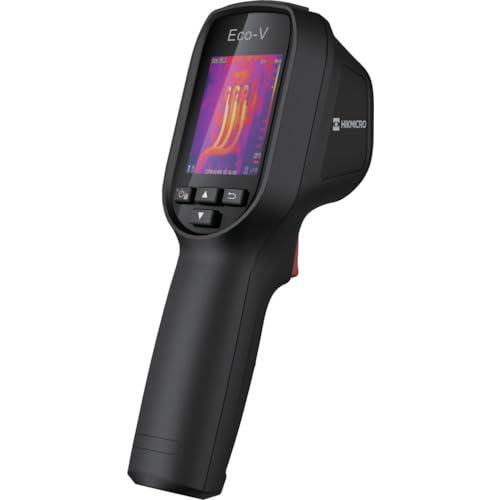
Figure 1: HIKMICRO ECO-V Handheld Thermography Camera
2. Segurtasun informazioa
Produktu hau erabili aurretik, irakurri eta ulertu segurtasun-abisu eta argibide guztiak. Argibide hauek jarraitzen ez badira, deskarga elektrikoak, sua edo lesio larriak gerta daitezke.
Segurtasun-neurri orokorrak
- Ez erabili gailua leherketa-arriskuetan, hala nola likido, gas edo hauts sukoien aurrean.
- Mantendu gailua uretatik eta beste likidoetatik urrun.
- Ez saiatu gailua irekitzen edo aldatzen. Mantendu konponketa guztiak langile kualifikatuen esku.
- Use only HIKMICRO-approved accessories.
- Avoid direct exposure of the thermal lens to strong light sources (e.g., sun, laser) as this may damage the detector.
Bateria Segurtasuna
- The device contains a built-in Lithium-ion battery. Do not expose the battery to excessive heat, direct sunlight, or fire.
- Do not puncture, open, or disassemble the battery.
- Charge the battery only with the provided USB cable and a compatible power adapter.
- Bota bateriak tokiko araudiaren arabera.
3. Paketearen edukia
The HIKMICRO ECO-V package includes the following items:
- HIKMICRO Handheld Thermography Camera ECO-V
- USB motako kablea
- Quick Start Guide (not explicitly mentioned but standard)
- Calibration Certificate (not explicitly mentioned but standard)
Video 3.1: Unboxing the HIKMICRO M-Series (similar to ECO-V, showing typical package contents and device appearance).
4. Gailua amaitu daview
Familiarize yourself with the physical components and interface of your HIKMICRO ECO-V camera.
Itxura eta Interfazea
The ECO-V features a compact, ergonomic design for comfortable handheld use. Key components include the thermal lens, optical lens, laser indicator, white light, trigger button, navigation buttons, and a 2.4-inch display.
Video 4.1: This video demonstrates the physical appearance and interface of a HIKMICRO M-Series camera, which shares similar design elements and interface components with the ECO-V.
5. Konfigurazioa
5.1 Gailua kargatzea
Before initial use, fully charge the device's built-in Lithium-ion battery.
- Connect the provided USB Type-C cable to the device's USB port.
- Connect the other end of the USB cable to a compatible power adapter (5V2A recommended) and plug it into a power outlet.
- The charging indicator will show red during charging and turn green when fully charged.
Video 5.1: This HIKMICRO ECO operation video demonstrates the charging process for the device.
5.2 Piztu/Itzali
To power on the device, press and hold the power button for more than 6 seconds. To power off, press and hold the power button again until the device shuts down.
Video 5.2: This HIKMICRO ECO operation video demonstrates how to power on the device.
6. Funtzionamendu-argibideak
This section covers the basic and advanced operational features of your ECO-V camera.
6.1 Image Capture and Display
To capture a thermal image, aim the camera at the target and press the trigger button. The captured image will be saved to the internal EMMC storage. To view saved images, navigate to the 'Albums' section in the menu.
Video 6.1: This HIKMICRO ECO operation video demonstrates image capture and viewing saved snapshots.
6.2 Neurketa-tresnak
The ECO-V provides various measurement tools to analyze thermal images:
- Hot Spot: Automatically identifies and displays the highest temperature point.
- Cold Spot: Automatically identifies and displays the lowest temperature point.
- Zentroa: Displays the temperature at the center of the screen.
Video 6.2: This HIKMICRO ECO operation video demonstrates the use of measurement tools like hot, cold, and center spots.
6.3 SuperIR Image Enhancement
SuperIR technology enhances the thermal image resolution, providing more detail for analysis. You can enable or disable this feature in the settings menu.
Video 6.3: This HIKMICRO ECO operation video demonstrates how to enable and use the SuperIR image enhancement feature.
6.4 Irudi moduak
The ECO-V supports multiple image modes for different inspection needs:
- Termikoak: Displays only the thermal image.
- Fusioa: Blends the thermal and visible light images for enhanced detail.
- PIP (Picture in Picture): Overlays a smaller thermal image on a visible light image.
- Optikoa: Argi ikusgaiaren irudia bakarrik erakusten du.
Video 6.4: This HIKMICRO B10S product video demonstrates switching between different image modes, including Thermal, Fusion, PIP, and Optical.
6.5 Parallax Correction
When using fusion modes, adjust the parallax correction based on the distance to the target to ensure accurate alignment between thermal and visible images.
Video 6.5: This HIKMICRO B10S product video demonstrates how to adjust parallax correction for accurate image fusion.
6.6 Palette Adjustment
Select from various color palettes (e.g., White Hot, Black Hot, Rainbow, Ironbow) to visualize temperature differences more effectively. This can be adjusted in the settings menu.
Video 6.6: This HIKMICRO B10S product video demonstrates how to adjust color palettes.
6.7 Emisibitatearen eta distantziaren ezarpenak
For accurate temperature measurements, it is crucial to set the correct emissivity value for the target material and the distance to the target. Refer to the general emissivity reference table in the specifications section.
Video 6.7: This HIKMICRO ECO operation video demonstrates setting emissivity and distance for accurate temperature readings.
6.8 Laser erakuslea
The built-in laser pointer helps to precisely identify the measurement target. It can be enabled or disabled in the settings menu.
Video 6.8: This HIKMICRO ECO operation video demonstrates how to enable and use the laser pointer.
6.9 Tenperatura Handiko Alarma
Set a high temperature alarm threshold to be notified when temperatures exceed a predefined limit. This feature is useful for identifying potential overheating issues.
Video 6.9: This HIKMICRO B10S product video demonstrates how to set a high temperature alarm.
6.10 Hotspot Connection
The ECO-V can connect to a mobile device via Wi-Fi hotspot for live viewing and data transfer. Enable the Wi-Fi hotspot function in the device settings and connect your mobile device.
Video 6.10: This HIKMICRO M-Series video demonstrates how to establish a hotspot connection with a mobile device.
6.11 HIKMICRO Viewer App Connection
Download the HIKMICRO Viewer app on your mobile device to access live view, manage images and videos, and generate reports. Connect the device to your phone via Wi-Fi.
Video 6.11: This HIKMICRO Pocket series video demonstrates connecting the device to the HIKMICRO Viewer app for various functions.
7. Mantentzea
7.1 Garbiketa
- Garbitu gailuaren gorputza oihal leun etaamp oihal. Ez erabili garbitzaile edo disolbatzaile urratzailerik.
- Gently clean the lenses with a lens cleaning cloth. Avoid touching the lens surface with bare hands.
7.2 Biltegiratzea
- Gorde gailua leku fresko eta lehor batean, eguzki-argitik eta muturreko tenperaturetatik babestuta.
- Denbora luzez gordetzen baduzu, ziurtatu bateria partzialki kargatuta dagoela (% 50 inguru) eta kargatu berriro hilero bateriaren osasuna mantentzeko.
8. Arazoak
If you encounter issues with your HIKMICRO ECO-V, refer to the following common problems and solutions:
| Arazoa | Kausa posiblea | Irtenbidea |
|---|---|---|
| Gailua ez da pizten | Bateria baxua; Gailuaren matxura | Charge the battery; Contact support |
| Tenperaturaren irakurketa okerrak | Incorrect emissivity/distance settings; Dirty lens | Adjust emissivity/distance; Clean the lens |
| Cannot connect to Wi-Fi hotspot | Incorrect password; Hotspot not enabled | Verify password; Enable hotspot in settings |
9. Zehaztapenak
Detailed technical specifications for the HIKMICRO ECO-V camera:
| Ezaugarri | Zehaztapena |
|---|---|
| Eredua | EKO-V |
| Measurement Temperature Range | -20°C eta 550°C artean |
| Minimum Temperature Display | 0.1°C |
| ren eremua View (FOV) | 50° × 50° |
| Ebazpen espaziala (IFOV) | 8.89 mrad |
| Funtzionamendu-tenperatura-tartea | -10°C eta 50°C artean |
| Biltegiratze-tenperatura-tartea | -40°C eta 70°C artean |
| Bistaratzeko tamaina | 2.4 hazbetekoa |
| Energia iturria | Litio-ioizko bateria integratua |
| Bateriaren funtzionamendu-denbora | 8 ordu |
| Wi-Fi | Ez dago eskuragarri |
| Babes Maila | IP54 |
| Interfazea | USB C motakoa |
| Pixel Pitch | 12μm |
| Measuring Wavelength | 7.5-14μm |
| NETD | < 40 mK (@ 25°C, F#=1.0) |
| Fokua | 1.35 mm |
| Irekiera | F1.0 |
| Fokatze gutxieneko distantzia | 0.1 m (0.33 oin) |
| Fotograma-tasa | 25Hz |
| Fokatze Sistema | Fokurik gabekoa |
| Grabaketa euskarria | EMMC (4GB) |
| Irudiak gordetzeko gaitasuna | 30,000 irudi |
| Irudia File Formatua | BMP (includes measurement data) |
| Irudi termikoaren bereizmena | 96×96 (9,216 pixels) |
| Visible Image Resolution | 640×480 |
| Zehaztasuna | ±2°C or ±2% (whichever is greater), when ambient temperature is 15°C to 35°C and target temperature is 0°C or above. |
| Materialak | Polikarbonatoa, ABS erretxina |
| Pisua | 360 g |
General Emissivity Reference
| Materiala | emisibitate |
|---|---|
| Giza azala | 0.98 |
| PCB | 0.91 |
| Hormigoizko hormigoia | 0.95 |
| Zeramika | 0.92 |
| Kautxua | 0.95 |
| Margotu | 0.93 |
| Egurra | 0.85 |
| Adreilua | 0.96 |
| Harea | 0.90 |
| Lurzorua | 0.92 |
| Kotoia | 0.98 |
| Kartoia | 0.90 |
| Liburu Zuria | 0.96 |
| Ura | 0.96 |
10. Bermea eta Laguntza
HIKMICRO products are covered by a limited warranty. For detailed warranty terms and conditions, please refer to the official HIKMICRO webgunearekin edo jarri harremanetan zure tokiko banatzailearekin.
Bezeroarentzako Arreta
If you require technical assistance, troubleshooting, or have questions about your ECO-V camera, please contact HIKMICRO customer support through their official webgunea edo zure produktuaren ontzian emandako harremanetarako informazioa.


