1. Sarrera
Thank you for choosing the LHKNL TG-T069 Rechargeable Headlamp. This manual provides detailed instructions for the safe and efficient use of your headlamp. The TG-T069 features a super bright LED, motion sensor functionality, multiple lighting modes, and a rechargeable battery, making it ideal for various outdoor and indoor activities.

Image 1.1: LHKNL TG-T069 Rechargeable Headlamps (Black and Orange)
This image displays both the black and orange versions of the LHKNL TG-T069 headlamp, erakutsiasing their design and illuminated state.
2. Segurtasun-argibideak
- Do not look directly into the LED light. The high intensity light can cause temporary vision impairment or eye damage.
- Mantendu buruaamp haurren eskura ez.
- Do not attempt to disassemble, repair, or modify the headlampHonek bermea baliogabetuko du eta kalteak edo lesioak eragin ditzake.
- Dispose of batteries according to local regulations. Do not expose batteries to fire or extreme temperatures.
- Saihestu headl agerianamp to extreme heat or cold.
- Kargatzen ez duzunean, ziurtatu kargatzeko atakaren estalkia ondo itxita dagoela urarekiko erresistentzia mantentzeko.
3. Paketearen edukia
Mesedez, egiaztatu paketea elementu hauek dituen:
- 1 x LHKNL TG-T069 Rechargeable Headlamp (beltza)
- 1 x LHKNL TG-T069 Rechargeable Headlamp (Laranja)
- 2 x USB kargatzeko kable
- 1 x Erabiltzailearen eskuliburua
4. Produktua amaitu daview
Familiarize yourself with the components of your LHKNL TG-T069 Headlamp:
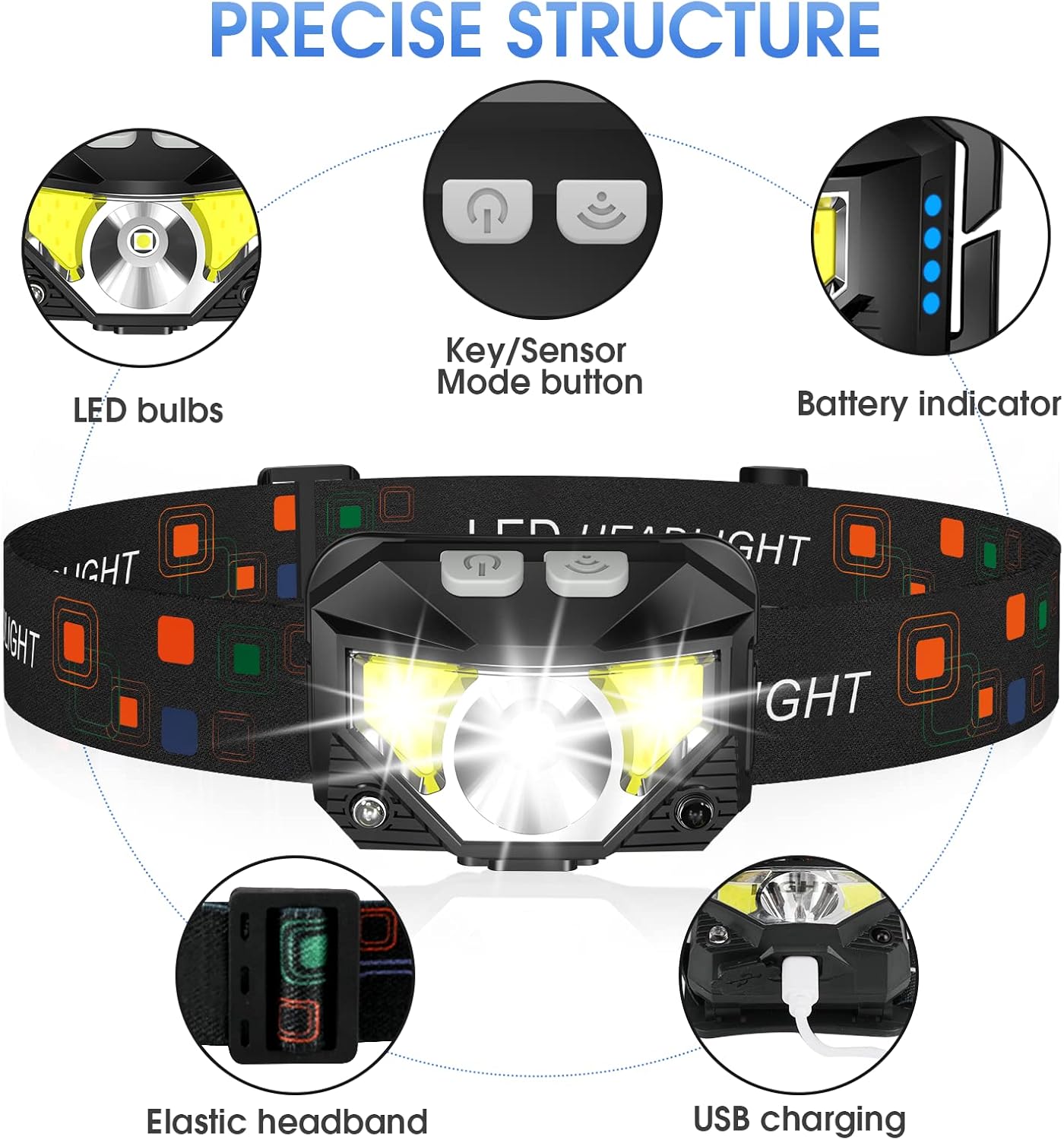
Image 4.1: LHKNL TG-T069 Headlamp Osagaiak
This diagram illustrates the key components of the headlamp, including the LED bulbs, the combined Key/Sensor Mode button, the battery indicator lights, the elastic headband, and the USB charging port.
- LED bonbillak: Main and side LED lights for various illumination needs.
- Key/Sensor Mode Button: Controls power, lighting modes, and activates motion sensor.
- Bateria adierazlea: Bateriaren gainerako karga erakusten du.
- Elastic Headband: Adjustable for a comfortable and secure fit.
- USB kargatzeko ataka: Barneko bateria kargatzeko.
5. Konfigurazioa
5.1 Hasierako karga
Before first use, it is recommended to fully charge your headlamp.
- Locate the USB charging port on the side of the headlamp.
- Open the protective cover of the USB port.
- Connect the provided USB charging cable to the headlamp and a suitable USB power source (e.g., wall adapter, computer USB port, power bank).
- Bateriaren adierazle-argiak piztuko dira kargatze-egoera erakusteko. Argi guztiak finko egongo dira guztiz kargatuta daudenean.
- Once fully charged, disconnect the cable and securely close the USB port cover to maintain water resistance.
5.2 Buruko zinta doitzea
The elastic headband is adjustable to fit various head sizes, for both adults and children.
- Jarri buruaamp zure buruaren gainean.
- Adjust the sliding buckle on the headband until it feels snug and comfortable, without being too tight.
- Lamp head can be rotated up to 60 degrees to direct the light where needed. Adjust the angle as desired.
6. Funtzionamendu-argibideak
6.1 Key Mode Operation
The main button controls the standard lighting modes.

Image 6.1: Key Mode and Motion Sensor Button Functions
This image highlights the two main control buttons: the Key Mode button for cycling through light modes and the Sensor Mode button for activating motion control.
- Power On/Mode Cycle: Press the Key Mode button once to turn on the headlamp. Subsequent presses will cycle through the following modes:
Main Strong Beam → Main Weak Beam → Side Strong Beam → Side Weak Beam → Red Beam → SOS Red Strobe. - Power Off (Long Press): Burua itzaltzekoamp directly from any mode, press and hold the Key Mode button for approximately 3 seconds. This eliminates the need to cycle through all modes to turn off the device.
6.2 Mugimendu-sentsorearen funtzionamendua
The motion sensor allows for hands-free control of specific lighting modes.
- Mugimendu sentsorea aktibatzea: Press the Sensor Mode button once. The indicator light for the motion sensor will illuminate.
- Cycle Sensor Modes: While in motion sensor mode, press the Key Mode button to cycle between:
Sensor Main Beam → Sensor Side Beam. - Hands-Free On/Off: Wave your hand in front of the headlamp's sensor to turn the light ON or OFF.
- Deactivate Motion Sensor: Press the Sensor Mode button again to exit motion sensor mode.

Image 6.2: All 8 Working Modes
This image visually represents all eight available lighting modes, including both manual and motion-sensor activated options, demonstrating the versatility of the headlamp.
7. Kargatzea
The LHKNL TG-T069 Headlamp is equipped with a powerful 1500mAh built-in rechargeable battery. It can be charged and used simultaneously.
- Use the provided USB cable to connect the headlamp to a 5V USB power source.
- Bateriaren adierazle-argiek kargatze-aurrerapena erakutsiko dute.
- A full charge typically provides 4-10 hours of usage, depending on the selected mode.
- Always ensure the USB port cover is sealed after charging to maintain the IPX4 waterproof rating.
8. Mantentzea
8.1 Garbiketa
- Garbitu buruaamp gorputz bigun batekin, damp oihal. Ez erabili garbitzaile edo disolbatzaile urratzailerik.
- Ziurtatu kargatzeko ataka hautsik eta hondakinik gabe dagoela.
8.2 Biltegiratzea
- Gorde buruaamp leku fresko eta lehor batean eguzki-argitik urrun.
- If storing for an extended period, charge the battery every 3-6 months to maintain battery health.
9. Arazoak
| Arazoa | Kausa posiblea | Irtenbidea |
|---|---|---|
| Buruaamp ez da pizten. | Bateria agortuta dago. | Burua kargatuamp guztiz. |
| Argia keinuka edo ahula da. | Bateria baxua. | Burua kargatuamp. |
| Mugimendu sentsoreak ez du erantzuten. | Motion sensor mode not activated or sensor obstructed. | Ensure the Sensor Mode button is pressed. Clear any obstructions in front of the sensor. |
| Buruaamp ez kargatzen. | Kable edo energia-iturri akastuna. | Try a different USB cable or power adapter. Ensure the cable is securely connected. |
10. Zehaztapenak
| Ezaugarri | Zehaztapena |
|---|---|
| Eredua | TG-T069 |
| Argi iturri mota | LED |
| Distira | 1100 Lumenseraino |
| Energia iturria | Bateriak (kargagarria) |
| Bateria mota | Lithium Ion (1500mAh built-in) |
| Elementuaren pisua | 1.87 ontza (gutxi gorabehera 53 g) |
| Uraren Erresistentzia Maila | IPX4 (iragazgaitza) |
| Ezaugarri bereziak | Long Press Function, Motion Sensor, 8 Lighting Modes |
| Materiala | Plastikoa edo kautxua |
| Fabrikatzailea | LHKNL |
11. Bermea eta Laguntza
LHKNL products are designed for reliability and performance. For any questions, technical support, or warranty claims, please contact LHKNL customer service through the retailer where the product was purchased or visit the official LHKNL webharremanetarako informazioa lortzeko gunea.
Gorde erosketaren egiaztagiria bermearen ondorioetarako.