1. Produktua amaitu daview
The LIORQUE Digital Kitchen Timer Model YGH5249 is a multi-functional device designed to assist with various timing needs. It features a large LCD display, adjustable alarm volume, and multiple placement options. This timer can function as a countdown timer, a count-up stopwatch, and a digital clock.

1.1. irudia: Aurrealdea view of the LIORQUE Digital Kitchen Timer, highlighting its large LCD screen and control buttons.
Ezaugarri nagusiak:
- 3-en-1 funtzionaltasuna: Timer, Stopwatch, and Clock modes.
- Pantaila LCD handia: Ensures clear readability of time.
- Alarmaren bolumena doigarria: Three levels (Mute, Low, High) to suit different environments.
- Modu pertsonalizatua: Save frequently used countdown times for quick access.
- Kokapen polifazetikoa: Magnetic back, foldable stand, and lanyard hole for flexible use.
- Delay Reminder: Automatically starts counting up after countdown finishes.
- Auto-Restore: Remembers the last set countdown time.

Image 1.2: Visual representation of the timer's main features and functions.
2. Konfigurazioa eta bateriaren instalazioa
The timer requires 2 AAA batteries (included) for operation. Follow these steps to install them:
- Locate the battery compartment cover on the back of the timer.
- Lerratu estalkia ireki.
- Sartu bi AAA pila, konpartimentuaren barruan adierazten den polaritate zuzena (+ eta -) ziurtatuz.
- Itxi bateriaren konpartimenduaren estalkia ondo.
The timer will power on automatically once batteries are installed.
3. Funtzionamendu-argibideak
3.1 Switching Modes (Timer/Stopwatch/Clock)
The LIORQUE timer offers three modes: Timer (countdown), Stopwatch (count-up), and Clock. To switch between Timer mode and Clock mode, press and hold the ST/SP button for 2 seconds. The timer will display the current time in Clock mode or the timer interface in Timer mode.

Image 3.1: Switching between Counting Mode and Clock Mode.
3.2 Setting Countdown Timer
- Ensure the timer is in Timer mode (displaying H:M:S).
- Erabili 1H, 5M, 1M, eta 5S buttons to set the desired countdown time. Each press adds the corresponding time increment.
- Sakatu ST/SP botoia atzerako kontaketa hasteko.
- To pause the countdown, press ST/SP berriro. Sakatu berriro jarraitzeko.
- To reset the timer to zero, press the Berrezarri botoia.
- When the countdown reaches zero, the alarm will sound for 1 minute.
3.3 Using Stopwatch (Count-Up)
- Ensure the timer is in Timer mode and reset to 00:00:00.
- Sakatu ST/SP button to start counting up.
- Kronometroa pausatzeko, sakatu ST/SP berriro. Sakatu berriro jarraitzeko.
- Kronometroa zeroan jartzeko, sakatu tekla Berrezarri botoia.

Image 3.2: Illustration of Count-up and Countdown modes.
3.4 Shortcut Setting
The timer allows for quick setting of common intervals:
- Sakatu 1H 1 orduz.
- Sakatu 5M 5 minutuz.
- Sakatu 1M 1 minutuz.
- Sakatu 5S 5 segundoz.

3.3 irudia: Adibideaamples of using shortcut buttons for quick time setting.
3.5 Modu pertsonalizatua
The Custom Mode allows you to save a frequently used countdown time for instant recall.
- In Timer mode, set your desired countdown time using the 1H, 5M, 1M, eta 5S botoiak.
- Eduki sakatuta PERTSONARITZA button for 2 seconds. The timer will remember this setting.
- Ondorengo sakatzean laburki PERTSONARITZA button will automatically load the saved time.

Image 3.4: Setting and recalling a custom timer value.
3.6 Alarmaren bolumena doitzea
The timer features a 3-level alarm volume adjustment (Mute, Low, High). A switch on the side of the timer allows you to select the desired volume level.

Image 3.5: Volume adjustment switch and its three settings.
3.7 Kokapen aukerak
The LIORQUE timer offers flexible placement options:
- Magnetikoa: Attach the timer to metal surfaces like refrigerators using its strong magnetic back.
- Standa: Use the integrated foldable stand to place the timer on any flat surface, such as a countertop or desk.
- Korritzeko zuloa: Hang the timer using a rope through the designated lanyard hole.
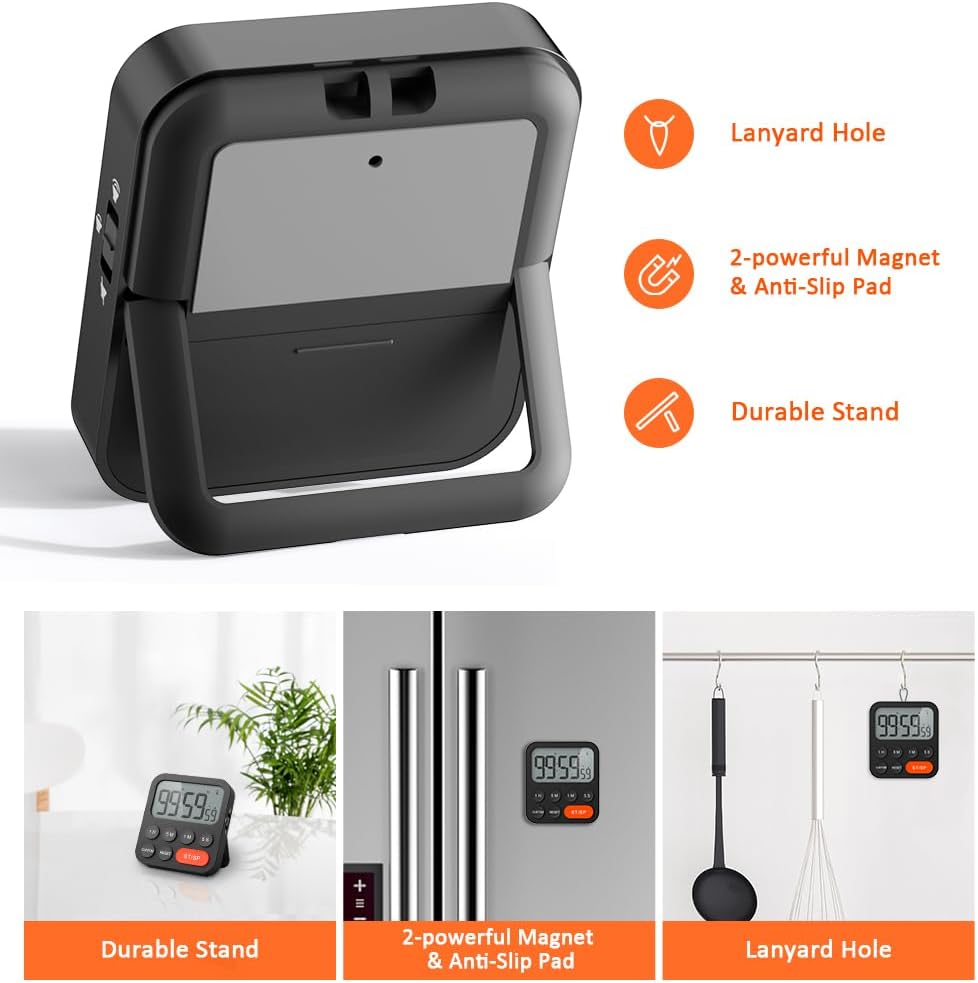
Image 3.6: Various ways to place and use the timer.
3.8 Funtzio osagarriak
- Delay Reminder: After a countdown finishes, the timer will automatically start counting up, indicating the elapsed time since the alarm.
- Auto-Restore: Once a countdown is complete and the alarm has sounded, pressing the ST/SP button will restore the timer to the last set countdown time, making it convenient for repetitive tasks.

Image 3.7: Explanation of Delay Reminder and Auto-restore features.
4. Mantentzea
- Clean the timer with a soft, dry cloth. Do not use abrasive cleaners or immerse in water.
- Aldatu bateriak pantaila iluntzen denean edo tenporizadorea irregular funtzionatzen duenean.
- Denbora luzez erabiltzen ez duzunean, gorde tenporizadorea leku fresko eta lehor batean.
5. Arazoak
- Tenporizadoreak ez du erantzuten: Egiaztatu bateriak behar bezala instalatuta dauden eta nahikoa karga duten. Beharrezkoa bada, ordezkatu itzazu.
- Alarm too quiet/loud: Adjust the volume switch on the side of the timer to your preferred level.
- Pantaila hutsik dago: Ensure batteries are installed and functional. If the issue persists, contact customer support.
6. Zehaztapenak
| Ezaugarri | Xehetasuna |
|---|---|
| Marka | LIORKO |
| Modelo zenbakia | YGH5249 |
| Kolorea | Beltza |
| Produktuaren neurriak | 0.94"D x 0.94"H |
| Elementuaren pisua | 4.2 ontza |
| Energia iturria | 2 AAA bateria (barne) |
| Ezarpen kopurua | 3 (Bolumena) |
| Pantailaren tamaina | 1E+1 zentimetro |
7. Bermea eta Laguntza
For warranty information or technical support, please refer to the product packaging or contact LIORQUE customer service through their official webproduktua erosi zenuen gunera edo dendara. Gorde erosketa-agiria berme-erreklamazioetarako.


