1. Produktua amaitu daview
The MEDca MZ-60 is a compact, in-canal (CIC) digital hearing amplifier designed to enhance sound for individuals seeking improved hearing clarity. This device features noise reduction capabilities and is intended for discreet, comfortable wear.
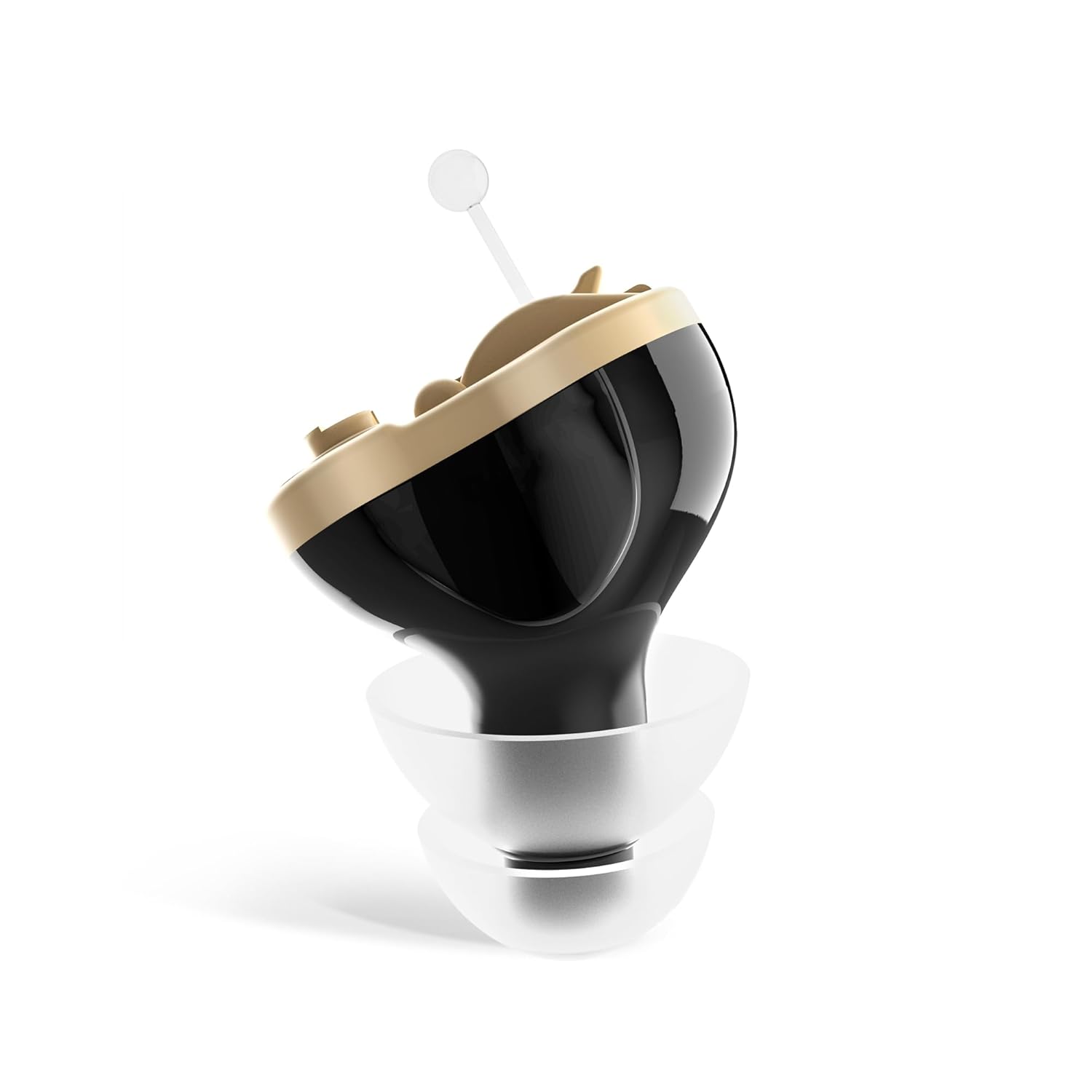
Image 1.1: The MEDca Digital Hearing Amplifier MZ-60, a compact in-ear device.
Ezaugarri nagusiak:
- Invisible in Canal (CIC) Design: For discreet wear.
- Zarata ezabatzea: Reduces background noise for clearer sound.
- Erabiltzaileak: No complex programming required.
- Bateriaren iraupen luzea: Operates on A10 batteries for extended use.
- Fit erosoa: Includes various ear dome sizes for optimal comfort.
2. Segurtasun informazio garrantzitsua
This product is a Personal Sound Amplifier Product (PSAP) as defined by the United States FDA. PSAPs are not intended to diagnose, treat, cure, or mitigate disease and do not alter the body. They are not intended to compensate for impaired hearing or to amplify speech or environmental sounds for individuals with impaired hearing.
- Consult a medical professional if you suspect hearing loss.
- Ez jarri gailua tenperatura altuen, hezetasunaren edo eguzki-argiaren eraginpean.
- Keep out of reach of children and pets due to small parts (batteries, ear domes).
- Remove the device before showering, swimming, or using hairspray.
- If irritation or discomfort occurs, discontinue use and consult a medical professional.
3. Paketearen edukia
Egiaztatu behean zerrendatutako elementu guztiak zure paketean sartuta daudela:

Image 3.1: Visual representation of all items included in the MEDca Digital Hearing Ampbizigarri paketea.
- MEDca CIC Hearing Amplifier (Left Ear, Black)
- Eramateko zorroa
- A10 Batteries (2 included)
- Garbiketa eskuila
- Volume Adjusting Tool (Screwdriver)
- Korrila
- Single Layer Ear Domes (various sizes)
- Double Layer Ear Domes (various sizes)
- Instruction Manual & Quick User Guide
4. Konfiguratzeko argibideak
Follow these steps to prepare your MEDca Digital Hearing Amplifier for first use.

Image 4.1: A visual guide illustrating the three main steps for setting up the hearing ampbiziagoa.
4.1 Osagaien identifikazioa
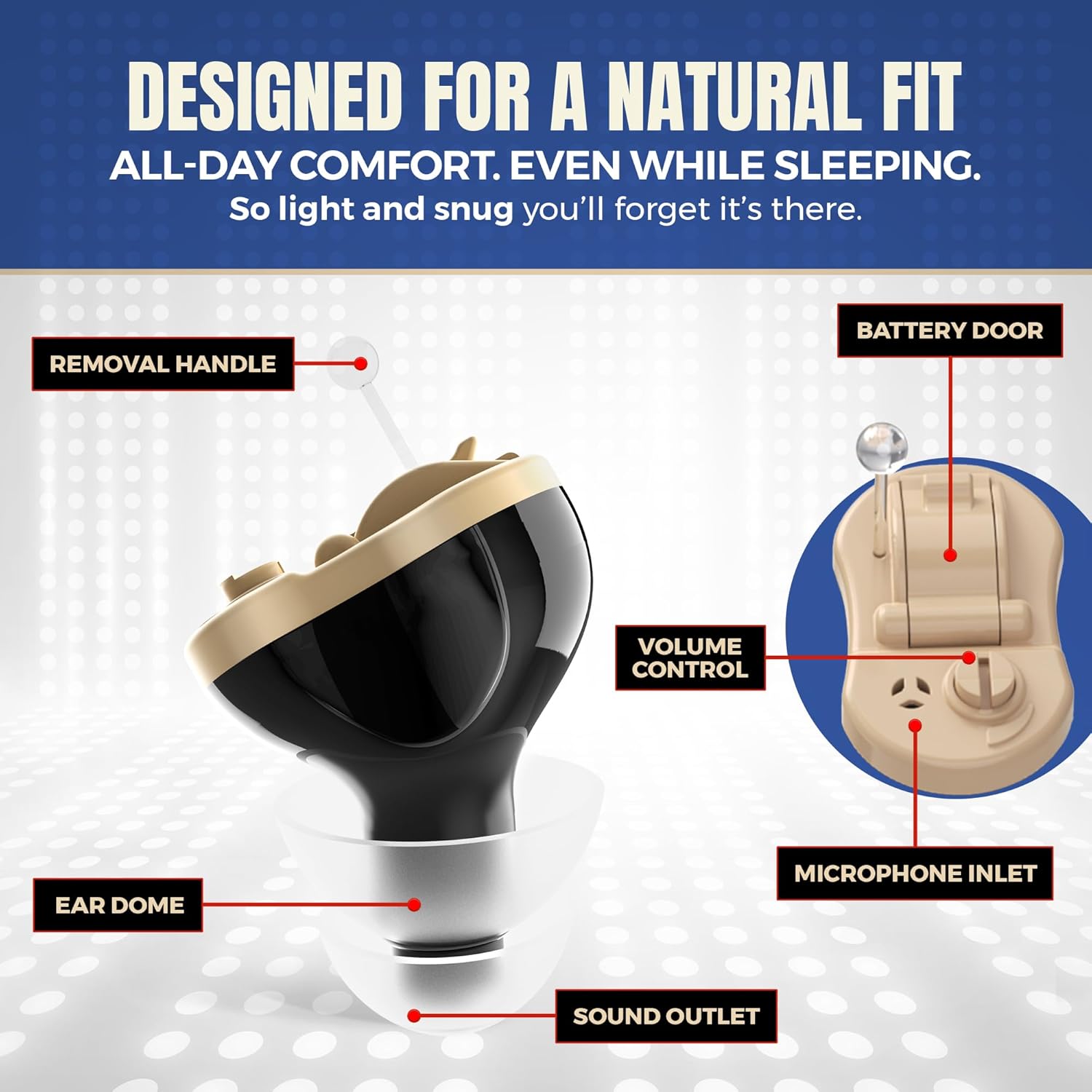
Image 4.2: Detailed diagram showing the various components of the hearing amplifier, including the battery door, volume control, and ear dome.
- Removal Handle: Used to easily remove the device from the ear canal.
- Bateriaren atea: Access point for inserting and replacing the A10 battery.
- Bolumen kontrola: A small dial for adjusting the sound amplifikazio maila.
- Microphone Inlet: Captures ambient sounds.
- Ear Dome: Soft silicone tip that fits into the ear canal.
- Sound Outlet: Entregatzen ampsoinua belarrian sartu.
4.2 Bateriaren instalazioa
- Gently open the battery door located on the device.
- Insert one A10 battery with the positive (+) side facing up, as indicated by the diagram inside the battery compartment.
- Itxi bateriaren atea ondo.
4.3 Ear Dome Selection and Attachment
- Select an ear dome size that provides a comfortable and secure fit in your ear canal. The package includes various single and double-layer domes.
- Carefully attach the chosen ear dome to the sound outlet of the amplifier. Ensure it is firmly seated.
4.4 Insertion and Initial Volume Adjustment
- Before inserting, ensure the volume is set to the lowest comfortable level using the provided screwdriver.
- Sartu astiro-astiro amplifier into your ear canal. The device features a 15-second delay start to prevent whistling during insertion.
- Once inserted, slowly adjust the volume using the screwdriver until the desired amplification level is achieved.
5. Funtzionamendu-argibideak
5.1 Piztu/Itzaltzea
- To turn on the device, ensure a fresh A10 battery is correctly installed and the battery door is closed. The device will activate after the 15-second delay.
- To turn off the device, open the battery door slightly to disconnect the battery. For extended storage, remove the battery completely.
5.2 Bolumenaren doikuntza
The volume control is a small dial on the device. Use the provided screwdriver to carefully turn the dial to increase or decrease the amplification level. Adjust to a comfortable listening level that avoids feedback or discomfort.

Image 5.1: Illustration highlighting the features of the amplifier, such as crystal clear sound and intelligent noise reduction.
5.3 Gailua janztea
The MEDca MZ-60 is designed for a natural and comfortable fit. Ensure the ear dome is properly seated in your ear canal. The device is lightweight and intended for all-day wear.

Image 5.2: A hand holding the amplifier, demonstrating its small size and lightweight design (0.05 Oz / 1.3 Grams).
6. Mantentzea
6.1 Garbiketa Ampbiziagoa
Garbiketa erregularrak errendimendu eta higiene optimoa bermatzen du.
- Use the provided cleaning brush to gently remove any earwax or debris from the ear dome and sound outlet.
- Garbitu gorputza. amplifier with a soft, dry cloth. Do not use liquids or cleaning solutions directly on the device.
- Ensure the microphone inlet is clear of obstructions.
6.2 Bateria ordezkatzea
When the sound becomes weak or the device stops functioning, it is time to replace the A10 battery.
- Ireki bateriaren atea.
- Remove the depleted A10 battery.
- Insert a new A10 battery with the correct polarity.
- Itxi bateriaren atea.
6.3 Biltegiratzea
Erabiltzen ez duzunean, gorde amplifier in its protective carrying case in a cool, dry place. For long-term storage, remove the battery to prevent corrosion.
7. Arazoak
If you encounter issues with your MEDca Digital Hearing Ampbizigarri gisa, jo ezazu honako arazo eta irtenbide ohiko hauetara:
| Arazoa | Kausa posiblea | Irtenbidea |
|---|---|---|
| Soinurik ez edo soinu ahula | Dead or incorrectly inserted battery; volume too low; clogged sound outlet. | Replace battery; ensure correct battery polarity; increase volume; clean sound outlet and ear dome. |
| Txistu edo feedback soinua | Improperly seated ear dome; ear dome too small; device not fully inserted; volume too high. | Re-insert device firmly; try a larger ear dome; ensure device is fully in ear canal; lower volume. |
| Soinua distortsionatua edo ez dago argia | Low battery; earwax buildup; microphone inlet blocked. | Replace battery; clean ear dome and sound outlet; clear microphone inlet. |
| Device does not fit comfortably | Incorrect ear dome size. | Try different sizes and types of ear domes provided in the package. |
8. Zehaztapenak
- Eredua: MZ-60
- Gailuaren neurriak: 0.39 x 0.39 x 0.39 hazbete inguru
- Gailuaren pisu garbia: 0.05 ontza (1.3 gramo)
- Bateria mota: A10 Zinc-Air Battery
- Bateriaren iraupena estimatua: 4-7 days (with normal use)
- Materiala: Silicone (ear domes)
- Kolorea: Beltza
9. Bermea eta Laguntza
9.1 Produktuaren bermea
The MEDca Digital Hearing Amplifier MZ-60 comes with a limited 2-year product warranty. Please retain your proof of purchase for warranty claims.
9.2 Bezeroarentzako laguntza
For technical assistance, troubleshooting not covered in this manual, or warranty inquiries, please contact MEDca customer support. Our highly trained customer experience team is available to assist you.
Contact information can typically be found on the MEDca official webgunean edo produktuaren ontzian.


