1. Sarrera
Thank you for choosing the Gosund SP111 Smart WiFi Plug. This device allows you to control your electronic appliances remotely via a smartphone application or voice commands, and to set schedules for automated operation. Please read this manual carefully before use to ensure proper installation and operation.
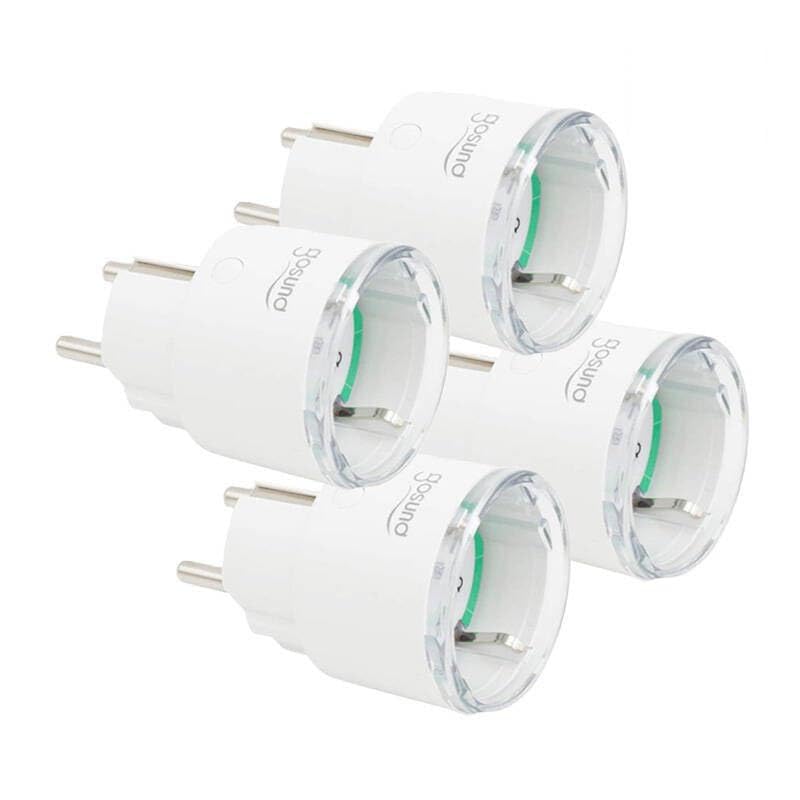
This image displays four white Gosund SP111 Smart WiFi Plugs. Each plug features a standard European Type F (Schuko) plug on one side and a corresponding socket on the other, with the Gosund logo printed on the side. A small indicator light and a button are visible on the top surface of each plug.
2. Segurtasun informazioa
- Do not exceed the maximum load current of 16A or power of 3680W.
- Ez desmuntatu edo aldatu gailua.
- Mantendu gailua uretatik, hezetasunetik eta tenperatura altuetatik urrun.
- Barruko erabilerarako soilik.
- Ziurtatu entxufea guztiz sartuta dagoela hormako entxufean.
- Do not connect appliances that could cause a fire hazard if left unattended (e.g., irons, heaters).
3. Paketearen edukia
Paketeak honako elementu hauek ditu:
- 4 x Gosund SP111 Smart WiFi Plugs
- 1 x Erabiltzailearen eskuliburua (dokumentu hau)
4. Produktua amaitu daview
Familiarize yourself with the components of your Gosund SP111 Smart WiFi Plug:
- Pizteko botoia: Press to manually turn the plug on/off. Press and hold for 5 seconds to enter pairing mode.
- Argi adierazlea: Indicates the status of the plug (e.g., solid blue for ON, flashing blue for pairing mode, off for OFF).
- Type F (Schuko) Socket: Zure etxetresna elektrikoa konektatzeko.
- Type F (Schuko) Plug: For inserting into a wall outlet.
5. Konfigurazioa
5.1 Deskargatu aplikazioa
The Gosund SP111 Smart WiFi Plug works with the Tuya Smart or Smart Life app. Download the app from the App Store (iOS) or Google Play Store (Android).
- Bilatu "Tuya Smart" or "Smart Life".
- Instalatu aplikazioa eta erregistratu kontu bat.
5.2 Gehitu gailua
- Plug the Gosund SP111 Smart WiFi Plug into a wall outlet.
- The indicator light should flash rapidly (approximately twice per second), indicating it's in pairing mode. If not, press and hold the power button for 5 seconds until it flashes rapidly.
- Ireki Tuya Smart edo Smart Life aplikazioa.
- Sakatu goiko eskuineko izkinan dagoen "+" ikonoa gailu bat gehitzeko.
- Select "Electrical Outlet" or "Socket (Wi-Fi)".
- Confirm that the indicator light is flashing rapidly.
- Enter your 2.4 GHz Wi-Fi network password (5 GHz Wi-Fi is not supported).
- Wait for the device to connect. Once connected, you can rename the plug.
6. Funtzionamendua
6.1 Eskuzko Kontrola
Press the power button on the plug to manually turn the connected appliance on or off.
6.2 Aplikazioen kontrola
- Urruneko piztu/desaktibatu: Tap the plug icon in the app to turn it on or off from anywhere.
- Programazioa: Set timers or schedules for the plug to turn on or off automatically at specific times.
- Atzerako kontaketa: Set a countdown timer for the plug to turn off after a set duration.
- Energiaren jarraipena: (If supported by the specific SP111 variant) View real-time and historical power consumption.
6.3 Ahots kontrola
The Gosund SP111 Smart WiFi Plug can be integrated with voice assistants like Amazon Alexa and Google Assistant via the Tuya Smart or Smart Life app. Follow the instructions within the app to link your smart home assistant account.
- Example komandoak:
- "Alexa, turn on [Plug Name]"
- "Hey Google, turn off [Plug Name]"
7. Mantentzea
- Deskonektatu gailua garbitu aurretik.
- Garbitu gainazala zapi leun eta lehor batekin. Ez erabili garbitzaile likidorik edo material urratzailerik.
- Gorde leku fresko eta lehor batean denbora luzez erabiltzen ez duzunean.
8. Arazoak
| Arazoa | Irtenbidea |
|---|---|
| Plug cannot connect to Wi-Fi. |
|
| Argiaren adierazlea itzalita dago. |
|
| Appliance connected to the plug does not turn on. |
|
9. Zehaztapenak
| Eredua: | SP111-4 |
| Sarrera boltage: | AC 230V, 50/60Hz |
| Gehienezko Karga Korrontea: | 16A |
| Gehienezko potentzia: | 3680W |
| Haririk gabeko mota: | Wi-Fi 2.4 GHz (802.11 b/g/n) |
| Aplikazioen euskarria: | Tuya Smart / Smart Life |
| Funtzionamendu-tenperatura: | 0°C eta 40°C (32°F eta 104°F) |
10. Bermea eta Laguntza
Gosund products are designed and manufactured to the highest quality standards. For warranty information and technical support, please refer to the official Gosund webwebgunearekin edo jarri harremanetan zure saltzailearekin. Gorde erosketa-agiria erosketaren frogagiri gisa.
Laguntza gehiago lortzeko, mesedez bisitatu: www.gosund.com/support