1. Sarrera
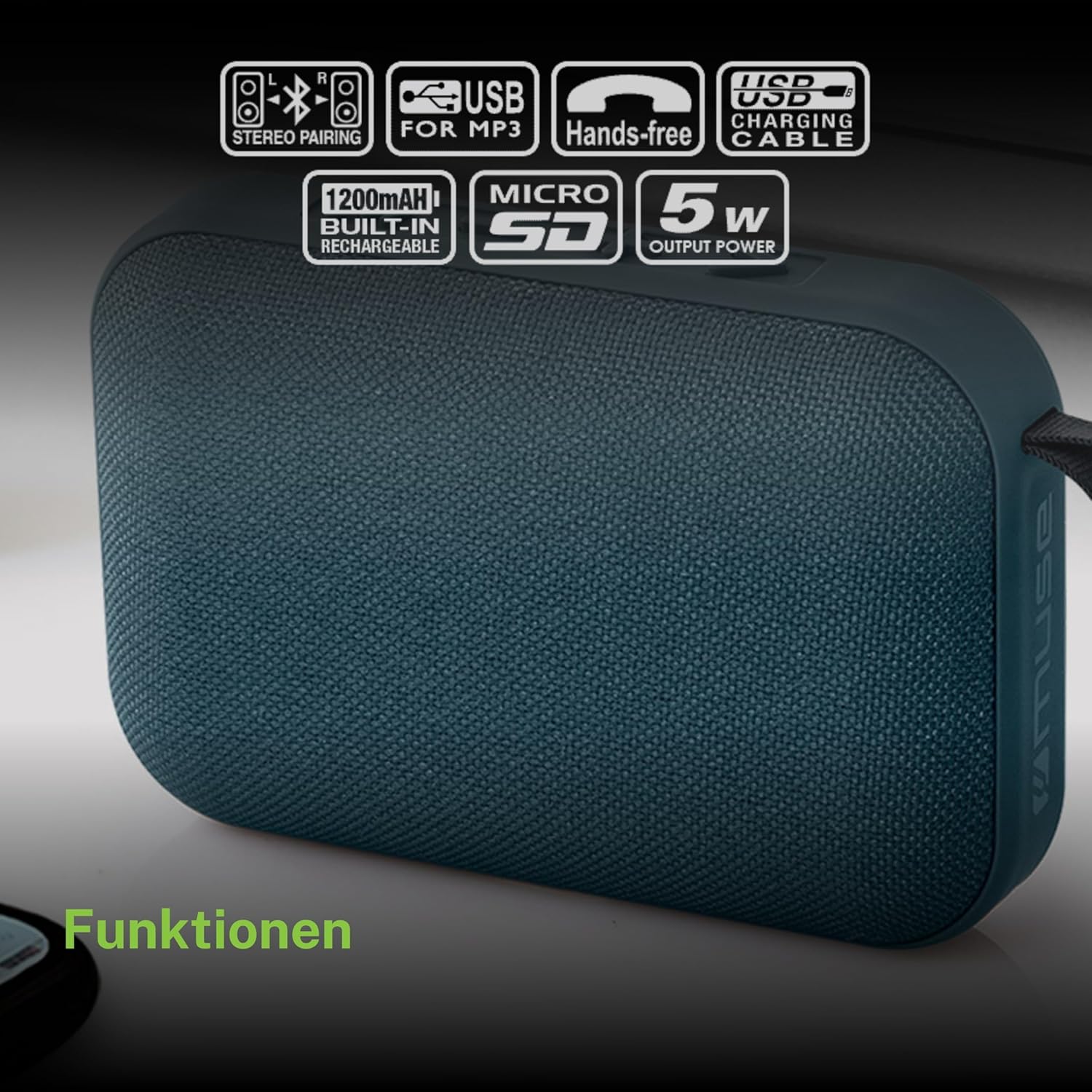
Eskerrik asko erosketagatik.asing the MUSE M307BT Portable Bluetooth Speaker. This compact and versatile speaker is designed to provide high-quality audio from your laptop, tablet, or smartphone. It features Bluetooth connectivity, a 5W output, a built-in rechargeable battery, and support for USB and Micro SD card playback. This manual provides essential information for setting up, operating, and maintaining your device.
2. Segurtasun informazioa
- Ez jarri gailua tenperatura altuen, eguzki-argiaren eraginpean edo hezetasun handiaren eraginpean.
- Saihestu bozgorailua kolpe gogorrak erortzea edo jasaten.
- Ez desmuntatu edo konpontzen saiatu gailua zeuk. Mantendu konponketa guztiak langile kualifikatuen esku.
- Keep the speaker away from water and other liquids. This device is not waterproof.
- Erabili emandako USB kargatzeko kablea edo baliokide ziurtatu bat soilik.
- Dispose of the battery and device responsibly according to local regulations.
3. Paketearen edukia
Ziurtatu elementu guztiak paketean daudela:
- MUSE M307BT Portable Bluetooth Speaker
- USB kargatzeko kablea
4. Produktua amaitu daview
Ezagutu bozgorailuen osagaiak eta kontrolak.


Kontrolak eta Portuak:
- Pizteko botoia: Bozgorailua piztu/itzali egiten du.
- Modu botoia (M): Switches between Bluetooth, USB, and Micro SD modes.
- Bolumena jaitsi / Aurreko abestia (-): Sakatu labur bolumena jaisteko, sakatu luze aurreko abestira joateko.
- Play/Pause / Call Button (>): Musika erreproduzitzen/pausatzen du, deiak erantzuten/amaitu egiten ditu.
- Bolumena igo / Hurrengo abestia (+): Sakatu labur bolumena igotzeko, sakatu luze hurrengo abestia ikusteko.
- Mikro-USB ataka: Bozgorailua kargatzeko.
- USB ataka: USB flash unitate batetik musika erreproduzitzeko.
- Micro SD (TF) Slot: Mikro SD txartel batetik musika erreproduzitzeko.
- LED adierazlea: Shows charging status and Bluetooth pairing status.
5. Konfigurazioa
5.1 Bozgorailua kargatzea
- Konektatu kargatzeko kablearen Mikro-USB muturra bozgorailuaren Mikro-USB atakara.
- Konektatu kargatzeko kablearen USB-A muturra USB elikatze-egokitzaile batera (ez dago barne) edo ordenagailuaren USB ataka batera.
- The LED indicator will illuminate to show charging status. It will typically turn off or change color once fully charged.
- Karga osoak 2-3 ordu behar ditu gutxi gorabehera.
5.2 Piztu/Itzaltzea
- Pizteko: Press and hold the Power button for a few seconds until you hear an audible prompt and the LED indicator flashes.
- Itzaltzeko: Press and hold the Power button for a few seconds until you hear an audible prompt and the LED indicator turns off.
6. Funtzionamendu-argibideak
6.1 Bluetooth parekatzea
Pair your speaker with a Bluetooth-enabled device (smartphone, tablet, laptop).

- Ensure the speaker is powered on and in Bluetooth mode. The LED indicator will flash rapidly, indicating it's ready for pairing.
- Gailuan, gaitu Bluetootha eta bilatu eskuragarri dauden gailuak.
- Select "MUSE M307BT" from the list of devices.
- Behin parekatuta, LED adierazlea keinuka utziko du eta finko mantenduko da, eta baieztapen soinu bat entzungo duzu.
- Orain zure gailuko audioa bozgorailuaren bidez erreproduzitu dezakezu.
6.2 USB erreprodukzioa
- Sartu MP3 audioa duen USB flash unitate bat files USB atakan sartu.
- Sakatu Modua (M) button to switch to USB mode. The speaker will automatically begin playing music from the USB drive.
- Erabili + eta - buttons for track navigation and volume control.
6.3 Micro SD (TF) Card Playback
- Insert a Micro SD (TF) card containing MP3 audio files into the Micro SD slot.
- Sakatu Modua (M) button to switch to Micro SD mode. The speaker will automatically begin playing music from the Micro SD card.
- Erabili + eta - buttons for track navigation and volume control.
6.4 Estereo parekatzea (TWS funtzioa)
To achieve a more immersive stereo sound experience, you can pair two MUSE M307BT speakers together.
- Ensure both MUSE M307BT speakers are powered on and in Bluetooth pairing mode (LED flashing).
- On one of the speakers (this will be your primary speaker), press and hold the Modua (M) button for a few seconds. You will hear a sound indicating that the speakers are attempting to pair with each other.
- Once successfully paired, you will hear a confirmation sound, and the LED indicator on the primary speaker will flash slowly, while the secondary speaker's LED will remain solid.
- Orain, konektatu zure Bluetooth gailua bozgorailu nagusira 6.1 atalean azaltzen den bezala. Audioa estereoan erreproduzituko da bi bozgorailuetatik.
6.5 Esku libreko deiak
When connected via Bluetooth to your smartphone, the speaker can be used for hands-free calls.
- Erantzun deia: Sakatu Play/Pause (>) botoia behin.
- Amaitu deia: Sakatu Play/Pause (>) botoia behin sakatu dei batean zehar.
- Deia baztertu: Eduki sakatuta Play/Pause (>) botoia 2 segundoz.
7. Mantentzea
- Garbitu bozgorailua zapi leun eta lehor batekin. Ez erabili garbitzaile edo disolbatzaile urratzailerik.
- Gorde bozgorailua leku fresko eta lehor batean denbora luzez erabiltzen ez duzunean.
- Avoid blocking the speaker grille to ensure optimal sound quality.
8. Arazoak
| Arazoa | Kausa posiblea | Irtenbidea |
|---|---|---|
| Bozgorailuak ez du pizten. | Bateria baxua. | Kargatu bozgorailua guztiz. |
| Ezin da Bluetooth bidez parekatu. | Bozgorailua ez dago parekatze moduan; Bluetooth desgaituta dago gailuan; gailua urrunegi dago. | Ensure speaker LED is flashing; enable Bluetooth on your device; move device closer to speaker (within 10 meters). |
| Soinurik ez. | Bolumena baxuegia; modu okerra; gailua ez dabil erreproduzitzen. | Increase speaker and device volume; press Mode button to select correct input; ensure audio is playing on your device. |
| USB/Micro SD playback not working. | Okerra file formatua; txartela/unitatea ez da behar bezala sartu; hondatuta files. | Ziurtatu files are MP3 format; reinsert card/drive; try different files edo biltegiratze gailua. |
| Estereo parekatzeak huts egin du. | Bozgorailuak oso urrun daude elkarrengandik; bozgorailu bat dagoeneko gailu batekin parekatuta dago. | Ensure speakers are close; disconnect any existing Bluetooth connections before attempting stereo pairing. |
9. Zehaztapenak

| Ezaugarri | Zehaztapena |
|---|---|
| Ereduaren izena | M307BT |
| Marka | MUSA |
| Irteera Potentzia | 5 Watt |
| Bateria | 1200 mAh / 3.7V Lithium-ion (Rechargeable) |
| Konektibitatea | Bluetooth, USB, Micro SD (TF) |
| Audio irteera modua | Stereo (with TWS pairing) |
| Neurriak (L x W x H) | 118 x 30 x 76 mm |
| Pisua | 200 gramo |
| Kolorea | Urdina |
| Dakarten osagaiak | USB kargatzeko kablea |
| Iragazgaitza | Ez |
| Gomendatutako Erabilerak | For computer, smartphone, or tablet |
| Gailu bateragarriak | Ordenagailu eramangarria, Tableta, Smartphone |
10. Bermea eta Laguntza
10.1 Fabrikatzailearen bermea
This MUSE M307BT Portable Bluetooth Speaker comes with a 2 urteko fabrikatzailearen bermea erosketa-datatik aurrera. Berme honek fabrikazio-akatsak eta eskulanaren funtzionamendua estaltzen ditu erabilera normalaren pean. Ez ditu estaltzen erabilera okerrak, istripuek, baimenik gabeko aldaketek edo higadura normalak eragindako kalteak.
10.2 Bezeroarentzako laguntza
For technical assistance, warranty claims, or further inquiries, please contact your retailer or the official MUSE customer support channel. Please have your proof of purchase and product model number (M307BT) ready when contacting support.