1. Sarrera
This manual provides detailed instructions for the setup, operation, and maintenance of your CZEview ZY-D1 Babyphone. Please read this manual thoroughly before using the device to ensure proper functionality and safety. The CZEview ZY-D1 is designed to help you monitor your baby with advanced features such as 2K Ultra HD video, AI-powered detection, two-way audio, and environmental monitoring.
2. Paketearen edukia
- CZEview ZY-D1 Babyphone Camera
- Korronte egokitzailea eta kablea
- Mounting Accessories (for wall mounting)
- Erabiltzailearen eskuliburua (dokumentu hau)
3. Produktua amaitu daview eta Ezaugarriak
Txekiar Errepublikaview ZY-D1 Babyphone offers a comprehensive monitoring solution with the following key features:
- 2K Ultra HD bideoa: Provides clear and detailed video surveillance.
- 360° AI Tracking: Intelligent AI technology tracks movements, ensuring no blind spots with 355° horizontal and 90° vertical rotation.
- Berehalako jakinarazpenak: Receive immediate alerts for detected motion, noise, or crying.
- Bi norabideko audioa: Communicate with your baby remotely using the built-in microphone and speaker.
- Stable Dual-Band Wi-Fi: Compatible with both 2.4 GHz and 5 GHz Wi-Fi networks for reliable connectivity.
- Gaueko infragorria: Clear monitoring even in low-light or dark conditions.
- Comfort Night Light & Lullabies: Features a looping night light and 14 pre-installed lullabies to soothe your baby.
- Tenperatura eta hezetasuna kontrolatzea: Keep track of the nursery environment.
- Loaren analisia: Monitor and analyze your baby's sleep patterns.
- Alexa integrazioa: Seamlessly integrates with Amazon Alexa for voice control and viewing.

1. irudia: Txekiar Errepublikaview ZY-D1 Babyphone camera, featuring a white body and colorful ears, designed for monitoring infants.
4. Konfigurazioa
4.1 Piztea
- Konektatu emandako elikatze-kablea kameraren elikatze-atakara.
- Entxufatu korronte-egokigailua entxufe elektriko estandar batean.
- The camera will power on, and an indicator light will show its status.
4.2 Aplikazioaren instalazioa
- Scan the QR code provided on the product packaging or in the quick start guide to download the official CZEview aplikazioa.
- Instalatu aplikazioa telefonoan edo tabletan.
- Erregistratu kontu berri bat lortzeko edo hasi saioa dagoeneko baduzu.
4.3 Wi-Fi konexioa
- Ireki CZE.view app and follow the on-screen instructions to add a new device.
- Select your Wi-Fi network (supports both 2.4 GHz and 5 GHz).
- Sartu zure Wi-Fi pasahitza.
- The app will guide you through pairing the camera with your network. This usually involves scanning a QR code displayed on your phone with the camera lens.
- Once connected, the camera's indicator light will change, and you will see the live feed in the app.

2. irudia: Illustration of the CZEview Babyphone's compatibility with both 5GHz and 2.4GHz dual-band Wi-Fi for a stable connection.
4.4 Kamera muntatzea
Txekiar Errepublikaview ZY-D1 Babyphone can be placed on a flat surface or mounted to a wall. If wall mounting, use the provided accessories and ensure the camera is securely fastened at a safe distance from the crib, out of reach of children.
5. Funtzionamendu-argibideak
5.1 Bizi View eta Pan/Tilt kontrola
- Ireki CZE.view aplikazioa eta hautatu zure kamera view zuzeneko jarioa.
- Erabili pantailako kontrolak kameraren lentea panoramika egiteko (355° horizontalki) eta okertzeko (90° bertikalki) doitzeko. viewangelua.
- The automatic tracking feature will detect and follow moving objects within its field of view.
5.2 Bi norabideko audioa

3. irudia: A parent using the CZEview app on a smartphone to engage in two-way communication with a baby in a crib.
- Zuzenean dagoen bitartean view, sakatu mikrofonoaren ikonoa aplikazioan.
- Hitz egin telefonoaren mikrofonoan zure ahotsa kameraren bozgorailutik transmititzeko.
- Release the microphone icon to listen to your baby.
5.3 AI Detection and Notifications

4. irudia: Txekiar Errepublikaview Babyphone camera positioned near a baby in a crib, highlighting its intelligent AI detection capabilities for motion, noise, and crying.
- Access the detection settings in the app.
- Enable Motion Detection, Noise Detection, and Cry Detection as needed.
- Alarma faltsuak gutxitzeko, egokitu sentikortasun mailak.
- You will receive instant push notifications on your smartphone when an event is detected.
5.4 Night Vision and Lullabies

5. irudia: Txekiar Errepublikaview Babyphone emitting a soft glow as a night light, with musical notes floating around a sleeping baby, illustrating its infrared night vision and lullaby features.
- Night vision activates automatically in low-light conditions.
- To play lullabies or activate the night light, navigate to the respective controls in the app.
- Select from the 14 available lullabies to soothe your baby.
5.5 Temperature and Humidity Monitoring
The app displays real-time temperature and humidity readings from the camera's environment. You can set alerts for specific temperature or humidity ranges.
5.6 Sleep Analysis

6. irudia: A visual representation of a sleep analysis timeline on a smartphone screen, showing snapshots of a baby at different times during sleep.
Txekiar Errepublikaview app provides a timeline view of your baby's activity, which can be used to analyze sleep patterns. Review recorded events and snapshots to understand sleep duration and disturbances.
5.7 Amazon Alexa integrazioa
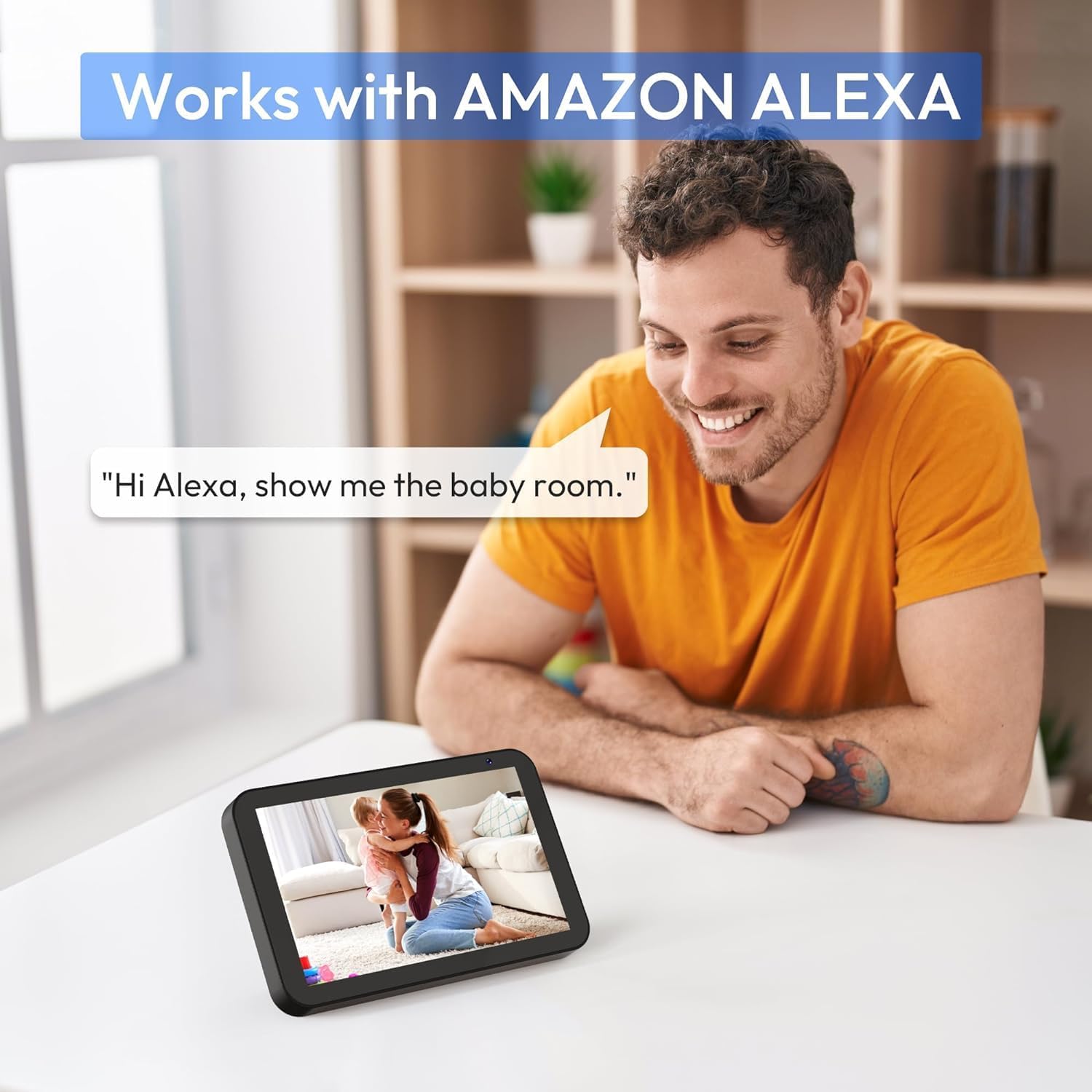
7. irudia: A person interacting with an Amazon Echo Show device, displaying the live feed from the CZEview Babyphone, demonstrating Alexa integration.
- Enable the CZEview skill in your Amazon Alexa app.
- Link your CZEview account with Alexa.
- Use voice commands such as "Alexa, show me the baby room" to view the camera feed on compatible Alexa devices.
5.8 Multi-User Access and SD Card Recording
- Familia partekatzea: You can invite family members to view the camera feed through the app. Invited users may have limited control functions compared to the primary account holder.
- Tokiko biltegiratzea: Insert an SD card (not included) into the camera's designated slot for local video recording and to enable certain features like playing lullabies directly from the camera.
6. Mantentzea
- Garbiketa: Erabili zapi leun eta lehor bat kameraren lentea eta gorputza garbitzeko. Ez erabili garbitzaile likidorik edo aerosolik.
- Firmware eguneraketak: Egiaztatu aplikazioa aldizka firmware eguneratzeak eskuragarri dauden ala ez, errendimendu eta segurtasun optimoak bermatzeko.
- Lekua: Ensure the camera is placed in a well-ventilated area and not exposed to extreme temperatures or direct sunlight.
7. Arazoak
- Potentziarik gabe: Ensure the power cable is securely connected to both the camera and the power outlet. Try a different outlet.
- Wi-Fi konexioaren arazoak: Verify your Wi-Fi password. Ensure the camera is within range of your router. Restart your router and the camera. Confirm your network is 2.4 GHz or 5 GHz compatible.
- Irudiaren kalitate eskasa: Check your internet connection speed. Ensure the camera lens is clean and free from obstructions. Adjust the video quality settings in the app if available.
- Audio kalitate eskasa: Ensure there are no obstructions near the camera's microphone or speaker. Check the volume settings in the app.
- Jaso ez diren jakinarazpenak: Check app notification settings on your phone and within the CZEview app. Ensure the camera is connected to Wi-Fi.
- Kamerak ez du erantzuten: Unplug the camera, wait 10 seconds, and plug it back in to restart.
8. Zehaztapenak
| Ezaugarri | Zehaztapena |
|---|---|
| Modelo zenbakia | ZY-D1 |
| Haririk gabeko Komunikazio Teknologia | Wi-Fia (2.4 GHz eta 5 GHz) |
| Viewangelua | 360 gradu (355° horizontalean, 90° bertikalean) |
| Materiala | Plastikoa |
| Elementuaren neurriak (L x W x H) | 12.7 x 7.62 x 7.62 cm |
| Konektibitate-protokoloa | Wi-Fi |
| Kontrolagailu mota | Amazon Alexa |
| Muntatze Mota | Hormako Muntaia |
| Kolorea | Zuria |
| Osagaiak barne | Kablea |
| Gomendatutako Erabilerak | Babyphone, Baby Monitoring, Night Vision |
9. Segurtasun informazioa
- Keep the camera and all accessories out of reach of children.
- Do not place the camera or its power cord within 1 meter (3 feet) of the crib or playpen to prevent strangulation hazards.
- Erabili emandako korronte-egokigailua soilik. Baimenik gabeko egokigailuak erabiltzeak gailua kaltetu eta bermea baliogabetu dezake.
- Ez jarri gailua uraren, hezetasunaren edo muturreko tenperaturen eraginpean.
- Ez saiatu gailua zeuk irekitzen edo konpontzen. Jarri harremanetan bezeroarentzako arreta-zerbitzuarekin laguntza jasotzeko.
10. Bermea eta Laguntza
For warranty information and customer support, please refer to the warranty card included in your product packaging or visit the official CZEview website. If you encounter any issues not covered in this manual, please contact CZEview bezeroarentzako arreta zerbitzua.


