1. Sarrera
The Amino H200 is a high-performance, ruggedized IPTV encoder and media player designed for diverse environments requiring 4K content delivery. Its robust design supports "out of sight" operation, making it suitable for applications ranging from in-room hospitality to public space signage and advertising. Key features include Power over Ethernet (PoE) for simplified installation and advanced AV1 and HEVC processing for efficient, high-quality video streaming.
2. Produktua amaitu daview
The H200 unit is engineered for durability and discreet placement. Its compact form factor and VESA mounting capabilities allow for installation behind displays or in other concealed locations. The device integrates essential connectivity for both encoding and media playback functionalities.

1. irudia: Aurrealdea view of the Amino H200 unit. This image shows the sleek, black casing of the device, designed for discreet installation.
2.1 Ezaugarri nagusiak
- 4K bereizmen laguntza: Capable of handling and delivering high-definition 4K content.
- Power Ethernet bidez (PoE): Simplifies installation by allowing power and data transmission over a single Ethernet cable.
- Diseinu malkartsua: Built for durability in various operational environments.
- AV1 and HEVC Capability: Efficient video compression for optimized bandwidth usage and high-quality image delivery.
- Graphics Acceleration: Ensures fast rendering of high-quality graphics.
- Out-of-Sight Operation: Features like serial display port, IR extender port, and VESA mounting facilitate discreet installation.
3. Konfigurazioa eta instalazioa
This section provides instructions for setting up your Amino H200 device. Ensure all accessories are present before beginning installation.
3.1 Desontziratzea eta edukia
Carefully unpack the Amino H200 unit and its accessories. The box should contain:
- Amino H200 Encoder/Media Player unit
- Energia egokitzailea (PoE erabiltzen ez baduzu)
- IR Extender Cable (optional, for remote control)
- Mounting hardware (e.g., VESA mount screws)
- Hasierako gida azkarra
3.2 Gailua konektatzea
Refer to the port diagram below for proper connection of cables.
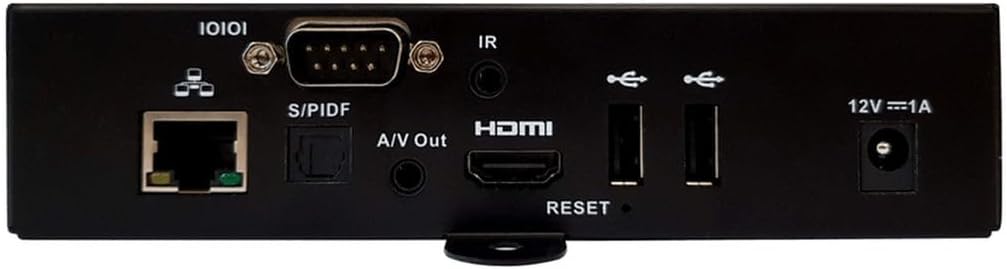
2. irudia: Rear panel connections of the Amino H200. This image details the various input and output ports available on the device, including Ethernet, S/PDIF, A/V Out, HDMI, USB, IR, and power input.
- Sare-konexioa:
- Konektatu Ethernet kable bat zure sareko etengailutik edo bideratzailetik Ethernet (10/100/1000) port on the H200.
- If your network switch supports Power over Ethernet (PoE), the device will receive power through this cable, eliminating the need for a separate power adapter.
- Bideo irteera:
- Konektatu HDMI kable bat honetatik. HDMI ataka on the H200 to the HDMI input of your display or TV.
- Audio irteera:
- For digital audio, connect an optical cable to the S/PDIF ataka.
- For analog audio, connect a 3.5mm audio cable to the A/V Out port.
- IR Extender (Optional):
- If the H200 is installed out of sight, connect the IR extender cable to the IR ataka. Position the IR receiver in a location where it can receive signals from your remote control.
- USB gailuak:
- Connect USB storage devices or peripherals to the available USB atakak.
- Energia konexioa (PoE erabiltzen ez bada):
- If not using PoE, connect the provided power adapter to the 12V === 1A power input eta gero hormako entxufe batera.

3. irudia: Angelukoa view of the Amino H200, highlighting the rear panel and side mounting brackets. This perspective provides a clearer view of the device's compact size and the arrangement of its various ports and connectors, along with the VESA mounting points.
3.3 VESA muntatzea
The H200 features VESA mounting points for secure installation behind compatible displays or on walls. Use appropriate screws and mounting hardware (not always included) to attach the device securely. Ensure adequate ventilation around the unit.
4. Funtzionamendu-argibideak
Once the H200 is connected and powered on, it will boot up. The operating system and specific applications will determine the user interface and functionality. The device supports IPTV services and can function as both an encoder and a media player.
4.1 Oinarrizko funtzionamendua
- Piztu/Itzali: The device powers on automatically when connected to a power source (PoE or power adapter). There is no physical power button. To power off, disconnect the power source.
- Urruneko kontrola: Use a compatible remote control (sold separately or provided by your service provider) to navigate the user interface. Ensure the IR extender is properly positioned if the unit is out of sight.
- Edukia erreproduzitzea: Access media content through the installed IPTV applications or from connected USB storage devices. The H200's AV1 and HEVC capabilities ensure smooth 4K video playback.
- Encoding Functionality: For encoding applications, refer to the specific software or platform documentation integrated with the H200.
4.2 Sistema berrezarri
A reset button is located on the rear panel (refer to Figure 2). This button is typically used for system reboots or factory resets, depending on the duration of the press. Consult your service provider or system administrator for specific reset procedures.
5. Mantentzea
The Amino H200 is designed for low maintenance. Follow these guidelines to ensure optimal performance:
- Garbiketa: Erabili zapi leun eta lehor bat gailuaren kanpoaldea garbitzeko. Ez erabili garbitzaile likidorik edo material urratzailerik.
- Aireztapena: Ensure that the ventilation openings are not blocked. Adequate airflow is crucial to prevent overheating.
- Firmware eguneraketak: Periodically check with your service provider or Amino's official support channels for available firmware updates. Updates can improve performance, add features, and enhance security.
- Ingurumen-baldintzak: Operate the device within its specified temperature and humidity ranges to prevent damage.
6. Arazoak
If you encounter issues with your Amino H200, try the following basic troubleshooting steps:
- Potentziarik gabe:
- Verify that the Ethernet cable is securely connected and your PoE switch is active, or that the power adapter is correctly plugged into the device and a working power outlet.
- Check the power indicator light on the device (if present).
- Bideo-irteerarik ez:
- Ensure the HDMI cable is securely connected to both the H200 and your display.
- Confirm your display is set to the correct HDMI input source.
- Try a different HDMI cable or display if possible.
- Sareko konexiorik ez:
- Egiaztatu Ethernet kablearen konexioa bi muturretan.
- Egiaztatu zure sareko bideratzailea/etengailua behar bezala funtzionatzen duela.
- Berrabiarazi sareko ekipoak.
- Urruneko kontrolak ez du erantzuten:
- Ensure the IR extender is properly connected and positioned to receive signals.
- Check the batteries in your remote control.
- Sistemak ez du erantzuten:
- Perform a soft reboot by disconnecting and reconnecting the power.
- If necessary, use the reset button on the rear panel (consult your service provider for proper procedure).
If these steps do not resolve the issue, please contact Amino technical support or your service provider for further assistance.
7. Zehaztapen Teknikoak
| Ezaugarri | Zehaztapena |
|---|---|
| Marka | Aminoa |
| Ereduaren izena | H200 |
| Elementuaren eredu-zenbakia | H200 |
| Ebazpena | 4K |
| Konektibitate Teknologia | Ethernet, HDMI, IR |
| Konektore mota | Ethernet |
| Ezaugarri Berezia | Power over Ethernet (PoE) capability |
| Onartutako Interneteko zerbitzuak | IPTV |
| Kontrolagailu mota | Urruneko Kontrola |
| Forma-faktorea | Telebista Kutxa |
| Kolorea | Multicolor (Device is primarily black) |
| Elementuaren pisua | 2 kilo |
| Lehen eskuragarri | 6ko abuztuaren 2024a |
8. Bermea eta Laguntza
For warranty information, please refer to the documentation provided with your purchase or contact your reseller/service provider. Amino products typically come with a standard manufacturer's warranty covering defects in materials and workmanship.
For technical support, product inquiries, or service requests, please contact your authorized Amino reseller or visit the official Amino weblaguntza baliabideen eta harremanetarako informazioaren gunea.
Fabrikatzailea: Aminoa
Note: Warranty terms and support availability may vary by region and reseller.