1. Bukatu daview
1.1 Produktuaren deskribapena
The PNI GreenHouse SC1800C PRO Solar Inverter is a central component for small off-grid solar systems, suitable for areas with or without grid electricity. It provides a continuous output of 3000W with a pure sine wave, making it suitable for various household lighting installations and other small electronic motors, including refrigerators, pumps, tools, and charging devices for phones, laptops, and TVs.
1.2 Ezaugarri nagusiak
- Maximum photovoltaic panel input power: 2000 W.
- DC sarrerako bolumen maximoatage from photovoltaic panels: 30 - 120 VDC (Vmp).
- Maximum solar charge current: 30 A input from panels, 60 A output to batteries.
- Solar charging efficiency: 98%.
- MPPT solar charger type.
- Irteera nominala boltage: 230 V.
- Rated output power: 3000 W (under ideal conditions with proportional battery count and 100% charged batteries).
- Maximum apparent power: 6000 VA (peak, 0.5 seconds under ideal conditions).
- Irteera boltage waveform: Pure sine wave.
- Output signal frequency: 50, 60 Hz.
- Sarrerako bolumenatage: 230 V AC.
- Grid connection for backup.
- Compatible with 24V batteries: AGM, lead-acid, gel, flooded lithium-ion.
- Minimum battery start voltage: 23 V (cold start voltageta).
- Integrated high-frequency inverter type (switching).
- Inverter efficiency: 90% ~ 93% (100% charged battery).
- Typical transfer time: 10 ms (UPS, VDE) 20 ms (APL).
- Line mode efficiency: > 95% (rated R load, fully charged battery).
- Hybrid operating modes: SBU – Solar/Battery/Utility, Solar Utility (UPS).
- AC charge voltage: 230 V.
- Maximum AC charge current: 30 A.
- Automatic switching: Solar - Batteries - Grid.
- Energia aurrezteko funtzioa.
- Multiple protections.
- Funtzio anitzeko pantaila.
- Dedicated menu for advanced settings.
- Monitoring with PC software (USB cable included).
- Remote monitoring from mobile/PC (with optional WiFi USB dongle).
1.3 Paketearen edukia
- PNI GreenHouse SC1800C PRO Solar Inverter
- USB kablea
- Erabiltzailearen eskuliburua
- PNI Smart Dongle-WLAN (for WiFi monitoring)
2. Segurtasun informazioa
Mesedez, irakurri arretaz argibide eta abisu guztiak instalatu eta erabili aurretik. Argibide hauek ez jarraitzen badituzu, deskarga elektrikoak, sua edo lesio larriak gerta daitezke.
- Pertsonal kualifikatua: Instalazioa eta mantentze-lanak langile kualifikatuek egin behar dituzte.
- Deskarga elektrikoaren arriskua: Gailu honek bolumen handiarekin funtzionatzen dutages. Do not open the casing unless specifically instructed.
- Bateriaren segurtasuna: Batteries can produce explosive gases. Ensure proper ventilation. Do not smoke or allow sparks or flames near batteries. Wear eye protection.
- Aireztapen egokia: Install the inverter in a well-ventilated area to prevent overheating.
- Ingurumen-baldintzak: Avoid exposure to rain, snow, spray, or any liquids. Operate within the specified temperature range (-26 °C to 80 °C).
- Lurreratzea: Ziurtatu inbertsoreak behar bezala lurrera konektatuta dagoela tokiko araudi elektrikoen arabera.
- Deskonektatu energia: Always disconnect all power sources (solar, battery, AC grid) before performing any wiring or maintenance.
3. Produktuaren osagaiak
3.1 PNI GreenHouse SC1800C PRO Solar Inverter

3.1. irudia: Aurrealdea view of the PNI GreenHouse SC1800C PRO Solar Inverter, showing the display and control buttons.

3.2. Irudia: Atzealdea view of the PNI GreenHouse SC1800C PRO Solar Inverter, illustrating the various connection ports for solar panels, batteries, AC input, and AC output.
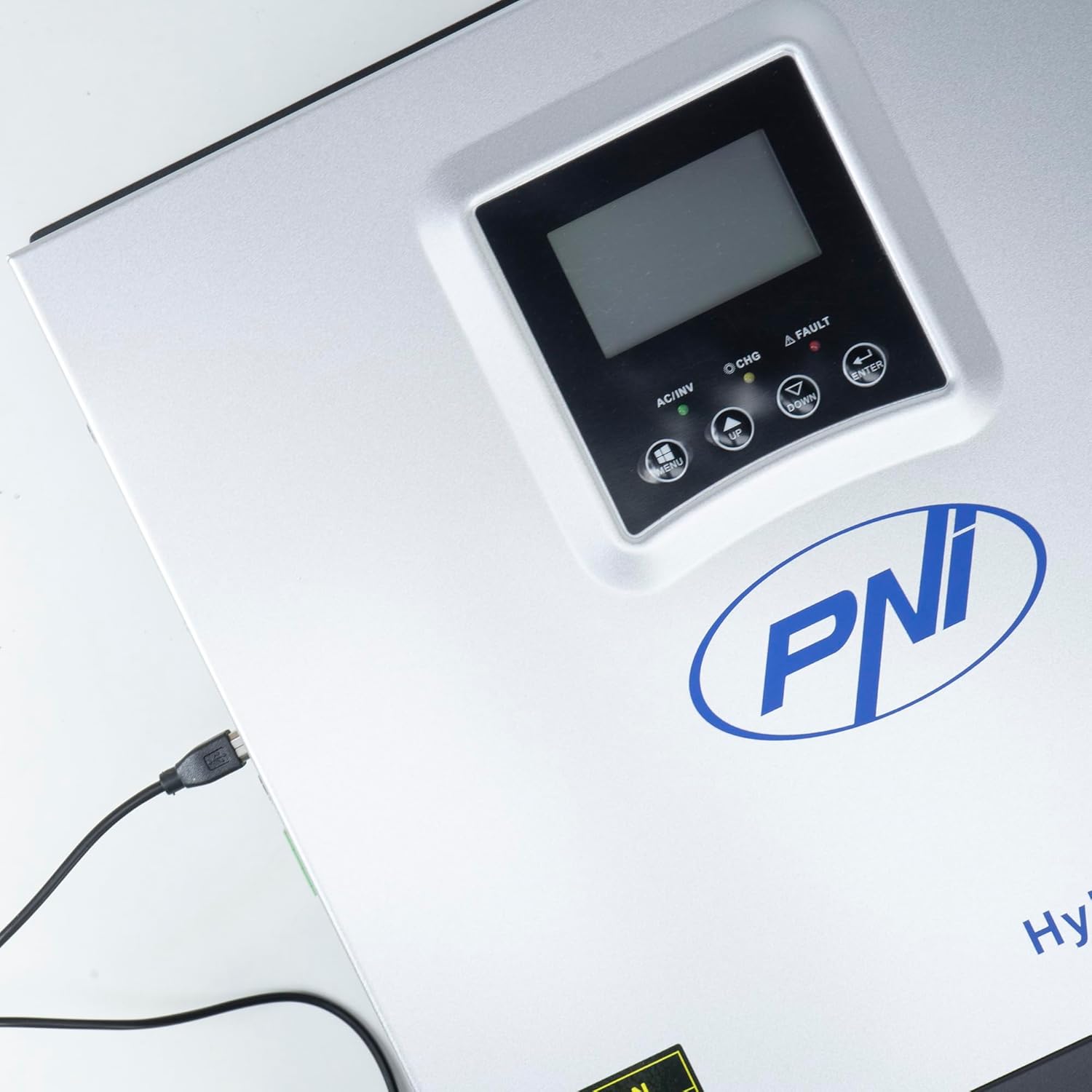
Figure 3.3: Close-up of the USB connection port on the inverter, used for PC monitoring.
3.2 PNI Smart Dongle-WLAN (Optional)

Figure 3.4: The PNI Smart Dongle-WLAN, an optional accessory for remote WiFi monitoring of the inverter.

Figure 3.5: The PNI Smart Dongle-WLAN connected to the inverter's dedicated port for WiFi communication.
4. Instalazioa eta konfigurazioa
4.1 Horman muntatzea
The inverter is designed for wall mounting. Choose a location that is dry, well-ventilated, and protected from direct sunlight and moisture. Ensure sufficient clearance around the unit for proper airflow and heat dissipation. Use appropriate mounting hardware for your wall type.
4.2 Sistemaren konexio-diagrama

Figure 4.1: Basic application diagram showing the connections between solar panels, utility grid, generator, inverter, battery, and home loads. Note: Generator, PV modules, WiFi module, and battery are not included with the inverter unless specified.
4.3 Kableatutako konexioak
Follow the diagram above and the labels on the inverter for correct wiring. Ensure all connections are secure and properly insulated. It is highly recommended that a qualified electrician performs all wiring.
- Eguzki-panelaren konexioa: Connect your solar panels to the designated PV input terminals. Observe correct polarity (positive to positive, negative to negative). The maximum DC input voltage 120 VDC da.
- Bateria konexioa: Connect the 24V battery bank to the battery terminals. Ensure correct polarity. The inverter supports AGM, lead-acid, gel, and flooded lithium-ion batteries.
- Korronte alternoko sarrera (sarea/sorgailua): Connect the AC utility grid or a generator to the AC input terminals. This provides backup power and can charge batteries.
- Korronte alternoko irteera (kargak): Konektatu etxeko kargak korronte alternoko irteerako terminaletara.
4.4 Hasierako piztea
After all connections are made and verified:
- Turn on the battery breaker.
- Turn on the solar panel breaker (if applicable).
- Turn on the AC input breaker (if connected to grid/generator).
- Turn on the inverter's power switch.
- Observe the display for status indicators and initial readings.
5. Funtzionamendu moduak
The PNI GreenHouse SC1800C PRO offers intelligent energy management with several configurable operating modes:
- Solar Priority Mode (SBU): In this mode, the inverter prioritizes power consumption from solar energy. If solar power is insufficient, it will draw from batteries. The utility grid acts as a backup.
- Bateria lehentasunezko modua: The inverter prioritizes drawing power from the batteries. Solar energy will charge the batteries. The utility grid is used only when battery voltage ezarritako atalase baten azpitik jaisten da.
- Utility Priority Mode (UPS): This mode prioritizes power from the utility grid. Solar energy will charge the batteries. The inverter switches to battery power only when the grid is unavailable, functioning as an Uninterruptible Power Supply (UPS).
These modes can be configured via the inverter's multifunction display and dedicated menu for advanced settings.
5.1 Jarraipena
The inverter supports monitoring through:
- PC Software (USB): Connect the inverter to a PC using the provided USB cable and dedicated software for detailed monitoring and analysis of parameters.
- Remote Monitoring (WiFi - Optional): With the optional PNI Smart Dongle-WLAN, you can monitor the inverter remotely via a mobile application or web interfazea.
6. Mantentzea
Mantentze-lan erregularrak zure inbertsorearen errendimendu optimoa eta iraupena bermatzen ditu. Deskonektatu beti energia-iturri guztiak edozein mantentze-lan egin aurretik.
- Garbiketa: Aldian-aldian garbitu inbertsorearen kanpoaldea oihal lehor batekin. Ziurtatu aireztapen-irekiduretatik hautsik eta hondakinik gabe daudela. Ez erabili garbitzaile likidorik.
- Konexioaren egiaztapenak: Annually inspect all wiring connections (solar, battery, AC input/output) for tightness and signs of corrosion. Tighten any loose connections.
- Bateriaren ikuskapena: If using lead-acid batteries, check electrolyte levels and terminal condition as per battery manufacturer guidelines.
- Ingurumen-kontrola: Ziurtatu instalazio-ingurunea tenperatura eta hezetasun-tarte jakin batzuen barruan mantentzen dela.
7. Arazoak
Atal honek arazo ohikoenei buruzko orientazioa eskaintzen du. Arazo konplexuetarako, jarri harremanetan zerbitzu-langile kualifikatuekin.
| Arazoa/Alarma | Kausa posiblea | Irtenbidea |
|---|---|---|
| Bateria baxuaren alarma | Bateria boltage bolumen baxuaren azpitik dagotage warning threshold. | Check battery charge level. Ensure solar panels are producing power or AC input is connected for charging. Reduce load. |
| Battery Disconnected Alarm | Battery cables are loose or disconnected. | Safely disconnect all power sources and check battery connections. Reconnect securely. |
| Overboltage Alarma | Sarrerako bolumenatage (PV or AC) exceeds safe limits. | Verify solar panel array voltage or AC input voltage. Ensure it is within the inverter's specifications. |
| AC Gainkargaren Babesa | Connected loads exceed the inverter's output capacity. | Reduce the total load connected to the inverter. Check individual appliance power consumption. |
| Irteerako potentziarik gabe | Inverter off, low battery, overload, or fault. | Check if the inverter is powered on. Verify battery voltage. Check for overload or fault codes on the display. |
8. Zehaztapenak
| Ezaugarri | Zehaztapena |
|---|---|
| Marka | PNI |
| Modelo zenbakia | PNI-SC1800P-DG |
| Potentzia nominala | 3000 W |
| Potentzia gailurra | 6000 VA (0.5 seconds) |
| Bateria Voltage | 24 V |
| Max. PV sarrerako potentzia | 2000 W |
| Gehienez PV sarrera boltage (Vmp) | 30 - 120 VDC |
| MPPT Solar Charge Current | 60 A (output to batteries) |
| CA sarrera boltage | 230 V |
| CA irteera boltage | 230 V |
| Irteerako uhin forma | Sine Wave Pure |
| Irteerako maiztasuna | 50/60 Hz |
| Gehienezko korronte alternoko karga-korrontea | 30 A |
| Inbertsorearen Eraginkortasuna | % 90 ~ % 93 |
| Funtzionamendu-tenperatura | -26 °C eta 80 °C artean |
| Neurriak (L x W x H) | 29 x 12 x 35 cm |
| Pisua | 6.9 kg |
| Egonean Kontsumoa | ≈ 25 W (Energy saving mode ≈ 12.5 W) |
| Komunikazioa | USB, Optional WiFi Dongle |
9. Bermea eta Laguntza
For warranty information and technical support, please refer to the documentation provided with your purchase or contact your retailer. Keep your proof of purchase for warranty claims.