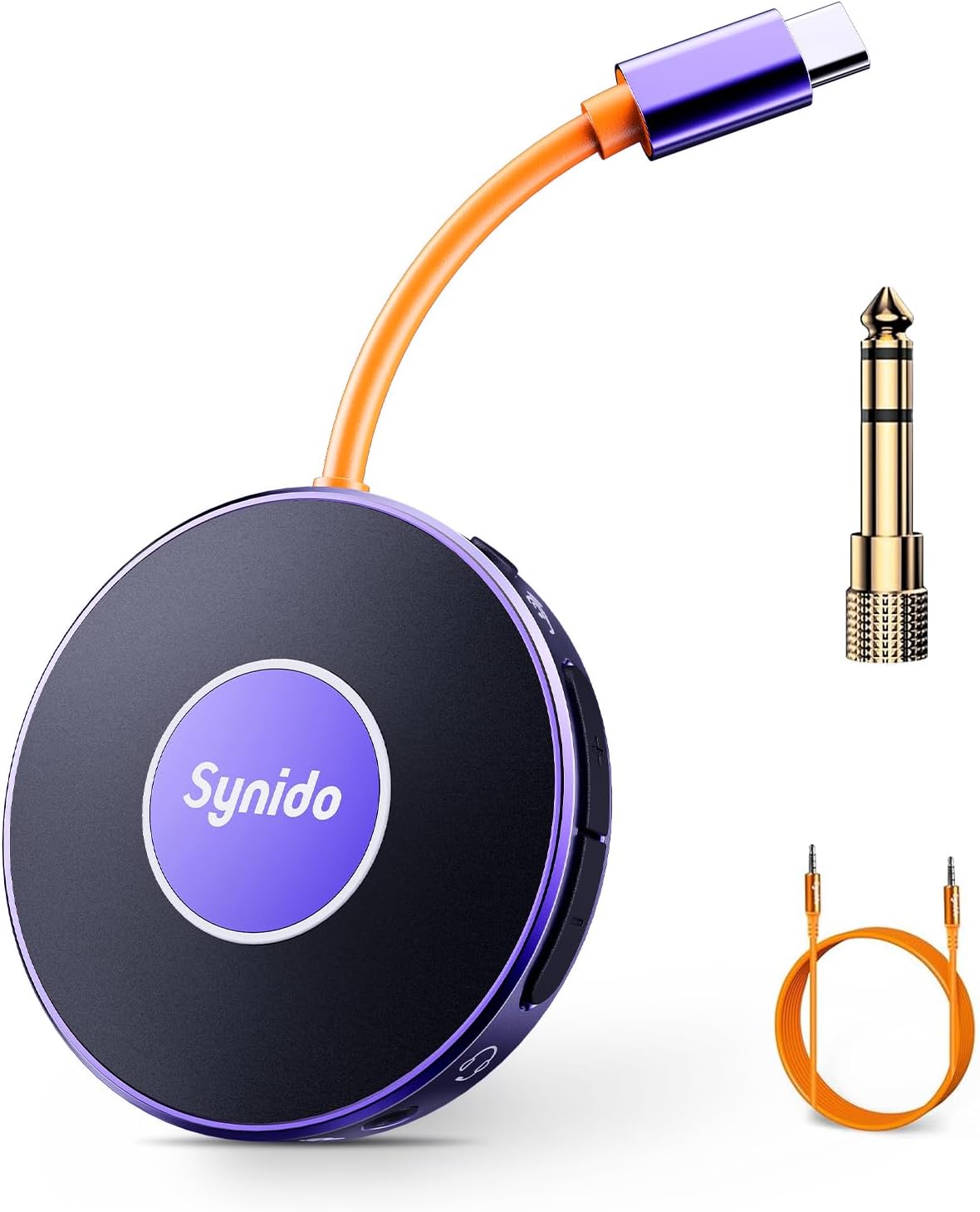
Eskerrik asko Synido Audio Interfaze Portatila aukeratzeagatik. Gailu trinkoa eta moldakorra hau zure zuzeneko erreprodukzioa, musika grabaketa eta audio esperientzia hainbat plataforma eta gailutan hobetzeko diseinatuta dago. Eskuliburu honek zure audio interfazea konfiguratzeko, erabiltzeko, mantentzeko eta arazoak konpontzeko argibide zehatzak eskaintzen ditu, errendimendu optimoa bermatzeko.
Paketearen edukia
Mesedez, egiaztatu behean zerrendatutako elementu guztiak zure paketean sartuta daudela:
1. irudia: Synido Audio Interfaze Portatilaren paketearen edukia, unitate nagusia, egokigailuak eta kableak barne. Oharra: iPhone modelo batzuetarako Lightning egokigailua ez dago barne eta bereiz erosi behar da datuak transmititzeko behar izanez gero.
Produktua amaituview
Synido Audio Interfaze Portatila zuzeneko emankizun mugikorretarako eta kalitate handiko musika grabazioetarako diseinatutako soinu txartel txiki bat eta audio bihurgailu bat da. USB-C interfazea du telefono mugikorretara edo ordenagailuetara zuzenean konektatzeko, eta aldi berean zure gailua kargatu dezake zuzeneko emankizunetan zehar. 24 biteko 48kHz bereizmenarekin eta txip bikoitzarekin, audio kalitate bikaina eta latentzia baxua bermatzen ditu.
2. irudia: Synido audio interfaze eramangarria, erakustenasinbere diseinu trinkoa eta barneko osagarriak direla eta.
Ezaugarri nagusiak:
Kargatzen ari den bitartean emititzen: Konektatu kargatzeko kable bat zure telefono mugikorra zuzeneko igorpenetan pizteko.
Soinu kalitate handikoa eta latentzia baxua: Estudio mailako 24 biteko 48 kHz-ko bereizmena, bi nukleoko txiparekin, audio garbia eta atzerapen minimoa lortzeko.
Jokalarientzat diseinatua: Barneko begizta-funtzio eta monitore-funtzio ultra-garbiak ditu, instrumentuen grabaziorako aproposa. 6.35 mm-ko (1/4'') instrumentuen egokitzaile bat barne hartzen du.
Diseinu funtzional sofistikatua: Entzungailuetarako eta mikrofonorako bi bolumen-botoi independente, belarri barneko monitore-etengailu independentea eta USB-C hebilla seguruaren diseinua.
Erabilera anitzak: Zuzeneko erreprodukzioetarako, instrumentuen grabazioetarako, musika entzutea hobetzeko, jokoetarako eta ahots-deietarako egokia.
3. irudia: Synido audio interfazearen diseinu elementuen banaketa bisuala, erabiltzaileentzako kontrol errazak eta konexio seguruak nabarmenduz.
4. irudia: Synido audio interfazea zuzeneko erreprodukzio konfigurazio batean, bere formatu trinkoa eta mugikorreko edukia sortzeko ezaugarri moldakorrak azpimarratuz.
Konfigurazioa
Hasierako konexioa:
Konektatu Synido Audio Interfaze Portatilaren USB-C kablea zuzenean zure telefono mugikorrera edo ordenagailura.
Behin konektatuta, zure gailuak automatikoki ezagutu beharko luke audio interfazea. Telefono mugikorretan, entzungailuen ikono bat agertzen da normalean egoera-barran, konexio arrakastatsua adieraziz.
Konektatu entzungailuak audio interfazearen dagokion entzungailuen interfazera.
Zuzeneko erreprodukzioa edo grabaketa erabiltzen ari bazara, ireki nahi duzun aplikazioa (adibidez, zuzeneko erreprodukzioko softwarea, DAW) eta hautatu Synido audio interfazea sarrera/irteera gailu gisa.
5. irudia: Synido audio interfazea Windows, Mac OS eta Android gailuekin bateragarritasun plug-and-play izateko diseinatuta dago. Kontuan izan iPhone modelo batzuek Lightning egokitzaile bat behar dutela datuen transmisioa bermatzeko.
Bideo-gida: Jokoetarako eta ahots-streamingerako konfigurazioa (telefono mugikorra)
1. bideoa: Bideo honek Synido audio interfazea zuzeneko erreprodukziorako nola konfiguratu erakusten du haririk gabeko laguntzarekin, streaming telefonorako, laguntza telefonorako (Bluetooth bidez) eta entzungailuetarako konexioak erakutsiz. Konexio arrakastatsuaren adierazlea eta Bluetooth nola aktibatu nabarmentzen ditu.
Bideo-gida: Instrumentuen grabaketa konfiguratzea (telefono mugikorra eta instrumentua)
2. bideoa: Bideo honek Synido audio interfazearen gitarra grabatzeko eta zuzeneko erreprodukziorako gaitasunak erakusten ditu. Gailua telefono eta gitarra batera konektatzea erakusten du, monitorizazio funtzioa eta haririk gabeko laguntza erakutsiz grabazio eta erreprodukzio esperientzia ezin hobea lortzeko.
Funtzionamendu-argibideak
Zuzeneko erreprodukzioa haririk gabeko laguntzarekin:
Konektatu Synido audio interfazea zure streaming telefono nagusira USB-C bidez.
Sakatu Synido Live Dock A10-eko erdiko botoia Bluetooth-a aktibatzeko. Argia zuri finkotik urdin finkora aldatuko da konektatuta dagoenean.
Zure telefono mugikorraren akonpainamenduan, gaitu Bluetooth-a eta konektatu 'Synido Live Dock'-era atzeko musika edo akonpainamendua haririk gabe erreproduzitzeko.
Ireki zuzeneko erreprodukziorako softwarea telefono nagusian eta hasi zure emisioa.
Instrumentuaren grabaketa:
Konektatu Synido audio interfazea zure telefono mugikorrera edo ordenagailura.
Ahots-deiak: Ahots-deietarako definizio handiko laguntza.
7. irudia: Synido audio interfazearen aplikazio anitzen irudikapen bisuala, zuzeneko erreprodukziotik hasi eta musika entzuteraino.
Bideo erakustaldi gehigarriak:
3. bideoa: Bideo honek Synido audio interfaze eramangarria gitarra elektrikoen grabaziorako erabiltzean jartzen du arreta. Konexio prozesua erakusten du eta denbora errealeko monitorizazioa eta loopback bezalako ezaugarriak nabarmentzen ditu, instrumentuen kalitate handiko grabaziorako.
4 bideoa: Bideo honek ikuspegi orokorra eskaintzen duview Synido eramangarri mini audio interfazearen zuzeneko erabilerarako. Gailuaren tamaina trinkoa, konektatzeko erraztasuna eta hainbat aplikazio erakusten ditu, besteak beste, streaming bidez kargatzea, jolastea eta ahots-deiak egitea, bere moldakortasuna azpimarratuz.
Mantentzea
Synido Audio Interfaze Portatilaren iraupena eta errendimendu optimoa bermatzeko, jarraitu mantentze-jarraibide hauek:
Garbiketa: Erabili zapi leun eta lehor bat gailuaren gainazala garbitzeko. Saihestu garbitzaile urratzaileak, disolbatzaileak edo produktu kimiko indartsuak erabiltzea, akabera edo barneko osagaiak kaltetu baitezakete.
Biltegiratzea: Gorde gailua leku fresko eta lehor batean, eguzki-argitik, tenperatura muturrekoetatik eta hezetasun handitik babestuta.
Manipulazioa: Kontu handiz maneiatu gailua. Saihestu erortzea edo kolpe bortitzak jasatea, barneko kalteak eragin baititzake.
Konexioak: Kableak beti kontu handiz sartu eta atera, atakak kaltetu ez daitezen. Ziurtatu konexioak ondo daudela erabiltzen ari zaren bitartean.
Arazoak konpontzea
Synido Audio Interfaze Portatilarekin arazoak badituzu, jo ezazu honako arazo eta irtenbide ohikoenei:
Soinurik ez irteera/sarrera:
Ziurtatu kable guztiak audio interfazera, gailura eta entzungailuetara/tresnara ondo konektatuta daudela.
Egiaztatu Synido audio interfazea hautatuta dagoela sarrera/irteera gailu lehenetsi gisa zure sistema eragilearen soinu ezarpenetan edo zure aplikazioaren audio hobespenetan.
iPhone bat erabiltzen baduzu, ziurtatu datuen transmisioa onartzen duen Lightning egokitzaile bateragarria duzula, ez baitator produktuarekin batera.
Estatikoa edo zarata audioan:
Egiaztatu konexio solteak.
Ziurtatu kalitate handiko kableak erabiltzen ari zarela.
Streaming bidez kargatzen ari zaren bitartean, interferentzia elektrikoak gerta daitezke. Saiatu kargatu gabe erabiltzen zarata jarraitzen duen ikusteko.
Bluetooth konexio-arazoak:
Ziurtatu audio interfazeko Bluetooth funtzioa aktibatuta dagoela (argi urdin finko bat piztuta).
Ziurtatu Bluetooth-a gaituta dagoela zure laguntza-gailuan eta irismen-eremuan dagoela.
Ahaztu gailua zure Bluetooth ezarpenetatik eta saiatu berriro parekatzen.
Ez da gailua ezagutzen:
Saiatu beste USB-C ataka batera edo beste gailu batera konektatzen, ataka edo gailu espezifikoetako arazoak baztertzeko.
Berrabiarazi konektatutako telefonoa edo ordenagailua.
Zehaztapenak
Marka
Sinido
Modelo zenbakia
A10 V1 ZUZENEAN
Elementuaren pisua
5.9 ontza
Paketearen neurriak
6.97 x 5.2 x 1.54 hazbete
Jatorrizko Herrialdea
Txina
Gailu bateragarriak
Smartphone
Onartutako softwarea
Ableton Live, FL Studio, Audacity
Sistema eragilea
Soinu txartela (sistema eragile moderno gehienentzat kontrolatzailerik gabe)
Konektibitate Teknologia
USBa
Kanal kopurua
2
Audio-ebazpena
24 biteko / 48 kHz
8. irudia: Synido audio interfazea oso eramangarria izateko diseinatuta dago, poltsa txikietan edo poltsikoetan erraz sartuz edonon erabiltzeko.
Bermea eta Laguntza
Bermeari buruzko informazioa eta bezeroarentzako laguntza lortzeko, jo ezazu Synido ofizialera. webwebgunea edo jarri harremanetan zuzenean bezeroarentzako arreta-zerbitzuarekin. Bisitatu ere egin dezakezu Synido markako denda Amazonen baliabide gehigarriak eta harremanetarako aukerak lortzeko.
Synidok kalitate handiko produktuak eta bezeroarentzako arreta bikaina eskaintzeko konpromisoa hartzen du. Galderarik baduzu edo laguntza behar baduzu, ez izan zalantzarik eta jarri gurekin harremanetan.
Erlazionatutako dokumentuak - A10 V1 ZUZENEAN
Synido Live 2x2 High-Fidelity Audio Interface User Guide Comprehensive user guide for the Synido Live 2x2 high-fidelity audio interface, covering product introduction, function descriptions for Solo and Duet models, driver installation, control panel usage, technical specifications, package contents, FAQs, and safety precautions. Compatible with Windows, macOS, Android, and iOS.
Synido Live Dock A10: Guía de Usuario para Interfaz de Audio Portátil Explore las funciones del Synido Live Dock A10, una interfaz de audio portátil de alta definición con tecnología avanzada. Aprenda a usar LOOPBACK, Bluetooth y controles de volumen para grabaciones y reproducción de audio profesional.
Synido Live Dock A10: Konexio azkarra eta konfigurazio gida streaming eta grabaziorako Ikasi nola konektatu eta konfiguratu zure Synido Live Dock A10 mugikorreko streaming-erako, instrumentuen grabaziorako, ahots-jokoetarako eta musika entzuteko. Interfazea barne hartzen du.view, konfigurazio diagramak, audio ezarpenak eta arazoak konpontzeko aholkuak.