1. Sarrera
The Mastech MS8233A is a compact, battery-powered digital multimeter designed for measuring AC/DC voltage, DC current, resistance, diode, continuity, and temperature. It features a 2000-count display, data hold function, and a low battery indicator, making it suitable for various electrical testing applications.
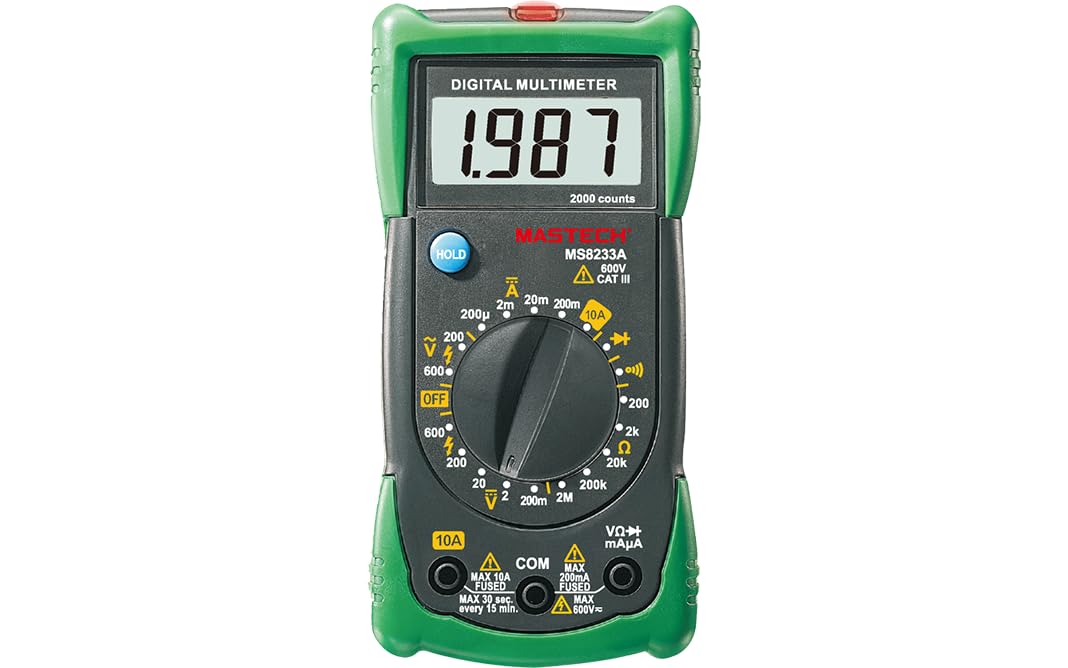
1. irudia: Aurrealdea view of the Mastech MS8233A Digital Multimeter, showing the display, rotary switch, and input jacks.
2. Segurtasun informazioa
To ensure safe operation and service of the meter, follow these instructions:
- Ziurtatu beti neurgailua funtzionamendu-egoera onean dagoela erabili aurretik.
- Ez aplikatu voltage edo neurgailuarentzat zehaztutako gehienezko mugak gainditzen dituen korrontea.
- Kontuz ibili voltag60V DC edo 30V AC RMS-tik gorako tentsioak, deskarga elektrikoaren arriskua baitakarte.
- Funtzioak aldatu aurretik, deskonektatu beti proba-kableak zirkuitutik.
- Irakurketa zehatzak bermatzeko, ordezkatu bateria berehala bateria baxuaren adierazlea agertzen denean.
- Do not operate the meter if the case is open or if it appears damaged.
- Errespetatu tokiko eta nazioko segurtasun-kodeak.
3. Produktuaren ezaugarriak
- Pantaila: 2000 zenbaki
- Diodo Ireki Bolumenatage: 3.0V
- Continuity Buzzer: Sounds at less than 60Ω
- Datuak gordetzeko funtzioa
- Low Battery Display indicator
- Neurriak AC/DC voltage, DC current, resistance, diode check, continuity test, and temperature.
4. Paketearen edukia
Egiaztatu elementu guztiak paketean daudela:
- Mastech MS8233A Digital Multimeter
- Proba-buruak
- 1x 9V 6F22 Battery (pre-installed or included separately)
- Kalibrazio Ziurtagiria
- Hasierako gida azkarra

Figure 2: Illustration of package contents and main applications for the MS8233A multimeter.
5. Konfigurazioa
5.1 Bateriaren instalazioa
The MS8233A requires one 9V 6F22 battery. If the battery is not pre-installed or needs replacement:
- Ziurtatu multimetroa itzalita dagoela eta deskonektatu proba-kable guztiak.
- Bilatu bateriaren konpartimentuaren estalkia unitatearen atzealdean.
- Unscrew the retaining screw(s) and carefully remove the cover.
- Konektatu 9V-ko bateria bateriaren kliparekin, polaritate zuzena errespetatuz.
- Jarri bateria konpartimentuan eta jarri berriro estalkia, torloju(ekin) finkatuz.
5.2 Proba-kableak konektatzea
Insert the test leads into the appropriate input jacks:
- Insert the black test lead into the “COM” (common) jack.
- Neurketa gehienetarako (bolumentage, resistance, diode, continuity, temperature), insert the red test lead into the “VΩmA” jack.
- For DC current measurements up to 10A, insert the red test lead into the “10A” jack.
6. Funtzionamendu-argibideak
To operate the multimeter, turn the rotary switch to the desired function. The display will show the measurement value.
6.1 DC Voltage Neurketa (V–)
- Ezarri biraketa-etengailua nahi den DC bolumenera.tage-tartea (adibidez, 200mV, 2V, 20V, 200V, 600V).
- Konektatu proba-kable gorria zirkuituaren alde positibora (+) eta proba-kable beltza alde negatibora (-).
- Irakurri liburukiatagPantailako balioa.
6.2 AC Voltage Neurketa (V∼)
- Ezarri biraketa-etengailua nahi den korronte alternoko bolumenera.tage tartea (adibidez, 200V, 600V).
- Konektatu proba-kableak AC bolumenaren artean.tage iturria.
- Irakurri liburukiatagPantailako balioa.
6.3 Korronte zuzenaren neurketa (A–)
- Set the rotary switch to the desired DC Current range (e.g., 200µA, 2mA, 20mA, 200mA, 10A).
- Garrantzitsua: For 10A measurements, move the red test lead to the “10A” jack. For other current ranges, use the “VΩmA” jack.
- Open the circuit where current is to be measured and connect the meter in series.
- Irakurri uneko balioa pantailan.
6.4 Erresistentziaren neurketa (Ω)
- Set the rotary switch to the desired Resistance range (e.g., 200Ω, 2kΩ, 20kΩ, 200kΩ, 2MΩ).
- Ziurtatu zirkuitua edo osagaia deskonektatuta dagoela erresistentzia neurtu aurretik.
- Konektatu proba-kableak neurtu beharreko osagaira.
- Irakurri erresistentziaren balioa pantailan.
6.5 Diode Test (→|–)
- Set the rotary switch to the Diode Test function.
- Konektatu proba-kable gorria diodoaren anodora eta proba-kable beltza katodora.
- Pantailak aurrerako bolumena erakutsiko dutage drop. Reverse the leads to check for open circuit (OL) indication.
6.6 Continuity Test (♫)
- Set the rotary switch to the Continuity Test function.
- Konektatu proba-kableak zirkuituan edo osagaian zehar.
- Erresistentzia 60Ω gutxi gorabehera baino txikiagoa bada, txisteak joko du jarraitutasuna adieraziz.
6.7 Temperature Measurement (℃/℉)
The MS8233A can measure temperature using a K-type thermocouple (not always included, check package contents).
- Set the rotary switch to the Temperature function.
- Konektatu K motako termoparea sarrera-hartuneetara, polaritatea errespetatuz.
- Jarri termoparearen zunda tenperatura neurtu behar den puntuan.
- Irakurri tenperaturaren balioa pantailan.
6.8 Datuak gordetzeko funtzioa
Press the “HOLD” button to freeze the current reading on the display. Press it again to release the hold function and resume live readings.
7. Mantentzea
7.1 Bateria ordezkatzea
Bateria baxuaren adierazlea pantailan agertzen denean, ordezkatu 9V-ko bateria 5.1 atalean azaltzen den bezala.
7.2 Garbiketa
Garbitu kasua iragarkiarekinamp oihal eta detergente leun batekin. Ez erabili urratzailerik edo disolbatzailerik. Ziurtatu neurgailua guztiz lehor dagoela erabili aurretik.
7.3 Fusiblearen ordezkapena
The current input jacks are typically protected by fuses. If the meter fails to measure current, the fuse may need replacement. Refer to the specific fuse ratings printed on the meter or in the detailed specifications. Fuse replacement should only be performed by qualified personnel.
8. Arazoak
If the multimeter does not function correctly, consider the following:
- Ez dago pantailarik edo pantaila ahula: Check battery charge and ensure it is correctly installed. Replace if necessary.
- Irakurketa okerrak: Verify the correct function and range are selected. Ensure test leads are properly connected and making good contact. Check battery level.
- Cannot measure current: Check the fuse for the current input. Ensure the red test lead is in the correct current jack (e.g., 10A).
- “OL” (Overload) displayed: The measured value exceeds the selected range. Switch to a higher range or verify the circuit is not open.
Arazoak jarraitzen badu, jarri harremanetan bezeroarentzako laguntzarekin.
9. Zehaztapenak
9.1 Zehaztapen orokorrak
- Power Source: 2 LR44 batteries required (included) - Note: Product description states 1x 9V 6F22 battery. Please verify with actual product.
- Produktuaren neurriak: 16 x 9 x 5 cm
- Item Weight: 0.5 Kilograms
- Manufacturer: MASTECH/MGL
- Segurtasun Balorazioa: CAT III 600V
- Ziurtagiriak: CE, RoHS
- Upper Temperature Rating: 50 Degrees Celsius
9.2 Zehaztapen elektrikoak
| Zehaztapenak | Barrutia | Ebazpena | Zehaztasuna |
|---|---|---|---|
| DC bolumenatage | 200mV/2V/20V/200V 600V | 0.1mV/1mV/10mV/100mV 1V | ±(%0.5+3) ±(%0.5+3) |
| AC Boltage | 200V 600V | 100mV 1V | ±(%1.2+10) ±(%1.2+10) |
| Korronte DC | 200µA/2mA/20mA/200mA 10A | 0.1µA/1µA/10µA/0.1mA 0.01A | ±(%1.0+3) ±(%3.0+5) |
| Erresistentzia | 200Ω/2kΩ/20kΩ/200kΩ 2MΩ | 0.1Ω/1Ω/10Ω/100Ω 1 kΩ | ±(%0.8+4) ±(%0.8+4) |
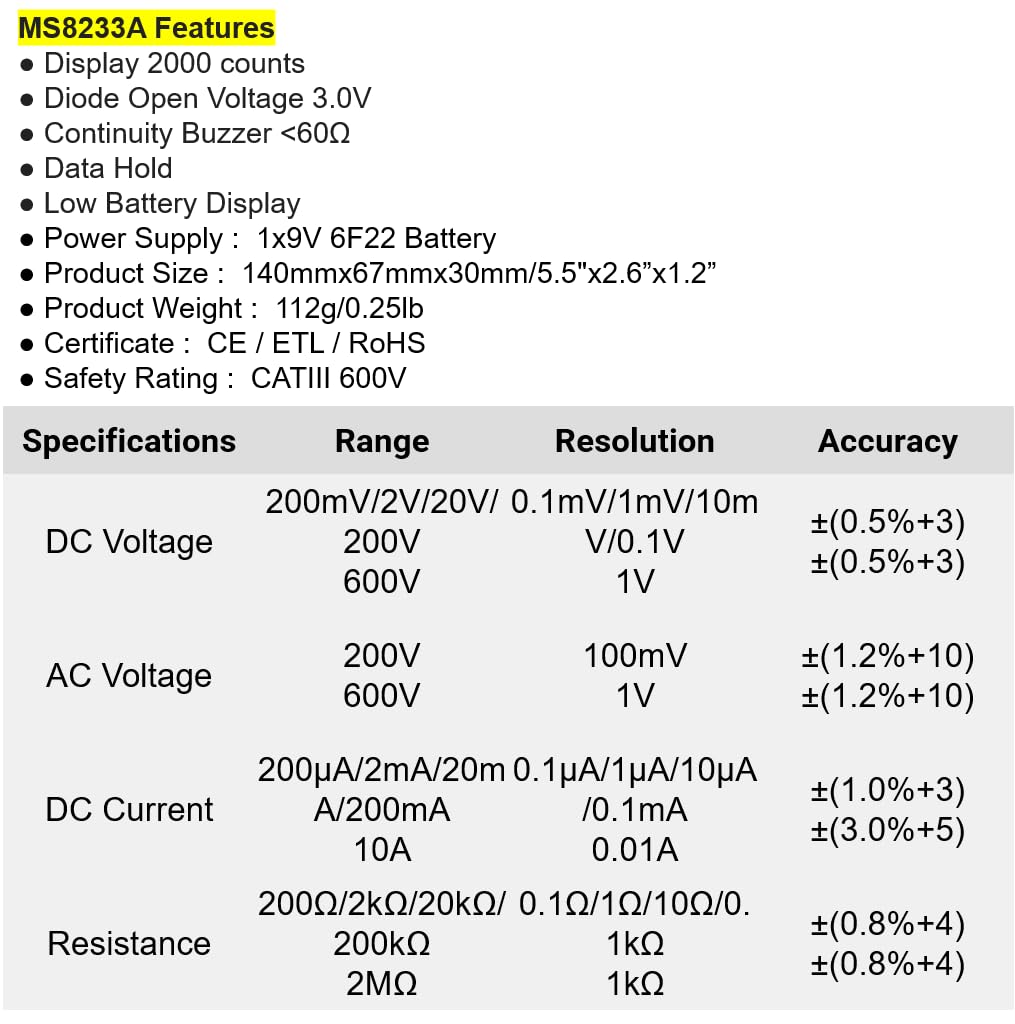
Figure 3: Detailed electrical specifications for the Mastech MS8233A.
9.3 Related Models Comparison

Figure 4: Comparison table of various Mastech manual ranging digital multimeters, including the MS8233A.
10. Bermea eta Laguntza
Mastech products are designed for reliability and performance. For warranty information or technical support, please refer to the warranty card included with your product or contact Mastech customer service through their official webgunea. Gorde erosketa-agiria erosketaren frogagiri gisa berme-erreklamazioetarako.


