1. Konfigurazioa
This section guides you through the initial setup of your DOOGEE U10 tablet.
1.1 Paketearen edukia
Ziurtatu elementu guztiak kutxan daudela:
- DOOGEE U10 tableta
- USB motako kablea
- Elikatze-moldagailua
- SIM txartela ateratzeko tresna (aplikagarria bada)
- Hasierako gida azkarra
- Berme Txartela
1.2 Gailuaren diseinua
Ezagutu zure tabletaren ezaugarri fisikoak.
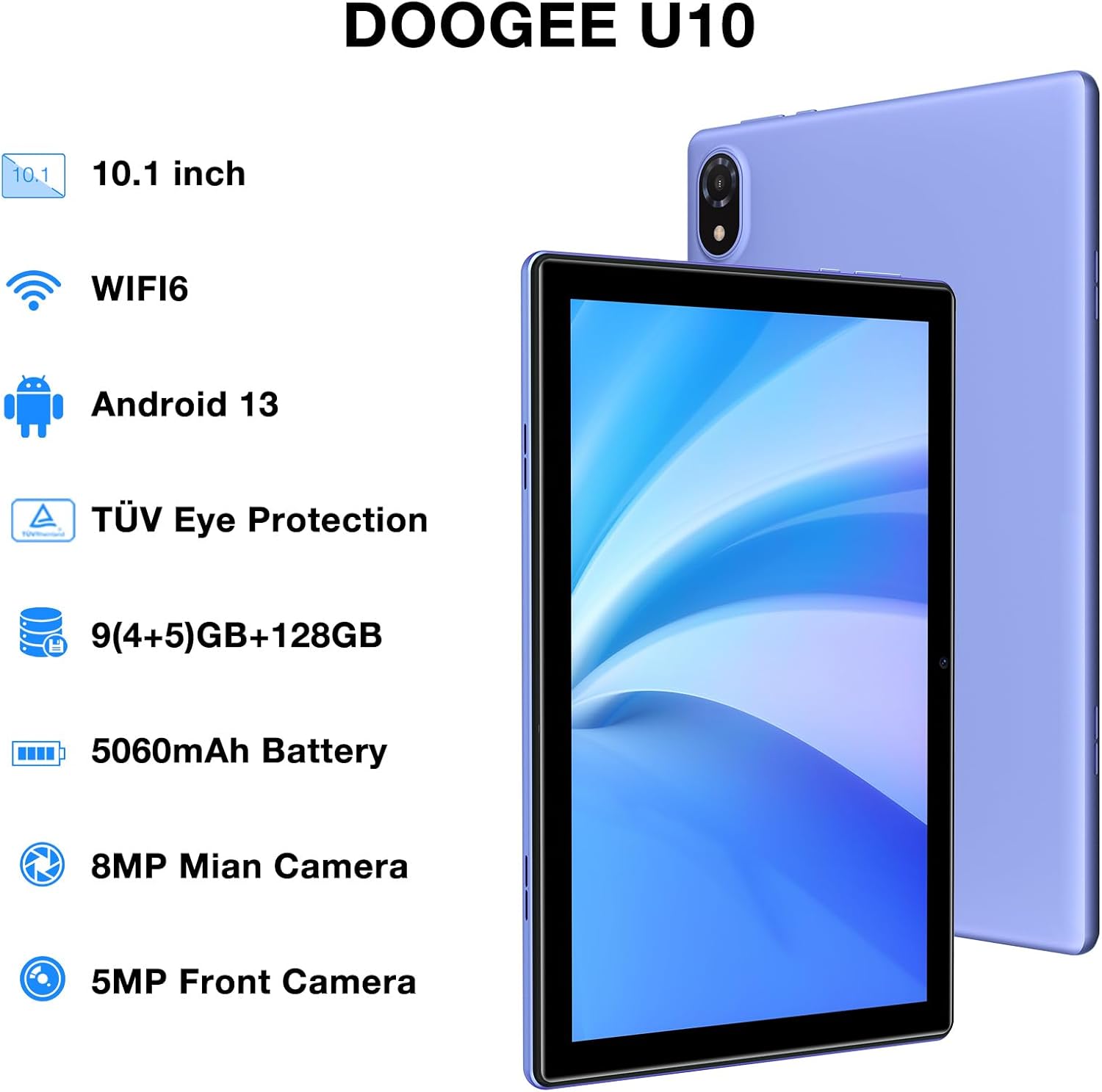
Figure 1: DOOGEE U10 Tablet Overview. This image highlights the tablet's 10.1-inch display, WiFi 6 capability, Android 13 operating system, TÜV Eye Protection, 9GB RAM, 128GB ROM, 5060mAh battery, 8MP main camera, and 5MP front camera.
- Pizteko botoia: Located on the side, press and hold to power on/off or restart.
- Bolumen-botoiak: Adjust media volume and notification sounds.
- USB C motako ataka: Kargatzeko eta datuak transferitzeko.
- 3.5 mm aurikularretarako konektua: Connect wired headphones.
- Aurrealdeko kamera: Bideo-deietarako eta selfieetarako.
- Atzeko kamera: Argazkiak eta bideoak ateratzeko.
- Hizlariak: Dual stereo speakers for audio output.
1.3 Hasierako piztea eta kargatzea
Before first use, fully charge your tablet. Connect the USB Type-C cable to the tablet and the power adapter to a wall outlet. The battery indicator will show charging status.
- Press and hold the Power Button until the DOOGEE logo appears.
- Jarraitu pantailan agertzen diren argibideei hizkuntza hautatzeko, Wi-Fi sarera konektatzeko eta Google kontua konfiguratzeko.
2. Tabletaren erabilera
Learn how to navigate and use the core features of your DOOGEE U10 tablet.
2.1 Pantaila eta nabigazioa
The DOOGEE U10 features a 10.1-inch IPS HD display with a resolution of 1280x800 pixels, providing clear visuals for various tasks.

Figure 2: Vivid IPS HD Display. This image illustrates the tablet's 10.1-inch screen with 800x1280 HD+ resolution, ideal for media consumption.
- Ukipen-keinuak: Sakatu hautatzeko, irristatu korritzeko, apurtu handitzeko.
- Hasierako pantaila: Pertsonalizatu widgetekin eta aplikazioen lasterbideekin.
- Jakinarazpenak: Irristatu hatza goitik behera jakinarazpenak eta ezarpen azkarrak atzitzeko.
- Aurpegi-aitorpena: Unlock your tablet using facial recognition for convenience.
2.2 Errendimendua eta biltegiratzea
The tablet is powered by a Quad-Core RK3562 processor clocked at up to 2.0GHz, ensuring smooth performance. It comes with 9GB RAM (5GB physical + 4GB expansion) and 128GB internal storage, expandable up to 1TB via a microSD card.

Figure 3: Powerful Processor and Memory. This image details the tablet's Rockchip RK3562 Quad-Core processor, 9GB RAM, 128GB ROM, and support for 1TB TF card expansion.
2.3 Konektibitatea
- Wi-Fi 6: Connect to high-speed Wi-Fi networks for faster browsing and streaming. Go to Settings > Network & internet > Wi-Fi.
- Bluetooth 5.0: Pair with wireless headphones, speakers, or other Bluetooth devices. Go to Settings > Connected devices > Bluetooth.
- OTG (Edonora Eramateko): Connect USB peripherals like flash drives or keyboards using an OTG adapter (sold separately).
2.4 Kameraren funtzioak
The tablet is equipped with an 8MP main camera and a 5MP front camera for photos and video calls.

Figure 4: Dual Camera System. This image showcases the tablet's 8MP main camera and 5MP front camera, suitable for capturing moments and video conferencing.
- Ireki Kamera aplikazioa hasierako pantailatik edo aplikazioen tiraderatik.
- Sakatu obturadorearen botoia argazkia ateratzeko.
- Aldatu aurreko eta atzeko kameren artean kameraren ikonoa erabiliz.
2.5 Bateriaren kudeaketa
The 5060mAh battery provides extended usage. To optimize battery life, adjust screen brightness, close unused apps, and enable power-saving modes.

Figure 5: Large Capacity Battery. This image highlights the 5060mAh battery, Type-C charging, 5V2A fast charging, and 3.5mm headphone jack, along with estimated usage times for gaming, movies, and music.
2.6 Multimedia Esperientzia
Enjoy an immersive audio experience with dual stereo speakers. The tablet supports Widevine L1, allowing for high-quality streaming from various video platforms.

Figure 6: Immersive Audio and DRM L1. This image illustrates the tablet's support for WiFi 6, Bluetooth 5.0, dual speakers, and DRM L1 for enhanced multimedia playback.
2.7 Eye Protection Mode
The DOOGEE U10 is TÜV SÜD blue light certified, reducing harmful blue light emissions to protect your eyes during prolonged use.

Figure 7: TÜV Certified Eye Protection. This image shows the TÜV Rheinland certification, indicating the tablet's low blue light feature for eye comfort.
2.8 Produktu Ofizialen Bideoak
DOOGEE U10 Tablet Showcase
Bideo honek ikuspegi orokorra eskaintzen duview and showcase of the DOOGEE U10 tablet's features and design.
DOOGEE U10 Fantastic Experience for Kids
This video demonstrates how the DOOGEE U10 tablet can be used by children, highlighting its suitability for educational and entertainment purposes for younger users.
3. Mantentzea
Proper care ensures the longevity and optimal performance of your tablet.
3.1 Tableta garbitzea
- Erabili zapi leun eta lihorik gabeko bat pantaila eta gorputza garbitzeko.
- Saihestu produktu kimiko gogorrak, garbitzaile urratzaileak edo aerosolak erabiltzea.
- Orban egoskorretarako, apur bat dampGarbitu oihal bat urarekin edo elektronikarako diseinatutako pantaila-garbitzaile batekin.
3.2 Software eguneraketak
Regularly check for and install software updates to enhance performance, security, and add new features.
- Joan Ezarpenak > Sistema > Sistema eguneratzea atalera.
- Konektatu Wi-Fi sare egonkor batera eguneraketak deskargatu aurretik.
4. Arazoak
Atal honek zure DOOGEE U10 tabletarekin izan ditzakezun arazo ohikoenei buruzko informazioa ematen du.
4.1 Gailua ez da pizten
- Ziurtatu bateria kargatuta dagoela. Konektatu tableta kargagailura gutxienez 30 minutuz.
- Press and hold the Power Button for 10-15 seconds to force a restart.
4.2 Konexio arazoak (Wi-Fi/Bluetooth)
- Toggle Wi-Fi or Bluetooth off and on in Quick Settings or Settings menu.
- Berrabiarazi tableta eta bideratzailea/Bluetooth gailua.
- Ahaztu sarea/gailua eta konektatu berriro.
4.3 Aplikazioak kraskatzen edo izozten dira
- Itxi arazoa duen aplikazioa eta ireki berriro.
- Clear the app's cache: Settings > Apps > [App Name] > Storage & cache > Clear cache.
- Ziurtatu aplikazioa azken bertsiora eguneratuta dagoela.
- Arazoak jarraitzen badu, kontuan hartu aplikazioa desinstalatzea eta berriro instalatzea.
5. Zehaztapen Teknikoak
Key technical details of the DOOGEE U10 tablet.
| Ezaugarri | Zehaztapena |
|---|---|
| Ereduaren izena | U10 |
| Sistema eragilea | Android 13 |
| Pantailaren tamaina | 10.1 hazbete |
| Pantailaren bereizmena | 1280 x 800 pixel (HD+) |
| Prozesadorea | Quad-Core (Rockchip RK3562, up to 2.0GHz) |
| RAM | 9 GB (5 GB fisikoa + 4 GB hedapena) |
| Barne Biltegiratzea | 128 GB |
| Biltegiratze zabalgarria | Up to 1TB (microSD/TF card) |
| Kamera Nagusia | 8MP |
| Aurrealdeko kamera | 5MP |
| Bateria Edukiera | 5060mAh |
| Konektibitatea | Wi-Fi 6, Bluetooth 5.0, OTG |
| Neurriak (LxWxH) | 9.6 x 6.4 x 0.4 hazbete |
| Pisua | Gutxi gorabehera 1.13 lb (427 g) |
| Begietako babesa | TÜV SÜD Low Bluelight Certified |
| DRM euskarria | Widevine L1 |
6. Bermea eta Laguntza
Information regarding your product's warranty and how to obtain support.
6.1 Berme mugatua
The DOOGEE U10 tablet typically comes with a 2-year limited warranty. This warranty covers manufacturing defects and workmanship under normal use. Please refer to the warranty card included in your package for specific terms and conditions, including coverage details and exclusions.
Gorde erosketa-froga berme-erreklamazioetarako.
6.2 Bezeroarentzako laguntza
If you encounter any issues not covered in the troubleshooting section or require further assistance, please contact DOOGEE customer support.
- Lineako laguntza: Visit the official DOOGEE website for FAQs, support resources, and contact options.
- Posta elektronikoko laguntza: Refer to your warranty card or quick start guide for specific email addresses.
- Zerbitzu Zentroak: Information on authorized service centers may be available on the DOOGEE webgunea.
When contacting support, please have your tablet's model number (U10) and purchase information ready.


