1. Sarrera
This manual provides essential information for the installation, operation, and maintenance of your ZEBRONICS Iceberg Premium Gaming Chassis. Please read these instructions carefully before beginning the assembly process to ensure proper functionality and safety. This chassis is designed to house mATX and Mini ITX motherboards, offering a blend of aesthetic appeal and efficient cooling for your gaming setup.
2. Segurtasun informazioa
- Always disconnect the power supply from the wall outlet before installing or removing any components inside the chassis.
- Handle tempered glass panels with care. Avoid impacts or sharp objects that could cause breakage.
- Wear anti-static wrist straps to prevent electrostatic discharge (ESD) damage to sensitive electronic components.
- Keep small parts and screws away from children.
- Ziurtatu aireztapen egokia xasisaren inguruan, gehiegi berotzea ekiditeko.
3. Paketearen edukia
Egiaztatu elementu guztiak paketean daudela:
- ZEBRONICS Iceberg Premium Gaming Chassis - 1 unit
- Osagarrien kita (torlojuak, euskarriak, kable-bridak)
- Erabiltzailearen eskuliburua (dokumentu hau)
4. Produktua amaitu daview eta Ezaugarriak
The ZEBRONICS Iceberg chassis is designed for optimal performance and aesthetics. Key features include:
- Glass-finish Outlook: Features sleek tempered glass wrap-around front and side panels for an enhanced visual appeal.
- Plakaren bateragarritasuna: Supports mATX and Mini ITX motherboards.
- Aireztapen nahikoa: Equipped with 5 pre-installed 120mm multicolor LED ring fans (one at the rear, two at the bottom, and two at the top) for effective cooling.
- Konexio anitzekoa: Front panel includes 1x USB 3.0 port, 2x USB 2.0 ports, and dedicated mic and headphone ports. The rear panel offers 4 expansion slots.
- Component Accommodation: Supports graphics cards up to 255mm in length and CPU coolers up to 165mm in height. Power supply unit (PSU) installs at the bottom.
- Optimal Cooling System: Designed to guarantee superior airflow and enhance frame rates during prolonged gaming sessions.
- Magnetic Dust Filters: Includes a magnetic dust filter at the top and a detachable dust filter at the bottom for easy maintenance.
- Kableen kudeaketa eraginkorra: Features a design that simplifies organizing internal cables.

Irudia: Aurrealdea view of the ZEBRONICS Iceberg Premium Gaming Chassis in white, showcasing its tempered glass panels and internal LED fans.
Bideoa: Amaiera batview of the ZEBRONICS Iceberg Premium Gaming Chassis, highlighting its design and features.
5. Instalazio gida
Follow these steps to install your components into the ZEBRONICS Iceberg chassis:
5.1. Txasisa prestatzea
- Carefully remove the tempered glass side panel by unscrewing the thumb screws and sliding it off. Place it on a soft, flat surface to prevent scratches.
- Identify the pre-installed standoffs for your motherboard size (mATX or Mini ITX). Adjust or install additional standoffs from the accessory kit if necessary.
5.2. Plaka amaren instalazioa
- Install your motherboard's I/O shield into the chassis's rear opening.
- Carefully align your mATX or Mini ITX motherboard with the standoffs and I/O shield.
- Lotu plaka nagusia emandako torlojuekin. Ez estutu gehiegi.

Image: The interior of the chassis, indicating support for mATX and Mini ITX motherboard form factors.
5.3. Elikatze-iturriaren (PSU) instalazioa
- Position your PSU at the bottom rear of the chassis.
- Secure the PSU to the chassis using the screws provided with your power supply.
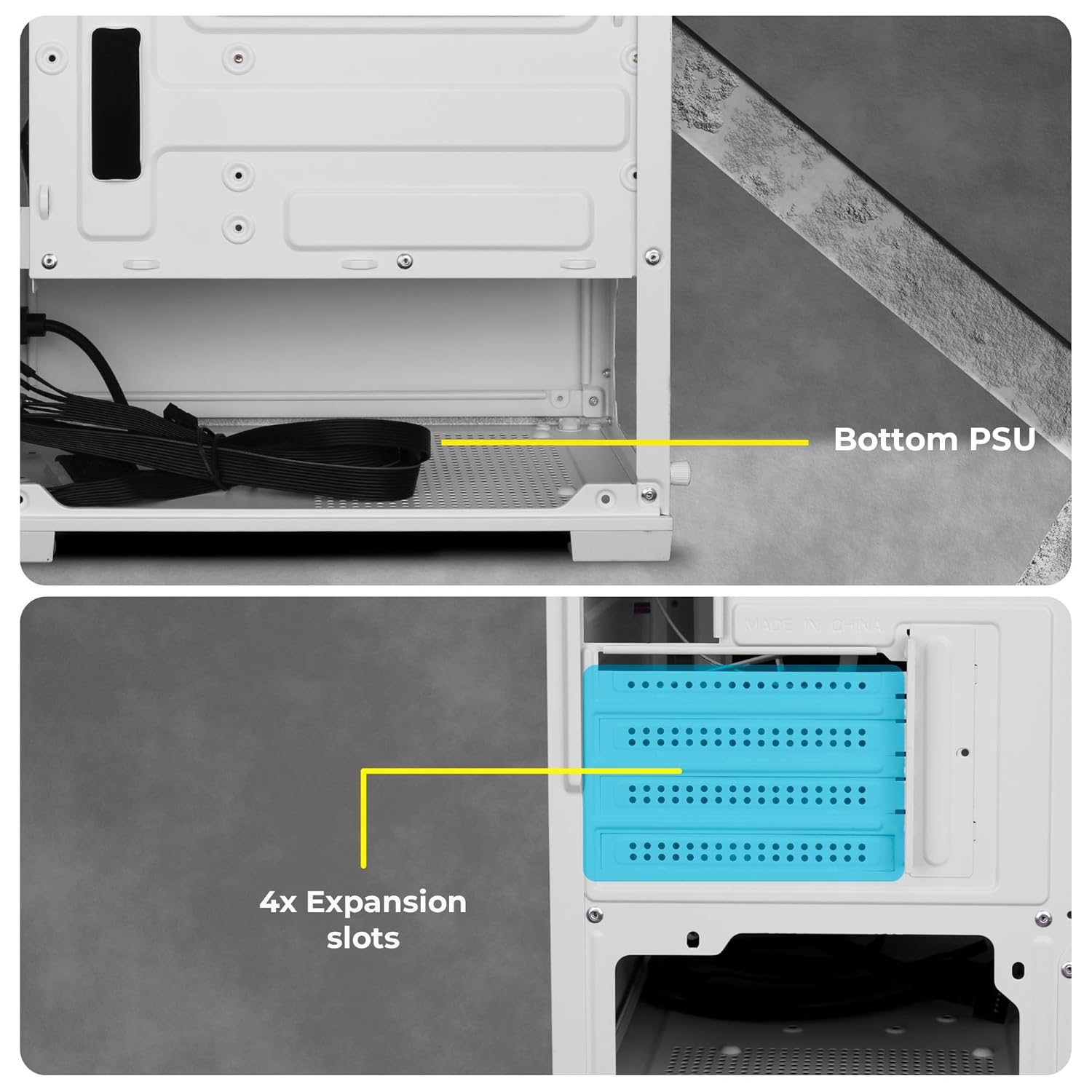
Irudia: View of the chassis interior showing the designated area for bottom-mounted PSU and the four expansion slots.
5.4. Biltegiratze unitatearen instalazioa
The chassis provides mounting options for 2.5-inch SSDs and 3.5-inch HDDs. Refer to the chassis interior for specific drive bay locations and secure drives with appropriate screws.
5.5. Grafiko Txartelaren (GPU) eta Hedapen Txartelaren Instalazioa
- Kendu beharrezko hedapen-zirrikituen estalkiak txasisaren atzealdean.
- Insert your graphics card or other expansion cards into the appropriate PCIe slots on your motherboard.
- Secure the cards with screws. Note that the chassis accommodates GPUs up to 255mm in length.
5.6. Kableen kudeaketa
Utilize the cable routing cutouts and tie-down points behind the motherboard tray to organize cables. This improves airflow and gives a cleaner look to your build.
6. Funtzionamendu-argibideak
6.1. Front Panel Connectivity
The front panel provides convenient access to essential ports:
- Pizteko botoia: To turn the system on/off.
- RGB LED Control Switch: To cycle through various lighting modes for the pre-installed fans.
- LED adierazleak: For power and HDD activity.
- Audio atakak: Dedicated ports for microphone and headphones.
- USB 2.0 portuak: Bi portu periferikoak konektatzeko.
- USB 3.0 ataka: One high-speed port for data transfer.

Irudia: Gertuko planoa view of the front panel showing the power button, RGB control switch, LED indicators, audio jacks, and USB ports.
6.2. Fan Operation and RGB Control
The chassis comes with 5 pre-installed 120mm multicolor LED ring fans. These fans provide effective cooling and aesthetic lighting. Use the dedicated RGB LED Control Switch on the front panel to change the lighting effects of the fans. Connect the fan power cables to your motherboard or power supply as per your system's requirements.

Image: The chassis interior with the multicolor LED ring fans illuminated, showcasing various lighting effects.

Irudia: Xehetasun zehatza view highlighting the five pre-installed 120mm multicolor LED ring fans located at the top and rear of the chassis.
7. Mantentzea
Regular maintenance helps ensure optimal performance and longevity of your chassis.
7.1. Hauts-iragazkiaren garbiketa
The chassis features a top magnetic dust filter and a detachable bottom dust filter. Regularly remove and clean these filters to prevent dust buildup, which can impede airflow and affect cooling performance.

Image: Close-up of the top magnetic dust filter, designed for easy removal and cleaning.
7.2. Garbiketa orokorra
Use a soft, dry cloth to wipe down the exterior surfaces of the chassis. For tempered glass panels, use a glass cleaner and a microfiber cloth. Avoid abrasive cleaners or solvents.
8. Arazoak
- Sistemak ez du pizten: Ensure all power cables (24-pin ATX, 8-pin CPU, GPU, etc.) are securely connected to the motherboard and components. Verify the PSU switch is in the 'ON' position. Check front panel power button connections to the motherboard.
- Haizagailuak ez dira biratzen edo RGBak ez du funtzionatzen: Confirm that the fan power cables are correctly connected to the motherboard or fan controller. Ensure the RGB control switch is functioning. If individual fans are not working, check their specific connections.
- Overheating issues: Ensure all fans are spinning correctly and oriented for optimal airflow (e.g., bottom fans as intake, top/rear as exhaust). Clean dust filters regularly. Verify CPU cooler and GPU cooler are properly installed.
- Difficulty with cable management: Due to the compact nature of the chassis, careful planning is required. Utilize all available tie-down points and route cables behind the motherboard tray where possible.
- Front panel ports not working: Check that the front panel header cables (USB 3.0, USB 2.0, Audio) are correctly connected to the corresponding pins on your motherboard.
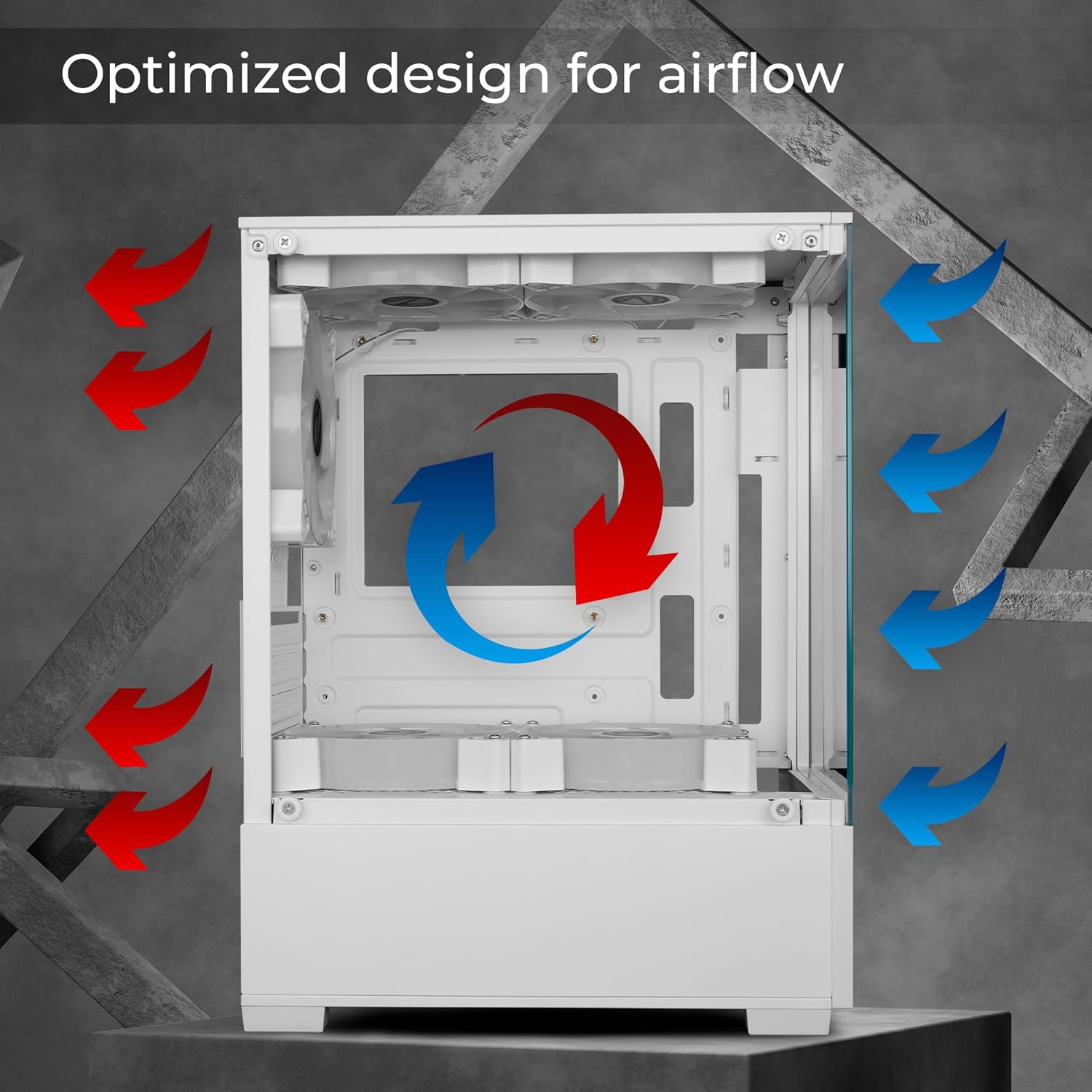
Image: Diagram illustrating the optimized airflow design within the chassis, with red arrows indicating exhaust and blue arrows indicating intake.
9. Zehaztapen Teknikoak
| Ezaugarri | Zehaztapena |
|---|---|
| Marka | ZEBRONIKA |
| Modelo zenbakia | Zeb-Iceberg |
| Plaka amaren bateragarritasuna | Mikro ATX, Mini ITX |
| Kasu mota | Mid dorrea |
| Materiala | Beira Tenplatua |
| Aurrez instalatutako zaleak | 5 x 120mm Multicolor LED Ring Fans (2 Top, 2 Bottom, 1 Rear) |
| GPU Luzerako Laguntza | Gehienez 255 mm |
| CPU hozkailuaren altuera euskarria | Gehienez 165 mm |
| Aurreko I / O Portuak | 1x USB 3.0, 2x USB 2.0, Mic, Headphone, RGB Control Switch, Power Button |
| Zabaltzeko Slots | 4 |
| Produktuaren neurriak (LxWxH) | 24.5 x 34.7 x 43.5 cm |
| Elementuaren pisua | 3.2 kg |
10. Bermearen informazioa
Your ZEBRONICS Iceberg Premium Gaming Chassis comes with a standard manufacturer's warranty. Please refer to the warranty card included with your product or visit the official ZEBRONICS webwebgunean bermearen estaldurari eta iraupenari buruzko baldintza zehatzak ikusteko.
11. Laguntza
For technical assistance, product inquiries, or support, please contact ZEBRONICS customer service. Contact details can typically be found on the official ZEBRONICS webgunean edo produktuaren ontzian.
ZEBRONICS INDIA SOZIETATE MUGATU PRIBATUA
13/7, Smith Road, Royapettah, Chennai-600002


