1. Sarrera
The RuoShui 9205D Digital Multimeter is a stable and high-performance battery-driven instrument designed for precise electrical measurements. It features a clear LCD display with unit symbols and backlight for easy reading. The multimeter includes overload protection to ensure safe operation.
This instrument is capable of measuring DC voltage (DCV), AC voltage (ACV), DC current (DCA), AC current (ACA), resistance, capacitance, inductance, temperature, and frequency. Additionally, it supports diode, triode, and continuity testing. Utilizing a dual-integral A/D converter, the 9205D is an essential tool for electricians and hobbyists alike.
2. Ezaugarri nagusiak
- High Definition Large Screen: Equipped with a large LCD screen, providing a maximum display of 1999 counts for clear, intuitive, and easily understandable numerical values.
- Erreduraren aurkako babes adimenduna: Features full-range intelligent anti-burn circuitry, enhancing safety and improving measurement precision.
- Itzali automatikoa: The instrument automatically shuts down after approximately 15 minutes of inactivity (this function can be disabled), conserving battery life and extending the instrument's lifespan.
- Single Probe Live Wire Detection: Allows for quick determination of whether a circuit is live or powered using a single test probe.
- Neurketa Funtzio Integralak: euskarria voltage, resistance, capacitance, on/off beep (continuity), diode, and triode measurements.
3. Segurtasun informazioa
To ensure safe operation and prevent damage to the meter, please read and follow all safety instructions carefully.
- Always ensure the meter is in good working condition before use. Do not use if the casing is damaged or if the test leads are frayed.
- Never exceed the maximum input limits for any measurement range. Refer to the specifications section for details.
- Oso kontuz ibili voltag30V AC RMS, 42V peak edo 60V DC-tik gorakoak. Bolumen hauektagshock arriskua dakar.
- Deskonektatu beti zirkuituaren korrontea eta deskargatu bolumen handiko karga guztiak.tagErresistentzia, jarraitutasun, diodo edo kapazitantzia neurketak egin aurretik, egiaztatu kondentsadoreak.
- Ensure the correct function and range are selected before connecting the test leads to the circuit.
- Connect the common (COM) test lead first, then the live test lead. Disconnect the live test lead first, then the common test lead.
- Irakurketa zehatzak bermatzeko, ordezkatu bateria berehala bateria baxuaren adierazlea agertzen denean.
- Ez erabili neurgailua gas lehergarriak, lurrunak edo hautsak dauden inguruneetan.
4. Paketearen edukia
Verify that all items are present and undamaged upon opening the package.
- RuoShui 9205D Digital Multimeter
- Proba-kableak (bat gorri, bestea beltz)
- Argibide eskuliburua
- Produktuen Kutxa

Image: Contents of the RuoShui 9205D Digital Multimeter package, showing the meter, test leads, and manual.
5. Produktua amaitu daview
Familiarize yourself with the components of your RuoShui 9205D Digital Multimeter.

Image: The large, high-definition LCD screen of the 9205D Multimeter, showing its clear digital display.
5.1. Pantaila
The large LCD shows measurement values, unit symbols (e.g., V, A, Ω, F, H, ℃), polarity, and special function indicators like APO (Auto Power Off) and low battery.
5.2. Etengailu birakaria
The central rotary switch is used to select the desired measurement function (e.g., DCV, ACV, Resistance, Capacitance, Diode, etc.) and range.
5.3. Sarrerako konektoreak
- COM (Komuna) Jack: Proba-kable beltzarentzat (negatiboa).
- VΩmA Jack: For the red (positive) test lead for voltage, resistance, capacitance, diode, and small current measurements.
- 10A-ko Jack-a: For the red (positive) test lead for high current (up to 10A) measurements.
6. Konfigurazioa
6.1. Bateriaren instalazioa
The RuoShui 9205D Multimeter operates on a 9V battery. To install or replace the battery:
- Ziurtatu multimetroa itzalita dagoela eta proba-kableak deskonektatuta daudela.
- Bilatu bateriaren konpartimentuaren estalkia neurgailuaren atzealdean.
- Kendu euskarri-torlojua(k) eta kendu estalkia.
- Konektatu 9V-ko bateria berri bat bateriaren kliparekin, polaritate zuzena errespetatuz.
- Jarri bateria konpartimentuaren barruan eta jarri berriro estalkia, torloju(ekin) finkatuz.
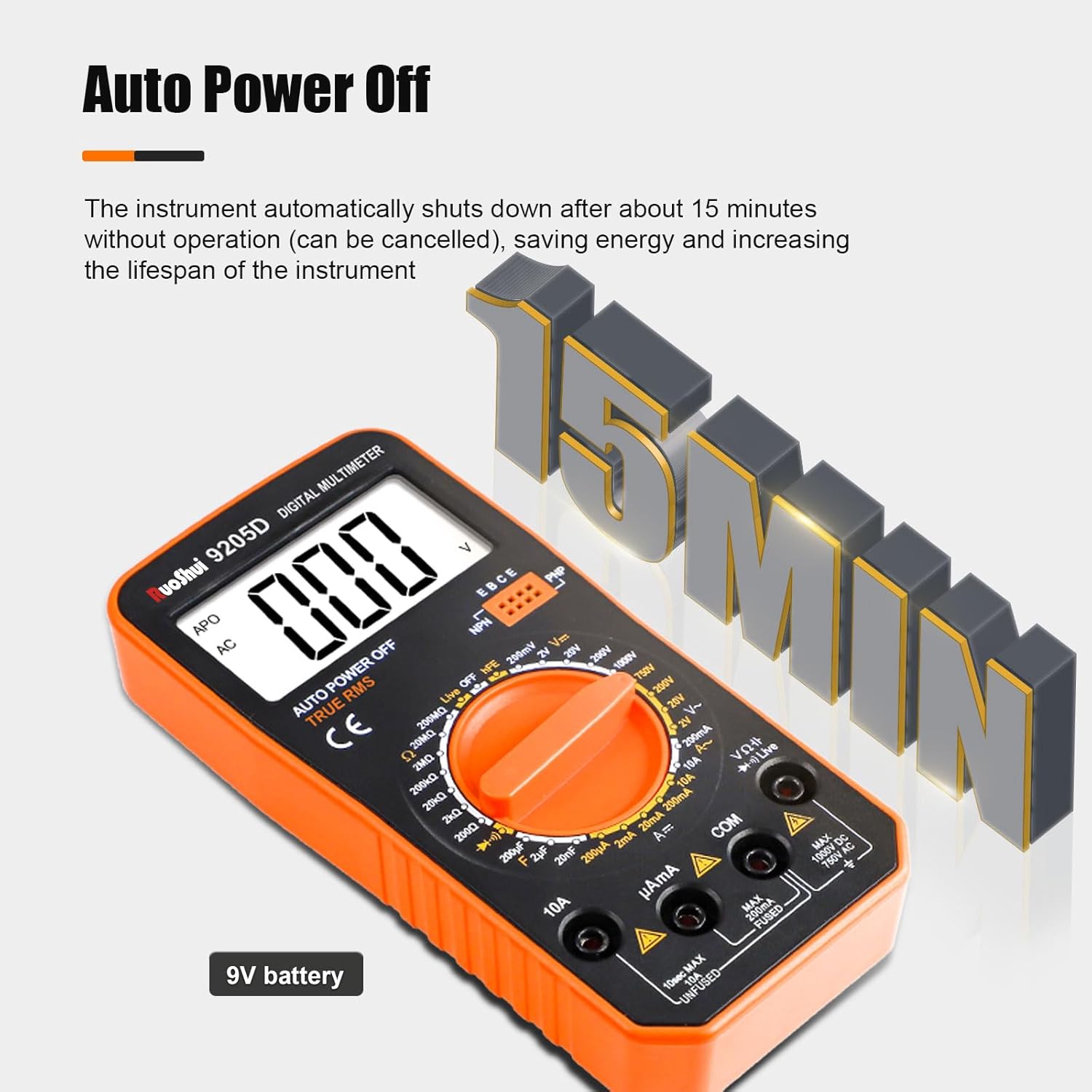
Image: The multimeter indicating its 9V battery power source.
7. Funtzionamendu-argibideak
Before taking any measurements, ensure the test leads are properly connected and the rotary switch is set to the correct function and range.

Image: Visual guide to different measurement functions including voltage, resistance, and capacitance.
7.1. Neurketa Prozedura Orokorra
- Sartu proba-kable beltza COM konektorean.
- Insert the red test lead into the appropriate input jack (VΩmA or 10A) for the desired measurement.
- Turn the rotary switch to the desired function and range. If the value is unknown, start with the highest range and decrease as necessary.
- Konektatu proba-zundak probatu beharreko zirkuituari edo osagaiari.
- Irakurri neurketaren balioa LCD pantailan.
- Disconnect the test probes from the circuit.
7.2. Neurketa-funtzio espezifikoak
- liburukiatage Measurement (DCV/ACV): Select the 'V—' for DC voltage or 'V~' for AC voltage. Connect probes in parallel with the circuit.
- Current Measurement (DCA/ACA): Select the 'A—' for DC current or 'A~' for AC current. Connect probes in series with the circuit. Use the 10A jack for high currents.
- Erresistentziaren neurketa (Ω): Select the 'Ω' range. Ensure the circuit is de-energized. Connect probes across the component.
- Kapazitantziaren neurketa (F): Select the 'F' range. Ensure the capacitor is discharged before connecting probes.
- Inductance Measurement (H): Select the 'H' range. Connect probes across the inductor.
- Diodo proba: Select the diode symbol. Connect the red probe to the anode and black probe to the cathode.
- Triode Test (hFE): Insert the transistor into the hFE socket, ensuring correct EBC/PNP/NPN configuration.
- Jarraitasun proba: Select the continuity symbol (buzzer). If resistance is below a certain threshold, the buzzer will sound.
7.3. Single Pen Live Wire Judgment
This function allows you to quickly check for the presence of AC voltage without needing both test leads.
- Ezarri biraketa-etengailua 'Live' posizioan.
- Hold the multimeter firmly and touch the tip of the red test probe to the suspected live wire or terminal.
- The display will indicate the presence of AC voltage, often with an 'L' or a specific symbol, and may emit an audible alert.

Image: Demonstrating the single-pen live wire judgment feature on an electrical outlet.
8. Mantentzea
Mantentze egokiak zure multimetroaren iraupena eta zehaztasuna bermatzen ditu.
8.1. Garbiketa
Garbitu neurgailuaren casiniragarkiarekin gamp oihal eta detergente leun batekin. Ez erabili urratzailerik edo disolbatzailerik. Ziurtatu neurgailua guztiz lehor dagoela erabili aurretik.
8.2. Bateria ordezkatzea
Refer to Section 6.1 for battery replacement instructions. Always use a fresh 9V battery.
8.3. Fusiblearen ordezkapena
The multimeter is equipped with internal fuses for protection. If the current measurement function stops working, the fuse may need replacement.

Irudia: Barnekoa view showing the 200mA/250V fuse tube, part of the intelligent anti-burning protection.
- Ziurtatu multimetroa itzalita dagoela eta proba-kableak deskonektatuta daudela.
- Ireki bateriaren konpartimentuaren estalkia (ikusi 6.1 atala).
- Kontu handiz kendu atzeko c-aasing of the multimeter to access the circuit board.
- Locate the blown fuse (typically a glass tube fuse).
- Replace it with a fuse of the exact same type and rating (e.g., 200mA/250V).
- Berriro muntatu multimetroa, torloju guztiak ondo estutu direla ziurtatuz.
9. Arazoak
If you encounter issues with your multimeter, refer to the following common problems and solutions.
- Ez dago pantailarik edo pantaila ahula:
- Egiaztatu bateria. Ordeztu bateria baxua edo agortuta badago.
- Ensure the battery is installed with correct polarity.
- Verify the rotary switch is not in the 'OFF' position.
- Irakurketa okerrak:
- Ziurtatu neurketarako funtzio eta tarte zuzenak hautatu direla.
- Egiaztatu proba-kableak kaltetuta edo konexio txarra dagoen.
- Verify the battery level. Low battery can affect accuracy.
- Ensure the circuit is de-energized for resistance, continuity, and capacitance measurements.
- Uneko neurketak ez du funtzionatzen:
- Check the internal fuse (refer to Section 8.3). It may have blown due to an overcurrent.
- Ensure the red test lead is connected to the correct current input jack (mA or 10A).
- 'OL' (Gainezka) pantaila:
- Neurtutako balioak hautatutako tartea gainditzen du. Aldatu tarte handiago batera.
- For resistance, it may indicate an open circuit.
10. Zehaztapenak
| Parametroa | Balioa |
|---|---|
| Gehienezko pantaila | 1999 (3 1/2 digits) |
| Vol. Baxuatage Erakutsi | Bateriaren ikurra |
| Itzaltze automatikoa | Gutxi gorabehera. 15 minutuko jarduerarik gabe |
| Sampling Tarifa | 3 aldiz / segundo |
| ACV Frequency Response | (40-1000)Hz |
| Over Range Prompt | 'OL' at highest position |
| Lan-ingurunea | (0-40)℃, relative humidity <80% |
| Biltegiratze ingurunea | (-20~60)℃, relative humidity <85% |
| Energia iturria | 9 V-ko bateria |
| Neurriak | 167 x 81 x 43 mm |
| Pisua | Gutxi gorabehera. 167 g |
| Neurketaren Zehaztasuna | %0.5 |
| Gutxieneko Eragiketa Boltage | 2 Volt |
| Gehienezko bolumen operatiboatage | 1000 Volt |
| Goiko Tenperaturaren Balorazioa | 40℃ |
11. Bermea eta Laguntza
The RuoShui 9205D Digital Multimeter is designed for reliability and performance. For warranty information or technical support, please refer to the contact details provided with your purchase documentation or visit the official RuoShui webgunea.
Keep your purchase receipt as proof of purchase for any warranty claims. Do not attempt to repair the device yourself, as this may void the warranty and pose safety risks.


