1. Sarrera
This manual provides essential information for setting up, operating, and maintaining your OSCAL Flat 1C smartphone. Please read it carefully to ensure proper use and to maximize the device's performance and longevity.

Image: The OSCAL Flat 1C smartphone, showcasinbere diseinu dotorea.
2. Paketearen edukia
Egiaztatu elementu guztiak zure produktuaren paketean daudela:
- OSCAL Flat 1C Smartphone
- USB motako kablea
- Elikatze-moldagailua
- SIM kanporatzeko tresna
- Hasierako gida azkarra (eskuliburu hau)

Image: Contents of the OSCAL Flat 1C retail box, including the phone, charger, and cable.
3. Gailua amaitu daview
Familiarize yourself with the physical components of your OSCAL Flat 1C smartphone.

Irudia: Gehiagoview of the OSCAL Flat 1C highlighting key features like RAM, ROM, camera, battery, screen size, Face ID, and Android 13.
Funtsezko osagaiak:
- Aurrealdeko kamera: Selfieetarako eta bideo-deietarako.
- Pantaila: 6.56 hazbeteko HD+ pantaila, ikusmen garbiak lortzeko.
- Bolumen-botoiak: Doitu multimedia eta dei bolumena.
- Pizteko botoia: Turn the device on/off, lock/unlock the screen.
- SIM/SD txartelaren erretilua: Insert your SIM cards and microSD card.
- USB C motako ataka: Kargatzeko eta datuak transferitzeko.
- Atzeko kamera: Capture high-quality photos and videos.
- Hizlaria: Audio irteera.
4. Konfigurazioa
4.1. SIM eta MicroSD txartelak sartzea
- Bilatu SIM txartelaren erretilua telefonoaren alboan.
- Sartu SIM txartela ateratzeko tresna erretiluaren ondoko zulo txikian eta bultzatu astiro erretilua atera arte.
- Jarri Nano-SIM txartela(k) eta/edo microSD txartela erretiluko zirrikituetan. Ziurtatu urre koloreko kontaktuak behera begira daudela.
- Kontu handiz sartu erretilua telefonoan berriro, bere lekuan klik egin arte.
4.2. Hasierako piztea eta konfigurazioa
- Press and hold the Power button until the OSCAL logo appears.
- Jarraitu pantailan agertzen diren argibideei hizkuntza hautatzeko, Wi-Fi sarera konektatzeko eta Google kontua konfiguratzeko.
- You will be prompted to set up a screen lock (PIN, pattern, or password) and Face ID.
4.3. Setting up Face ID
Face ID allows you to unlock your phone using facial recognition.
- Joan zaitez Ezarpenak > Segurtasuna eta pribatutasuna > Aurpegia desblokeatzea.
- Follow the on-screen prompts to register your face. Ensure you are in a well-lit area and hold the phone at eye level.
- For optimal security, Face ID should be used in conjunction with a strong PIN or pattern.
5. Funtzionamendu-argibideak
5.1. Android 13 and Doke_OS 4.0
Your OSCAL Flat 1C runs on Android 13 with the Doke_OS 4.0 interface, offering intuitive graphics and fluid controls.

Image: Screenshots of the Android 13 and Doke_OS 4.0 user interface, showing various apps and widgets.
- Nabigazioa: Use gestures or the traditional three-button navigation bar (configurable in Settings).
- Jakinarazpenak: Irristatu hatza pantailaren goialdetik behera jakinarazpenak eta ezarpen azkarrak atzitzeko.
- Widgetak: Customize your home screen with widgets for quick access to information.
- Floating Window: Doke_OS 4.0 supports floating windows for enhanced multitasking.
5.2. Konektibitatea
- Wi-Fi: Konektatu haririk gabeko sareetara honen bidez Ezarpenak > Sarea eta Internet > Wi-Fi. Supports 2.4G and 5G dual-band Wi-Fi.
- Bluetootha: Parekatu Bluetooth gailuekin (aurikularrak, bozgorailuak) bidez Ezarpenak > Konektatutako gailuak > BluetoothaBluetooth 4.2 onartzen du.
- Datu mugikorrak (4G): Ziurtatu SIM txartela aktibo dagoela eta datu mugikorrak gaituta daudela Ezarpenak > Sarea eta Internet > Sare mugikorra.
- OTG (Edonora Eramateko): Connect USB devices like flash drives or keyboards using an OTG adapter (sold separately).
5.3. Biltegiratzea eta errendimendua
The OSCAL Flat 1C is equipped with a Unisoc SC 9863A 8-core processor, 4GB RAM, and 32GB ROM, expandable up to 1TB via a TF card.

Image: Diagram illustrating the 4GB RAM (2GB + 2GB virtual) and 32GB ROM, with 1TB TF card expansion capability.
- RAMaren kudeaketa: The 4GB RAM allows for smooth multitasking.
- Biltegiratze kudeaketa: The 32GB internal storage provides space for apps and files. Expand storage with a microSD card for additional capacity.
6. Kameraren erabilera
Capture memorable moments with the OSCAL Flat 1C's cameras.

Image: Visual representation of the OSCAL Flat 1C's 8MP rear camera and 5MP front camera, with exampargazkiak.
- Atzeko kamera: The 8MP Samsung back camera captures detailed photos and vibrant colors.
- Aurrealdeko kamera: 5MP-ko aurrealdeko kamera aproposa da selfieetarako eta bideo-deietarako.
- Bideo Grabaketa: Record videos in 1080P resolution.
- Kamera aplikazioa: Open the Camera app from your home screen or app drawer. Tap to focus, pinch to zoom, and use various modes like Photo, Video, and Portrait.
7. Baterien kudeaketa
Your OSCAL Flat 1C is equipped with a 4700mAh battery designed for extended use.
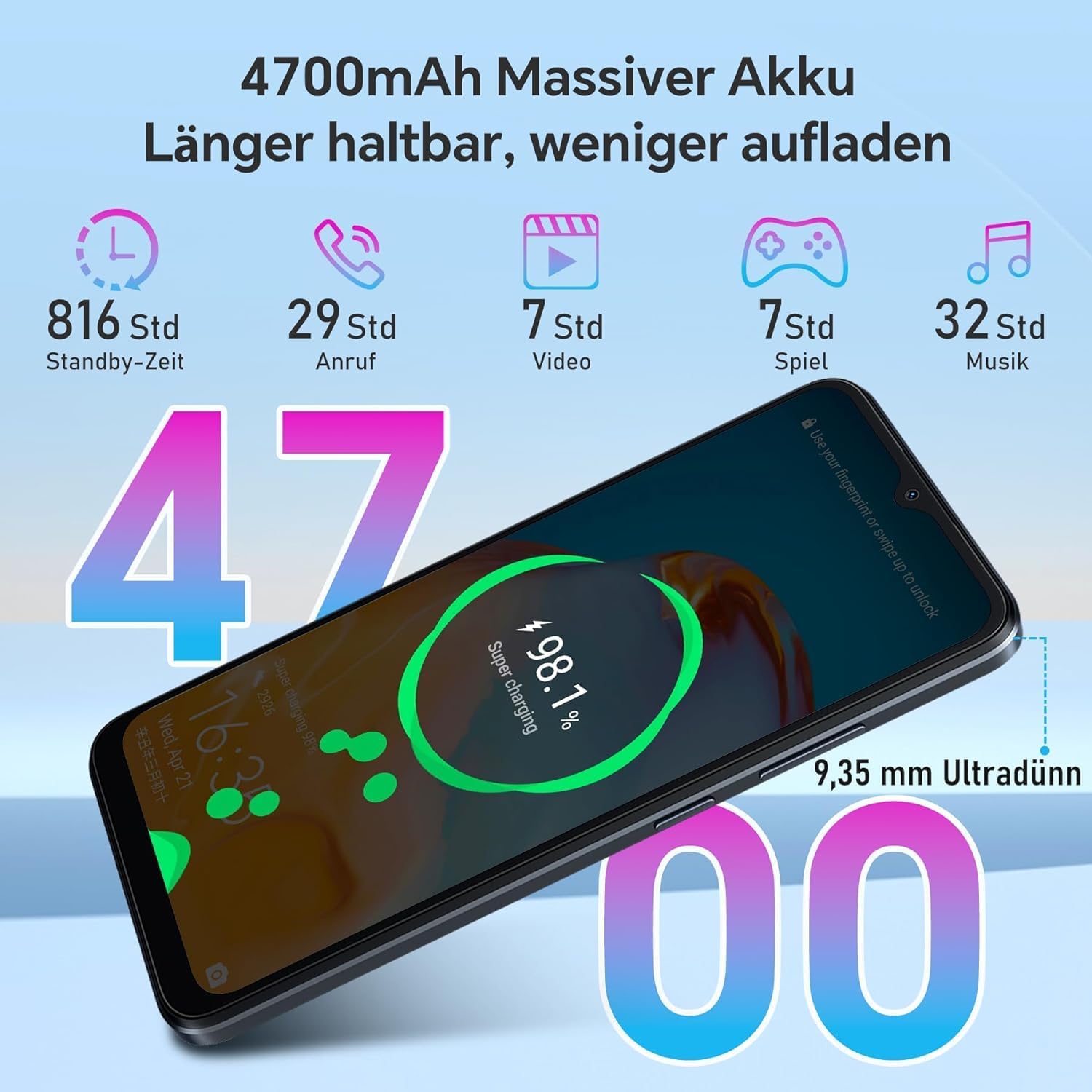
Image: Infographic showing the 4700mAh battery and estimated usage times for standby, calls, video, gaming, and music playback.
- Kargatzen: Use the provided Type-C cable and power adapter to charge your device.
- Bateriaren iraupena: Expect up to 34 days standby, 29 hours talk time, 32 hours music playback, and 7 hours video playback on a single charge.
- Bateria aurrezlea: Gaitu bateria aurrezteko modua hemen: Ezarpenak > Bateria bateriaren iraupena luzatzeko behar denean.
8. Zehaztapenak
Detailed technical specifications for the OSCAL Flat 1C smartphone:
| Ezaugarri | Zehaztapena |
|---|---|
| Eredua | Flat 1C |
| Bistaratzeko tamaina | 6.56 inches HD+ |
| Prozesadorea | Unisoc SC 9863A 8-core |
| RAM | 4 GB |
| Barne biltegiratzea (ROM) | 32 GB |
| Biltegiratze zabalgarria | Gehienez 1 TB (TF txartela) |
| Sistema eragilea | Android 13 with Doke_OS 4.0 |
| Atzeko kamera | 8 MP Samsung |
| Aurrealdeko kamera | 5 MP |
| Bateria Edukiera | 4700 mAh |
| Kargatzeko ataka | USB C motakoa |
| Konektibitatea | 4G, Wi-Fi (2.4G/5G), Bluetooth 4.2 |
| Nabigazioa | GPS, GLONASS, Galileo |
| Segurtasun Ezaugarriak | Aurpegiko IDa |
| Pisua | 192 g |
9. Mantentzea
Follow these guidelines to keep your OSCAL Flat 1C in optimal condition:
- Garbiketa: Erabili zapi leun eta lihorik gabeko bat pantaila eta gorputza garbitzeko. Saihestu produktu kimiko gogorrak.
- Software eguneraketak: Egiaztatu eta instalatu sistemaren eguneraketak aldizka honen bidez: Ezarpenak > Sistema > Sistema eguneratzea zure gailuak azken funtzioak eta segurtasun-adabakiak dituela ziurtatzeko.
- Saihestu muturreko baldintzak: Do not expose the phone to extreme temperatures, direct sunlight for prolonged periods, or excessive moisture.
- Babestu pantaila: Kontuan hartu pantaila-babesle bat eta babes-zorro bat erabiltzea marradurak eta kalteak saihesteko.
10. Arazoak
Hona hemen aurki ditzakezun arazo ohikoen irtenbideak:
- Gailua ez da pizten: Ziurtatu bateria kargatuta dagoela. Konektatu telefonoa kargagailura gutxienez 10 minutuz, eta gero saiatu berriro pizten.
- Aplikazioak huts egiten edo blokeatzen: Close background apps. If the issue persists, restart the phone. Consider clearing the app's cache or reinstalling it.
- Wi-Fi konexio eskasa: Restart your Wi-Fi router and your phone. Ensure you are within range of the Wi-Fi signal.
- SIM txartela ez da detektatu: Ensure the SIM card is correctly inserted into the tray. Restart the phone.
- Bateria azkar agortzen da: Reduce screen brightness, disable unnecessary features like GPS or Bluetooth when not in use, and check battery usage in Ezarpenak > Bateria energia-gosea duten aplikazioak identifikatzeko.
11. Bermea eta Laguntza
Your OSCAL Flat 1C smartphone comes with a 12 hilabeteko berme epea erosketa-datatik aurrera. Berme honek erabilera normalaren ondoriozko fabrikazio-akatsak estaltzen ditu.
For warranty claims, technical support, or further assistance, please contact OSCAL customer service through their official website or the retailer where you purchased the device. Keep your proof of purchase for warranty validation.
For more information, visit the official OSCAL webgunea: www.oscal.global


