Sarrera
This manual provides detailed instructions for the setup, operation, and maintenance of your MageGee V560 Wireless Gaming Keyboard and Mouse Combo. Please read this manual thoroughly before use to ensure optimal performance and longevity of your device.

Image: The MageGee V560 Wireless Gaming Keyboard and Mouse Combo, featuring a blue, white, and purple color scheme, with the USB receiver visible.
Paketearen edukia
Mesedez, egiaztatu elementu guztiak paketean daudela:
- MageGee V560 Wireless Keyboard
- MageGee Wireless Mouse
- 2.4GHz USB Receiver (stored in mouse battery compartment)
- USB-C kargatzeko kablea
- Erabiltzailearen eskuliburua

Image: Contents of the MageGee V560 package, including the keyboard, mouse, USB receiver, charging cable, and user manual.
Konfigurazio Argibideak
- Aurkitu USB hargailua: Open the battery cover of the wireless mouse. The 2.4GHz USB receiver is stored inside the compartment next to the mouse battery slot.
- Konektatu hargailua: Konektatu USB hargailua zure ordenagailuko USB ataka erabilgarri batean.
- Piztu gailuak: Ensure both the keyboard and mouse are powered on. The devices are plug-and-play and should connect automatically.
- Hasierako karga: For optimal performance, it is recommended to fully charge both the keyboard and mouse before first use. Use the provided USB-C charging cable.

Image: Illustration showing the 2-in-1 USB receiver connecting the keyboard and mouse wirelessly to a laptop.
Funtzionamendu-argibideak
Teklatuaren funtzioak
- RGB atzeko argiztapenaren kontrola:
- Sakatu FN + INS atzeko argia pizteko edo itzaltzeko.
- Sakatu FN + PgUp or FN + PgDn to adjust the 3-level backlight brightness.
- Sakatu FN + 1 / 2 / 3 / 4 / 5 to switch between different backlight modes. Note: Backlight settings are not saved after power off.
- Multimedia lasterbideak: Erabili FN key in combination with F1-F12 keys for quick access to multimedia functions such as volume control, media playback, and more.
- Diseinu ergonomikoa: The keyboard features a stepped layout and foldable brackets at the bottom, allowing you to adjust the typing angle for comfort during extended use.
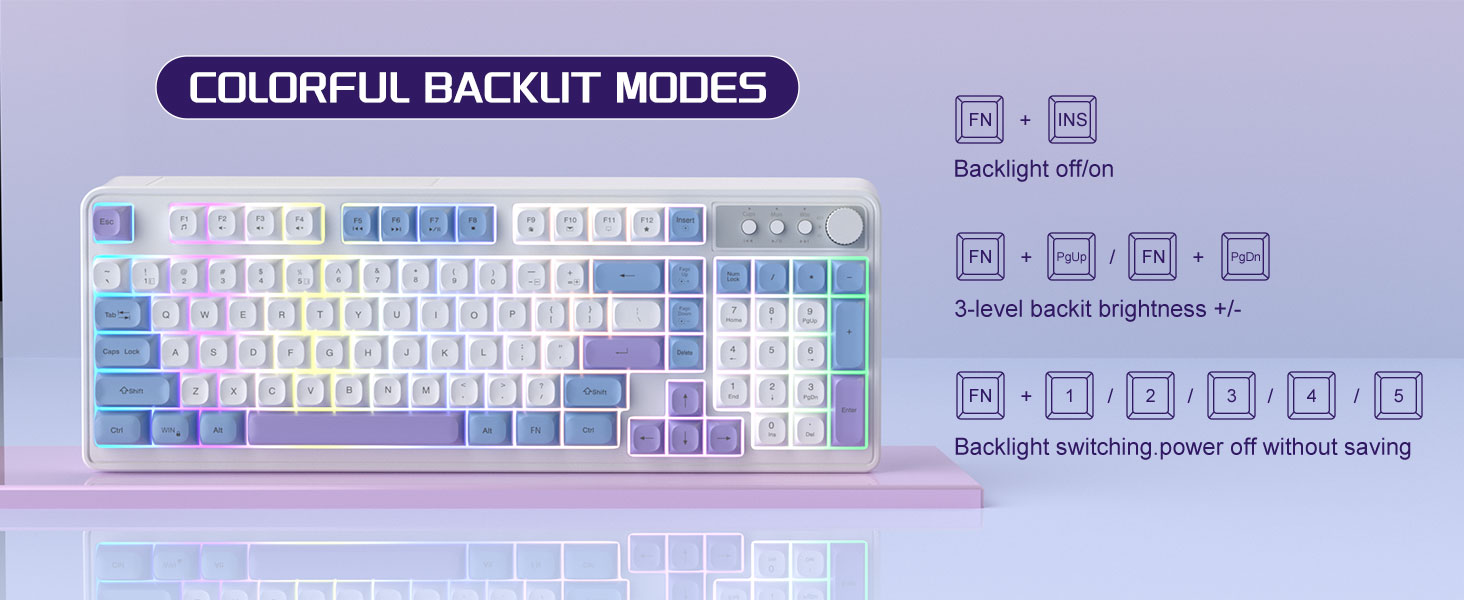
Image: The MageGee V560 keyboard displaying various colorful backlit modes, with instructions for controlling them.

Image: A visual representation of the 16 multimedia shortcuts available on the MageGee V560 keyboard, activated via the FN key.
Saguaren funtzioak
- DPI doikuntza: The mouse supports 6 levels of DPI adjustment (600-3200 DPI). Press the DPI button (usually located below the scroll wheel) to cycle through the sensitivity settings. Internal indicator lights will show the current DPI level.
- Breathing Backlight: The mouse features 7 dazzling color breathing backlights. This lighting is automatic and indicates mouse activity.

Image: The MageGee V560 mouse highlighting its DPI settings (1000, 1200, 1600 DPI) and showing the USB-C charging port.
Kargatzea eta bateriaren iraupena
- Both the keyboard and mouse are rechargeable. Use the provided USB-C charging cable to charge them.
- Keyboard Standby Time: Gehienez 365 egun.
- Mouse Standby Time: Gehienez 270 egun.
- Auto-lo funtzioa: The devices automatically enter sleep mode after a period of inactivity to conserve battery power and extend battery life.

Image: An illustration demonstrating the intelligent auto-sleep feature of the MageGee V560 combo, which conserves battery life.
Bateragarritasuna
The MageGee V560 Wireless Gaming Keyboard and Mouse Combo is compatible with the following operating systems:
- Irabazi 2000
- Irabazi XP
- Irabazi NI
- Vista
- Irabazi 7
- Irabazi 8
- Irabazi 10
- Android
- Linux
- Mac OS
Arazoak konpontzea
If you encounter issues with your MageGee V560 combo, please refer to the following common solutions:
- Gailua ez da konektatzen:
- Ziurtatu USB hartzailea ondo konektatuta dagoela funtzionatzen duen USB ataka batera.
- Egiaztatu teklatua eta sagua piztuta daudela.
- Check the battery levels of both devices and charge if necessary.
- Saiatu USB hargailua beste USB ataka batera konektatzen.
- Atzerapena edo deskonexioa:
- Ensure the devices are within the 33 ft (10 meter) operating range of the USB receiver.
- Minimize interference from other 2.4GHz wireless devices (e.g., Wi-Fi routers, cordless phones).
- Charge the devices to ensure sufficient power.
- Keys Not Registering / Mouse Not Responding:
- Recharge the keyboard and mouse.
- Ziurtatu USB hartzailea behar bezala konektatuta dagoela.
- Berrabiarazi ordenagailua.
- Atzeko argiaren arazoak:
- Ziurtatu teklatua kargatuta dagoela.
- Erabili FN + INS atzeko argia aktibatzeko.
- Doitu distira honekin: FN + Orrialdea gora/Orrialdea behera.
Zehaztapenak
| Marka | MageGee |
| Eredua | V560 |
| Konektibitate Teknologia | 2.4 GHz Wireless |
| Ezaugarri bereziak | RGB lighting, rechargeable keyboard and mouse, ergonomic design |
| Gailu bateragarriak | Personal Computer (Win2000, Win XP, Win ME, Vista, Win7, Win8, Win10, Android, Linux, Mac OS) |
| Elementuaren pisua | 1.87 kilo |
| Paketearen neurriak | 16.61 x 9.21 x 1.73 hazbete |
| Fabrikatzailea | MAGOA |
Mantentzea
- Garbiketa: Erabili zapi leun eta lehor bat teklatua eta sagua garbitzeko. Zikinkeria egoskorra bada, garbitu zapi pixka bat.amp oihal bat erabil daiteke, likidorik gailuan sartzen ez dela ziurtatuz.
- Biltegiratzea: Gorde gailuak leku fresko eta lehor batean, eguzki-argitik eta muturreko tenperaturetatik babestuta.
- Bateria zaintzea: Saihestu bateriak maiz erabat deskargatzea. Kargatu itzazu aldizka bateriaren osasuna mantentzeko.
Bermea eta Laguntza
Produktu hau a 1 urteko bermea erosketa-datatik aurrera.
For any questions or support needs, please contact MageGee customer service via Amazon email. We aim to respond within 12 hours and provide a satisfactory solution.


