1. Sarrera
This user manual provides essential information for the installation, operation, and maintenance of your APC Back-UPS Series uninterruptible power supply (UPS). This series includes two models: the BE900G3 (900VA/540W) eta du BE500G3 (500VA/300W). Both models are designed to protect your electronic equipment from power outages, surges, and spikes, ensuring continuous operation and safe shutdown of connected devices.
Please read this manual thoroughly before installing or operating your Back-UPS unit. Keep this manual for future reference.
2. Segurtasun informazioa
Observe the following safety precautions during installation and operation of your UPS unit:
- Segurtasun elektrikoa: Connect the UPS to a grounded outlet only. Do not remove the grounding prong from the power cord.
- Barruko erabilera soilik: This UPS is intended for indoor use in a controlled environment. Avoid exposure to excessive moisture, direct sunlight, or extreme temperatures.
- Bateriaren segurtasuna: The battery contains hazardous chemicals. Refer to the Maintenance section for battery replacement instructions. Do not dispose of batteries in a fire; they may explode.
- Aireztapena: Ensure adequate airflow around the UPS. Do not block ventilation openings.
- Gainkarga: Do not overload the UPS. Refer to the Specifications section for maximum load capacity.
3. Produktua amaitu daview
The APC Back-UPS Series provides reliable power protection for your home or small office electronics. Both models feature battery backup outlets, surge-only outlets, and USB charging ports.
3.1. Model BE900G3 (900VA / 540W)
This higher-capacity model is suitable for multiple PCs, networking equipment, and home entertainment systems. It offers extended runtime for critical devices.
- Saltokiak guztira: 8 (NEMA 5-15R)
- Battery Backup & Surge Protection Outlets: 6
- Tentsio-tentsioen aurkako babes-entxufeak soilik: 2
- USB kargatzeko atakak: 1 USB-C, 1 USB-A (5V/3A Shared)
- User Replaceable Battery: Yes (RBC17)
- Datu ataka: For PowerChute UPS management software (Windows 10, 11 Pro; Mac OS uses native Energy Saver settings)

Irudia: Aurrealdea view of the APC Back-UPS BE900G3, illustrating the arrangement of battery backup outlets, surge-only outlets, and the USB-C and USB-A charging ports on the side panel.
3.2. Model BE500G3 (500VA / 300W)
This compact model is ideal for essential devices such as routers, modems, and internet phones, ensuring connectivity during brief power interruptions.
- Saltokiak guztira: 6 (NEMA 5-15R)
- Battery Backup & Surge Protection Outlets: 4
- Tentsio-tentsioen aurkako babes-entxufeak soilik: 2
- USB kargatzeko atakak: 1 USB-C, 1 USB-A (5V/3A Shared)
- User Replaceable Battery: Yes (RBC17)
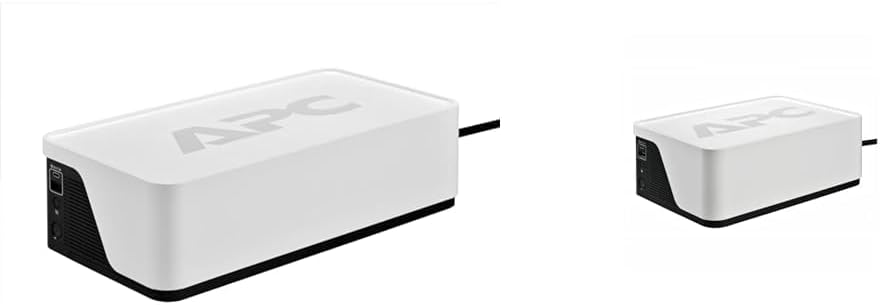
Image: A compact APC Back-UPS BE500G3 unit, showcasing its smaller form factor compared to the BE900G3.
3.3. Ezaugarri komunak
- Bolumen automatikoatage Araudia (AVR): Corrects minor voltage fluctuations without using battery power, extending battery life.
- Gaindituen babesa: Protects connected equipment from damaging power surges and spikes.
- Etengailua: Resettable circuit breaker for overload protection.
- Eraikinaren kableatu-akatsen adierazlea: Alerts to potential wiring issues in the wall outlet.

Irudia: Atzealdea view of an APC Back-UPS unit, highlighting the data port for communication with a computer and the resettable circuit breaker button.
4. Konfigurazioa
Follow these steps to set up your APC Back-UPS unit:
- UPSa despaketatzea: Carefully remove the UPS and all accessories from its packaging. Inspect for any shipping damage.
- Konektatu bateria: The battery may be disconnected for shipping. Refer to the Maintenance section for instructions on connecting the internal battery.
- Hasierako karga: Plug the UPS power cord into a grounded wall outlet. Allow the unit to charge for at least 24 hours before connecting any equipment to ensure maximum battery runtime. The UPS will charge whether it is turned on or off.
- Konektatu ekipoak:
- Battery Backup & Surge Protection Outlets: Connect critical equipment such as computers, monitors, routers, and modems to these outlets. These devices will receive power from the battery during an outage.
- Tentsio-tentsioen aurkako babes-entxufeak soilik: Connect non-critical equipment like printers, scanners, or lamps to these outlets. These outlets provide surge protection but no battery backup.
- Connect USB Charging Ports: Use the USB-C and USB-A ports to charge compatible mobile devices.
- (BE900G3 Only) Connect Data Port: For advanced power management and automatic shutdown features, connect the supplied USB cable from the UPS data port to your computer. Install APC PowerChute software (available for Windows) or configure native energy saver settings (for Mac OS).
- Turn On the UPS: Press the power button on the front of the unit. The power indicator will illuminate.

Image: An APC Back-UPS unit positioned within a home entertainment system, demonstrating how various devices like a TV and media players can be connected for power protection.
5. Funtzionamendu-argibideak
5.1. Power Button and Indicators
The front panel features a power button and LED indicators that provide status information:
- Pizteko botoia: Press to turn the UPS on or off.
- Pizteko adierazlea: Illuminates when the UPS is on and receiving utility power.
- Bateriaren adierazlea: Flashes or illuminates when the UPS is operating on battery power during an outage.
- Gainkargaren adierazlea: Illuminates if the connected load exceeds the UPS capacity.
- Eraikinaren kableatu-akatsen adierazlea: Illuminates if there is a wiring problem in the wall outlet (e.g., missing ground).

Irudia: Xehetasun zehatza view of the APC Back-UPS control panel, showing the power button, LED indicators, and the USB charging ports.
5.2. Bol automatikoatagAraudia (AVR)
Your Back-UPS unit includes AVR, which automatically corrects minor voltage fluctuations (sags and surges) without switching to battery power. This feature helps to preserve battery life and ensures a stable power supply to your connected devices.
5.3. Potentzia Outage Funtzionamendua
Potentzia batean zehartage, the UPS will automatically switch to battery power. An audible alarm will sound, and the 'On Battery' indicator will illuminate. The alarm will typically sound every 30 seconds. When utility power returns, the UPS will automatically switch back to utility power and recharge its battery.
Boterea badatage is prolonged, save your work and shut down your computer and other connected devices gracefully before the UPS battery is depleted. The BE900G3, when connected via its data port, can initiate an automatic shutdown of your computer.
6. Mantentzea
6.1. Bateria ordezkatzea
The batteries in your APC Back-UPS are user-replaceable. The typical battery life is 3-5 years, depending on usage and environmental conditions. When the battery needs replacement, the UPS will typically indicate this with an audible alarm and/or an LED indicator.
Replacement Battery Model: RBC17 (sold separately)
Prozedura:
- Itzali UPSa eta deskonektatu hormako entxufetik.
- Disconnect all connected equipment from the UPS.
- Locate the battery compartment (usually on the bottom or side of the unit).
- Follow the instructions on the battery compartment cover to open it and disconnect the old battery.
- Insert the new RBC17 battery, ensuring correct polarity.
- Close the battery compartment and reconnect the UPS to the wall outlet. Allow it to charge for 24 hours.
Abisua: Only use genuine APC replacement batteries. Using non-APC batteries may void your warranty and could be unsafe.
6.2. Garbiketa
Clean the exterior of the UPS with a soft, dry cloth. Do not use liquid or aerosol cleaners. Ensure ventilation openings are free from dust and debris.
6.3. Biltegiratzea
If storing the UPS for an extended period, charge the battery for 24 hours every 3-6 months to prevent battery degradation.
7. Arazoak
Ikusi beheko taula arazo ohikoenak eta haien irtenbideak ikusteko:
| Arazoa | Kausa posiblea | Irtenbidea |
|---|---|---|
| UPS-a ez da pizten | Battery not connected or discharged | Ensure battery is connected. Plug UPS into wall outlet and charge for 24 hours. |
| UPS beeps continuously or 'Overload' LED is on | Gainkarga egoera | Disconnect non-essential equipment from battery backup outlets. Reduce the total load. |
| UPSak ez du espero den funtzionamendu-denbora ematen | Battery is old or not fully charged | Replace battery if old. Ensure UPS is charged for 24 hours. |
| 'Building Wiring Fault' LED is on | Wiring problem in wall outlet | Kontsultatu elektrizista kualifikatu bati eraikinaren kableatua ikuskatzeko. |
| UPS is on but connected devices are not powered | Etengailua piztu da | Press the circuit breaker button on the rear of the UPS to reset it. |
8. Zehaztapenak
| Ezaugarri | BE900G3 | BE500G3 |
|---|---|---|
| Edukiera (VA/Watt) | 900VA / 540W | 500VA / 300W |
| Sarrera boltage | 120 V AC | 120 V AC |
| Irteera boltage (Baterian) | 120 V AC | 120 V AC |
| Saltokiak guztira | 8 (NEMA 5-15R) | 6 (NEMA 5-15R) |
| Bateriaren babesko irteerak | 6 | 4 |
| Surge Bakarrik Saltokiak | 2 | 2 |
| USB kargatzeko atakak | 1 USB-C, 1 USB-A (5V/3A Shared) | 1 USB-C, 1 USB-A (5V/3A Shared) |
| Erabiltzaileak ordezka daitekeen bateria | Yes (RBC17) | Yes (RBC17) |
| Datu portua | USB (for PowerChute) | Ez |
| Forma-faktorea | Trinkoa | Trinkoa |
| Kolorea | Zuria | Zuria |
| Entxufe mota | B mota - 3 pin (Ipar Amerika) | B mota - 3 pin (Ipar Amerika) |
9. Bermea eta Laguntza
APC provides a standard warranty for its Back-UPS products. For specific warranty terms and conditions, please refer to the warranty card included with your product or visit the official APC webgunea. Gorde erosketaren egiaztagiria bermearen erreklamazioetarako.
For technical support, troubleshooting assistance, or to inquire about replacement parts, please contact APC Customer Support through their official webgunea edo zure produktuaren ontzian emandako harremanetarako informazioa.


