1. Sarrera
This manual provides detailed instructions for the installation, operation, and maintenance of your ANRAN 4K 8MP PoE Security Camera System. Please read this manual thoroughly before using the product to ensure proper setup and functionality. This system is designed for comprehensive surveillance with advanced features such as 4K resolution, AI intelligent detection, auto-tracking, and two-way audio.

Figure 1: ANRAN 4K 8MP PoE Security Camera System components.
2. Paketearen edukia
Egiaztatu behean zerrendatutako elementu guztiak zure paketean sartuta daudela:
- ANRAN 4K 8MP PoE Cameras (4 units)
- Network Video Recorder (NVR) with 2TB HDD
- LAN Cables (for camera connection)
- NVRrako korronte egokitzailea
- USB sagua
- Muntatzeko Torlojuak eta Aingurak
- Hasierako gida azkarra
3. Segurtasun informazioa
- Ziurtatu elikadura hornidura boltage is compatible with the NVR.
- Ez jarri NVRa edo kamerak muturreko tenperaturen, hezetasunaren edo hautsaren eraginpean.
- Saihestu NVRa eguzki-argitan edo bero-iturrietatik gertu jartzea.
- Erabili onartutako osagarriak eta energia-egokigailuak soilik.
- Keep cables organized to prevent tripping hazards and damage.
- Consult a qualified professional for complex installations or electrical work.
4. Sistema amaituview
4.1 NVR Ports
The Network Video Recorder (NVR) serves as the central hub for your security system, managing camera connections, recording, and data storage. Familiarize yourself with the NVR's ports for proper setup.

Figure 2: Rear panel of the NVR showing various connection ports.
- Switch potentziala: Turns the NVR on/off.
- Camera Connection Ports (PoE): Connect PoE cameras using LAN cables.
- HDMI ataka: Connects to a monitor or TV for video output.
- VGA ataka: Alternative video output for monitors.
- USB atakak: For connecting a mouse, USB drive for backup, or external HDD.
- Net Port: Connects the NVR to your router for internet access and remote viewing.
- Potentzia ataka: Connects the NVR to the power adapter.
4.2 Kameraren Ezaugarriak
The ANRAN cameras are designed for outdoor use with IP65 weather resistance, ensuring reliable operation in various environmental conditions from -10°C to 50°C.

Figure 3: Camera weather resistance features.
5. Konfigurazioa
5.1 Initial System Connection
The PoE (Power over Ethernet) design simplifies installation by transmitting both power and data through a single LAN cable. This eliminates the need for separate power adapters for each camera.
- Konektatu NVRa monitore batera HDMI edo VGA kable bat erabiliz.
- Connect the USB mouse to one of the NVR's USB ports.
- Konektatu NVRa entxufe batera emandako korronte-egokitzailea erabiliz.
- Connect each camera to a PoE port on the NVR using a LAN cable. The cameras will power on automatically.
- For remote access, connect the NVR's Net port to your internet router using a LAN cable.

Figure 4: Simplified PoE connection using a single LAN cable.
5.2 Kameraren instalazioa
Select appropriate locations for your cameras, ensuring a clear field of view and secure mounting. The cameras can be installed up to 100 meters from the NVR using standard LAN cables.
- Mark the drilling points on the wall or ceiling using the camera's mounting base as a template.
- Beharrezkoa bada, zuloak egin eta hormako aingurak sartu.
- Secure the camera mounting base with screws.
- Adjust the camera angle as needed. The PTZ function allows for remote adjustment after installation.
6. Funtzionamendu-argibideak
6.1 Bizi View eta Grabaketa
Once connected, the cameras will automatically display live footage on the connected monitor. The system records continuously 24/7 to the internal 2TB HDD.

Figure 5: 4K 8MP resolution provides superior detail compared to 3MP.
6.2 PTZ Kontrola
The cameras feature Pan-Tilt-Zoom (PTZ) functionality, allowing you to remotely adjust the camera's viewing angle. This can be controlled via the NVR interface or the dedicated smartphone application.

Figure 6: PTZ control interface on a smartphone.
- pan: Biratu kamera horizontalki 355°-raino.
- okertu: Doitu kamera bertikalki 90°-raino.
- Zooma: Digital zoom is available through the software.
6.3 AI Intelligent Detection and Auto-Tracking
The system utilizes AI to differentiate between human and vehicle movement, reducing false alarms. When a human or vehicle is detected, the system can trigger an alarm, activate the camera's built-in lights, and send push notifications to your smartphone. The auto-tracking feature will automatically follow the detected subject within the camera's field of view.

Figure 7: AI detection in action with night vision and alert.

Figure 8: AI detection and alert system.
6.4 Bi norabideko audioa
Each camera is equipped with a built-in microphone and speaker, enabling two-way communication. You can listen to audio from the camera's location and speak through the camera using the smartphone application.

Figure 9: Two-way audio communication via the app.
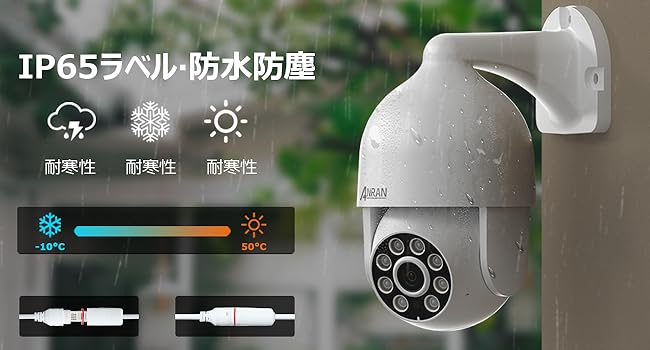
Figure 10: App interface for two-way audio.
6.5 Remote Access (App)
Download the ANRAN application on your smartphone (Android or iOS) to access live view, recorded footage, PTZ control, and two-way audio remotely. Multiple users can be granted access to view the system simultaneously.

11. irudia: Kamera anitzeko zuzeneko emanaldia view on the smartphone app.
7. Mantentzea
7.1 Disko gogorraren kudeaketa
The NVR includes a 2TB HDD for continuous recording. The system uses H.265+ compression to optimize storage space. An automatic overwrite function ensures that when the hard drive is full, the oldest recordings are deleted to make space for new footage.

Figure 12: Hard drive capacity and H.265+ compression benefits.
- Edukiera: The 2TB HDD can store approximately 30 days of footage from four 5MP cameras.
- Hedapena: The HDD is expandable up to 10TB. Refer to the NVR's internal instructions for replacement.
- Babeskopia: Egin aldizka elikagai garrantzitsuen babeskopiaktage kanpoko USB unitate batera behar izanez gero.
7.2 Firmware eguneraketak
Periodically check the ANRAN official website or the smartphone application for available firmware updates. Keeping your system's firmware up-to-date ensures optimal performance, security, and access to new features.
7.3 Garbiketa
Clean the camera lenses and NVR exterior regularly with a soft, dry cloth. Avoid using harsh chemicals or abrasive materials that could damage the surfaces.
8. Arazoak
| Arazoa | Kausa posiblea | Irtenbidea |
|---|---|---|
| Ez dago bideorik monitorearen bistaratzerik | Loose cable connection, NVR not powered on, incorrect input source on monitor. | Check HDMI/VGA cables, ensure NVR is powered, select correct input on monitor. |
| Kamerak ez du bideoa erakusten | LAN cable disconnected, camera not receiving power, faulty camera. | Verify LAN cable connection to NVR PoE port, check cable for damage, try a different port or camera. |
| Ez dago aplikazioaren bidezko urruneko sarbiderik | NVR not connected to internet, incorrect app settings, network issues. | Ensure NVR is connected to router, check router's internet connection, verify app settings and NVR network configuration. |
| Mugimendu detekzioaren alarma faltsuak | Sensitivity too high, environmental factors (e.g., moving branches, shadows). | Adjust detection sensitivity in NVR settings, utilize AI human/vehicle detection to filter out irrelevant motion. |
| Hard drive full, no new recordings | Overwrite function disabled, excessive recording settings. | Ensure automatic overwrite is enabled in NVR settings. The system is designed to manage storage automatically. |
9. Zehaztapenak
| Ezaugarri | Xehetasuna |
|---|---|
| Marka | ANRAN |
| Produktuaren eredu-zenbakia | SW-K04P7264 |
| Irudi-sentsorea | CMOS |
| Mota | Wired Surveillance Camera Set (PoE) |
| Dakarten osagaiak | Camera body, LAN cable, Network Video Recorder (NVR) |
| Gailu bateragarriak | Smartphoneak, Tabletak |
| Kameraren bereizmena | 8 Megapixel (4K, 3840x2160p) |
| NVR biltegiratzea | 2TB HDD (Expandable up to 10TB) |
| Konektibitate Teknologia | Kable bidezkoa (PoE) |
| Bideo-konpresioa | H.265 + |
| Ezaugarriak | PTZ control, AI Human/Vehicle Detection, Two-way audio, Automatic overwrite, Audio recording, Color Night Vision, IP65 Weatherproof |
| Kanal kopurua | 8 (supports up to 8 cameras) |
| Funtzionamendu-tenperatura | -10°C eta 50°C artean |
10. Bermea eta Laguntza
ANRAN products typically come with a manufacturer's warranty. Please refer to your purchase documentation or contact ANRAN customer support for specific warranty terms and conditions.
For technical assistance, troubleshooting, or any inquiries, please contact ANRAN customer support through their official website or the contact information provided with your product. When contacting support, please have your product model number (SW-K04P7264) and purchase details ready.


