Sarrera
This manual provides detailed instructions for the safe and efficient operation of your DEWENWILS 24 Hour Programmable Digital Timer Outlet. This device is designed to automate the on/off cycles of your indoor electrical appliances, enhancing convenience and energy efficiency. Please read this manual thoroughly before use and retain it for future reference.
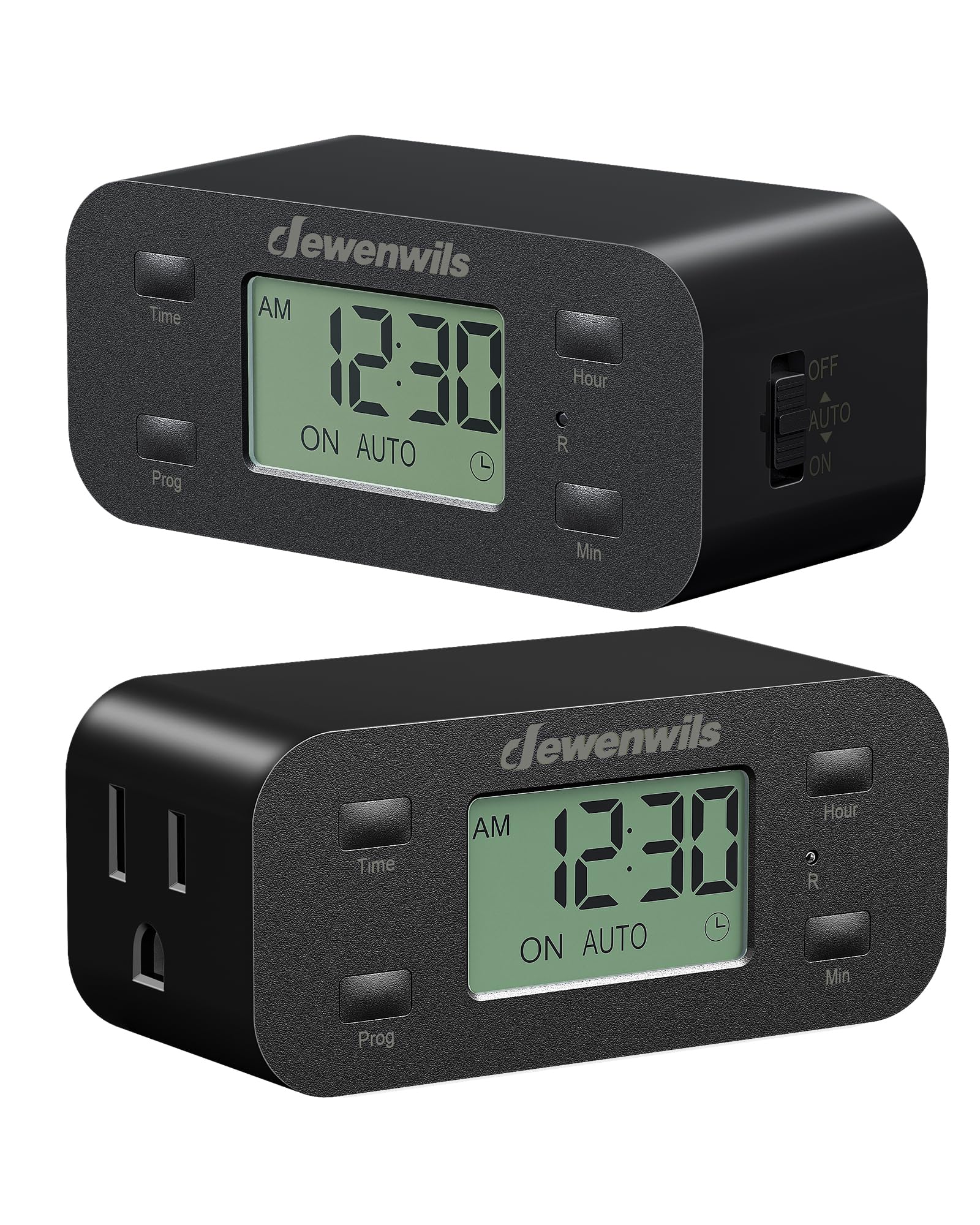
Irudia: Aurrealdea view of the DEWENWILS Digital Timer Outlet.
Segurtasun Informazioa
- Barruko erabilerarako soilik. Ez jarri euripean edo hezetasunean.
- Do not exceed the maximum load rating of 125V/15A/1000W.
- Ensure the timer is fully inserted into a grounded outlet.
- Do not use with devices that require continuous supervision, such as power tools or heating appliances without safety cut-offs.
- Mantendu haurren eskura.
- Do not disassemble or attempt to repair the device. Contact customer support if service is required.
Produktuaren Ezaugarriak
- 3 Group Daily Repeat Program: Set up to three daily on/off schedules.
- Minimalist & Functional Design: Slim profile ensures other outlets remain accessible.
- Ordezko Bateria: Retains programmed settings for up to 3 months during power interruptions.
- Errendimendu lasaia: Operates silently, suitable for bedrooms and quiet environments.
- Energia eraginkorra: Automates device operation to save time and energy.
- Aplikazio zabala: Ideala lamps, fans, aquariums, plant lights, and holiday decorations.
Paketearen edukia
- 2 x DEWENWILS 24 Hour Programmable Digital Timer Outlets
- 1 x Erabiltzailearen eskuliburua
Produktua amaituview
Familiarize yourself with the components of your DEWENWILS Digital Timer Outlet.

Image: The large LCD screen display for easy reading of time and settings.

Image: Side switch for manual control (OFF, AUTO, ON).

Image: Space-saving design allows access to the second wall outlet.
Konfigurazioa
Follow these steps to set up your DEWENWILS Digital Timer Outlet:
- Initial Reset: Before first use or after a long period of inactivity, use a small pin or paperclip to press the 'R' (Reset) button located on the front of the timer. This clears all previous settings.
- Ezarri uneko ordua:
- Press and hold the 'Time' button.
- While holding 'Time', press 'Hour' to adjust the hour.
- While holding 'Time', press 'Min' to adjust the minute.
- Release 'Time' when the correct time is set.
- Set a Program: The timer allows for up to 3 ON/OFF programs daily.
- Press the 'Prog' button once to enter Program 1 ON setting. The display will show '1 ON'.
- Use 'Hour' and 'Min' buttons to set the desired ON time for Program 1.
- Press 'Prog' again to enter Program 1 OFF setting. The display will show '1 OFF'.
- Use 'Hour' and 'Min' buttons to set the desired OFF time for Program 1.
- Repeat for Program 2 and Program 3 if needed.
- After setting all desired programs, press the 'Time' button to exit programming mode.

Image: Visual guide for resetting, setting the current time, and programming schedules.
Funtzionamendu-argibideak
Once programmed, select the desired operating mode using the side switch:
- AUTO MODUA: Slide the side switch to 'AUTO'. In this mode, the timer will automatically turn the connected device ON and OFF according to your programmed schedules. The display will show 'ON AUTO' or 'OFF AUTO'.
- ON modua: Slide the side switch to 'ON'. The connected device will remain continuously ON, overriding any programmed schedules. The display will show 'ON'.
- OFF modua: Slide the side switch to 'OFF'. The connected device will remain continuously OFF, overriding any programmed schedules. The display will show 'OFF'.

Irudia: Adibample of three daily repeat programs set on the timer.
Video Guide: Setup and Operation
Bideoa: Amaiera batview of the DEWENWILS 24 Hour Programmable Digital Timer Outlet, including unboxing, setting the time, programming schedules, and using the manual switch.
Mantentzea
- Clean the timer with a dry, soft cloth. Do not use liquid cleaners or sprays.
- Gorde leku fresko eta lehor batean erabiltzen ez duzunean.
- Periodically check the timer and connected devices for any signs of damage or wear.
Arazoak konpontzea
- Gailua ez da programatutako moduan pizten/itzaltzen:
- Ensure the side switch is set to 'AUTO'.
- Egiaztatu uneko ordua behar bezala ezarrita dagoela.
- Check that the ON and OFF times for your programs are correctly entered and do not overlap unintentionally.
- Confirm the connected device is functioning properly when plugged directly into a wall outlet.
- Pantaila hutsik edo ilun dago:
- Ensure the timer is securely plugged into a live electrical outlet.
- The backup battery may be low. Plug the timer into an outlet for several hours to charge the internal battery.
- Ezarpenak galdu dira energia itzaltzeantage:
- The internal backup battery may be depleted. The battery retains settings for up to 3 months. If the outage exceeds this, settings may need to be re-entered.
Zehaztapenak
- liburukiatage: 125 V AC
- Maiztasuna: 60Hz
- Gehienezko karga: 15A / 1000W
- Materiala: Plastikoa
- Produktuaren neurriak: 4.21" L x 1.85" W x 3.62" H
- Elementuaren pisua: 7.4 ontza
- Ezarpen kopurua: 3 daily ON/OFF programs
- Kolorea: Beltza
Bermea eta Laguntza
DEWENWILS produktuak fidagarritasun eta errendimendurako diseinatuta daude. Bermeari buruzko informazioa, laguntza teknikoa edo zure produktuarekin laguntza jasotzeko, mesedez, kontsultatu produktuaren ontzian agertzen diren harremanetarako datuak edo bisitatu DEWENWILS-en webgune ofiziala. website. Please have your model number (B0D2RM248G) ready when contacting support.


