1. Sarrera
This manual provides detailed instructions for setting up, operating, and maintaining your Womier SK80 PRO 75% Wireless Mechanical Keyboard. Please read this guide thoroughly to ensure proper usage and to maximize your keyboard's features.

Image 1.1: Womier SK80 PRO keyboard, wrist rest, and mouse pad setup.
2. Paketearen edukia
Egiaztatu elementu guztiak zure paketean daudela:
- Womier SK80 PRO %75eko haririk gabeko teklatu mekanikoa
- Matching Wrist Rest
- Matching Mouse Pad
- USB-C kablea
- 2.4G USB Receiver (stored magnetically in the keyboard)
- Keycap tiratzailea
- Switch Puller
- Erabiltzailearen eskuliburua (dokumentu hau)
3. Konfigurazioa
3.1 Konfigurazio fisikoa
- Jarri teklatua gainazal egonkor batean.
- Position the wrist rest in front of the keyboard for ergonomic support.
- Place the mouse pad next to your keyboard.
- Adjust the keyboard's feet for your preferred typing angle.

Image 3.1: Ergonomic design and dimensions of the keyboard and wrist rest.
3.2 Konexio moduak
The Womier SK80 PRO supports three connection modes: 2.4G Wireless, Bluetooth, and USB-C Wired.
- 2.4G Haririk gabeko modua:
- Locate the 2.4G USB receiver stored magnetically on the underside of the keyboard.
- Konektatu hargailua ordenagailuko USB ataka erabilgarri batean.
- Switch the mode selector on the keyboard's underside to '2.4G'.
- Teklatua automatikoki konektatu beharko litzateke.
- Bluetooth modua:
- Switch the mode selector on the keyboard's underside to 'BT'.
- Zure gailuan (ordenagailuan, tabletan, telefonoan), gaitu Bluetooth-a eta bilatu gailu berriak.
- Select 'Womier SK80 PRO' from the list of available devices to pair.
- The keyboard can connect to up to 3 Bluetooth devices. Use Fn + Q/W/E to switch between paired devices.
- USB-C kable bidezko modua:
- Konektatu emandako USB-C kablea teklatuaren USB-C atakara.
- Konektatu kablearen beste muturra ordenagailuko USB ataka erabilgarri batera.
- Switch the mode selector on the keyboard's underside to 'USB'.
- Teklatuak kable bidezko gailu gisa funtzionatuko du eta aldi berean kargatuko da.

Image 3.2: The keyboard supports three versatile connection modes.
3.3 Driver/Software Installation
For advanced customization, including key remapping, macro settings, RGB lighting effects, and custom GIF images on the multimedia screen, download the official Womier SK80 PRO software from the Womier website. The software is compatible with Windows systems.
Video 3.3: Demonstration of the Womier SK80 PRO programming software.
4. Funtzionamendu-argibideak
4.1 Oinarrizko teklatuaren funtzioak
The keyboard features a 75% layout with standard keys. Refer to the keycap legends for primary and secondary functions. Use the Fn key in combination with other keys to access secondary functions (e.g., media controls, F-keys).
4.2 Multimedia Screen Functions
The built-in color multimedia smart display screen can show various information and custom content:
- Bistaratu informazioa: Time, connection status, and battery level.
- Custom GIF Images: Upload custom GIF images via the software for a personalized display.

Image 4.1: Multimedia screen displaying various functions and custom GIFs.
Video 4.2: Demonstration of the multimedia display features.
4.3 RGB Argiztapen Pertsonalizazioa
The keyboard features 16.8 million RGB backlight colors with south-facing LEDs for enhanced illumination. Customize lighting effects, brightness, and speed using the dedicated software or onboard controls (refer to the keyboard's quick guide for specific key combinations).

Image 4.3: RGB customization options via software.
4.4 Beroan alda daitezkeen etengailuak
The PCB supports 3-pin/5-pin hot-swappable switches, allowing you to easily replace the pre-lubed linear cream switches with other compatible mechanical switches without soldering.
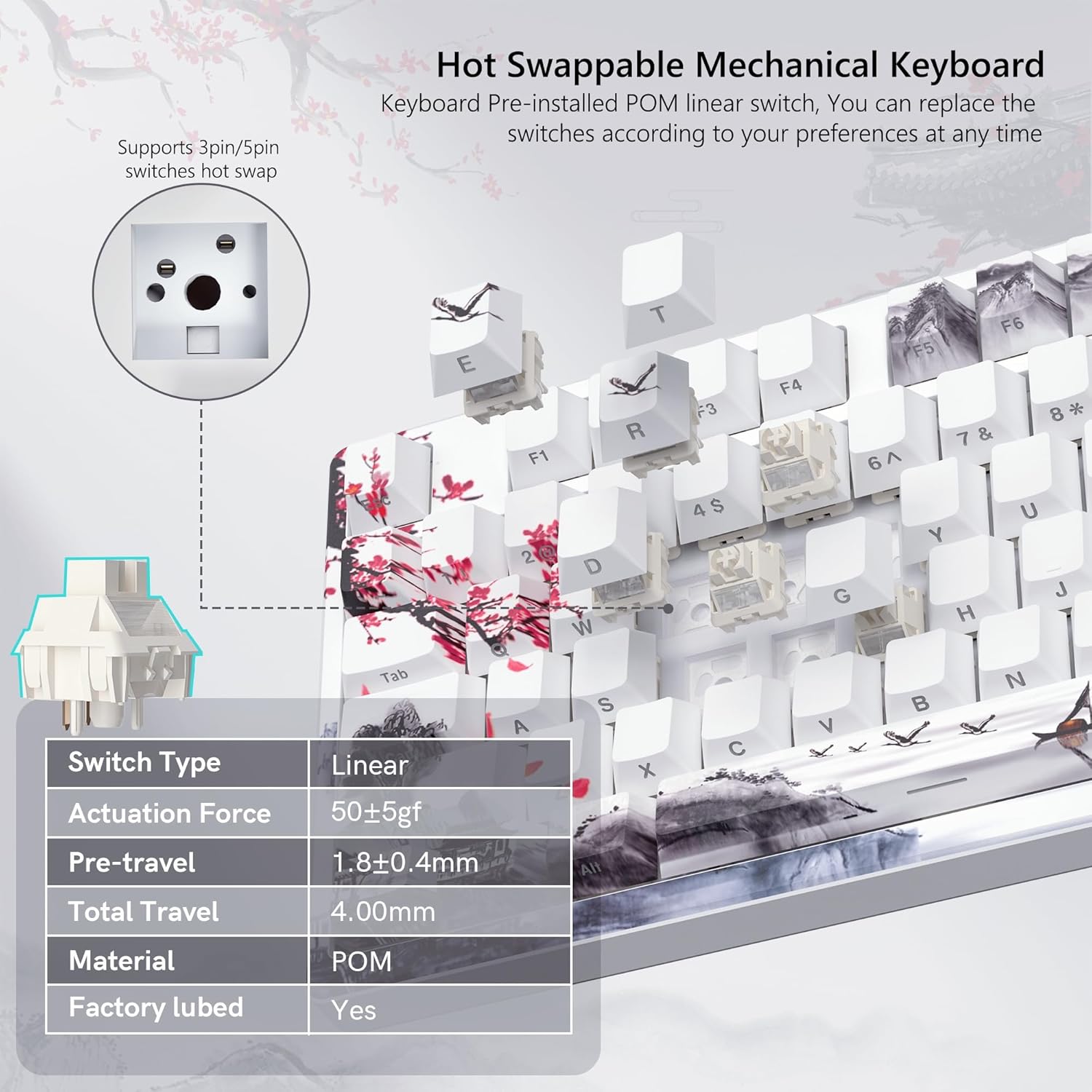
Image 4.4: Hot-swappable switch mechanism.
Video 4.5: Demonstration of hot-swappable switches and connectivity modes.
4.5 Key Remapping and Macro Settings
Utilize the Womier SK80 PRO software to redefine key functions and set up custom macros, enhancing your productivity and gaming experience.
5. Mantentzea
5.1 Garbiketa
- Deskonektatu teklatua gailutik garbitu aurretik.
- Use a keycap puller to carefully remove keycaps for thorough cleaning.
- Garbitu teklatuaren gainazala oihal leun batekin,amp oihal. Saihestu gehiegizko hezetasuna.
- Erabili aire konprimatua giltzen arteko hautsa eta hondakinak kentzeko.
5.2 Bateria zaintzea
The keyboard is equipped with a 4000mAh battery. To prolong battery life:
- Kargatu teklatua guztiz lehenengo erabili aurretik.
- Saihestu bateria maiz erabat deskargatzea.
- Gorde teklatua leku fresko eta lehor batean denbora luzez erabiltzen ez duzunean.
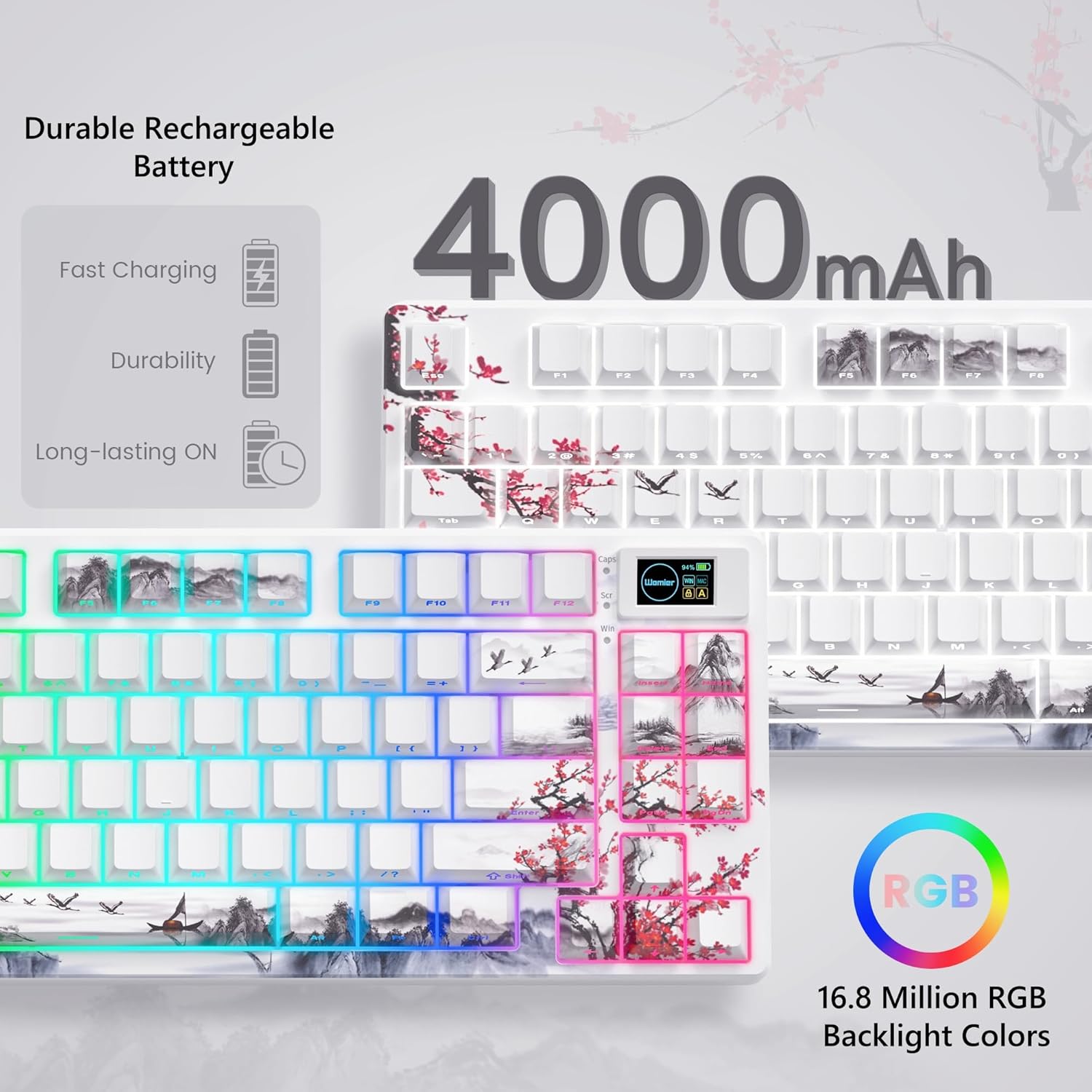
Image 5.1: Battery and RGB features.
5.3 Etengailuaren ordezkapena
Etengailuak ordezkatzeko:
- Erabili emandako tekla-tapa kentzeko tresna nahi duzun tekla-tapa kentzeko.
- Use the switch puller to gently grasp and pull the switch upwards until it detaches from the PCB.
- Lerrokatu etengailu berriaren pinak PCBko zuloekin.
- Press the new switch firmly until it clicks into place. Ensure pins are not bent.
- Lotu berriro giltza-tapoia.
6. Arazoak
- Teklatuak ez du erantzuten:
- Check the connection mode switch (2.4G, BT, USB) on the underside of the keyboard.
- Ensure the USB-C cable or 2.4G receiver is securely connected.
- For Bluetooth, ensure the keyboard is paired and selected on your device.
- Egiaztatu bateriaren maila; kargatu baxua bada.
- RGB lighting not working/customizing:
- Ziurtatu teklatua piztuta dagoela.
- Install and use the Womier SK80 PRO software for full customization.
- Refer to the quick guide for onboard RGB control shortcuts.
- Multimedia screen not displaying correctly:
- Ensure the keyboard is connected and powered.
- Use the Womier SK80 PRO software to upload or reset custom GIFs.
- Giltzak ez dira erregistratzen edo bi aldiz idazten ari dira:
- This may indicate a faulty switch. Use the switch puller to replace the affected switch.
- Ziurtatu etengailua PCBan guztiz sartuta dagoela.
7. Zehaztapenak
| Ezaugarri | Xehetasuna |
|---|---|
| Modelo zenbakia | JM-AZ-129 |
| Diseinua | %75 |
| Konektibitatea | 2.4G Haririk gabekoa, Bluetooth, USB-C Kableduna |
| Gailu bateragarriak | PC (Windows, Mac, Android, iOS) |
| Etengailuak | Womier Customized Pre-lubed Linear Cream Switches (Hot-swappable 3-pin/5-pin) |
| Giltzak | Theme Art Keycaps (Shine-through) |
| Atzeko argiztapena | 16.8 Million RGB (South-facing LED) |
| Bateria Edukiera | 4000mAh litio-polimeroa |
| Ezaugarri bereziak | Color Multimedia Smart Display Screen, Gasket Mount Design, EVA Positioning Plate, Bottom Filling |
| Produktuaren neurriak | 13.39 x 6.69 x 1.38 hazbete |
| Elementuaren pisua | 2.97 kilo |
8. Bermea eta Laguntza
Womier products are designed for reliability and performance. For warranty information, technical support, or service inquiries, please visit the official Womier website or contact customer support directly. Keep your purchase receipt for warranty claims.


