1. Sarrera
Thank you for choosing the truefree O2 Open Ear Headphones. This manual provides detailed instructions for setting up, operating, and maintaining your new wireless earbuds. Please read this guide thoroughly to ensure optimal performance and a satisfying user experience.
2. Paketearen edukia
Egiaztatu behean zerrendatutako elementu guztiak zure paketean daudela:
- truefree O2 Open Ear Earbuds (x2)
- Kargatzeko kaxa
- USB-C kargatzeko kablea
- Erabiltzailearen eskuliburua
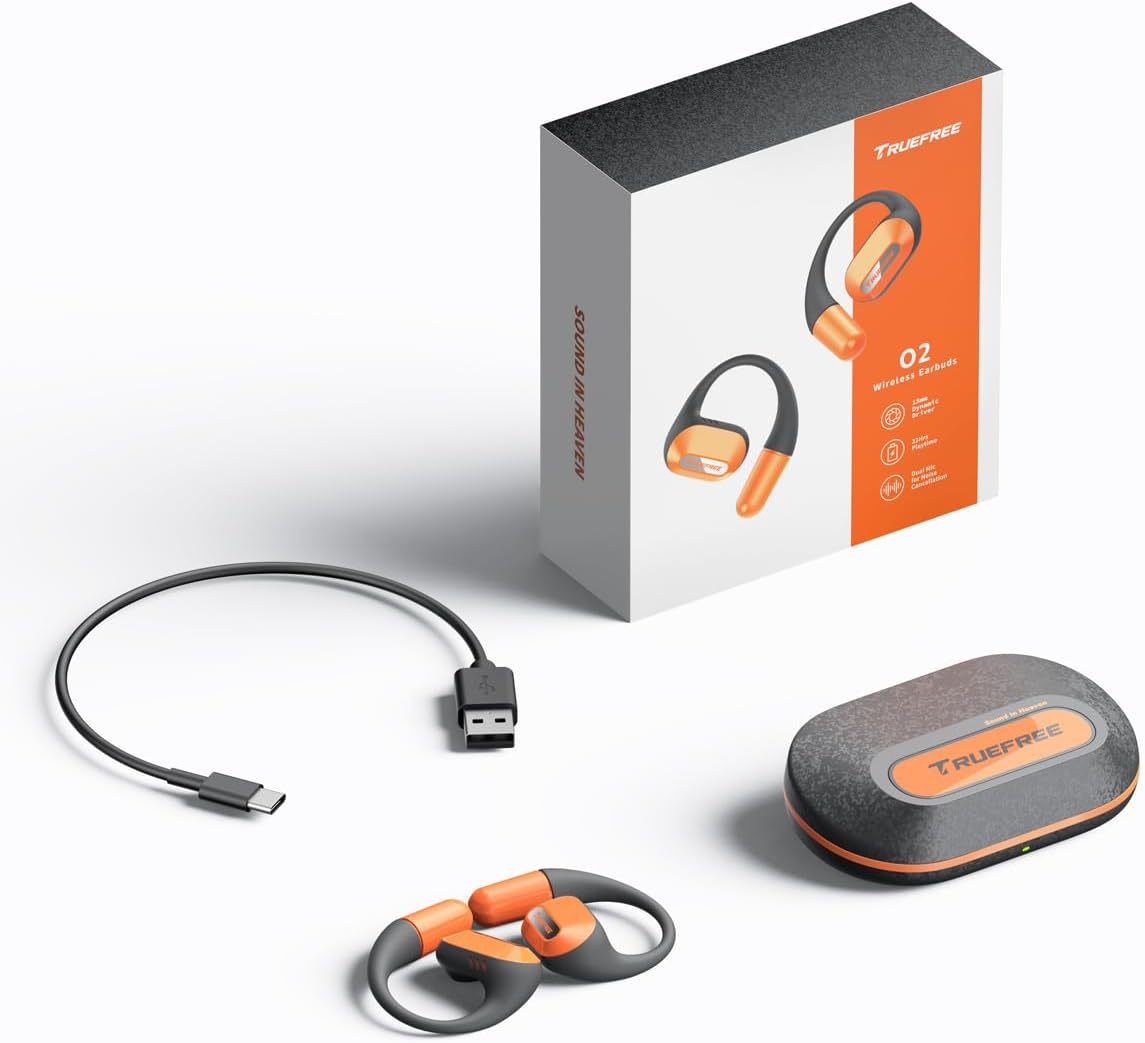
The complete package contents: two truefree O2 open ear earbuds, the charging case, a USB-C charging cable, and the user manual.
3. Produktua amaitu daview
The truefree O2 headphones feature an open-ear design for comfort and situational awareness, equipped with 15mm dynamic drivers and directional acoustics. The earbuds are ultra-lightweight (8g each) and designed with soft silicone ear hooks for a secure fit during various activities.

The truefree O2 open ear headphones and their compact charging case.
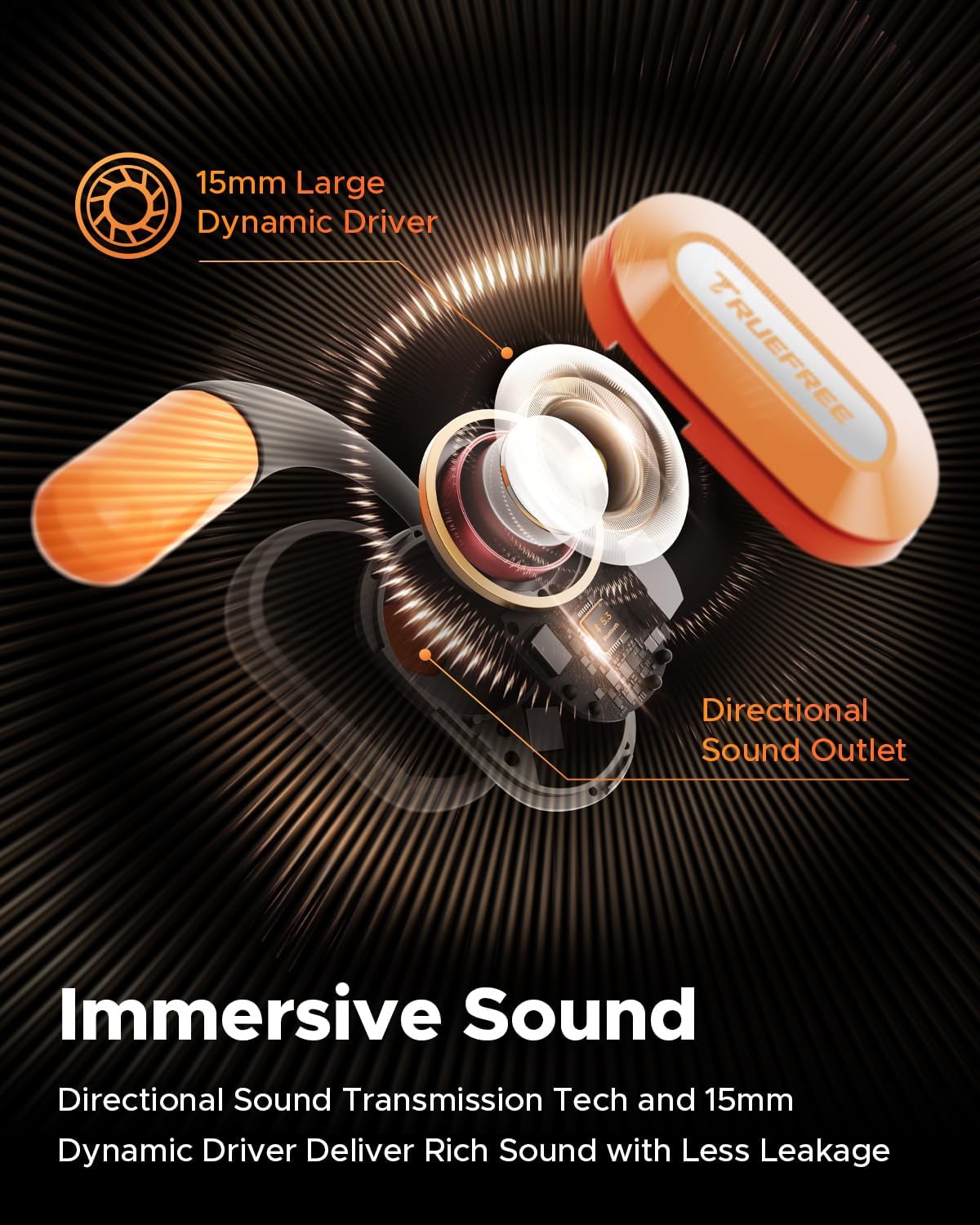
Bat eztanda egin zuen view diagram of the truefree O2 earbud, highlighting its 15mm large dynamic driver and directional sound outlet for immersive audio with minimal leakage.
4. Entzungailuak janztea
Soinu-kalitate eta erosotasun optimoa lortzeko, ziurtatu entzungailuak behar bezala jantzita daudela.
- Identifikatu ezkerreko (L) eta eskuineko (R) entzungailuak.
- Gently hook the earbud over your ear, positioning the speaker part towards your ear canal.
- Adjust the ear hook to fit snugly and securely around your ear. The flexible NiTi alloy memory steel wire ensures a stable fit for various ear shapes.
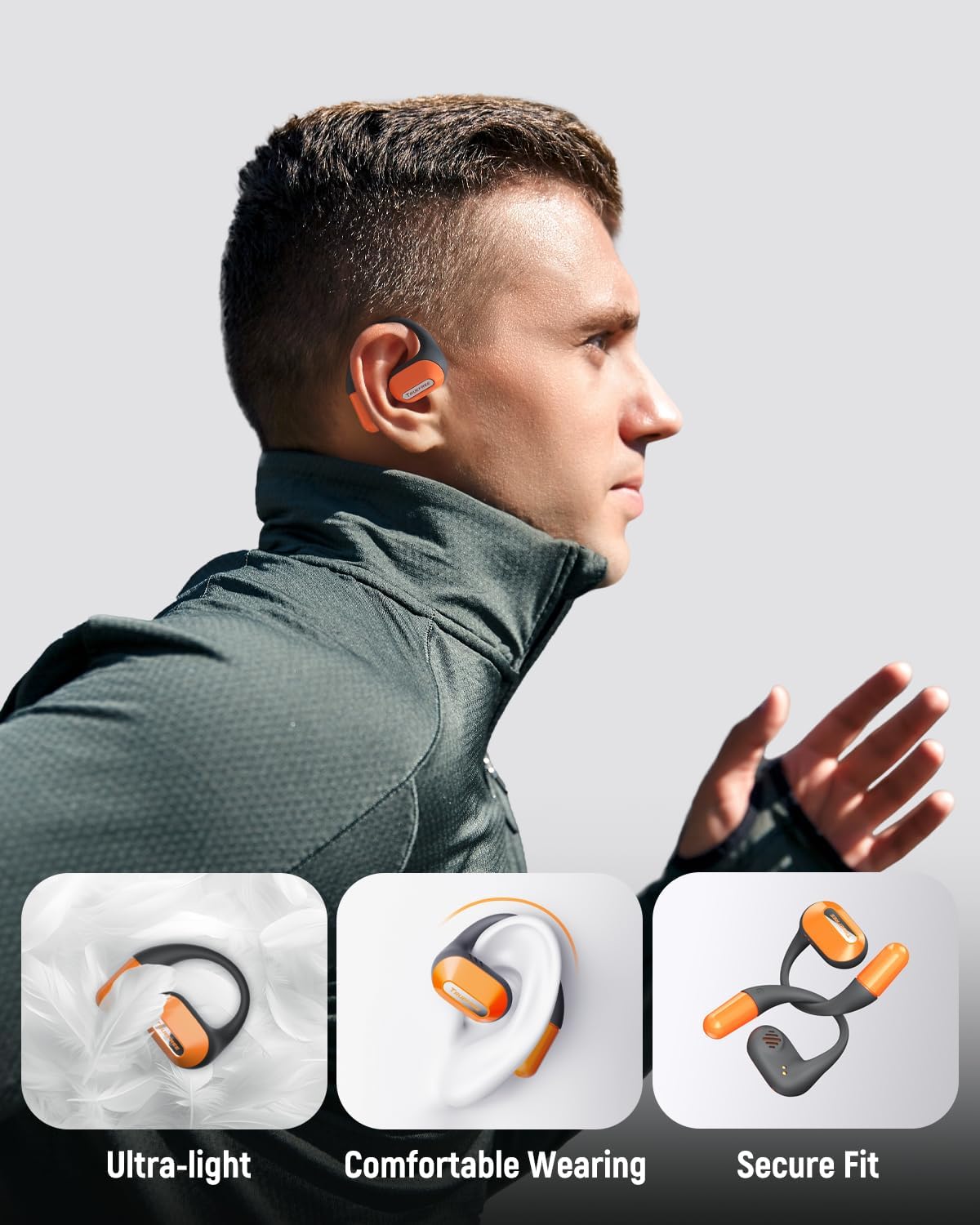
A user wearing the truefree O2 headphones, demonstrating their ultra-light design, comfortable fit, and secure ear hooks suitable for active use.
5. Kargatzea
The truefree O2 headphones and charging case are designed for efficient power management.
5.1 Entzungailuak kargatzea
- Jarri entzungailuak kargatzeko zorroan. Ziurtatu kargatzeko kontaktuak lerrokatuta daudela.
- The indicator lights on the earbuds will show their charging status.
- Karga oso batek 6.5 ordu inguruko erreprodukzio-denbora ematen du.
5.2 Kaxa kargatzea
- Konektatu USB-C kargatzeko kaxako kargatzeko atakara eta energia-iturri batera.
- The charging case can be fully charged in approximately 1 hour and 15 minutes.
- A fully charged case provides up to 22 hours of total playtime for the earbuds.

An illustration detailing the IPX5 waterproof rating, 6.5 hours of playtime on a single charge, 22 hours total with the charging case, and 1 hour 15 minutes fast charging via USB-C.
6. Konfigurazioa
6.1 Hasierako Bluetooth parekatzea
- Ireki kargatzeko zorroa. Aurikularrak automatikoki sartuko dira parekatze moduan.
- Gaitu Bluetooth-a zure gailuan (telefono adimenduna, tableta, ordenagailu eramangarria).
- Bilatu "truefree O2" in the list of available Bluetooth devices.
- Select "truefree O2" to connect. A voice prompt will confirm successful pairing.
6.2 Aplikazioen kontrola
Enhance your experience by downloading the "Truefree" application from your device's app store.
- Pertsonalizazioa: Adjust EQ settings, including 9 personalized presets and a customizable option.
- Firmware eguneraketak: Mantendu zure entzungailuak eguneratuta azken funtzio eta hobekuntzekin.
- Funtzio bereziak: Control features like game mode and other settings directly from the app.
- Gailu bikoitzeko konexioa: Enable multipoint connection for seamless switching between two devices.
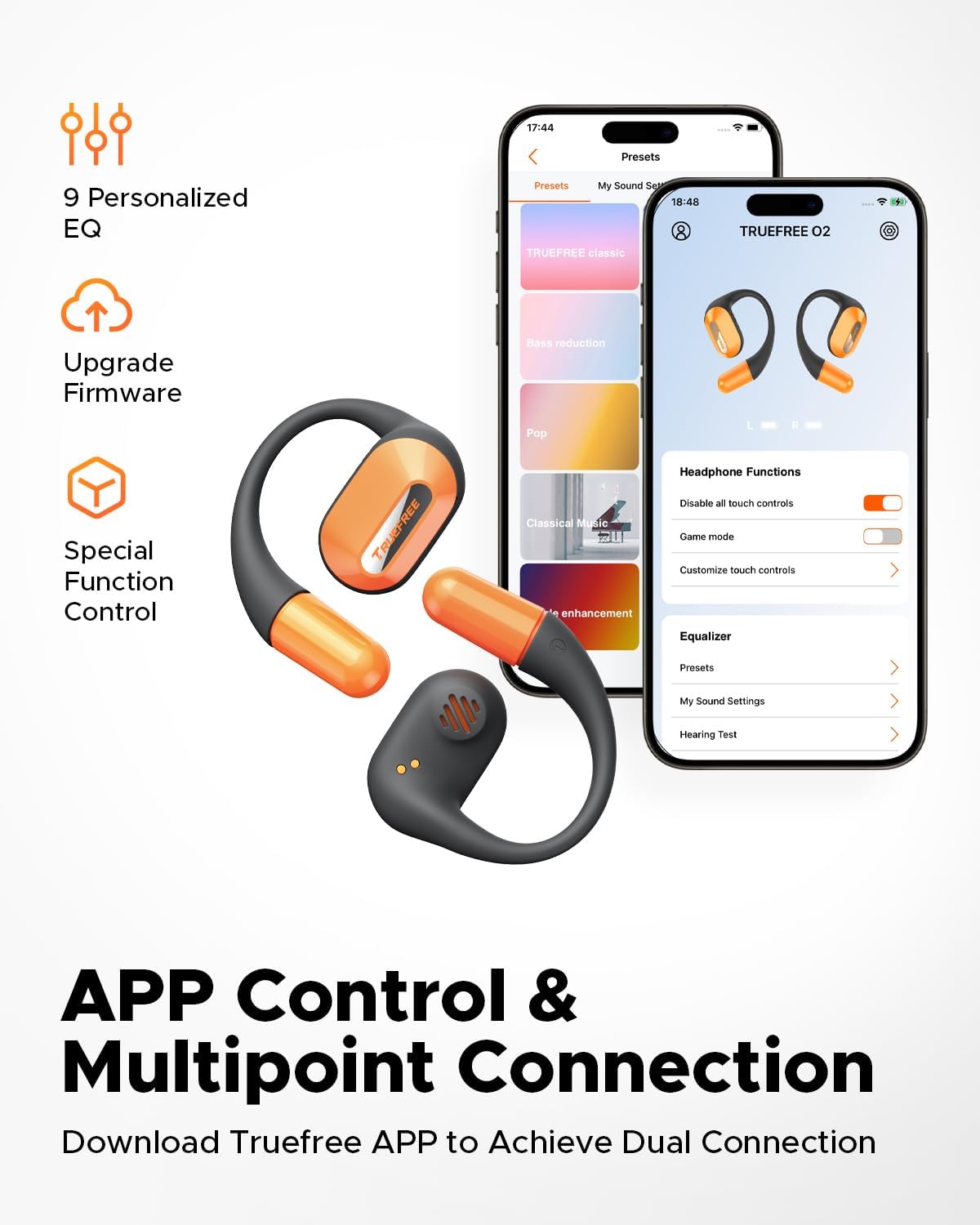
Screenshots of the Truefree mobile application, illustrating options for customizing EQ settings, game mode, and other control functions for the O2 headphones.
7. Funtzionamendua
7.1 Ukitu Kontrolak
The truefree O2 earbuds feature intuitive touch controls on both the left (L) and right (R) earbuds.
| Ekintza | Funtzioa |
|---|---|
| L & R Double tap | Erreproduzitu/Pausatu, Deiari erantzun/Amaitu |
| L & R Long press for 1.5s | Previous Track (L), Next Track (R), Power On/Off (when not in case) |
| L Single tap | Bolumena jaitsi |
| R Single tap | Bolumena igo |
| L Long press for 3s | Aktibatu Joko modua |
| R Long press for 3s | Aktibatu Ahots Laguntzailea |

A visual guide to the touch control functions on the truefree O2 earbuds.
7.2 Puntu anitzeko konexioa
The truefree O2 supports connecting to two devices simultaneously, allowing for seamless switching between audio sources.
- Ensure the earbuds are connected to your first device.
- Put the earbuds back into the charging case, then take them out again to re-enter pairing mode.
- Connect the earbuds to your second device via Bluetooth.
- Once both devices are paired, the earbuds will intelligently switch audio based on activity (e.g., taking a call on your phone while listening to music on your laptop).

An image showing the truefree O2 headphones connected to both a laptop and a smartphone, illustrating the multipoint connection feature for seamless device switching.
7.3 Joko modua
Aktibatu Joko Modua audio-latentzia murrizteko, jokoetan zehar ikus-entzunezko esperientzia sinkronizatuagoa izan dadin.
- To activate: Long press the left earbud for 3 seconds.
- To deactivate: Repeat the action.
- Game Mode can also be toggled via the Truefree app.
8. Mantentzea
8.1 IPX5 iragazgaitza
The truefree O2 earbuds are IPX5 waterproof, meaning they are resistant to sweat and light splashes of water. This makes them suitable for workouts and outdoor activities.
- Ez murgildu entzungailuak uretan.
- Ziurtatu entzungailuak lehor daudela kargatzeko zorroan berriro sartu aurretik, kalteak ekiditeko.

The truefree O2 earbud with water droplets, illustrating its IPX5 waterproof rating.
8.2 Garbiketa
- Garbitu entzungailuak eta kargatzeko zorroa oihal leun, lehor eta lihorik gabeko batekin.
- Saihestu material urratzaileak edo produktu kimiko gogorrak erabiltzea.
- Garbitu aldizka entzungailuen eta zorroaren kargatzeko kontaktuak behar bezala kargatzen direla ziurtatzeko.
9. Arazoak
If you encounter issues with your truefree O2 headphones, refer to the following common solutions:
| Arazoa | Irtenbidea |
|---|---|
| Entzungailuak ez dira parekatzen | Ensure earbuds are charged. Turn off and on Bluetooth on your device. Forget "truefree O2" from your device's Bluetooth list and re-pair. |
| Ez dago soinurik entzungailu batetik | Jarri bi entzungailuak berriro zorroan, itxi eta ireki berriro. Egiaztatu gailuaren audio balantze ezarpenak. |
| Kargatzeko arazoa | Clean charging contacts on earbuds and case. Try a different USB-C cable and power adapter. Ensure earbuds are correctly seated in the case. |
| Bolumen baxua | Adjust volume on both the earbuds and your connected device. Check EQ settings in the Truefree app. |
| Konexioa maiz eten egiten da | Ensure no obstructions between earbuds and device. Reduce distance between earbuds and device. Avoid strong electromagnetic interference. |
If the issue persists, please contact truefree customer support for further assistance.
10. Zehaztapenak
| Ezaugarri | Xehetasuna |
|---|---|
| Ereduaren izena | truefree O2 |
| Konektibitatea | Bluetooth 5.3 |
| Belarrien Kokatzea | Belarri irekia |
| Entzungailuaren forma | Amua |
| Uraren Erresistentzia | IPX5 |
| Aurikularretako bateriaren iraupena | Gehienez 6.5 ordu |
| Jolas-denbora osoa (zorroarekin) | Gehienez 22 ordu |
| Kasua kargatzeko denbora | Approx. 1 hour 15 minutes (USB-C) |
| Audio kontrolatzailearen tamaina | 15 mm |
| Earbud pisua | 8 gramo (bakoitza) |
| Kontrol mota | Ukitu Kontrola, Aplikazioen Kontrola |
| Ezaugarri bereziak | Multipoint Pairing, Game Mode, Dual-mic Noise Cancelling |
11. Bermea eta Laguntza
truefree is committed to providing excellent customer experience. If you have any problems or suggestions regarding your truefree O2 Open Ear Headphones, please do not hesitate to contact our customer support team. We are ready to offer you a satisfactory solution.
For support, please refer to the contact information provided on the truefree official webgunea edo zure erosketa plataforma.


