1. Sarrera
This user manual provides comprehensive instructions for the installation, operation, and maintenance of your COCOCAM AOV 4G LTE Security Camera. Please read this manual thoroughly before using the product to ensure proper functionality and safety.
1.1 Paketearen edukia
- 1x COCOCAM AOV 4G LTE Security Camera
- 1x Eguzki Panela
- 1x Screw Package (for mounting)
- 1x Datu-kablea
- 1x Argibide eskuliburua (dokumentu hau)
- 1x eguzki-panel euskarria
- 2x AA Batteries (pre-installed or included for initial setup)

Figure 1.1: COCOCAM AOV 4G LTE Security Camera and Solar Panel. The image displays the main camera unit with two antennas, a lens, and four LED lights, alongside a rectangular solar panel connected by a cable.
2. Segurtasun informazioa
- Ensure the camera and solar panel are installed securely to prevent falling.
- Ez jarri kamera bere funtzionamendu-eremutik kanpo dauden tenperatura altuetan.
- Mantendu gailua eremu magnetiko indartsuetatik urrun.
- Ez saiatu kamera zeuk desmuntatzen edo konpontzen. Jarri harremanetan laguntza-zerbitzuarekin laguntza jasotzeko.
- Ensure all cables are properly connected and protected from environmental damage.
- This device is IP66 rated for water and dust resistance, but avoid submerging it in water.
3. Produktua amaitu daview
3.1 Ezaugarri nagusiak
- 24/7 Recording & Fast Alarm Trigger: Continuous recording with quick alarm activation.
- Intelligent Sound and Light Alarm: Customizable alarm areas with real-time notifications.
- 30 Meters Night Vision: Clear visibility in low-light conditions with white light and infrared options.
- AI Detection/Tracking: Human form detection and movement tracking up to 30 meters.
- Biltegiratze aukera malguak: Supports TF card (up to 128GB) and cloud storage.
- Bi norabideko audioa: Komunikatzeko mikrofono eta bozgorailu integratuak.
- Long-lasting Battery with Solar Panel: 15000mAh rechargeable battery with 8W solar panel for continuous power.
- IP66 Eguraldiarekiko erresistentea: Designed for outdoor use, resistant to water and dust.
- 3MP High Definition Video: 2304*1296 resolution for clear footage.
- 355° Pan/90° Tilt: Wide area coverage with remote adjustable viewangeluak.
- Remote Monitoring and Mobile Compatibility: Access via COCOCAM app on Android/iOS devices.
- 4G LTE konexioa: Operates without Wi-Fi, includes a built-in SIM card with trial data.
4. Konfigurazioa
4.1 Kamera eta eguzki-panela muntatzea
The camera and solar panel can be mounted on walls or ceilings. Choose a location that provides optimal sunlight exposure for the solar panel and a clear view kamerarentzat.
- Identifikatu muntatzeko gainazal egokia.
- Use the provided screw package to secure the camera bracket and solar panel bracket.
- Attach the camera to its bracket and the solar panel to its bracket.
- Konektatu eguzki-panelaren kablea kameraren kargatzeko atakara. Ziurtatu konexioa segurua eta iragazgaitza dela.

Figure 4.1: Easy installation of the COCOCAM camera and solar panel. The image shows a person installing the camera and solar panel unit under an eave, demonstrating the ease of setup.

Figure 4.2: Self-sustaining power setup with solar panel and battery. This image illustrates the camera and solar panel mounted on a building, highlighting the 8W solar panel and 15000mAh rechargeable battery for continuous power.
4.2 SIM txartelaren eta biltegiratze txartelaren instalazioa
The camera comes with a built-in SIM card for initial use. You can also install an external SIM card or a TF (microSD) card for local storage.
- Locate the SIM card slot and TF card slot on the camera (refer to the product diagram in the quick start guide).
- Insert the TF card (up to 128GB) into the TF card slot with the contacts facing down.
- If using an external SIM card, insert it into the designated slot. Ensure it is properly seated.
- Close the protective cover to maintain IP66 rating.

Figure 4.3: 3G/4G LTE Connection without Wi-Fi. This image highlights the camera's ability to operate using 3G or 4G LTE networks, making it suitable for locations without Wi-Fi, such as farms, construction sites, or RVs.
4.4 App Download and Initial Configuration
Download the COCOCAM app from your device's app store (Android or iOS).
- Bilatu "COCOCAM" in the Google Play Store or Apple App Store.
- Instalatu aplikazioa eta sortu kontu bat.
- Jarraitu aplikazio barruko argibideei kamera gehitzeko. Horrek normalean kamerako QR kode bat eskaneatzea edo IDa eskuz sartzea dakar.
- Once connected, you can configure network settings, recording preferences, and alarm settings.

Figure 4.4: COCOCAM app for 24/7 continuous recording. This image shows a smartphone displaying the COCOCAM app interface, with the security camera mounted on a wall in the background, indicating continuous monitoring capabilities.
5. Funtzionamendu-argibideak
5.1 24/7 Recording and Alarm Features
The camera supports continuous recording. When an alarm is triggered, the camera quickly switches to full-frame recording.
- Grabaketa jarraitua: The camera records 2 seconds per frame during non-alarm periods.
- Fast Alarm Trigger: Upon detection, the camera initiates full-frame recording within 0.2 seconds.
- Customizable Alarm Areas: Definitu eremu espezifikoak kameraren barruan view mugimenduak hautemateko.
- Intelligent Sound and Light Alarm: The camera can emit sound and light warnings upon detecting suspicious activity.
- Denbora errealeko jakinarazpenak: Receive instant alerts on your mobile device when an alarm is triggered.
5.2 PTZ kontrola (panoramikoa, inklinatua, zooma)
The camera offers extensive pan and tilt capabilities, allowing you to adjust the viewing angle remotely via the COCOCAM app.
- pan: Biratu kamera horizontalki 355°-raino.
- okertu: Doitu kamera bertikalki 90°-raino.
- Zoom digitala: Use the app to digitally zoom into the live feed or recorded footage.

Figure 5.1: 355° Pan and 90° Tilt with AI Tracking. This image illustrates the camera's wide range of motion and its ability to track subjects, with icons for two-way audio, AI detection, and AI tracking.
5.3 IA Detekzioa eta Jarraipena
The camera's advanced AI capabilities allow for precise detection and tracking of human forms and vehicles.
- Giza Detekzioa: Identifies human shapes, reducing false alarms from animals or swaying branches.
- Ibilgailuen Ezagutza: Distinguishes vehicles for specific alerts.
- AI jarraipena: The camera can automatically follow detected subjects within its field of view 30 metrora arte.
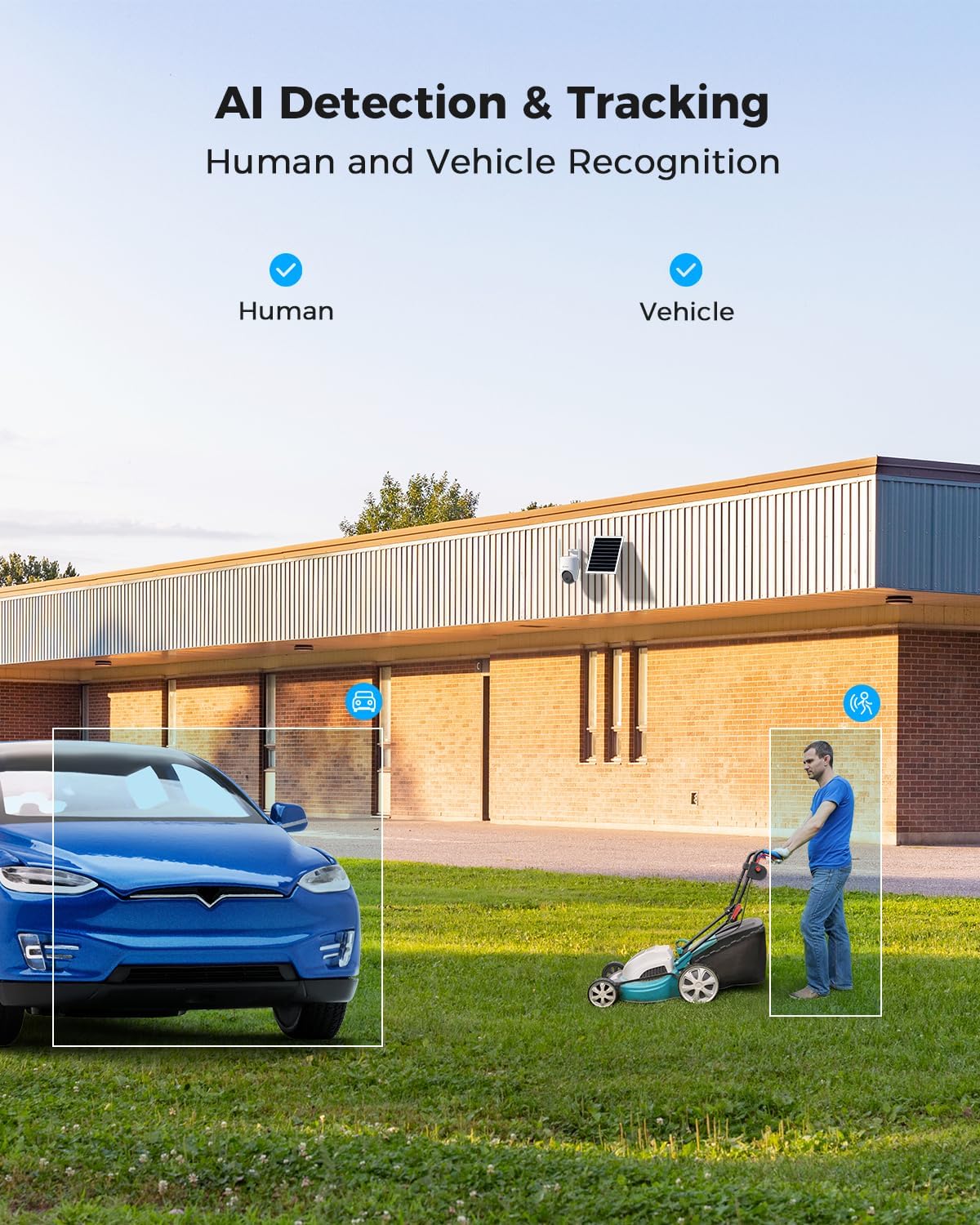
Figure 5.2: AI Detection & Tracking for Human and Vehicle Recognition. The image shows a security camera monitoring an outdoor area, with highlighted boxes indicating detected human and vehicle subjects, demonstrating its AI capabilities.
5.4 Bi norabideko audioa
Komunikatu bisitariekin edo uxatu intrusoak barneko mikrofonoa eta bozgorailua erabiliz.
- Access the two-way audio feature through the COCOCAM app.
- Speak into your phone's microphone to transmit audio through the camera's speaker.
- Listen to audio from the camera's surroundings through your phone.
5.5 Gaueko ikusmena
The camera provides clear visibility up to 30 meters in complete darkness.
- Gaueko infragorria: Automatically activates in low-light conditions for black and white video.
- Gaueko ikusmen koloretsua: Utilizes white light LEDs to provide color video at night when activated or upon detection.

Figure 5.3: 30m Night Vision and 2K Full Color Night Vision. This image compares standard black and white night vision with the camera's full-color night vision capability, showing enhanced detail and color in low light.
6. Mantentzea
6.1 Battery and Solar Panel Care
The integrated 15000mAh battery is continuously charged by the 8W solar panel. To ensure optimal performance:
- Ziurtatu eguzki-panelak egun osoan zehar eguzki-argia ahalik eta gehien jasotzeko moduan kokatuta dagoela.
- Regularly clean the surface of the solar panel to remove dust, dirt, or debris that may obstruct sunlight.
- Avoid placing the solar panel in shaded areas.

Figure 6.1: 8W Solar Panel for continuous power. This image focuses on the solar panel, highlighting its 8W power output and the 3-meter cable length for flexible installation.
6.2 Kamera garbitzea
- Erabili biguna, damp cloth to wipe the camera lens and body.
- Ez erabili produktu kimiko gogorrik edo garbigailu urratzailea.
- Ensure the camera is dry before prolonged exposure to the elements.
6.3 Firmware eguneraketak
Periodically check the COCOCAM app for available firmware updates. Keeping your camera's firmware updated ensures optimal performance, new features, and security enhancements.
7. Arazoak
| Arazoa | Kausa posiblea | Irtenbidea |
|---|---|---|
| Camera not connecting to app. | Incorrect pairing process, weak 4G signal, camera not powered on. | Ensure camera is powered on. Re-attempt pairing process. Check 4G signal strength at installation location. |
| Bideoaren kalitate eskasa. | Dirty lens, low light conditions, weak 4G signal. | Clean the camera lens. Ensure adequate lighting or verify night vision is active. Check 4G signal strength. |
| Bateria ez da kargatzen. | Solar panel obstructed, faulty connection, insufficient sunlight. | Ensure solar panel is clean and receives direct sunlight. Check cable connection between solar panel and camera. |
| AI detection not working or too many false alarms. | Incorrect sensitivity settings, detection area not configured. | Adjust AI detection sensitivity in the app. Configure specific detection zones to exclude irrelevant areas. |
| Bi norabideko audio arazoak. | Microphone/speaker obstruction, app permissions, network delay. | Ensure nothing is blocking the camera's microphone or speaker. Check app permissions for microphone access. Verify stable 4G connection. |
8. Zehaztapenak
| Ezaugarri | Xehetasuna |
|---|---|
| Ereduaren izena | AOV 4G Camera with 7x24 Recording |
| Elementuaren eredu-zenbakia | ZY-Q6 |
| Marka | COCOCAM |
| Bideo Harrapaketa Ebazpena | 1440p (3MP, 2304*1296) |
| Panorama/Tilt barrutia | 355° Pan / 90° Tilt |
| Gaueko Ikusmenaren barrutia | 30 Meters (Infrared & White Light) |
| Konektibitate Teknologia | Wireless (4G LTE) |
| Energia iturria | Battery Powered (15000mAh) with 8W Solar Panel |
| Biltegiratze-aukerak | TF txartela (128 GB arte), hodeiko biltegiratzea |
| Eguraldi Erresistentzia | IP66 |
| Materiala | Akrilonitrilo Butadieno Estirenoa (ABS) |
| Elementuaren neurriak (L x W x H) | 20 x 15 x 12 cm |
| Elementuaren pisua | 620 g |
| Pilak | 2 AA bateria (barne) |
9. Bermea eta Laguntza
COCOCAM provides a bizitza osorako bermea produktu honetarako, epe luzerako fidagarritasuna eta bezeroen gogobetetasuna bermatuz.
For technical support, troubleshooting assistance, or warranty claims, please contact COCOCAM customer service:
- Fabrikatzailea: COCOCAM
- Ofiziala Webgunea: www.cococamtech.com
- Posta elektronikoa: service@cococamtech.com
Please have your model number (ZY-Q6) and purchase information ready when contacting support.


