Digital Buds - Wired in-Ear Earphones User Manual
Model: GVEB16
Brand: groov e
Sarrera
Thank you for choosing the groov e Digital Buds. These USB-C earphones are designed to provide a high-quality audio experience for music playback and hands-free calls. This manual will guide you through the setup, operation, and maintenance of your new earphones to ensure optimal performance and longevity.
Paketearen edukia
- Digital Buds USB-C Earphones
- Earbuds (3X Sizes) - Note: The product description mentions "Includes Earbuds (3X Sizes)", but "whats_in_the_box" only lists "Earphones". Assuming the different sizes are pre-attached or included as accessories with the main earphones.
Produktua amaituview
Familiarize yourself with the components of your Digital Buds.
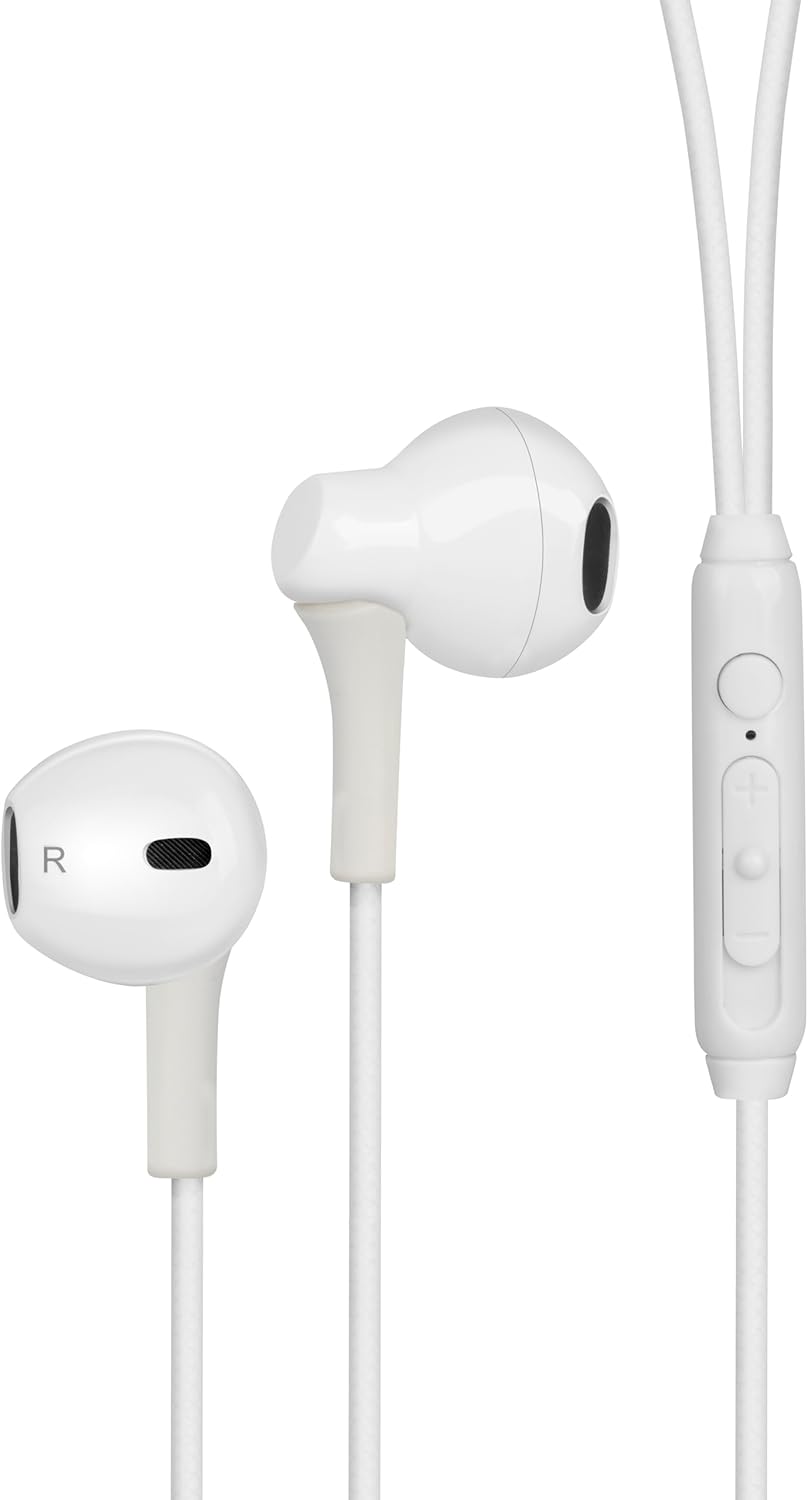
Figure 1: Digital Buds Earphones. This image shows both the left and right earbuds connected by their cable.

Figure 2: In-Line Remote and Microphone. The remote features volume up (+), volume down (-), and a multi-function button for calls and music control. The microphone is integrated into this unit.

Figure 3: USB-C Connector. This connector is used to plug the earphones into compatible devices such as smartphones, tablets, and laptops.
Konfigurazioa
- Konektatu gailura: Locate the USB-C port on your smartphone, tablet, or laptop. Insert the USB-C connector of the Digital Buds firmly into the device's USB-C port.
- Earbud Placement: Gently insert the earbuds into your ears. The earbud marked 'L' is for the left ear, and 'R' is for the right ear. Adjust them for a comfortable and secure fit. If necessary, try the different sized ear tips included to find the best fit for optimal sound quality and comfort.
- Hasierako aitorpena: Your device should automatically recognize the earphones. You may need to select them as the audio output device in your device's sound settings.
Funtzionamendu-argibideak
The in-line remote provides convenient control over your audio and calls.
Musika erreproduzitzea
- Erreproduzitu/Pausatu: Sakatu funtzio anitzeko botoia behin.
- Hurrengo ibilbidea: Sakatu funtzio anitzeko botoia bi aldiz azkar.
- Aurreko pista: Sakatu funtzio anitzeko botoia hiru aldiz azkar.
- Bolumena igo: Sakatu '+' botoia.
- Bolumena jaitsi: Sakatu '-' botoia.
Deien Kudeaketa
- Deia erantzun/amaitu: Sakatu funtzio anitzeko botoia behin sarrerako dei batean edo dei aktibo batean zehar.
- Deia baztertu: Sakatu eta eutsi funtzio anitzeko botoia 2 segundo inguru sarrerako dei bat jasotzen ari zaren bitartean.
Ahots Laguntzailea
- Aktibatu Ahots Laguntzailea: Press and hold the multi-function button for approximately 2 seconds when not on a call or playing music. This will activate your device's default voice assistant (e.g., Google Assistant, Siri).
Mantentzea
Proper care will extend the life of your Digital Buds.
- Garbiketa: Use a soft, dry, lint-free cloth to wipe the earbuds and cable. For stubborn dirt, slightly dampGarbitu zapiarekin urarekin. Ez erabili produktu kimiko gogorrik edo garbitzaile urratzailerik.
- Biltegiratzea: When not in use, store the earphones in a clean, dry place, preferably in a small pouch or case to prevent tangling and damage.
- Saihestu hezetasuna: Do not expose the earphones to excessive moisture, rain, or liquids.
- Kontuz maneiatu: Avoid pulling on the cable excessively or bending the USB-C connector at sharp angles.
Arazoak konpontzea
Arazoren bat izanez gero, jo ezazu honako arazo eta irtenbide ohikoenei.
| Arazoa | Irtenbidea |
|---|---|
| Ez da soinurik entzuten entzungailuetatik. |
|
| Mikrofonoa ez dabil deietan zehar. |
|
| Urruneko agintearen botoiek ez dute erantzuten. |
|
Zehaztapenak
| Ezaugarri | Xehetasuna |
|---|---|
| Marka | groov e |
| Ereduaren izena | Groove Digital Buds - White |
| Elementuaren eredu-zenbakia | GVEB16 |
| Konektibitate Teknologia | Kable bidezkoa (USB-C) |
| Belarrien Kokatzea | Belarrian |
| Forma-faktorea | Belarrian |
| Kontrol-metodoa | Remote (In-line) |
| Dakarten osagaiak | Entzungailuak |
| Materiala | Silikona, plastikoa |
| Elementuaren pisua | 1.06 ontza |
| Paketearen neurriak | 6.61 x 2.36 x 1.26 hazbete |
| Gailu bateragarriak | Tablets, Mobile phones, Laptops, Desktops |
| Produkturako erabilera espezifikoak | Entretenimendua |
Bermea eta Laguntza
groov e products are manufactured to high standards and undergo rigorous quality checks. For information regarding warranty coverage, technical support, or customer service, please refer to the warranty card included with your purchase or visit the official groov e webgunea.
Gorde erosketaren egiaztagiria bermearen erreklamazioetarako.


