1. Segurtasun-argibide garrantzitsuak
Mesedez, irakurri arretaz eskuliburu hau tresna erabili aurretik eta gorde etorkizunean erreferentzia gisa. Argibide hauek ez jarraitzen badituzu, deskarga elektrikoak, suteak edo lesio larriak gerta daitezke.
- Always connect the dehumidifier to a grounded power outlet.
- Ez erabili unitatea korronte-kablea edo entxufea hondatuta duela.
- Keep the appliance away from water and other liquids. Do not immerse it.
- Ziurtatu unitatearen inguruko aireztapen egokia dagoela. Ez blokeatu aire sarrerak edo irteerak.
- Deskonektatu hezegailuaren entxufea garbitu edo mantentze-lanak egin aurretik.
- Tresna hau ez da gaitasun fisiko, sentsorial edo mental murriztua duten edo esperientzia eta ezagutza falta duten pertsonek (haurrak barne) erabiltzeko, baldin eta haien segurtasunaz arduratzen den pertsona batek gailuaren erabilerari buruz gainbegiratu edo jarraibiderik eman ez badu.
- Ez erabili tresna gas edo lurrun sukoiak dauden lekuetan.
- Operate the unit within the specified temperature range of 5-32 °C.
2. Produktua amaitu daview
The SENCOR SDH 3028WH is a portable smart dehumidifier designed to efficiently remove excess moisture from your indoor environment. It features Wi-Fi connectivity for app control, multiple operating modes, and a large water tank capacity.
Ezaugarri nagusiak:
- Dehumidification Capacity: 30 liters per day (at 30 °C, 80% Relative Humidity).
- Water Tank Capacity: 6 liters.
- Control: Wi-Fi enabled with Sencor HOME app (iOS and Android).
- Dehumidification Settings: Adjustable from 35% to 85% Relative Humidity, or Continuous operation.
- Operating Modes: Dehumidification, Fan, Laundry Drying.
- Fan Speeds: High and Low.
- Display: Precise humidity indication.
- Timer: 0-24 hours.
- Safety Features: Full tank indicator, Child safety lock, Automatic defrost function, Automatic restart function.
- Convenience: Removable and washable filter, Integrated handles and wheels for easy portability, 1-meter drain hose for continuous drainage.
- Quiet Operation: Noise level 43/41 dB.
- Suitable Room Size: 30 to 89 m².
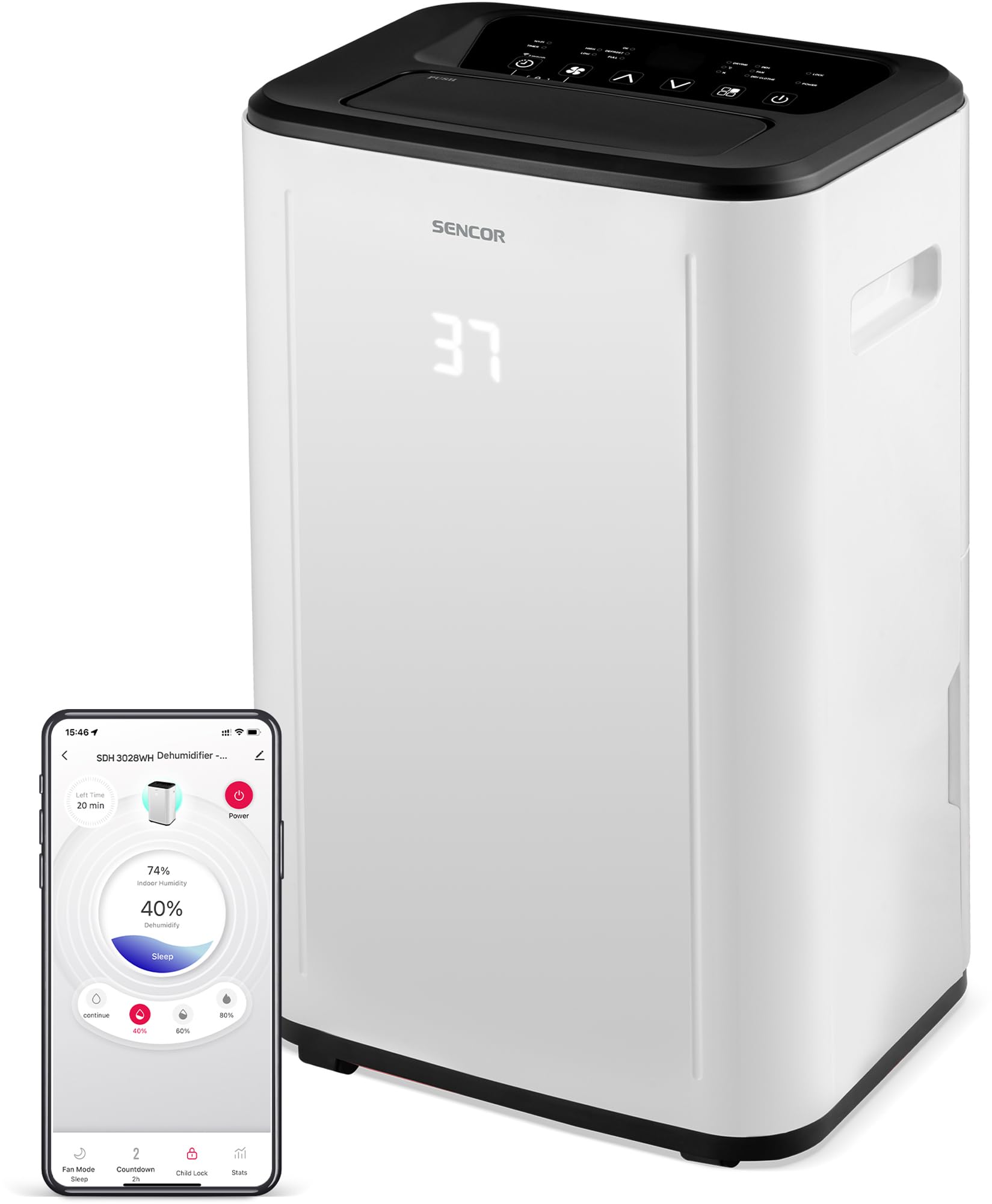
1. irudia: Aurrealdea view of the SENCOR SDH 3028WH Portable Dehumidifier.
3. Paketearen edukia
Despaketatzean, ziurtatu elementu guztiak bertan daudela eta egoera onean daudela:
- SENCOR SDH 3028WH Portable Dehumidifier
- Argibide eskuliburua
- Drain Hose (1 meter)

Figure 2: Packaging of the SENCOR SDH 3028WH, illustrating key features.
4. Konfigurazioa
4.1 Jartzea
Place the dehumidifier on a firm, level surface in the area where dehumidification is desired. Ensure there is at least 20 cm (8 inches) of clear space around the air inlets and outlets for optimal airflow.
4.2 Energia-konexioa
Plug the power cord into a suitable grounded electrical outlet (220-240V, 50Hz). The unit will enter standby mode.
4.3 Wi-Fi Setup (Sencor HOME App)
- Download the Sencor HOME app from the App Store (iOS) or Google Play Store (Android).
- Sortu kontu bat edo hasi saioa.
- Follow the in-app instructions to add your SDH 3028WH dehumidifier. This typically involves putting the dehumidifier into pairing mode (refer to the app or device display for specific instructions) and connecting it to your home Wi-Fi network.
- Once connected, you can control the dehumidifier remotely and monitor its status via the app.
5. Funtzionamendu-argibideak
5.1 Kontrol-panela
The control panel on top of the unit allows you to manage all functions. The digital display shows the current humidity level or timer settings.
5.2 Piztu/Itzali
Sakatu Boterea botoia unitatea pizteko edo itzaltzeko.
5.3 Nahi den hezetasuna ezartzea
- Sakatu Hezetasuna botoia.
- Erabili Gora/Behera arrows to adjust the desired humidity level between 35% and 85% RH in 5% increments.
- Unitatea ezarritako hezetasun maila lortu arte funtzionatuko du, eta gero piztu eta itzali egingo da hura mantentzeko.
- To enable continuous dehumidification, select the 'Continuous' setting (usually indicated by 'CO' or similar on the display).
5.4 Funtzionamendu moduak
Sakatu Modua botoia eskuragarri dauden moduen artean aldatzeko:
- Deshumidifikazio modua: Standard operation to remove moisture.
- Fan modua: Circulates air without dehumidifying.
- Garbitegia lehortzeko modua: Optimized for drying clothes faster by continuously running the fan and dehumidifier.
5.5 Haizearen abiadura
Sakatu Fan Abiadura button to switch between High and Low fan speeds.
5.6 Tenporizadorearen funtzioa
- Sakatu Tenporizadorea botoia.
- Erabili Gora/Behera arrows to set the desired operating duration from 0 to 24 hours.
- The unit will automatically turn off or on after the set time.
5.7 Haurrentzako blokeoa
Haurren blokeoa aktibatzeko, sakatu eta eutsi botoiari Haurrentzako blokeoa button (or a combination of buttons as indicated on the control panel) for a few seconds. This prevents accidental changes to settings. Repeat the action to deactivate.
6. Mantentzea
Mantentze-lan erregularrak zure deshezegailuaren errendimendu optimoa bermatzen du eta bizitza luzatzen du.
6.1 Ur depositua hustea
- When the water tank is full, the unit will stop operating, and the 'Full Tank' indicator will illuminate.
- Kontu handiz atera ur-depositua unitatearen atzealdetik edo albotik.
- Hustu bildutako ura.
- Sartu berriro depositu hutsa bere tokian ondo. Unitateak berriro funtzionatzen hasiko da.
6.2 Drainatze Jarraitua
For continuous operation without needing to empty the tank, you can use the included drain hose.
- Locate the continuous drain outlet on the back of the dehumidifier.
- Kendu gomazko tapoia (baldin badago).
- Connect one end of the 1-meter drain hose to the outlet.
- Direct the other end of the hose to a suitable drain or larger container, ensuring it is lower than the dehumidifier's drain outlet for gravity flow.
6.3 Aire-iragazkia garbitzea
- Aire-iragazkia bi astean behin garbitzea gomendatzen da, edo maizago, erabileraren arabera.
- Deshezegailua itzali eta deskonektatu.
- Aurkitu eta kendu aire-iragazkia (normalean atzealdean edo alboan).
- Garbitu iragazkia ur epelarekin eta detergente leun batekin. Ondo garbitu.
- Utzi iragazkia airean guztiz lehortzen unitatean berriro sartu aurretik. Ez erabili lehorgailurik edo bero zuzenik.
6.4 Kanpoaldea garbitzea
Garbitu unitatearen kanpoaldea leun batekin, damp oihalik. Ez erabili produktu kimiko gogorrik, garbitzaile urratzailerik edo disolbatzailerik.
7. Arazoak
Bezeroarentzako arreta-zerbitzuarekin harremanetan jarri aurretik, mesedez, kontsultatu arazo eta irtenbide ohikoenak:
| Arazoa | Kausa posiblea | Irtenbidea |
|---|---|---|
| Unitatea ez da pizten. | Ez dago elikadura hornidurarik. Kable elektrikoa ez dago behar bezala konektatuta. | Egiaztatu unitatea funtzionatzen duen entxufe batera konektatuta dagoen. Ziurtatu korronte-kablea ondo lotuta dagoela. |
| Hezegailu ezak ez du ura biltzen. | Aire-iragazkia beteta dago. Gelako tenperatura baxuegia da (5 °C-tik behera). Hezetasun ezarpena altuegia da. Ur-depositua ez dago behar bezala sartuta. | Garbitu aire-iragazkia. Ensure room temperature is within 5-32°C. Jaitsi nahi den hezetasun-ezarpena. Sartu berriro ur-depositua behar bezala. |
| Unit is noisy or vibrating excessively. | Unit is on an uneven surface. Aire-iragazkia beteta dago. | Jarri unitatea gainazal lau eta egonkor batean. Garbitu aire-iragazkia. |
| "Depositu betea" adierazlea piztuta dago, baina depositua ez dago beteta. | Ur-depositua ez dago behar bezala jarrita. Float switch is stuck. | Kendu ur-depositua eta sartu berriro ondo. Check the float switch inside the tank for obstructions. |
| Wi-Fi konexio arazoak. | Wi-Fi pasahitz okerra. Dehumidifier too far from router. Routerraren arazoak. | Egiaztatu Wi-Fi pasahitza. Move dehumidifier closer to the router. Restart your Wi-Fi router. Re-attempt pairing process. |
8. Zehaztapenak
| Ezaugarri | Xehetasuna |
|---|---|
| Marka | SENTOR |
| Modelo zenbakia | SDH 3028WH |
| Deshumidifikazio Ahalmena | 30 Liters/day (at 30 °C, 80% RH) |
| Ur deposituaren edukiera | 6 litro |
| Energia-kontsumoa | 420 Watt |
| Funtzionamendu-tenperatura-tartea | 5-32 °C |
| Gomendatutako Gelaren Tamaina | 30-89 m² |
| Zarata Maila | 43/41 dB |
| Neurriak (L x W x H) | 26 x 33.5 x 53 cm |
| Pisua | 15.3 kg |
| Materiala | Plastikoa |
| Ezaugarri bereziak | Digital display, Automatic defrost, Timer, Portable, Wi-Fi control, Child lock, Auto restart |
| Xukatzeko mahuka luzera | 1 metro |
9. Bermea eta Laguntza
SENCOR products are manufactured to the highest quality standards. For warranty information, please refer to the warranty card included with your product or visit the official SENCOR website. For technical support or service inquiries, please contact SENCOR customer service through their official channels.
Ordezko piezen erabilgarritasuna: 5 urte.


