Sarrera
This manual provides instructions for the VIVO Electric Standing Desk, Model DESK-KIT-1B6C-30. This desk is designed to offer a versatile and ergonomic workspace, allowing users to easily switch between sitting and standing positions.
- Active Standing: Transition smoothly from sitting to standing for comfortable viewing angles and customized user heights.
- Spacious 3-Piece 59” Top: A 59” x 29.5” surface with extra depth for monitors, accessories, and supplies. The desktop is made of particle board for a scratch-resistant surface.
- Motor elektriko indartsua: Enjoy a height range of 29.2” to 48.4” with precise telescopic height adjustment.
- Strong Desk Frame Support: All-steel construction supports up to 220 lbs, ensuring stability for various setups.
- Memoria kontrolatzailea: Easy-to-use push-button controller with 4 memory presets to save desired heights.
Segurtasun Informazioa
Please read and understand all instructions before use. Failure to follow these instructions may result in injury or damage to the product.
- Do not exceed the weight capacity of 220 lbs to ensure stability and safety.
- Ensure all cables are managed to prevent pinching or entanglement during height adjustments.
- Keep children and pets away from the desk during operation to avoid injury from moving parts.
- Ensure there are no obstructions above or below the desk when adjusting height.
Paketearen edukia
The VIVO Electric Standing Desk (Model DESK-KIT-1B6C-30) includes the following components:
- Motor bakarreko mahai elektrikoaren marko elektrikoa
- Light Wood 60" x 30" Table Top (3-piece design)
- Memoria kontrolatzailea
- Assembly Hardware and Tools (as specified in the included manual)
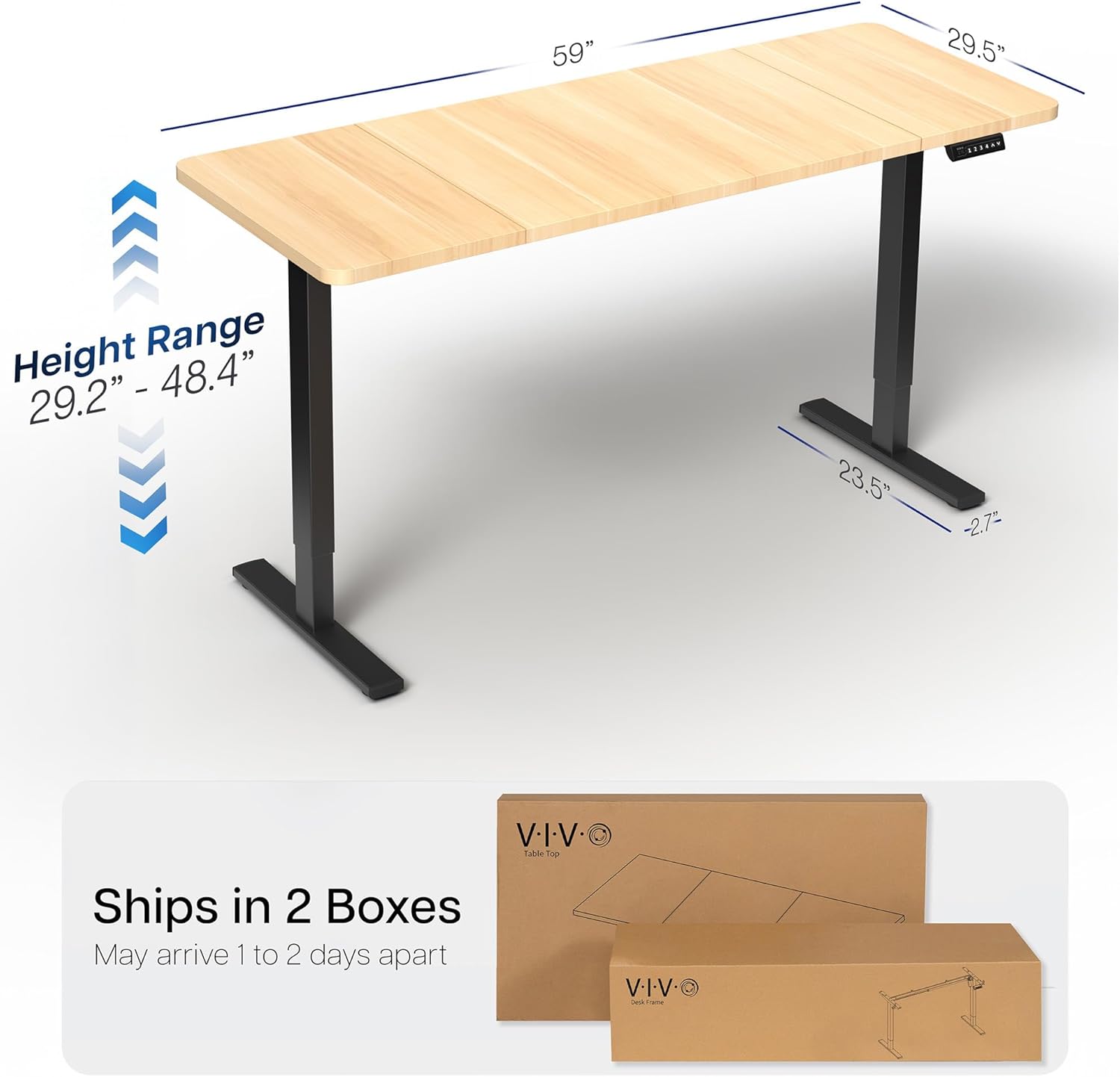
Figure 1: The VIVO Electric Standing Desk ships in two separate boxes, typically containing the table top and the frame components.
Konfigurazioa eta Muntaketa
Assembly of the VIVO Electric Standing Desk is required. It is recommended to follow the detailed instructions provided in the included physical manual. Key steps involve:
- Deskonprimitu osagai guztiak eta egiaztatu piezen zerrendarekin.
- Assemble the desk frame, ensuring all screws are securely tightened.
- Attach the three-piece table top to the assembled frame. Ensure proper alignment for a seamless surface.
- Install the memory controller to the underside of the desk.
- Connect all necessary cables for the electric motor and controller.
- Plug the desk into a power outlet.
Video 1: Official VIVO Brand Video demonstrating the assembly process and features of a VIVO standing desk. This video provides a visual guide to setting up your new desk.
Funtzionamendu-argibideak
The VIVO Electric Standing Desk features an intuitive memory controller for easy height adjustment.
Basic Height Adjustment
- Erabili Gora (^) eta Behera (b) arrow buttons on the controller to manually adjust the desk height.
- Uneko altuera LED pantailan bistaratuko da.
- The desk offers a height range of 29.2 inches (minimum) to 48.4 inches (maximum).
Memoria aurrezarpenak
The controller allows you to save up to 4 preferred height settings:
- Egokitu mahaia nahi duzun altuerara Gora/Behera botoiak erabiliz.
- Sakatu "M" button (Memory) once. The LED display will flash.
- Sakatu berehala zenbakidun aurrezarritako botoietako bat (1, 2, 3 edo 4) uneko altuera aurrezarpen horretan gordetzeko.
- Gordetako altuera berreskuratzeko, sakatu dagokion zenbakidun aurrezarritako botoia. Mahaia automatikoki mugituko da gordetako posiziora.

Figure 2: The memory controller with LED display and preset buttons for convenient height adjustment.
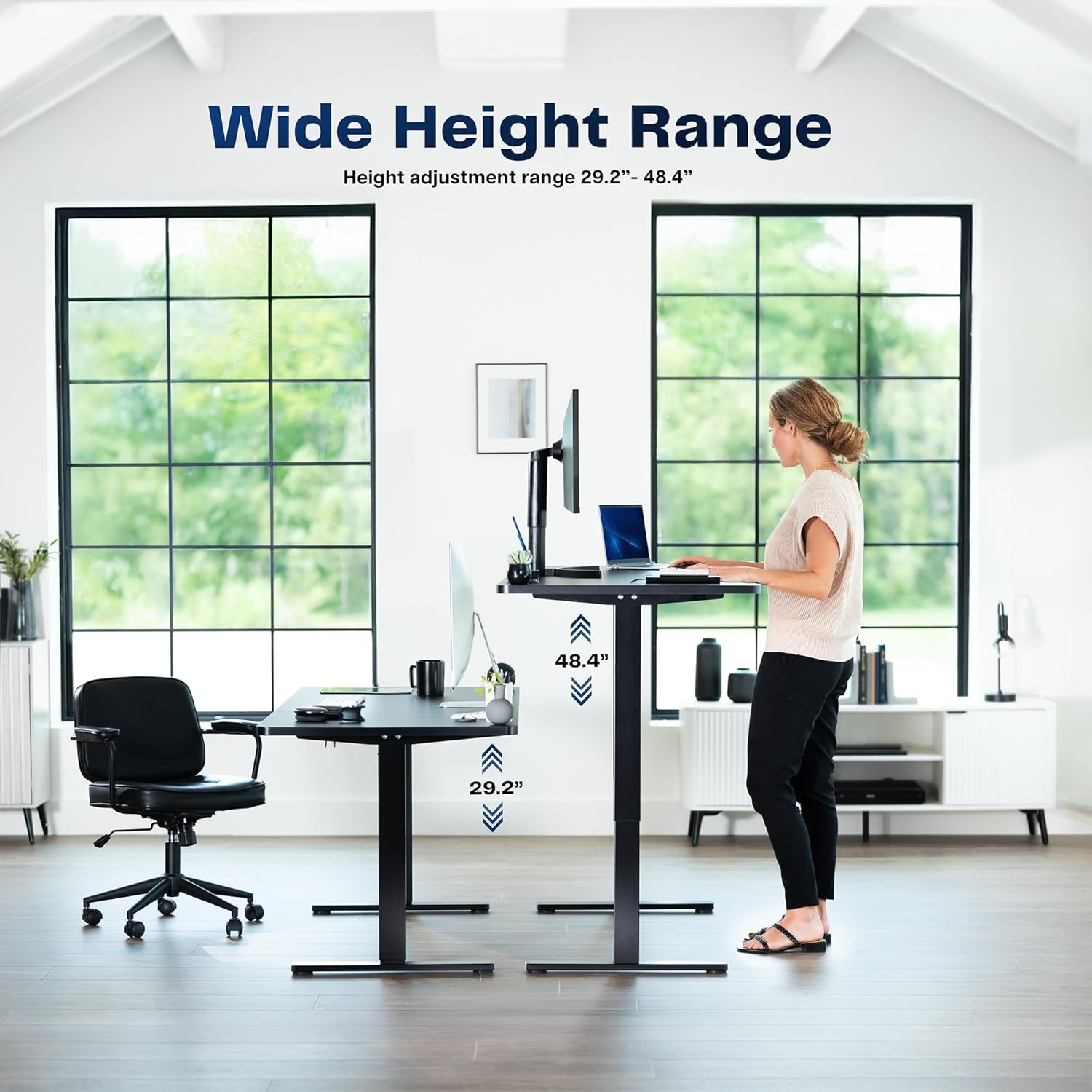
Figure 3: The VIVO Electric Standing Desk offers a wide height range to accommodate both sitting and standing preferences.
Mantentzea
Regular maintenance ensures the longevity and optimal performance of your VIVO Electric Standing Desk.
- Garbiketa: Garbitu mahaigainaren gainazala oihal leun batekin,amp cloth. Avoid abrasive cleaners that may damage the laminated finish.
- Kableen kudeaketa: Periodically check and organize cables to prevent tangling or damage, especially around moving parts of the desk frame.
- Loturaren egiaztapena: Noizean behin, torloju eta azkoin guztiak ondo estutu direla ziurtatzeko. Beharrezkoa bada, berriro estutu.
- Pisu-gaitasuna: Adhere to the maximum weight recommendation of 220 lbs to prevent strain on the motor and frame.
Arazoak konpontzea
If you encounter issues with your VIVO Electric Standing Desk, refer to the following common troubleshooting steps:
- Mahaia ez da mugitzen:
- Egiaztatu elikatze-kablea ondo konektatuta dagoen mahaian eta hormako entxufean.
- Ziurtatu mahaia gora edo behera mugitzea eragozten duen oztoporik ez dagoela.
- If the controller displays an error code, consult the full manual for specific error resolution.
- Altuera irregularra:
- Perform a reset procedure (refer to your full manual for specific steps).
- Ensure the desk is on a level surface. Adjust the leveling feet if necessary.
- Ezohiko zaratak:
- Minor motor sounds are normal during operation.
- If noises are loud or unusual, check for loose fasteners or obstructions.
For persistent issues, please contact VIVO Customer Support.
Zehaztapenak
| Ezaugarri | Xehetasuna |
|---|---|
| Marka | VIVO |
| Modelo zenbakia | DESK-KIT-1B6C-30 |
| Mahaiaren diseinua | Ordenagailuko mahaia |
| Produktuaren neurriak | 29.5" L x 59" W x 29.2" H |
| Kolorea | Light Wood Top / Black Frame |
| Goiko material mota | Engineered Wood (Laminated) |
| Oinarrizko materiala | Altzairu aleazioa |
| Ezaugarri Berezia | Adjustable Height, Memory Presets |
| Gutxieneko Altuera | 29.2 hazbete |
| Gehienezko Altuera | 48.4 hazbete |
| Gehienezko pisuaren gomendioa | 220 kilo |
| Muntaia Beharrezkoa | Bai |
| UL zerrendatua | Bai |
Bermea eta Laguntza
VIVO offers a Limited Warranty for this product. For detailed warranty information, please refer to the documentation included with your purchase or visit the official VIVO webgunea.
For any questions, technical assistance, or support, please contact VIVO Customer Support. Our US-based team is available to assist you.
- Itzultzeko politika: 30 eguneko itzulketa errazak.
- Bezeroarentzako laguntza: Available for assistance with product inquiries and troubleshooting.

Figure 4: VIVO provides dedicated US-based customer support for all products.


