Sarrera
The Mytrix Tac Master Wireless Gaming Headset is designed to provide a high-quality audio experience for gaming across multiple platforms. Featuring 2.4GHz lossless wireless technology, Bluetooth 5.3, and a 3.5mm wired connection, this headset offers versatile connectivity, low latency, and immersive surround sound. The detachable noise-canceling microphone ensures clear communication, while the ergonomic design and long battery life provide comfort for extended use.
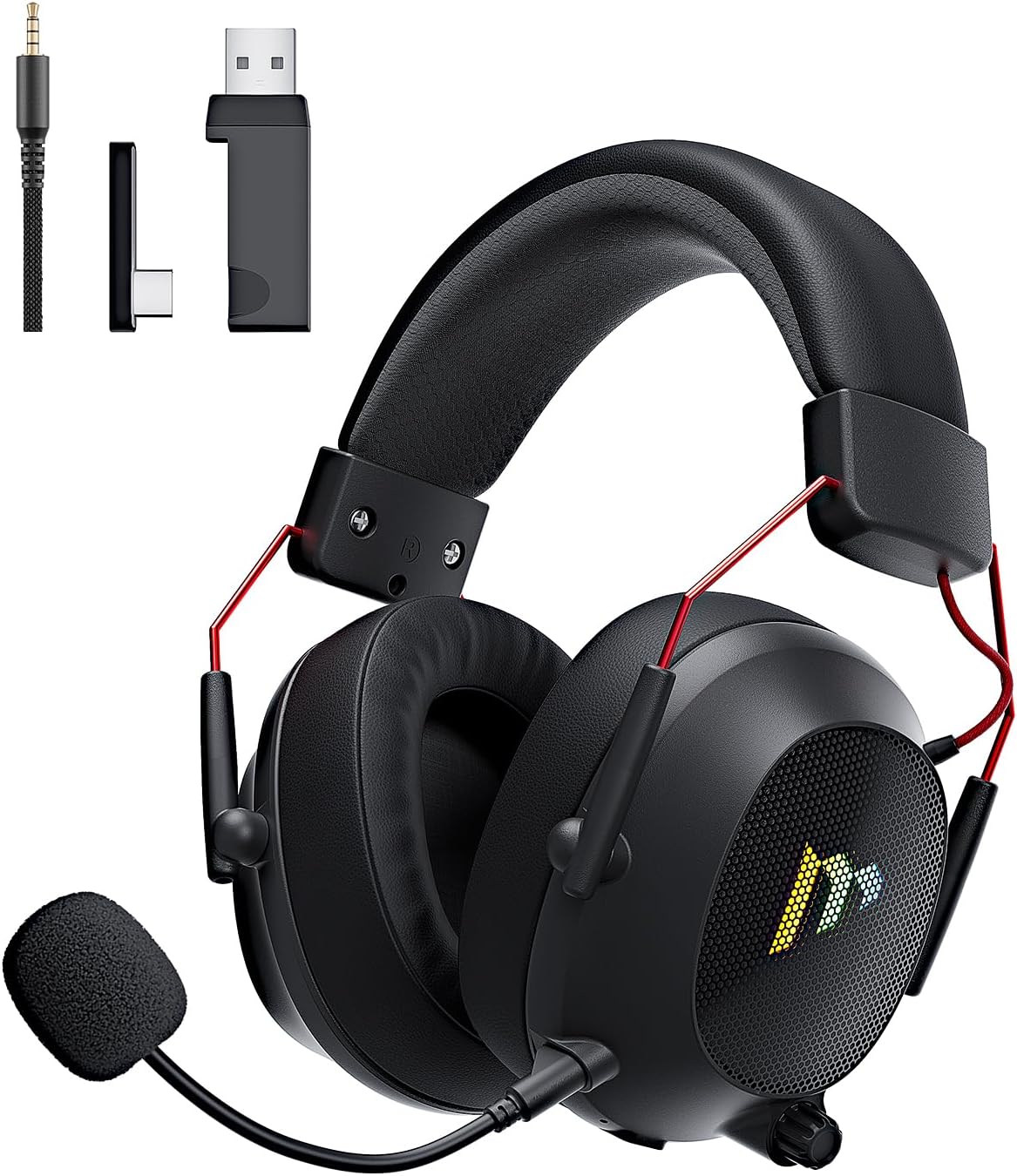
Image: The Mytrix Tac Master Wireless Gaming Headset, showcasing its sleek black design with red accents, detachable microphone, and included USB dongle and Type-C adapter.
Paketearen edukia
Mesedez, egiaztatu behean zerrendatutako elementu guztiak zure paketean sartuta daudela:
- Mytrix Tac Master Wireless Gaming Headset
- Detachable Noise-Canceling Microphone
- 2.4GHz USB-A Wireless Dongle
- USB Type-C Transmitter
- 3.5 mm-ko audio kablea
- USB kargatzeko kablea (USB-A USB-C-ra)
- Erabiltzailearen eskuliburua (dokumentu hau)
Headset Controls and Components
Familiarize yourself with the various controls and components of your Mytrix Tac Master headset:

Image: Diagram illustrating the location and function of controls on the Mytrix Tac Master headset, including power button, volume wheel, microphone mute button, and mode switch.
- Pizteko botoia: Press and hold for 3 seconds to turn on/off. Single press to pause/play audio.
- Modu botoia (M): Single press to toggle microphone on/off. Double press to switch between Bluetooth and 2.4G wireless modes. Press and hold for 3 seconds to turn RGB lights on/off.
- Bolumen-gurpila: Rotate up to increase volume, rotate down to decrease volume.
- Mikrofonoaren ataka: Mikrofono desmuntagarria lotzeko.
- 3.5 mm-ko audio-konexioa: Kable bidezko konexiorako.
- USB-C kargatzeko ataka: Entzungailua kargatzeko.
- RGB argiztapena: Located on the earcups.
Konfigurazioa
1. Entzungailua kargatzea
Before first use, fully charge the headset. Connect the USB charging cable to the headset's USB-C port and the other end to a USB power source (e.g., computer USB port, USB wall adapter). The LED indicator will show charging status and turn off when fully charged. A full charge takes approximately 3 hours and provides up to 48 hours of battery life.

Image: Visual representation of the headset's long-lasting battery life, indicating approximately 50 hours of use and a 3-hour charging time.
2. Mikrofonoa konektatzea
Insert the detachable microphone into the microphone port on the left earcup. Ensure it is securely seated. The microphone is flexible and omni-directional, allowing for angle adjustment.
3. Konektibitate-aukerak
The Mytrix Tac Master headset offers multiple connection methods for broad compatibility:

Image: Diagram illustrating the four connection modes: 2.4GHz Dongle (USB-A and USB-C), Bluetooth 5.3, and 3.5mm Wired, along with compatible devices for each mode.
3.1. 2.4GHz Wireless Connection (Recommended for PC, PS4, PS5, Switch Docked Mode)
- Identify the appropriate dongle for your device:
- For devices with a USB-A port (PC, PS4, PS5, Switch Docked): Use the 2.4GHz USB-A dongle.
- For devices with a USB-C port (Switch Handheld, Laptops, Tablets): Use the USB Type-C transmitter.
- Plug the selected 2.4GHz dongle/transmitter into an available USB port on your device.
- Power on the headset by pressing and holding the Power button for 3 seconds.
- Ensure the headset is in 2.4GHz mode. If not, double-press the 'M' button to switch modes until the headset connects to the dongle. The headset will automatically pair with the dongle.
- Zure gailuan, hautatu entzungailuak audio irteera eta sarrera gailu gisa.
3.2. Bluetooth 5.3 Connection (Recommended for Mobile Phones, Tablets, Laptops)
- Power on the headset by pressing and holding the Power button for 3 seconds.
- Double-press the 'M' button to switch the headset to Bluetooth pairing mode. The LED indicator will flash, indicating it's ready to pair.
- On your device, enable Bluetooth and search for "Mytrix Tac Master" in the list of available devices.
- Select "Mytrix Tac Master" to connect. Once connected, the LED indicator will stop flashing.
3.3. 3.5mm Wired Connection (Recommended for Xbox, Game Console Controllers, Devices without USB/Bluetooth)
- Connect one end of the 3.5mm audio cable to the headset's 3.5mm jack.
- Connect the other end of the 3.5mm audio cable to the audio jack on your device (e.g., Xbox controller, phone).
- In wired mode, the headset's microphone and RGB lighting functions are not active.
Funtzionamendu-argibideak
Piztu/Itzali
- Pizteko: Press and hold the Power button for approximately 3 seconds until the headset powers on.
- Itzaltzeko: Press and hold the Power button for approximately 3 seconds until the headset powers off.
Bolumen kontrola
- Handitu bolumena: Rotate the Volume wheel upwards.
- Murriztu bolumena: Rotate the Volume wheel downwards.
Mikrofonoaren kontrola
- Mikrofonoa desaktibatu/desaktibatu: Single press the 'M' button.
- The detachable microphone features noise cancellation for clear voice chat.
RGB argiaren kontrola
- Turn RGB Lights On/Off: Press and hold the 'M' button for approximately 3 seconds.
Audio erreprodukzioaren kontrola
- Erreproduzitu/Pausatu audioa: Sakatu behin pizteko botoia.
Inguruko Soinua
The headset features 7.1 stereo surround sound for an immersive audio experience, allowing for precise positioning of sound details in games.

Irudia: Leherketa bat view of the headset's 50mm drivers, illustrating the components that contribute to its 7.1 stereo surround sound capability.
Mantentzea
- Garbiketa: Use a soft, dry cloth to clean the headset. Do not use abrasive cleaners or solvents. For earcups, gently wipe with a damp oihal bat eta utzi airean guztiz lehortzen erabili aurretik.
- Biltegiratzea: Store the headset in a cool, dry place away from direct sunlight and extreme temperatures. If storing for an extended period, ensure the battery is partially charged (around 50%) to preserve battery health.
- Bateria zaintzea: Avoid fully discharging the battery frequently. Charge the headset regularly, even if not in constant use, to maintain battery longevity.
- Mikrofonoaren zainketa: Handle the detachable microphone gently. Avoid excessive bending or twisting.
Arazoak konpontzea
| Arazoa | Kausa posiblea | Irtenbidea |
|---|---|---|
| Ez dago soinurik entzungailutik. | Headset not powered on, low battery, incorrect audio output selected, connection issue. | Ensure headset is powered on and charged. Check device's audio settings to confirm "Mytrix Tac Master" is selected as output. Re-establish 2.4GHz or Bluetooth connection. For wired mode, ensure cable is fully inserted. |
| Mikrofonoa ez dabil. | Microphone muted, not properly attached, incorrect audio input selected, wired mode limitation. | Single press the 'M' button to unmute. Ensure microphone is securely attached. Check device's audio settings to confirm "Mytrix Tac Master" is selected as input. Note: Microphone does not function in 3.5mm wired mode. |
| Cannot connect via 2.4GHz wireless. | Dongle not recognized, headset not in 2.4GHz mode, interference. | Ensure dongle is fully inserted into a working USB port. Double-press 'M' button to switch headset to 2.4GHz mode. Try a different USB port. Move closer to the dongle to reduce interference. |
| Ezin da Bluetooth bidez konektatu. | Headset not in pairing mode, Bluetooth disabled on device, already connected to another device. | Double-press 'M' button to enter Bluetooth pairing mode (LED flashes). Ensure Bluetooth is enabled on your device. Disconnect from other Bluetooth devices if necessary. |
| RGB argiak ez dira funtzionatzen. | Lights turned off, low battery, wired mode limitation. | Press and hold the 'M' button for 3 seconds to toggle RGB lights. Ensure headset has sufficient battery. Note: RGB lights do not function in 3.5mm wired mode. |
Zehaztapenak
| Ezaugarri | Xehetasuna |
|---|---|
| Ereduaren izena | Gaming Headset (G901) |
| Konektibitate Teknologia | 2.4 GHz haririk gabekoa, Bluetooth 5.3, 3.5 mm-ko kableatua |
| Aurikularretarako Jack | 3.5 mm Jack |
| Wireless Range | Up to 50 feet (in open spaces) |
| Latentzia | ≤20ms (2.4GHz) |
| Audio kontrolatzaile mota | 50 mm-ko kontrolatzaile dinamikoak |
| Soinu Ezaugarriak | 7.1 Stereo Surround Sound |
| Mikrofonoa | Detachable, Omni-directional, Noise-Canceling |
| Bateriaren iraupena | Gehienez 48 ordu |
| Kargatzeko Denbora | Gutxi gorabehera. 3 ordu |
| Bateria mota | 1 litio ioizko bateria (barne) |
| Entzungailuaren forma | Belarri gainean |
| Ezaugarri bereziak | Ergonomic Design, RGB Lighting, Foldable & Portable |
| Produktuaren neurriak | 5.91 x 3.94 x 5.91 hazbete |
| Elementuaren pisua | 13.4 ontza |
| Fabrikatzailea | Mytrix |
Bermea eta Laguntza
Mytrix products are manufactured to high quality standards. For information regarding warranty coverage, technical support, or service inquiries, please refer to the warranty card included with your product or visit the official Mytrix website. You may also contact Mytrix customer support directly for assistance with your Tac Master Gaming Headset.
Laguntza gehiago behar baduzu, bisitatu Mytrix Store on Amazon.
Segurtasun informazio garrantzitsua
- Ez jarri entzungailuak muturreko tenperaturen, hezetasunaren edo likidoen eraginpean.
- Saihestu entzungailuak erortzea edo kolpe gogorren eraginpean jartzea.
- Do not attempt to disassemble or repair the headset yourself. This will void the warranty.
- Entzun bolumen moderatuan entzumen-kalteak saihesteko. Soinu ozenen eraginpean denbora luzez egoteak entzumen-galera iraunkorra eragin dezake.
- Mantendu haurren eskura.


