1. Sarrera
Thank you for choosing the Aigo Q2503 Mini-Tower PC Case. This manual provides detailed instructions for the proper installation, operation, and maintenance of your new computer chassis. Please read this guide thoroughly before beginning assembly to ensure optimal performance and longevity of your system components.
2. Produktua amaitu daview
The Aigo Q2503 is a compact Mini-Tower PC case designed for M-ATX and ITX motherboards. It offers a streamlined design with essential features for building a functional and efficient computer system. Its robust construction provides a secure environment for your components.
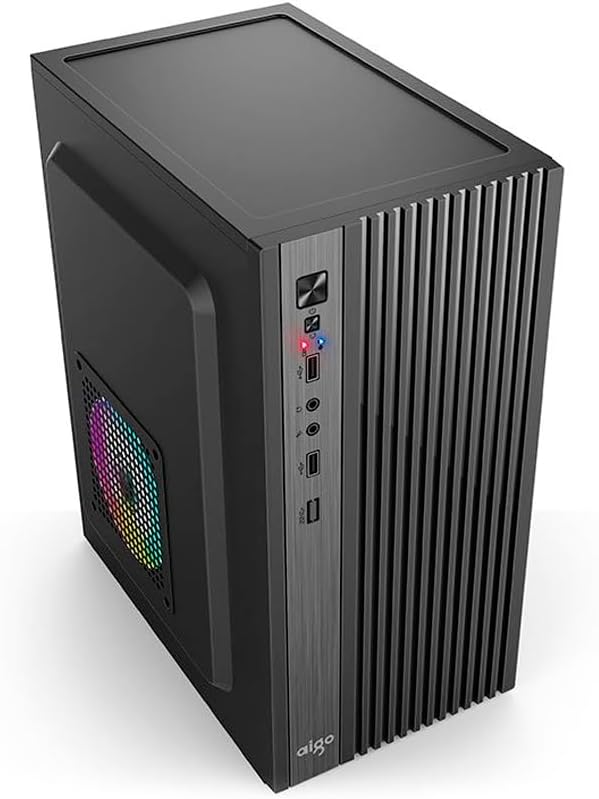
2.1. irudia: Aurrealdea view of the Aigo Q2503 Mini-Tower PC Case, showcasing its compact design and front panel I/O ports.
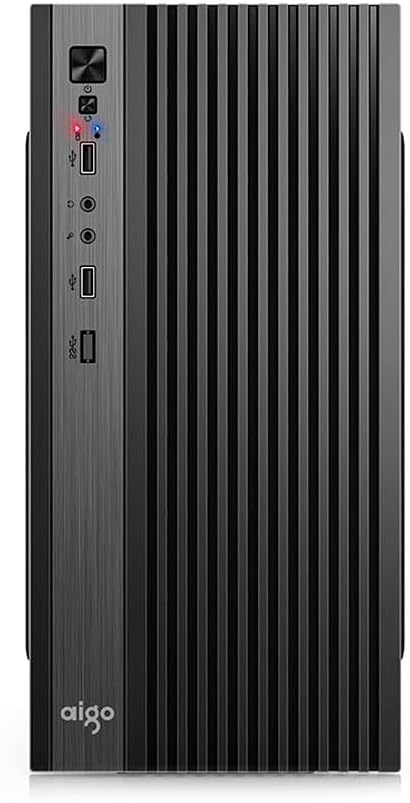
2.2. irudia: Aurrealdea view of the Aigo Q2503 Mini-Tower PC Case, highlighting the vertical ventilation slats and front panel controls.
3. Konfigurazioa eta instalazioa
Follow these steps for proper component installation within the Aigo Q2503 case.
3.1 Kasua prestatzea
- Unpack the case and remove all packaging materials.
- Carefully remove the side panels by unscrewing the thumbscrews at the rear of the case and sliding the panels backward.
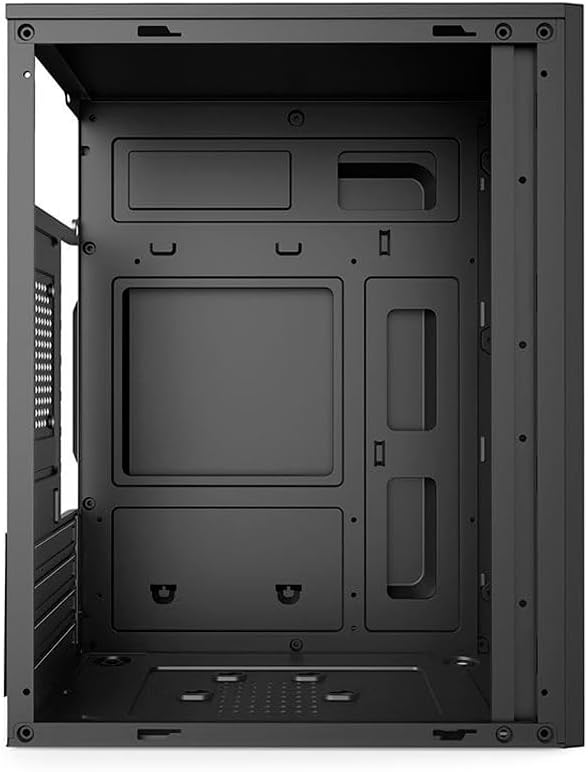
3.1. irudia: Barnekoa view of the Aigo Q2503 PC Case, showing the motherboard tray and drive mounting points.
3.2 Plaka amaierako instalazioa
- Install the I/O shield provided with your motherboard into the rear opening of the case.
- Align your M-ATX or ITX motherboard with the standoffs inside the case. Ensure all standoffs match the motherboard's mounting holes.
- Secure the motherboard with the appropriate screws.
3.3 Diskoaren instalazioa
- SSD (1x): Locate the dedicated SSD mounting point (typically on the motherboard tray or behind it). Secure the SSD using screws.
- HDD (1x): Locate the HDD bay. Slide the HDD into the bay and secure it with screws.
3.4 Expansion Card Installation (VGA)
- Kendu beharrezko hedapen-zirrikituen estalkiak kaxaren atzealdetik.
- Insert your graphics card (VGA) or other expansion cards into the PCIe slots on your motherboard.
- Secure the expansion cards with screws. Note the maximum VGA length supported is 150 mm.
3.5 CPU Cooler Installation
Install your CPU cooler according to its manufacturer's instructions. Ensure the cooler's height does not exceed the maximum supported height of 250 mm for this case.
3.6 Energia-iturriaren instalazioa
The Aigo Q2503 supports ATX power supplies. Mount your ATX power supply in the designated area, typically at the top or bottom rear of the case, and secure it with screws.
3.7 Haizagailuaren instalazioa
The case supports the following fan configurations (fans are not included):
- Atzekoa: 1 x 80 mm fan
- Aldea: 1 x 120 mm fan
Install fans in the specified locations to optimize airflow.
3.8 Aurrealdeko panelaren konexioak
Connect the front panel cables (Power SW, Reset SW, HDD LED, Power LED, USB 2.0, Audio/Mic) to the corresponding headers on your motherboard. Refer to your motherboard manual for exact pin layouts.
4. Zure ordenagailuaren kaxa erabiltzea
Once all components are installed and connected, replace the side panels and secure them. Connect your monitor, keyboard, mouse, and power cable to your system. Press the power button on the front panel to start your computer.
The front panel provides convenient access to:
- Pizteko botoia
- Berrezarri botoia
- 2 x USB 2.0 ataka
- Audio Out (Headphone) Jack
- Mikrofonoa Jack In
5. Mantentzea
Regular maintenance helps ensure optimal performance and extends the lifespan of your PC components.
5.1 Garbiketa
- Kanpoaldea: Erabili biguna, damp kanpoko gainazalak garbitzeko zapi bat erabili. Saihestu garbitzaile urratzaileak.
- Barrualdea: Periodically open the case and use compressed air to remove dust buildup from components, fans, and filters. Ensure the system is powered off and unplugged before cleaning the interior.
5.2 Aire-fluxua
Ensure that the case's ventilation openings are not obstructed to maintain proper airflow and prevent overheating.
6. Arazoak
Zure ordenagailuaren muntaketarekin arazoak badituzu, kontuan hartu arazoak konpontzeko urrats orokor hauek:
- Potentziarik gabe: Double-check all power connections, including the power supply to the wall, the power supply to the motherboard, and the front panel power switch cable to the motherboard.
- Gehiegizko berotzea: Verify that all case fans and CPU cooler fans are spinning correctly. Ensure proper airflow within the case and that ventilation openings are clear.
- Front Panel Ports Not Working: Confirm that the USB and Audio/Mic cables from the front panel are correctly connected to the motherboard headers.
- Osagaien egokitzapen arazoak: Ensure that all components, especially the graphics card and CPU cooler, are within the specified maximum dimensions for the case.
7. Zehaztapenak
Below are the detailed specifications for the Aigo Q2503 Mini-Tower PC Case:
| Ezaugarri | Zehaztapena |
|---|---|
| Marka | aigo |
| Eredua | Q2503-BK |
| Kasu mota | Mini-dorrea |
| Plaka amaren euskarria | M-ATX / ITX |
| Materialak | 0.4mm SPCC (Steel Alloy) |
| Drive Bays | 1 SSD, 1 HDD |
| Zabaltzeko Slots | 4 |
| Aurreko I / O Portuak | 2 x USB 2.0, Audio/Mic |
| VGA luzera maximoa | 150 mm |
| CPU hozgailuaren gehienezko altuera | 250 mm |
| Elikatze-hornidura euskarria | ATX |
| Supported Fans (not included) | Rear: 1 x 80 mm, Side: 1 x 120 mm |
| Neurriak (L x W x H) | 265 x 165 x 340 mm |
| Kolorea | Beltza |
8. Bermearen informazioa
The Aigo Q2503 Mini-Tower PC Case comes with a manufacturer's warranty of 12 hilabete from the date of purchase. This warranty covers defects in materials and workmanship under normal use. Please retain your proof of purchase for warranty claims. The warranty does not cover damage caused by improper installation, misuse, accidents, modifications, or unauthorized repairs.
9. Laguntza
For technical assistance, troubleshooting, or warranty inquiries, please contact your retailer or the official Aigo support channels. Refer to the Aigo official webgunea kontaktu-informazio eta laguntza-baliabide eguneratuenak lortzeko.
Before contacting support, please have your product model (Q2503-BK) and proof of purchase readily available.


