1. Sarrera
Thank you for choosing the MageGee MK-Storm Mechanical Gaming Keyboard. This 104-key wired keyboard is designed for an enhanced typing and gaming experience, featuring durable brown switches, blue backlighting, and anti-ghosting technology. This manual provides essential information for setup, operation, and maintenance to ensure optimal performance.
2. Ezaugarri nagusiak
- Blue Backlit Gaming Keyboard: Features 20 different backlit modes, 5 brightness levels, and 5 speed adjustments. The backlight can be easily turned off.
- Mechanical Brown Switches: Offers moderate trigger key travel and force, suitable for both typing and gaming. Provides tactile feedback with a slight sound.
- Anti-Ghosting Keyboard: All 104 keys have individual switches with full N-key rollover, ensuring faster response and simultaneous key presses without conflict.
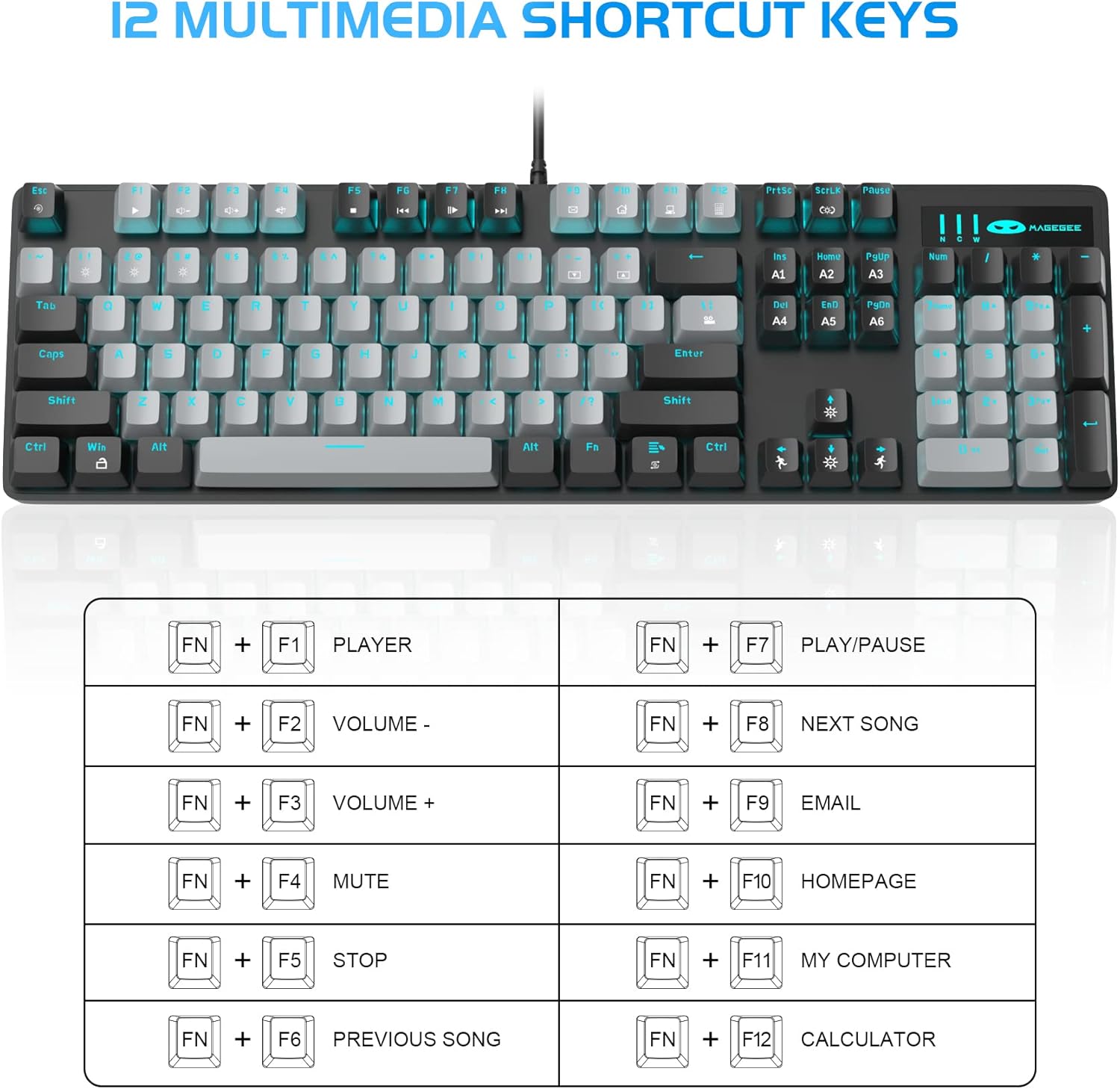
- 12 Multimedia Combination Keys: Quick operations via FN+ F1~F12 for media control and office functions.
- Diseinu ergonomikoa: Premium metal panel construction for stability. Ergonomic key layout and two-step adjustable feet for comfortable typing angles.
- Bateragarritasun zabala: USB wired connection compatible with Windows 2000/Vista/Win7/Win8/Win10/MAC/Linux.

3. Paketearen edukia
The MageGee MK-Storm Mechanical Gaming Keyboard package includes the following items:
- MageGee Mechanical Gaming Keyboard (MK-Storm)
- USB Wired Cable (attached to keyboard)
- Teklak ateratzeko tresna
- 16 Extra Keycaps (color scheme varies by keyboard variant)
- Erabiltzailearen eskuliburua
4. Konfigurazioa
- Konektatu teklatua: Plug the USB connector of the keyboard cable into an available USB port on your computer (PC, laptop, or desktop).
- Gidariaren instalazioa: The keyboard is plug-and-play. Your operating system should automatically detect and install the necessary drivers. No additional software installation is typically required for basic functionality.
- Teklatuaren angelua doitu: Flip out the two-step feet on the underside of the keyboard to adjust the typing angle to your preference.

5. Funtzionamendu-argibideak
5.1 Atzeko argiaren kontrola
The MK-Storm keyboard features a single blue backlight with multiple modes and adjustable settings.
- Aldatu atzeko argiztapen modua: Sakatu FN + INS to cycle through 20 different backlight modes.
- Doitu distira: Sakatu FN + ↑ (Up Arrow) to increase brightness (5 levels). Press FN + ↓ (Down Arrow) to decrease brightness.
- Abiadura doitzea: Sakatu FN + ← (Left Arrow) to decrease animation speed (5 levels). Press FN + → (Right Arrow) to increase animation speed.
- Turn Off Backlight: The backlight can be turned off by cycling through the brightness levels until it is off, or by selecting a mode that has no illumination.

5.2 Multimedia teklak
Access multimedia and system functions quickly using the FN key in combination with the F1-F12 keys.
| Tekla-konbinazioa | Funtzioa |
|---|---|
| FN + F1 | Jokalari |
| FN + F2 | Bolumena - |
| FN + F3 | Bolumena + |
| FN + F4 | Isildu |
| FN + F5 | Gelditu |
| FN + F6 | Aurreko Abestia |
| FN + F7 | Erreproduzitu/Pausatu |
| FN + F8 | Hurrengo Abestia |
| FN + F9 | Posta elektronikoa |
| FN + F10 | Hasierako orria |
| FN + F11 | Nire Ordenagailua |
| FN + F12 | Kalkulagailua |
5.3 Profesional pertsonalizatuafiles (If applicable)
The keyboard supports custom lighting profiles. Refer to the manufacturer's website or included software (if any) for detailed instructions on programming and saving custom lighting zones or key assignments. Once programmed, these profiles can often be accessed directly from the keyboard using FN key combinations (e.g., FN+1, FN+2, FN+3 for different profiles).
6. Pertsonalizazioa
The MageGee MK-Storm keyboard allows for customization of keycaps and switches.
- Tekla-tapoiaren ordezkapena: Use the included keycap puller tool to carefully remove existing keycaps. Align the new keycap with the switch stem and press down gently until it clicks into place.
- Etengailuaren ordezkapena: The keyboard comes with extra brown switches. To replace a switch, first remove the keycap. Then, use a switch puller (not included, but often similar to a keycap puller) to gently extract the switch from the PCB. Insert the new switch, ensuring the pins align correctly, and press firmly until it seats properly.


7. Mantentzea
- Garbiketa: The floating keys design makes cleaning easier. Use a soft brush or compressed air to remove dust and debris from between the keycaps. For stubborn dirt, remove keycaps using the provided tool and wipe the keyboard surface with a slightly damp oihal bat. Ziurtatu teklatua deskonektatuta dagoela garbitu aurretik.
- Biltegiratzea: Gorde teklatua leku lehor eta fresko batean, eguzki-argitik eta muturreko tenperaturetatik babestuta.
- Kableen zainketa: Kalteak ekiditeko, saihestu USB kablea gehiegi tolestea edo bihurritzea.
8. Arazoak
- Teklatuak ez du erantzuten:
- Ziurtatu USB kablea ondo konektatuta dagoela bai teklatuan bai ordenagailuan.
- Saiatu teklatua ordenagailuko beste USB ataka batera konektatzen.
- Berrabiarazi ordenagailua.
- Probatu teklatua beste ordenagailu batean sistemaren arazo espezifiko bat baztertzeko.
- Atzeko argia ez dabil/okerra:
- Ensure the backlight is not turned off (FN + ↓ to increase brightness).
- Cycle through backlight modes using FN + INS.
- Check if any specific software is interfering with the lighting settings.
- Giltzak ez dira erregistratzen:
- Clean around the affected key to ensure no debris is obstructing the switch.
- If a specific switch is faulty, consider replacing it with one of the spare switches provided, following the customization instructions.
9. Zehaztapenak
| Ezaugarri | Xehetasuna |
|---|---|
| Marka | MageGee |
| Modelo zenbakia | MK-Storm |
| Teklen diseinua | 104 tekla (tamaina osoa) |
| Aldatu mota | Mechanical Brown Switches |
| Atzeko argia | Blue Backlit (20 modes, 5 brightness, 5 speed) |
| Konektibitatea | USB kableduna |
| Ghostingaren aurkakoa | N-teklaren iraulketa osoa |
| Multimedia gakoak | 12 (FN + F1-F12) |
| Materiala | Metal Panel Construction |
| Gailu bateragarriak | Ordenagailu eramangarria, ordenagailua |
| Sistema Eragileak | Windows 2000/Vista/Win7/Win8/Win10/MAC/Linux |
| Elementuaren pisua | 2.77 kilo |
| Paketearen neurriak | 17.63 x 12.36 x 1.89 hazbete |

10. Bermea eta Laguntza
For warranty information, technical support, or any product-related inquiries, please contact MageGee customer service through the retailer where the product was purchased or visit the official MageGee webgunea. Gorde erosketa-agiria berme-erreklamazioetarako.


