1. Sarrera
This manual provides essential information for the installation, operation, and maintenance of your DELTA Z1 PRO Smart Door Lock. Please read these instructions carefully before installation and use to ensure proper function and safety. The DELTA Z1 PRO offers advanced security features including multiple unlocking methods and integrated communication capabilities.
2. Segurtasun informazioa
- Do not expose the lock to direct water or corrosive substances.
- Ziurtatu bateriaren polaritate zuzena instalatzean.
- Keep mechanical keys in a safe location outside the property.
- Avoid using abrasive cleaners on the lock's surface.
- Perform regular checks to ensure all components are securely fastened.
3. Produktua amaitu daview
Familiarize yourself with the components of your DELTA Z1 PRO Smart Door Lock.

3.1. irudia: DELTA Z1 PRO Smart Door Lock components. Key parts include the LCD Screen, Inbuilt Camera, Battery Cover, RFID Card Reader, Touch Keypad, Indoor Handle, Fingerprint Sensor, Outdoor Handle, and Do Not Disturb Knob.
Ezaugarri nagusiak:
- 6 Ways of Unlocking: 3D Face Recognition, Fingerprint, Mobile App, RFID Card, PIN, Mechanical Key.
- 3D Aurpegi Ezagutza: Advanced facial scanning for secure and convenient access.
- Two-Way Intercom with Live Camera Stream: Communicate with visitors and monitor your doorstep in real-time.
- Mugikorreko aplikazioen kontrola: Remote access management, notifications, and control.
- Eraikuntza sendoa: Made from Aluminium alloy with 5 high-quality stainless steel bolts.
4. Instalazio gida
4.1 Atearen bateragarritasun-egiaztapena
Before installation, ensure your door meets the required thickness specifications.
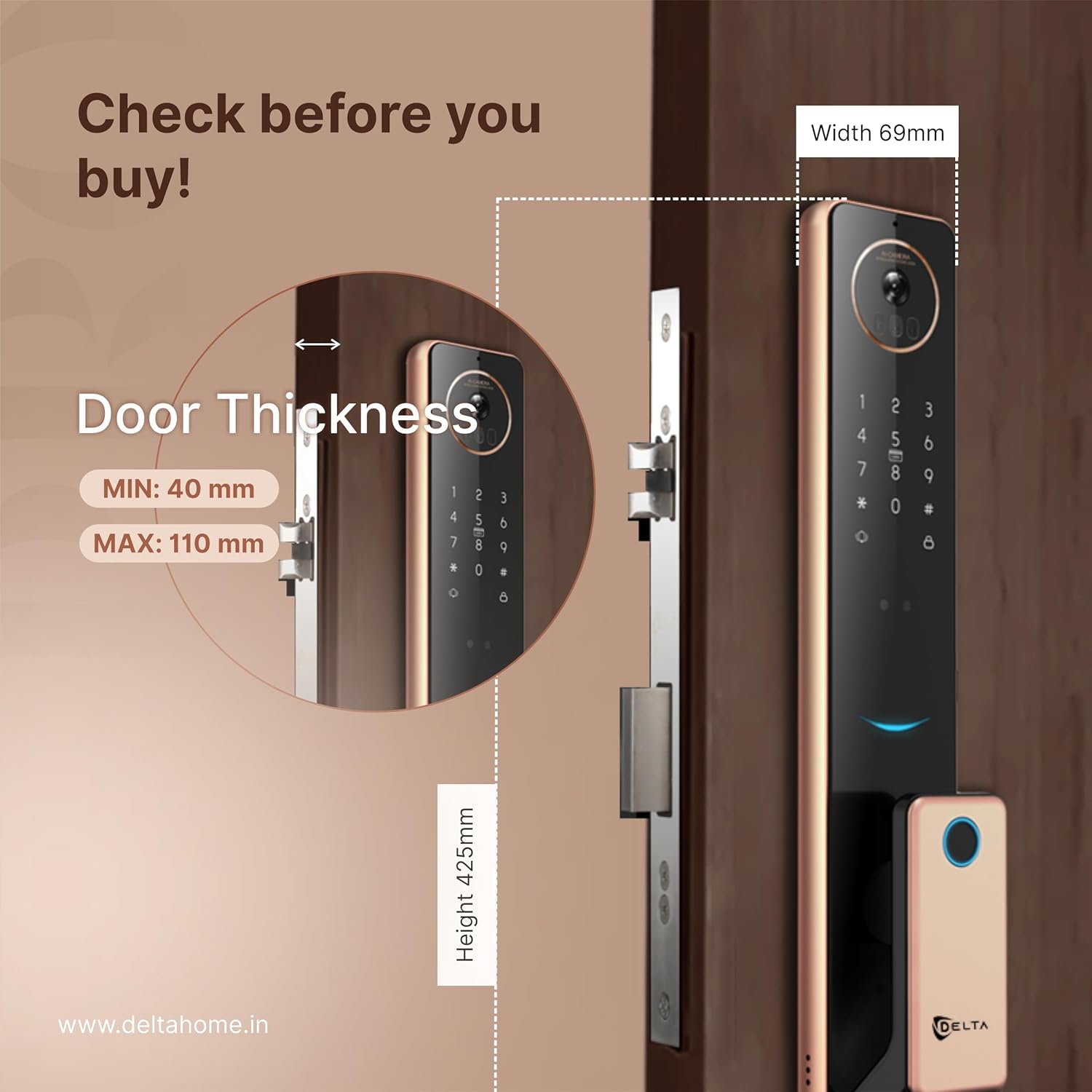
4.1. irudia: Door thickness and lock dimensions. The lock is compatible with doors between 40 mm and 110 mm thick.
4.2 Instalazio Urrats Orokorrak
Note: Professional installation is recommended. Refer to the detailed installation template included in the packaging for precise measurements and drilling instructions.
- Atea prestatu: Mark and drill holes according to the provided template.
- Instalatu horma-sarraila: Sartu giltzarrapoa atearen ertzean eta finkatu torlojuekin.
- Install Outdoor Panel: Route the cables through the door and attach the outdoor panel.
- Barneko panela instalatu: Connect the cables to the indoor panel and secure it to the door.
- Instalatu bateriak: Sartu behar diren bateriak bateriaren konpartimentuan.
- Proba funtzionaltasuna: Verify all unlocking methods and features are working correctly.
5. Funtzionamendu-argibideak
5.1 Desblokeatzeko metodoak
- 3D Aurpegi Ezagutza:

5.1. irudia: 3D Face Recognition in action. The lock scans the user's face for secure entry.
Stand facing the lock's camera at an appropriate distance. The lock will scan your face and unlock if a registered face is detected.
- Hatz-marka: Jarri erregistratutako hatza hatz-marken sentsorean. Blokeoa desblokeatuko da egiaztapena behar bezala egin ondoren.
- PIN kodea: Enter your registered PIN code on the touch keypad, followed by the '#' key.
- RFID txartela: Aurkeztu zure RFID txartela giltzarrapoan dagoen txartel-irakurgailuaren eremuan.
- Mugikorretarako aplikazioa: Use the dedicated mobile application to remotely unlock the door.
- Giltza mekanikoa: In emergencies or power outages, use the mechanical key to unlock the door.
5.2 Two-Way Intercom and Live Camera Stream

5.2. irudia: Seamless Two-Way Communication. Interact with visitors directly through the lock's intercom and your mobile device.

5.3. irudia: Camera Streaming Real-Time. Monitor your doorstep live via the mobile application.
When a visitor presses the doorbell, you will receive a notification on your mobile app. You can then view the live camera feed and engage in two-way audio communication with the visitor directly from your smartphone.
5.3 Mugikorretarako aplikazioen kontrola
The DELTA Z1 PRO connects to a dedicated mobile application via Wi-Fi. Through the app, you can:
- Remotely unlock/lock the door.
- Manage user access (add/delete fingerprints, PINs, RFID cards, faces).
- View access logs and activity history.
- Receive real-time notifications for door activities.
- Access live camera stream and intercom functions.
6. Mantentzea
- Garbiketa: Wipe the lock's surface with a soft, dry cloth. Do not use harsh chemicals or abrasive materials.
- Bateria ordezkatzea: Replace all batteries when the low battery indicator appears. Use high-quality alkaline batteries.
- Sentsoreen mantentze-lanak: Keep the fingerprint sensor, camera lens, and 3D face recognition area clean and free from obstructions.
- Firmware eguneraketak: Regularly check the mobile app for available firmware updates to ensure optimal performance and security.
7. Arazoak
- Blokeoak ez du erantzuten: Egiaztatu bateriaren mailak eta ordeztu behar izanez gero. Ziurtatu sarraila behar bezala instalatuta dagoela eta kable guztiak konektatuta daudela.
- Hatz-marka/aurpegi-ezagutzaren hutsegitea: Ensure the sensor/camera is clean. Re-register your fingerprint/face if issues persist.
- PIN kodea ez dabil: Verify the correct PIN is entered. Ensure the keypad is clean and responsive.
- Mobile app connectivity issues: Check your Wi-Fi connection. Ensure the lock is within Wi-Fi range and properly configured in the app. Restart the app or the lock if needed.
- Intercom/Camera not working: Check network connection. Ensure app permissions for camera and microphone are granted.
8. Zehaztapenak
| Ezaugarri | Zehaztapena |
|---|---|
| Marka | DELTA |
| Modelo zenbakia | DELTA HOME 003 |
| Blokeo mota | Biometrikoa |
| Desblokeatzeko metodoak | 3D Face, Fingerprint, Mobile App, RFID Card, PIN, Mechanical Key |
| Materiala | Aluminio aleazioa |
| Konektibitatea | Wi-Fi |
| Produktuaren neurriak (LxWxH) | 44 x 24 x 14 cm |
| Elementuaren pisua | 2.99 kg |
| Atearen lodieraren bateragarritasuna | Min 40 mm, Max 110 mm |
| Ezaugarri bereziak | 3D Face, Two-way intercom, Live camera stream, 3 years warranty |
9. Bermearen informazioa
The DELTA Z1 PRO Smart Door Lock comes with a 3 urteko bermea from the date of purchase. This warranty covers manufacturing defects and malfunctions under normal use. Please retain your proof of purchase for warranty claims. The warranty does not cover damage caused by improper installation, misuse, unauthorized repairs, or external factors.
10. Laguntza
For technical assistance, troubleshooting, or warranty claims, please contact DELTA customer support:
- Fabrikatzailea: DELTA HOME
- Helbidea: Delta Locks F509, F Block, PNTC Tower, Radio Mirchi Road, Vejalpur, Ahmedabad, Gujarat, IN, 380015
- Telefonoa: +916359691267


